> ## Documentation Index
> Fetch the complete documentation index at: https://notes.kodekloud.com/llms.txt
> Use this file to discover all available pages before exploring further.
# Demo OTel Col Attribute Processor
> Guide demonstrating using OpenTelemetry Collector attributes processor to add, modify, and remove telemetry attributes with example configuration, action explanations, and pipeline ordering for Jaeger verification
This guide demonstrates how to use the OpenTelemetry Collector attributes processor to add, modify, or remove attributes on telemetry (traces, metrics, logs). It includes a concise Collector configuration and a line-by-line explanation so you can apply attribute mutation rules (`insert`, `upsert`, `delete`, etc.) and wire the processor into pipelines correctly.
See the OpenTelemetry Collector docs for more details: [OpenTelemetry Collector](https://opentelemetry.io/docs/collector/).
## Collector configuration
Below is a minimal Collector configuration that defines an attributes processor instance named `attributes/add_env`. The configuration also includes an OTLP receiver, the batch processor, a Jaeger OTLP exporter, and a debug exporter for local inspection.
```yaml theme={null}
receivers:
otlp:
protocols:
http:
endpoint: 0.0.0.0:4318
processors:
batch:
timeout: 15s
send_batch_size: 512
# An instance of the attributes processor named "add_env"
attributes/add_env:
actions:
- key: deployment.environment
value: production
action: insert
- key: service.region
value: us-west-2
action: upsert
exporters:
otlp/jaeger:
endpoint: http://jaeger:4317
tls:
insecure: true
debug:
# The debug exporter logs telemetry to the console for inspection
loglevel: debug
service:
pipelines:
traces:
receivers: [otlp]
processors: [attributes/add_env, batch]
exporters: [debug, otlp/jaeger]
metrics:
receivers: [otlp]
exporters: [debug]
logs:
receivers: [otlp]
exporters: [debug]
```
## What this configuration does
* Receives OTLP/HTTP traffic on port 4318 (`receivers.otlp.protocols.http.endpoint`).
* Runs an attributes processor instance named `attributes/add_env` that mutates attributes on telemetry.
* Uses the `batch` processor to group telemetry before sending to exporters.
* Exports traces to a Jaeger collector at `http://jaeger:4317` via the `otlp/jaeger` exporter.
* Sends telemetry to the `debug` exporter so you can view messages in the Collector logs while testing.
### Why name the attributes instance `attributes/add_env`?
Naming the instance `attributes/add_env` lets you reference it in pipelines as `attributes/add_env`. The full processor type is `attributes` and `add_env` is the instance name.
## Attributes actions explained
In the `attributes/add_env` processor we define two actions:
* `deployment.environment` set to `production` with `action: insert`
* `insert` only adds the attribute if it does not already exist.
* `service.region` set to `us-west-2` with `action: upsert`
* `upsert` adds the attribute if missing and overwrites it if present.
Here’s a quick reference table of common actions for the attributes processor:
| Action | Purpose | Example |
| --------- | ----------------------------------------------------------------------------------- | ----------------------------------- |
| `insert` | Add the attribute only if it does not already exist. | `deployment.environment=production` |
| `upsert` | Add the attribute if missing or overwrite if present. | `service.region=us-west-2` |
| `delete` | Remove the attribute if it exists. | `- key: foo action: delete` |
| `extract` | Extract values from existing attributes (e.g., regex capture) into a new attribute. | `- key: version action: extract` |
| `hash` | Replace attribute value with a hashed value (useful for PII). | `- key: user_id action: hash` |
| `update` | Update an attribute only if it already exists. | `- key: env action: update` |
Processor execution order matters. Place processors in the sequence you want them applied. For example, if you want attributes added before batching (so they appear in the batched payload), list the attributes processor before the batch processor.
Choose the correct action type for your intent. Use `insert` to avoid overwriting existing values and `upsert` if you want to force a value. Misusing `upsert` can unintentionally overwrite source-provided attributes.
## Processor order and pipeline behavior
Processors are executed in the order you list them in a pipeline. In the `traces` pipeline above:
1. `attributes/add_env` runs first — it mutates/sets attributes on each trace/span.
2. `batch` runs next — it groups the modified telemetry before exporting.
If you reversed the order, the batch processor would group traces before attributes are added, meaning the exported batches might not include your added attributes.
## Verify in Jaeger
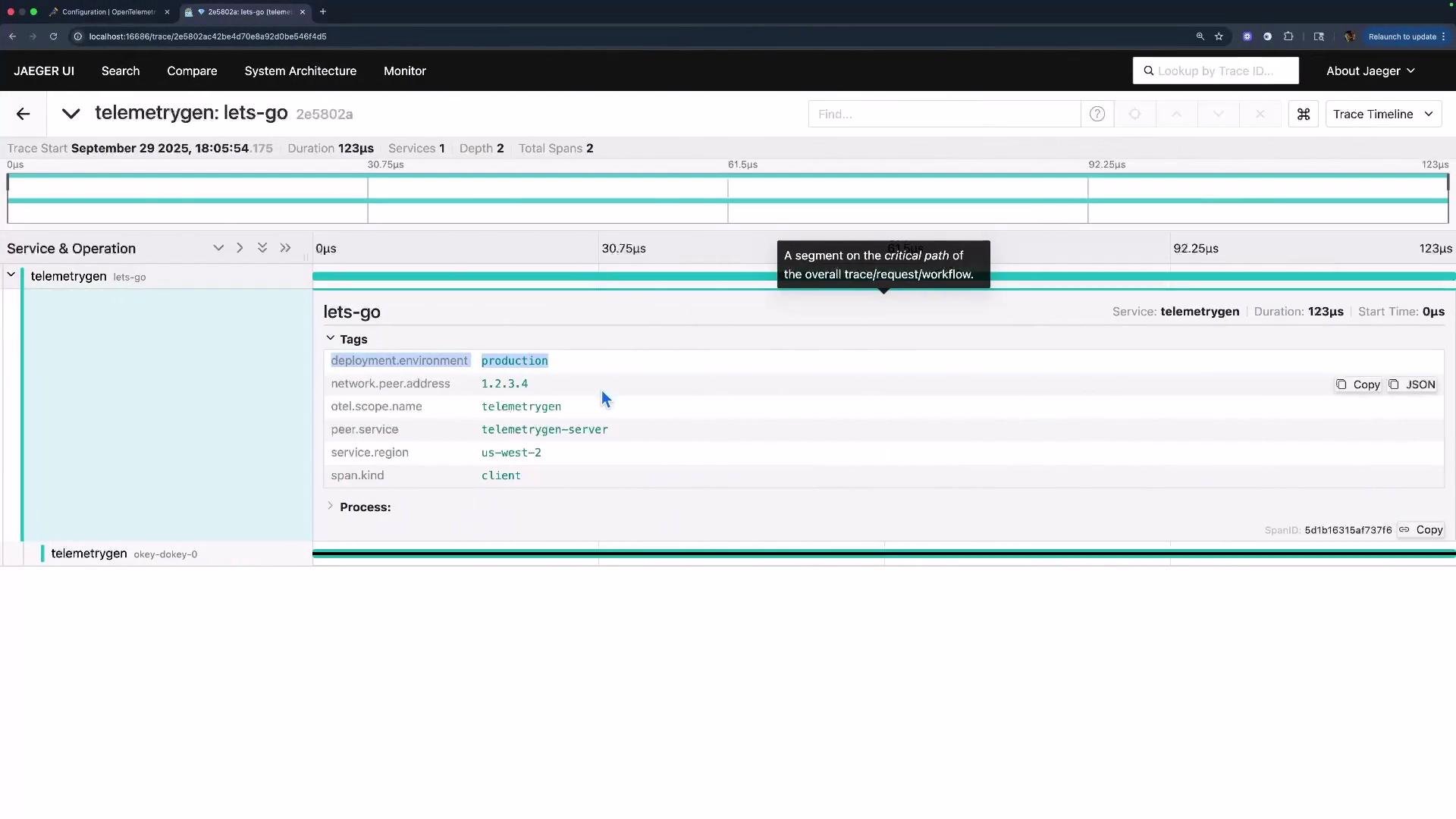
After restarting the Collector with this configuration and generating traces from your instrumented application, inspect traces in Jaeger. You should observe the added/modified attributes such as `deployment.environment=production` and `service.region=us-west-2`.
 ## Additional resources
* OpenTelemetry Collector documentation: [https://opentelemetry.io/docs/collector/](https://opentelemetry.io/docs/collector/)
* Jaeger tracing: [https://www.jaegertracing.io/](https://www.jaegertracing.io/)
That’s the essentials: define an attributes processor instance, choose appropriate actions (`insert` vs `upsert`), and place the processor in the correct pipeline order so your mutations are applied when you expect them.
## Additional resources
* OpenTelemetry Collector documentation: [https://opentelemetry.io/docs/collector/](https://opentelemetry.io/docs/collector/)
* Jaeger tracing: [https://www.jaegertracing.io/](https://www.jaegertracing.io/)
That’s the essentials: define an attributes processor instance, choose appropriate actions (`insert` vs `upsert`), and place the processor in the correct pipeline order so your mutations are applied when you expect them.