> ## Documentation Index
> Fetch the complete documentation index at: https://notes.kodekloud.com/llms.txt
> Use this file to discover all available pages before exploring further.
# Modifiers
> Explains PromQL modifiers offset and @ to query and anchor historical metric values and ranges for debugging, incident analysis, and retrospective inspection.
This lesson explains how to query historic metric values with PromQL modifiers. So far we've been returning the most recent value for a metric. PromQL provides two modifiers — `offset` and `@` — to look back in time or anchor queries to a specific timestamp. Use these when you need to inspect values from minutes, hours, or days in the past, or when debugging incidents that happened at a particular time.
## offset — shift relative to “now” or an anchored time
Use the `offset` modifier to retrieve a metric value from some time ago. The modifier accepts a time duration (for example, `5m` for five minutes):
```promql theme={null}
node_memory_Active_bytes{instance="node1"} offset 5m
```
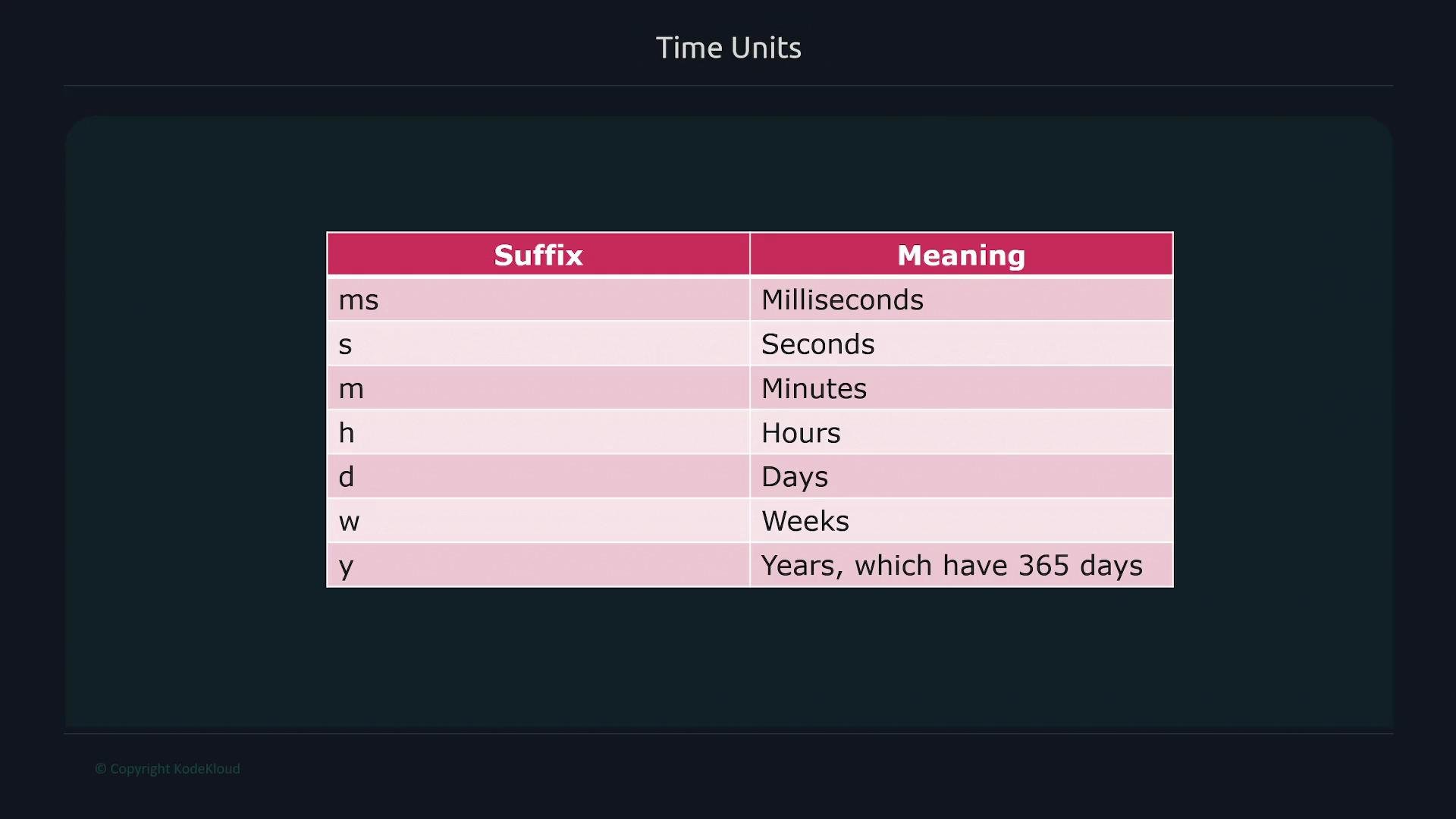 Supported time suffixes:
| Suffix | Meaning |
| ------ | ------------ |
| `ms` | milliseconds |
| `s` | seconds |
| `m` | minutes |
| `h` | hours |
| `d` | days |
| `w` | weeks |
| `y` | years |
Examples:
```promql theme={null}
# Five days ago
node_memory_Active_bytes{instance="node1"} offset 5d
# Two weeks ago
node_memory_Active_bytes{instance="node1"} offset 2w
# One and a half hours ago (two equivalent forms)
node_memory_Active_bytes{instance="node1"} offset 90m
node_memory_Active_bytes{instance="node1"} offset 1h30m
```
## @ — anchor to an exact timestamp
To evaluate a metric at an exact point in time, use the `@` modifier with a Unix timestamp (seconds since the epoch). This returns the sample closest to that timestamp:
Supported time suffixes:
| Suffix | Meaning |
| ------ | ------------ |
| `ms` | milliseconds |
| `s` | seconds |
| `m` | minutes |
| `h` | hours |
| `d` | days |
| `w` | weeks |
| `y` | years |
Examples:
```promql theme={null}
# Five days ago
node_memory_Active_bytes{instance="node1"} offset 5d
# Two weeks ago
node_memory_Active_bytes{instance="node1"} offset 2w
# One and a half hours ago (two equivalent forms)
node_memory_Active_bytes{instance="node1"} offset 90m
node_memory_Active_bytes{instance="node1"} offset 1h30m
```
## @ — anchor to an exact timestamp
To evaluate a metric at an exact point in time, use the `@` modifier with a Unix timestamp (seconds since the epoch). This returns the sample closest to that timestamp:
 ```promql theme={null}
# Value at a specific Unix timestamp
node_memory_Active_bytes{instance="node1"} @1663265188
```
Note: Unix timestamps used with `@` are in seconds. Many tools can convert a human-readable time into the Unix epoch if needed.
## Combining @ and offset
You can combine `@` and `offset`. When both are present, the `@` timestamp serves as the anchor point and `offset` shifts relative to that anchor. The order of `@` and `offset` does not matter — both forms are equivalent:
```promql theme={null}
node_memory_Active_bytes{instance="node1"} @1663265188 offset 5m
node_memory_Active_bytes{instance="node1"} offset 5m @1663265188
```
Both queries return the metric value five minutes before the specified timestamp (for example, if the timestamp corresponds to 06:06, the returned value is from 06:01).
You can use `offset` and `@` with instantaneous vectors (single-value queries) or with range vectors (time windows). The `@` timestamp anchors the evaluation, and `offset` shifts that anchored timestamp or window.
## Range vectors with anchors and offsets
Range vectors use square brackets to request a window of samples, for example `[2m]`. By default, `[2m]` refers to the most recent two minutes. When combined with `@` and/or `offset`, the range vector is anchored and shifted accordingly:
```promql theme={null}
# Two minutes of data anchored at the timestamp (e.g., covering 06:04–06:06 if the timestamp is 06:06)
node_memory_Active_bytes{instance="node1"}[2m] @1663265188
# Two minutes of data anchored at the timestamp, then offset 10 minutes earlier
node_memory_Active_bytes{instance="node1"}[2m] @1663265188 offset 10m
```
These modifiers let you precisely inspect historical values and sample windows — useful for incident postmortems, trend analysis, and retroactive debugging.
## Additional resources
* Prometheus PromQL documentation: [https://prometheus.io/docs/prometheus/latest/querying/basics/](https://prometheus.io/docs/prometheus/latest/querying/basics/)
* PromQL examples and timestamp usage: [https://prometheus.io/docs/prometheus/latest/querying/expression/](https://prometheus.io/docs/prometheus/latest/querying/expression/)
```promql theme={null}
# Value at a specific Unix timestamp
node_memory_Active_bytes{instance="node1"} @1663265188
```
Note: Unix timestamps used with `@` are in seconds. Many tools can convert a human-readable time into the Unix epoch if needed.
## Combining @ and offset
You can combine `@` and `offset`. When both are present, the `@` timestamp serves as the anchor point and `offset` shifts relative to that anchor. The order of `@` and `offset` does not matter — both forms are equivalent:
```promql theme={null}
node_memory_Active_bytes{instance="node1"} @1663265188 offset 5m
node_memory_Active_bytes{instance="node1"} offset 5m @1663265188
```
Both queries return the metric value five minutes before the specified timestamp (for example, if the timestamp corresponds to 06:06, the returned value is from 06:01).
You can use `offset` and `@` with instantaneous vectors (single-value queries) or with range vectors (time windows). The `@` timestamp anchors the evaluation, and `offset` shifts that anchored timestamp or window.
## Range vectors with anchors and offsets
Range vectors use square brackets to request a window of samples, for example `[2m]`. By default, `[2m]` refers to the most recent two minutes. When combined with `@` and/or `offset`, the range vector is anchored and shifted accordingly:
```promql theme={null}
# Two minutes of data anchored at the timestamp (e.g., covering 06:04–06:06 if the timestamp is 06:06)
node_memory_Active_bytes{instance="node1"}[2m] @1663265188
# Two minutes of data anchored at the timestamp, then offset 10 minutes earlier
node_memory_Active_bytes{instance="node1"}[2m] @1663265188 offset 10m
```
These modifiers let you precisely inspect historical values and sample windows — useful for incident postmortems, trend analysis, and retroactive debugging.
## Additional resources
* Prometheus PromQL documentation: [https://prometheus.io/docs/prometheus/latest/querying/basics/](https://prometheus.io/docs/prometheus/latest/querying/basics/)
* PromQL examples and timestamp usage: [https://prometheus.io/docs/prometheus/latest/querying/expression/](https://prometheus.io/docs/prometheus/latest/querying/expression/)