> ## Documentation Index
> Fetch the complete documentation index at: https://notes.kodekloud.com/llms.txt
> Use this file to discover all available pages before exploring further.
# Operators
> Guide to PromQL operators covering arithmetic, comparisons, bool modifier, precedence, and logical set operators with examples for building Prometheus queries and alerting rules
This lesson dives into PromQL operators — how to perform arithmetic, compare and filter series, combine expressions using logical set operators, and understand operator precedence. These concepts are essential for crafting precise Prometheus queries and reliable alerting rules.
## Arithmetic operators
Arithmetic operators perform numeric operations on instant vectors or scalars: addition (`+`), subtraction (`-`), multiplication (`*`), division (`/`), modulo (`%`), and power (`^`).
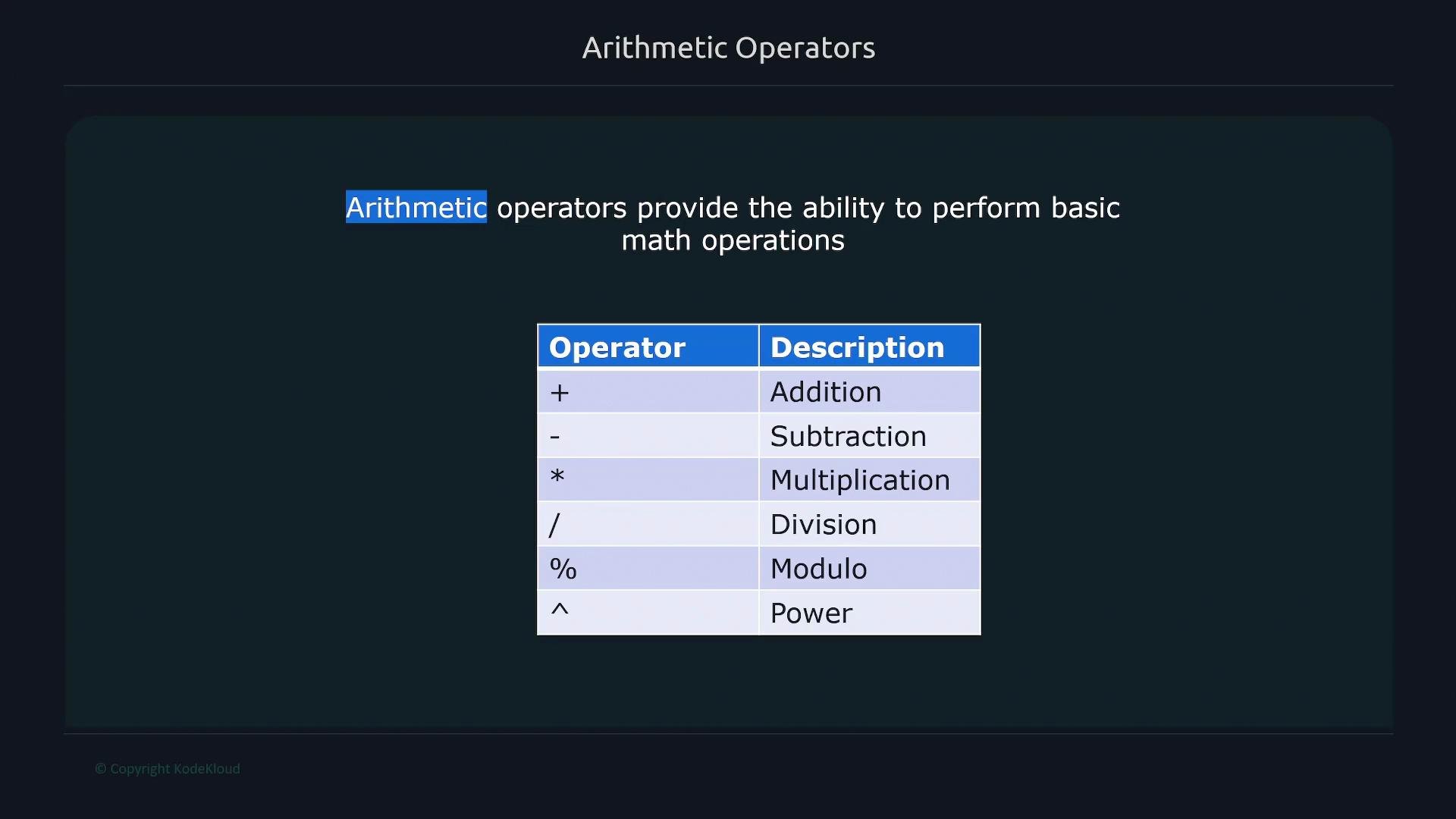 Operator quick reference:
| Operator | Meaning |
| -------- | ---------------------- |
| `+` | Addition |
| `-` | Subtraction |
| `*` | Multiplication |
| `/` | Division |
| `%` | Modulo (remainder) |
| `^` | Exponentiation (power) |
Example — convert bytes to kibibytes (KiB). `node_memory_active_bytes` reports memory in bytes; divide by `1024` to convert to KiB:
```bash theme={null}
$ node_memory_active_bytes{instance="node1"}
node_memory_active_bytes{instance="node1", job="node"} 2204815360
$ node_memory_active_bytes{instance="node1"} / 1024
{instance="node1", job="node"} 2153168
```
Arithmetic on a metric produces a computed vector — the result does not preserve the original metric name. The result contains the same labels but no original metric identifier. This is expected PromQL behavior.
Dividing by `1000` converts to decimal kilobytes (kB); dividing by `1024` converts to kibibytes (KiB). Choose based on the unit system you want.
## Comparison operators
Comparison operators filter or compare metric values: `==`, `!=`, `>`, `<`, `>=`, `<=`.
Operator quick reference:
| Operator | Meaning |
| -------- | ---------------------- |
| `+` | Addition |
| `-` | Subtraction |
| `*` | Multiplication |
| `/` | Division |
| `%` | Modulo (remainder) |
| `^` | Exponentiation (power) |
Example — convert bytes to kibibytes (KiB). `node_memory_active_bytes` reports memory in bytes; divide by `1024` to convert to KiB:
```bash theme={null}
$ node_memory_active_bytes{instance="node1"}
node_memory_active_bytes{instance="node1", job="node"} 2204815360
$ node_memory_active_bytes{instance="node1"} / 1024
{instance="node1", job="node"} 2153168
```
Arithmetic on a metric produces a computed vector — the result does not preserve the original metric name. The result contains the same labels but no original metric identifier. This is expected PromQL behavior.
Dividing by `1000` converts to decimal kilobytes (kB); dividing by `1024` converts to kibibytes (KiB). Choose based on the unit system you want.
## Comparison operators
Comparison operators filter or compare metric values: `==`, `!=`, `>`, `<`, `>=`, `<=`.
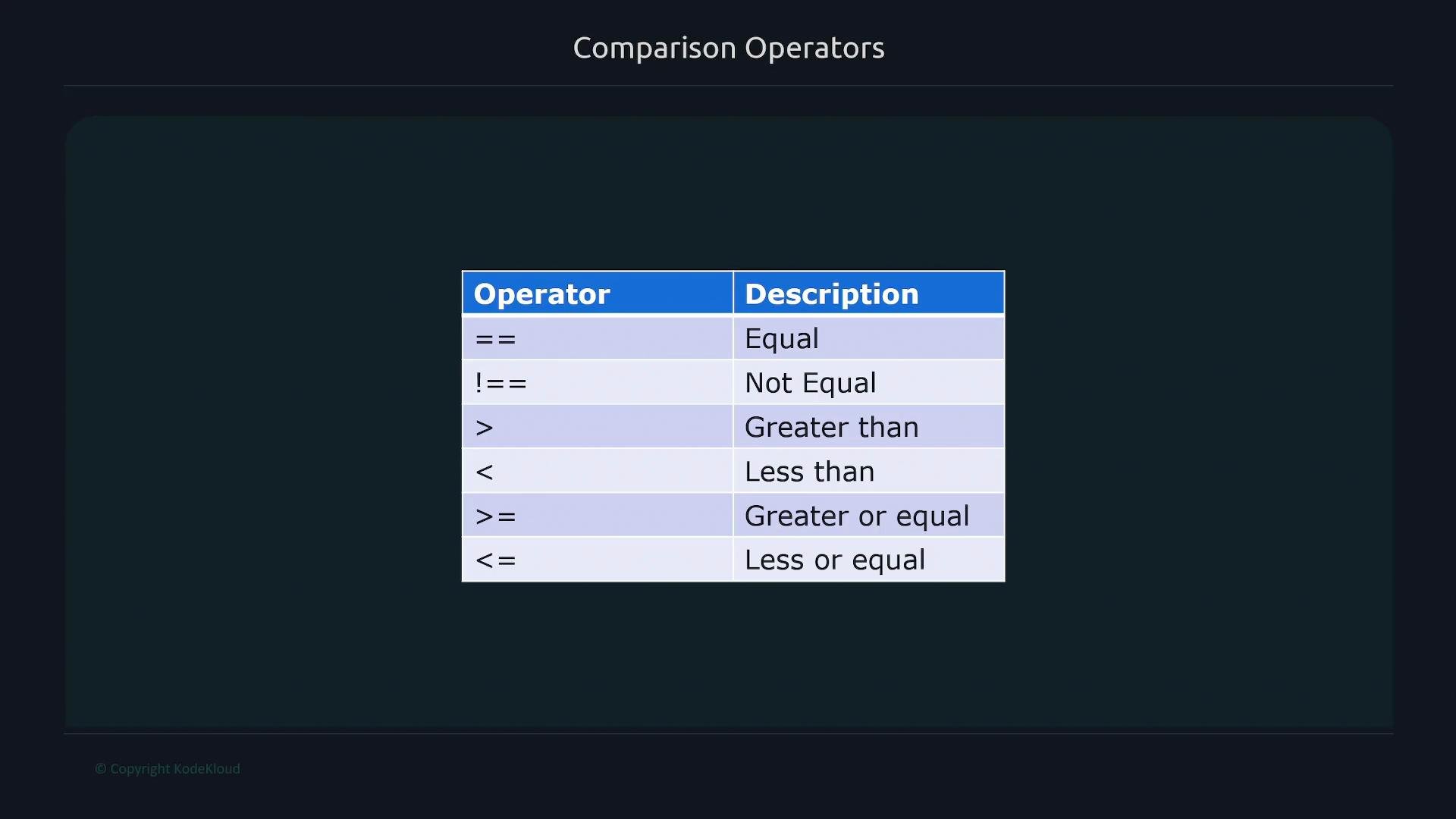 Comparison operator examples:
| Operator | Use case |
| -------- | --------------------- |
| `==` | Equal to |
| `!=` | Not equal |
| `>` | Greater than |
| `<` | Less than |
| `>=` | Greater than or equal |
| `<=` | Less than or equal |
Example — filter network flags greater than `100`:
```bash theme={null}
$ node_network_flags
node_network_flags{device="enp0s3", instance="node1", job="node"} 5000
node_network_flags{device="enp0s3", instance="node2", job="node"} 4800
node_network_flags{device="lo", instance="node1", job="node"} 77
node_network_flags{device="lo", instance="node2", job="node"} 84
$ node_network_flags > 100
node_network_flags{device="enp0s3", instance="node1", job="node"} 5000
node_network_flags{device="enp0s3", instance="node2", job="node"} 4800
```
## The `bool` modifier
The `bool` modifier changes a comparison from a filter (dropping non-matching series) into a 0/1 indicator for each input series. This is especially useful for alerting rules where you need an on/off numeric signal rather than a filtered set.
Example — check which filesystems have less than `1000` bytes available:
```bash theme={null}
$ node_filesystem_avail_bytes
node_filesystem_avail_bytes{device="/dev/sda2", fstype="vfat", instance="node1", mountpoint="/boot/efi"} 53371
node_filesystem_avail_bytes{device="/dev/sda3", fstype="ext4", instance="node1", mountpoint="/"} 18771
node_filesystem_avail_bytes{device="tmpfs", fstype="tmpfs", instance="node1", mountpoint="/run"} 421
node_filesystem_avail_bytes{device="tmpfs", fstype="tmpfs", instance="node1", mountpoint="/run/lock"} 80012
node_filesystem_avail_bytes{device="tmpfs", fstype="tmpfs", instance="node1", mountpoint="/run/snapd/ns"} 872
$ node_filesystem_avail_bytes < bool 1000
node_filesystem_avail_bytes{device="/dev/sda2", fstype="vfat", instance="node1", mountpoint="/boot/efi"} 0
node_filesystem_avail_bytes{device="/dev/sda3", fstype="ext4", instance="node1", mountpoint="/"} 0
node_filesystem_avail_bytes{device="tmpfs", fstype="tmpfs", instance="node1", mountpoint="/run"} 1
node_filesystem_avail_bytes{device="tmpfs", fstype="tmpfs", instance="node1", mountpoint="/run/lock"} 0
node_filesystem_avail_bytes{device="tmpfs", fstype="tmpfs", instance="node1", mountpoint="/run/snapd/ns"} 1
```
A `1` indicates the comparison evaluated to true; `0` indicates false. Use these boolean vectors directly in alert expressions or downstream calculations.
## Operator precedence
PromQL evaluates expressions according to operator precedence. Higher-precedence operators are evaluated before lower-precedence ones. Operators on the same precedence level are left-associative (evaluated left-to-right), except exponentiation (`^`) which is right-associative.
Comparison operator examples:
| Operator | Use case |
| -------- | --------------------- |
| `==` | Equal to |
| `!=` | Not equal |
| `>` | Greater than |
| `<` | Less than |
| `>=` | Greater than or equal |
| `<=` | Less than or equal |
Example — filter network flags greater than `100`:
```bash theme={null}
$ node_network_flags
node_network_flags{device="enp0s3", instance="node1", job="node"} 5000
node_network_flags{device="enp0s3", instance="node2", job="node"} 4800
node_network_flags{device="lo", instance="node1", job="node"} 77
node_network_flags{device="lo", instance="node2", job="node"} 84
$ node_network_flags > 100
node_network_flags{device="enp0s3", instance="node1", job="node"} 5000
node_network_flags{device="enp0s3", instance="node2", job="node"} 4800
```
## The `bool` modifier
The `bool` modifier changes a comparison from a filter (dropping non-matching series) into a 0/1 indicator for each input series. This is especially useful for alerting rules where you need an on/off numeric signal rather than a filtered set.
Example — check which filesystems have less than `1000` bytes available:
```bash theme={null}
$ node_filesystem_avail_bytes
node_filesystem_avail_bytes{device="/dev/sda2", fstype="vfat", instance="node1", mountpoint="/boot/efi"} 53371
node_filesystem_avail_bytes{device="/dev/sda3", fstype="ext4", instance="node1", mountpoint="/"} 18771
node_filesystem_avail_bytes{device="tmpfs", fstype="tmpfs", instance="node1", mountpoint="/run"} 421
node_filesystem_avail_bytes{device="tmpfs", fstype="tmpfs", instance="node1", mountpoint="/run/lock"} 80012
node_filesystem_avail_bytes{device="tmpfs", fstype="tmpfs", instance="node1", mountpoint="/run/snapd/ns"} 872
$ node_filesystem_avail_bytes < bool 1000
node_filesystem_avail_bytes{device="/dev/sda2", fstype="vfat", instance="node1", mountpoint="/boot/efi"} 0
node_filesystem_avail_bytes{device="/dev/sda3", fstype="ext4", instance="node1", mountpoint="/"} 0
node_filesystem_avail_bytes{device="tmpfs", fstype="tmpfs", instance="node1", mountpoint="/run"} 1
node_filesystem_avail_bytes{device="tmpfs", fstype="tmpfs", instance="node1", mountpoint="/run/lock"} 0
node_filesystem_avail_bytes{device="tmpfs", fstype="tmpfs", instance="node1", mountpoint="/run/snapd/ns"} 1
```
A `1` indicates the comparison evaluated to true; `0` indicates false. Use these boolean vectors directly in alert expressions or downstream calculations.
## Operator precedence
PromQL evaluates expressions according to operator precedence. Higher-precedence operators are evaluated before lower-precedence ones. Operators on the same precedence level are left-associative (evaluated left-to-right), except exponentiation (`^`) which is right-associative.
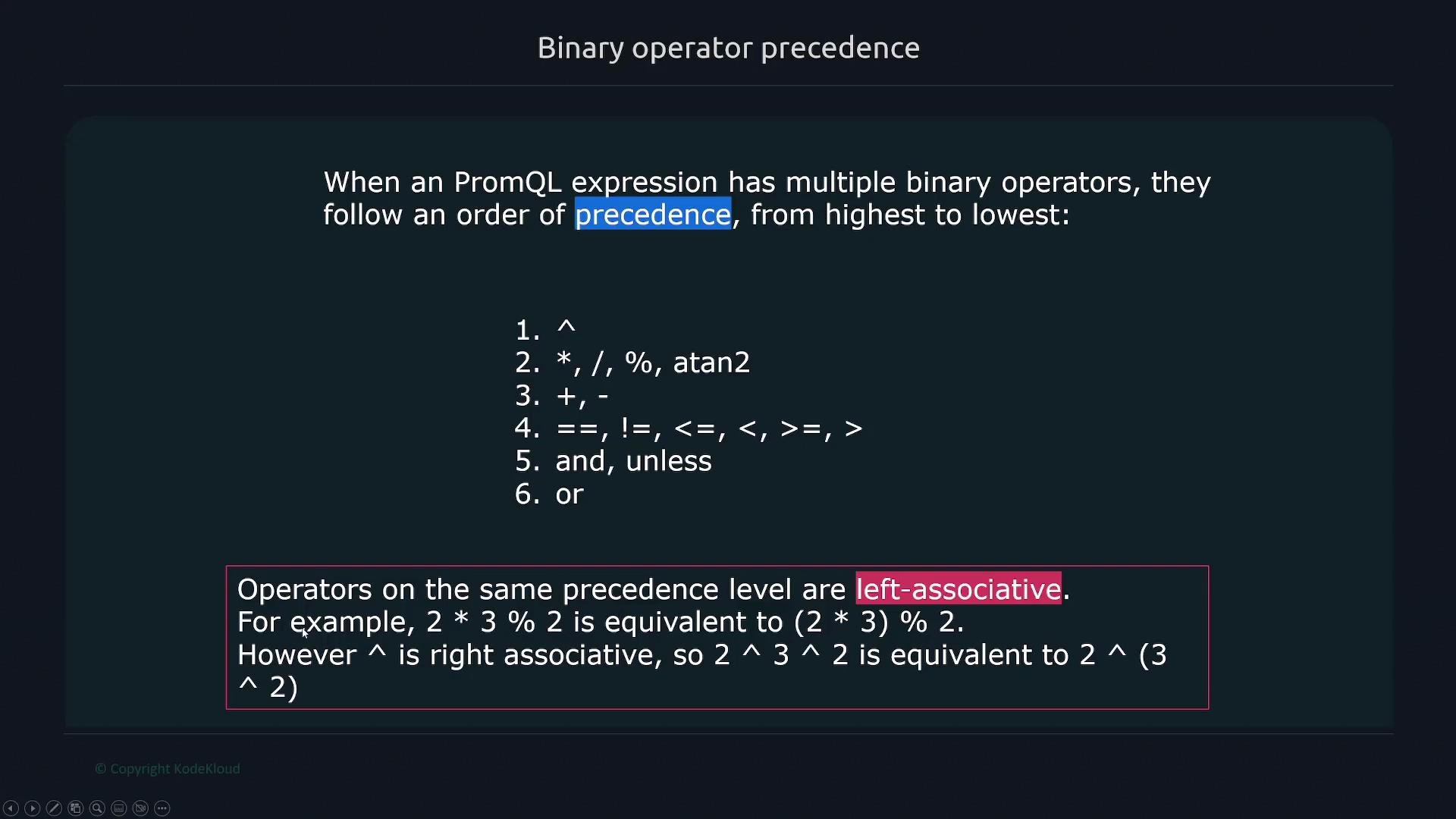 Examples:
* `2 * 3 % 2` is evaluated as `(2 * 3) % 2` (left-to-right).
* `2 ^ 3 ^ 2` is evaluated as `2 ^ (3 ^ 2)` (right-to-left).
Always use parentheses when in doubt to make your intent explicit and avoid surprises.
## Logical operators: or, and, unless
PromQL provides three set-level logical operators that operate on series sets: `or`, `and`, and `unless`.
Examples:
* `2 * 3 % 2` is evaluated as `(2 * 3) % 2` (left-to-right).
* `2 ^ 3 ^ 2` is evaluated as `2 ^ (3 ^ 2)` (right-to-left).
Always use parentheses when in doubt to make your intent explicit and avoid surprises.
## Logical operators: or, and, unless
PromQL provides three set-level logical operators that operate on series sets: `or`, `and`, and `unless`.
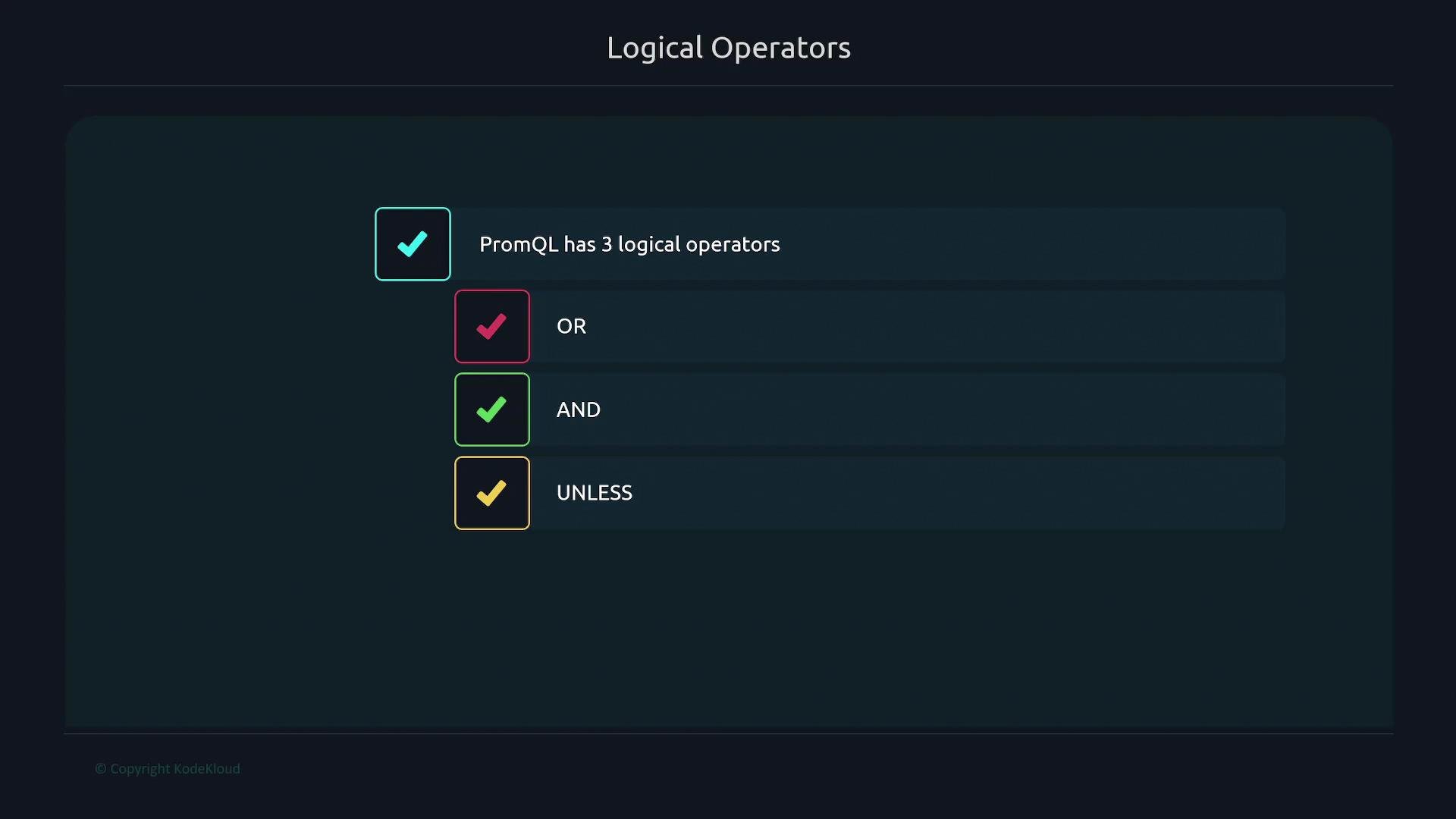 Behavior overview:
| Operator | Description |
| -------- | -------------------------------------------------------------------------------- |
| `and` | Intersection: returns series present in both left and right vectors. |
| `or` | Union: returns series present in either left or right vector. |
| `unless` | Set difference: returns series from the left that do not match any on the right. |
Examples
* Return filesystems with available bytes greater than `1000` and less than `3000` (intersection):
```bash theme={null}
$ node_filesystem_avail_bytes
node_filesystem_avail_bytes{instance="node1", job="node", mountpoint="/"} 53371
node_filesystem_avail_bytes{instance="node1", job="node", mountpoint="/var"} 1771
node_filesystem_avail_bytes{instance="node1", job="node", mountpoint="/etc"} 421
node_filesystem_avail_bytes{instance="node1", job="node", mountpoint="/home"} 2872
$ node_filesystem_avail_bytes > 1000 and node_filesystem_avail_bytes < 3000
node_filesystem_avail_bytes{instance="node1", job="node", mountpoint="/var"} 1771
```
* Union: filesystems with available bytes less than `500` or greater than `70000`:
```bash theme={null}
$ node_filesystem_avail_bytes
node_filesystem_avail_bytes{instance="node1", job="node", mountpoint="/home"} 53371
node_filesystem_avail_bytes{instance="node1", job="node", mountpoint="/var"} 18771
node_filesystem_avail_bytes{instance="node1", job="node", mountpoint="/etc"} 421
node_filesystem_avail_bytes{instance="node1", job="node", mountpoint="/opt"} 80012
$ node_filesystem_avail_bytes < 500 or node_filesystem_avail_bytes > 70000
node_filesystem_avail_bytes{instance="node1", job="node", mountpoint="/etc"} 421
node_filesystem_avail_bytes{instance="node1", job="node", mountpoint="/opt"} 80012
```
* `unless` (left set difference): return series greater than `1000` unless they are greater than `30000`:
```bash theme={null}
$ node_filesystem_avail_bytes > 1000 unless node_filesystem_avail_bytes > 30000
# returns series that match the left condition (>1000) but do NOT appear on the right (>30000)
```
## Putting it together: quick interactive examples
Combine arithmetic, comparison, and logical operators to build targeted queries.
Example — add 50 to `node_arp_entries`:
```bash theme={null}
$ node_arp_entries
node_arp_entries{instance="node1"} 2
$ node_arp_entries + 50
{instance="node1"} 52
```
Example — filter filesystems greater than `6_000_000` bytes:
```bash theme={null}
$ node_filesystem_avail_bytes
node_filesystem_avail_bytes{device="/dev/sda2", fstype="vfat", instance="192.168.1.168:9100", job="node", mountpoint="/boot/efi"} 531341312
node_filesystem_avail_bytes{device="/dev/sda3", fstype="ext4", instance="192.168.1.168:9100", job="node", mountpoint="/"} 1427759104
node_filesystem_avail_bytes{device="tmpfs", fstype="tmpfs", instance="192.168.1.168:9100", job="node", mountpoint="/run"} 726482944
node_filesystem_avail_bytes{device="tmpfs", fstype="tmpfs", instance="192.168.1.168:9100", job="node", mountpoint="/run/snapd/ns"} 726482944
node_filesystem_avail_bytes{device="tmpfs", fstype="tmpfs", instance="192.168.1.168:9100", job="node", mountpoint="/run/user/127"} 727838720
$ node_filesystem_avail_bytes > 6000000
node_filesystem_avail_bytes{device="/dev/sda2", fstype="vfat", instance="192.168.1.168:9100", job="node", mountpoint="/boot/efi"} 531341312
node_filesystem_avail_bytes{device="/dev/sda3", fstype="ext4", instance="192.168.1.168:9100", job="node", mountpoint="/"} 1427759104
node_filesystem_avail_bytes{device="tmpfs", fstype="tmpfs", instance="192.168.1.168:9100", job="node", mountpoint="/run"} 726482944
node_filesystem_avail_bytes{device="tmpfs", fstype="tmpfs", instance="192.168.1.168:9100", job="node", mountpoint="/run/snapd/ns"} 726482944
node_filesystem_avail_bytes{device="tmpfs", fstype="tmpfs", instance="192.168.1.168:9100", job="node", mountpoint="/run/user/127"} 727838720
```
Add a second filter to exclude very large filesystems (greater than `1_000_000_000` bytes):
```bash theme={null}
$ node_filesystem_avail_bytes > 6000000 and node_filesystem_avail_bytes < 1000000000
node_filesystem_avail_bytes{device="tmpfs", fstype="tmpfs", instance="192.168.1.168:9100", job="node", mountpoint="/run"} 726482944
node_filesystem_avail_bytes{device="tmpfs", fstype="tmpfs", instance="192.168.1.168:9100", job="node", mountpoint="/run/snapd/ns"} 726482944
node_filesystem_avail_bytes{device="tmpfs", fstype="tmpfs", instance="192.168.1.168:9100", job="node", mountpoint="/run/user/127"} 727838720
```
`or` example — values less than `6_000_000` OR greater than `10_000_000_000`:
```bash theme={null}
$ node_filesystem_avail_bytes < 6000000 or node_filesystem_avail_bytes > 10000000000
# returns series matching either condition (below the first threshold or above the second)
```
## Summary
* Arithmetic operators (`+`, `-`, `*`, `/`, `%`, `^`) perform numeric transformations and unit conversions.
* Comparison operators (`==`, `!=`, `>`, `<`, `>=`, `<=`) filter series; use `bool` to emit 0/1 results for alerting.
* Operator precedence determines evaluation order; use parentheses to make expressions explicit.
* Logical set operators (`and`, `or`, `unless`) combine or subtract series sets to build complex queries.
Further reading and references:
* Prometheus PromQL documentation: [https://prometheus.io/docs/prometheus/latest/querying/basics/](https://prometheus.io/docs/prometheus/latest/querying/basics/)
* PromQL operators and expressions: [https://prometheus.io/docs/prometheus/latest/querying/operators/](https://prometheus.io/docs/prometheus/latest/querying/operators/)
Behavior overview:
| Operator | Description |
| -------- | -------------------------------------------------------------------------------- |
| `and` | Intersection: returns series present in both left and right vectors. |
| `or` | Union: returns series present in either left or right vector. |
| `unless` | Set difference: returns series from the left that do not match any on the right. |
Examples
* Return filesystems with available bytes greater than `1000` and less than `3000` (intersection):
```bash theme={null}
$ node_filesystem_avail_bytes
node_filesystem_avail_bytes{instance="node1", job="node", mountpoint="/"} 53371
node_filesystem_avail_bytes{instance="node1", job="node", mountpoint="/var"} 1771
node_filesystem_avail_bytes{instance="node1", job="node", mountpoint="/etc"} 421
node_filesystem_avail_bytes{instance="node1", job="node", mountpoint="/home"} 2872
$ node_filesystem_avail_bytes > 1000 and node_filesystem_avail_bytes < 3000
node_filesystem_avail_bytes{instance="node1", job="node", mountpoint="/var"} 1771
```
* Union: filesystems with available bytes less than `500` or greater than `70000`:
```bash theme={null}
$ node_filesystem_avail_bytes
node_filesystem_avail_bytes{instance="node1", job="node", mountpoint="/home"} 53371
node_filesystem_avail_bytes{instance="node1", job="node", mountpoint="/var"} 18771
node_filesystem_avail_bytes{instance="node1", job="node", mountpoint="/etc"} 421
node_filesystem_avail_bytes{instance="node1", job="node", mountpoint="/opt"} 80012
$ node_filesystem_avail_bytes < 500 or node_filesystem_avail_bytes > 70000
node_filesystem_avail_bytes{instance="node1", job="node", mountpoint="/etc"} 421
node_filesystem_avail_bytes{instance="node1", job="node", mountpoint="/opt"} 80012
```
* `unless` (left set difference): return series greater than `1000` unless they are greater than `30000`:
```bash theme={null}
$ node_filesystem_avail_bytes > 1000 unless node_filesystem_avail_bytes > 30000
# returns series that match the left condition (>1000) but do NOT appear on the right (>30000)
```
## Putting it together: quick interactive examples
Combine arithmetic, comparison, and logical operators to build targeted queries.
Example — add 50 to `node_arp_entries`:
```bash theme={null}
$ node_arp_entries
node_arp_entries{instance="node1"} 2
$ node_arp_entries + 50
{instance="node1"} 52
```
Example — filter filesystems greater than `6_000_000` bytes:
```bash theme={null}
$ node_filesystem_avail_bytes
node_filesystem_avail_bytes{device="/dev/sda2", fstype="vfat", instance="192.168.1.168:9100", job="node", mountpoint="/boot/efi"} 531341312
node_filesystem_avail_bytes{device="/dev/sda3", fstype="ext4", instance="192.168.1.168:9100", job="node", mountpoint="/"} 1427759104
node_filesystem_avail_bytes{device="tmpfs", fstype="tmpfs", instance="192.168.1.168:9100", job="node", mountpoint="/run"} 726482944
node_filesystem_avail_bytes{device="tmpfs", fstype="tmpfs", instance="192.168.1.168:9100", job="node", mountpoint="/run/snapd/ns"} 726482944
node_filesystem_avail_bytes{device="tmpfs", fstype="tmpfs", instance="192.168.1.168:9100", job="node", mountpoint="/run/user/127"} 727838720
$ node_filesystem_avail_bytes > 6000000
node_filesystem_avail_bytes{device="/dev/sda2", fstype="vfat", instance="192.168.1.168:9100", job="node", mountpoint="/boot/efi"} 531341312
node_filesystem_avail_bytes{device="/dev/sda3", fstype="ext4", instance="192.168.1.168:9100", job="node", mountpoint="/"} 1427759104
node_filesystem_avail_bytes{device="tmpfs", fstype="tmpfs", instance="192.168.1.168:9100", job="node", mountpoint="/run"} 726482944
node_filesystem_avail_bytes{device="tmpfs", fstype="tmpfs", instance="192.168.1.168:9100", job="node", mountpoint="/run/snapd/ns"} 726482944
node_filesystem_avail_bytes{device="tmpfs", fstype="tmpfs", instance="192.168.1.168:9100", job="node", mountpoint="/run/user/127"} 727838720
```
Add a second filter to exclude very large filesystems (greater than `1_000_000_000` bytes):
```bash theme={null}
$ node_filesystem_avail_bytes > 6000000 and node_filesystem_avail_bytes < 1000000000
node_filesystem_avail_bytes{device="tmpfs", fstype="tmpfs", instance="192.168.1.168:9100", job="node", mountpoint="/run"} 726482944
node_filesystem_avail_bytes{device="tmpfs", fstype="tmpfs", instance="192.168.1.168:9100", job="node", mountpoint="/run/snapd/ns"} 726482944
node_filesystem_avail_bytes{device="tmpfs", fstype="tmpfs", instance="192.168.1.168:9100", job="node", mountpoint="/run/user/127"} 727838720
```
`or` example — values less than `6_000_000` OR greater than `10_000_000_000`:
```bash theme={null}
$ node_filesystem_avail_bytes < 6000000 or node_filesystem_avail_bytes > 10000000000
# returns series matching either condition (below the first threshold or above the second)
```
## Summary
* Arithmetic operators (`+`, `-`, `*`, `/`, `%`, `^`) perform numeric transformations and unit conversions.
* Comparison operators (`==`, `!=`, `>`, `<`, `>=`, `<=`) filter series; use `bool` to emit 0/1 results for alerting.
* Operator precedence determines evaluation order; use parentheses to make expressions explicit.
* Logical set operators (`and`, `or`, `unless`) combine or subtract series sets to build complex queries.
Further reading and references:
* Prometheus PromQL documentation: [https://prometheus.io/docs/prometheus/latest/querying/basics/](https://prometheus.io/docs/prometheus/latest/querying/basics/)
* PromQL operators and expressions: [https://prometheus.io/docs/prometheus/latest/querying/operators/](https://prometheus.io/docs/prometheus/latest/querying/operators/)