> ## Documentation Index
> Fetch the complete documentation index at: https://notes.kodekloud.com/llms.txt
> Use this file to discover all available pages before exploring further.
# AuthenticationEncryption
> How to secure Prometheus scrapes to Node Exporter using TLS encryption and basic authentication, with configuration steps and best practices for testing and production.
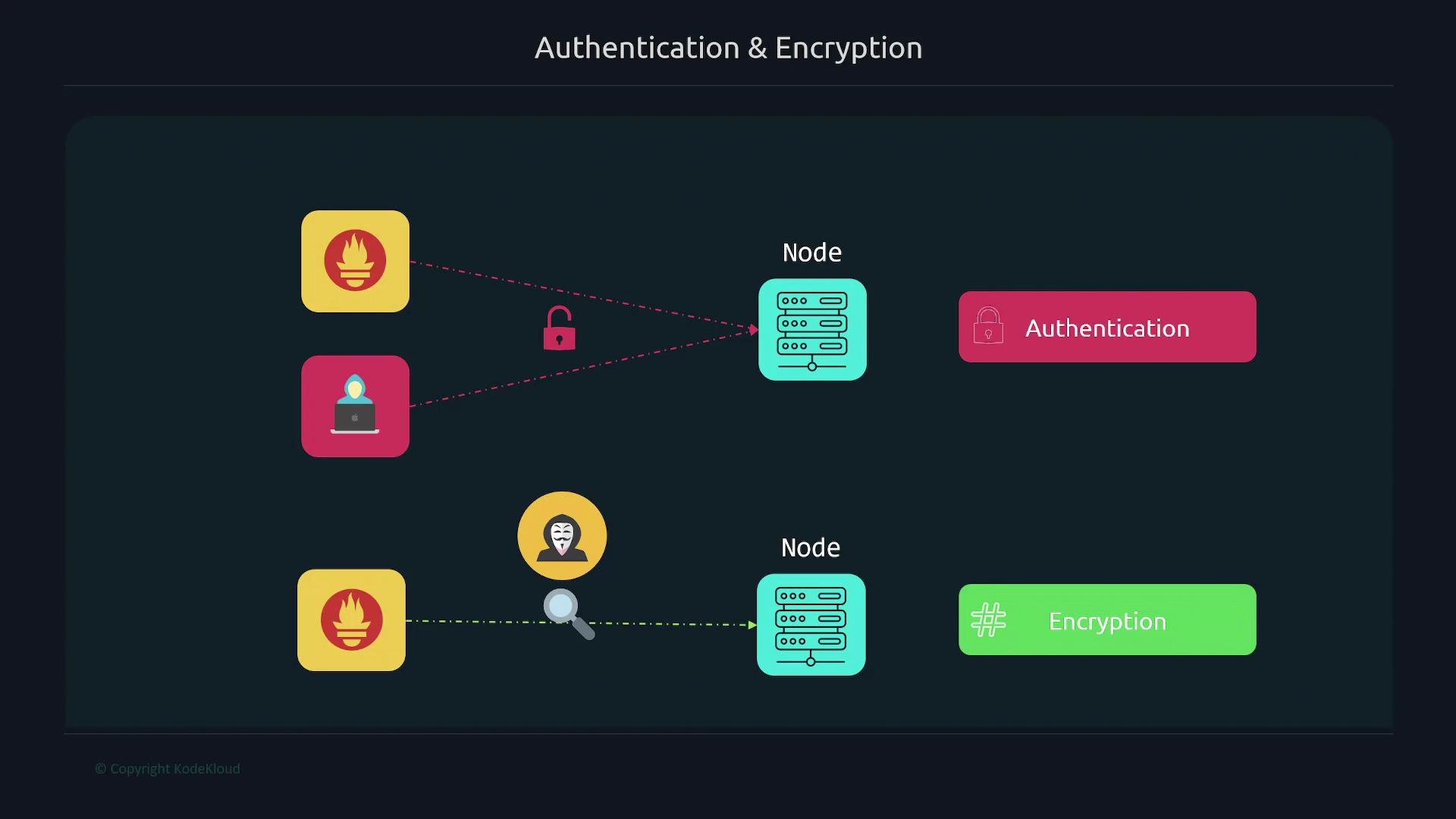
In this lesson we cover how to secure Prometheus scrapes of targets (Node Exporter) using authentication and TLS encryption. We'll walk through the end-to-end steps so that:
* only authorized clients (Prometheus) can scrape metrics (authentication), and
* network traffic is protected from packet sniffers (TLS encryption).
By default, Prometheus can scrape a Node Exporter endpoint without any authentication or encryption. That means anyone who can reach the endpoint can read metrics. Adding authentication restricts access, while TLS prevents eavesdroppers from reading the data, and protects against certain active attacks when properly validated.
This guide shows a practical self-signed example for testing and the recommended approach for production—use CA-signed certificates (or a public CA like Let's Encrypt) and keep TLS verification enabled.
 Below are the steps and example configurations to enable TLS + basic auth for Node Exporter and to configure Prometheus to scrape it securely.
## 1) Generate TLS certificate and key for the target (Node Exporter)
For testing you can generate a self-signed cert with OpenSSL. In production, use your organization CA or Let's Encrypt. Make sure the certificate's Common Name (CN) and/or subjectAltName (SAN) includes the hostname or IP address Prometheus will use to reach the Node Exporter (for example `node` or `node.example.com`), otherwise TLS name validation will fail.
Example OpenSSL command (run on the target host):
```bash theme={null}
sudo openssl req -new -newkey rsa:2048 -days 365 -nodes -x509 \
-keyout node_exporter.key \
-out node_exporter.crt \
-subj "/C=US/ST=California/L=Oakland/O=MyOrg/CN=node" \
-addext "subjectAltName = DNS:node"
```
This produces `node_exporter.key` and `node_exporter.crt`.
Example listing after generation:
```bash theme={null}
$ ls -l
-rw-r--r-- 1 user2 user2 11357 Dec 5 2021 LICENSE
-rwxr-xr-x 1 user2 user2 18228926 Dec 5 2021 node_exporter
-rw-r--r-- 1 root root 1326 Sep 5 18:04 node_exporter.crt
-r-------- 1 root root 1700 Sep 5 18:04 node_exporter.key
```
## 2) Create a Node Exporter web config (TLS + optional basic auth users)
Create a YAML web config for Node Exporter and store it next to the certificate and key (or use absolute paths). Minimal TLS configuration:
```yaml theme={null}
# /etc/node_exporter/config.yml
tls_server_config:
cert_file: node_exporter.crt
key_file: node_exporter.key
```
Later you can add `basic_auth_users:` to this file for username/password protection (bcrypt hashes).
## 3) Run Node Exporter with the web config file
Update the Node Exporter systemd unit (or the service file you use) so Node Exporter is started with `--web.config.file`:
```ini theme={null}
# /etc/systemd/system/node_exporter.service
[Unit]
Description=Node Exporter
Wants=network-online.target
After=network-online.target
[Service]
User=node_exporter
Group=node_exporter
Type=simple
ExecStart=/usr/local/bin/node_exporter --web.config.file=/etc/node_exporter/config.yml
[Install]
WantedBy=multi-user.target
```
Reload systemd and restart:
```bash theme={null}
sudo systemctl daemon-reload
sudo systemctl restart node_exporter
```
Testing note: with a self-signed cert a client like curl will reject the connection by default. To test locally, use:
```bash theme={null}
curl -k https://localhost:9100/metrics
```
If you use a CA-trusted certificate, `-k` is not necessary.
## 4) Move cert/config into a canonical location and set permissions
Best practice: store config and keys under `/etc/node_exporter` and set appropriate ownership/permissions:
```bash theme={null}
sudo mkdir -p /etc/node_exporter
sudo mv node_exporter.crt node_exporter.key config.yml /etc/node_exporter/
sudo chown -R node_exporter:node_exporter /etc/node_exporter
sudo chmod 640 /etc/node_exporter/*.key
sudo chmod 644 /etc/node_exporter/*.crt
sudo systemctl restart node_exporter
```
## 5) Configure Prometheus to validate TLS when scraping the target
Copy the Node Exporter certificate or the CA cert to the Prometheus server so Prometheus can validate the target:
```bash theme={null}
# On Prometheus server, copy the cert from the target host
scp user@node:/etc/node_exporter/node_exporter.crt /etc/prometheus/node_exporter.crt
sudo chown prometheus:prometheus /etc/prometheus/node_exporter.crt
sudo chmod 644 /etc/prometheus/node_exporter.crt
```
Update the Prometheus scrape job to use HTTPS and a `tls_config` that points to the CA file you copied. This ensures proper verification. For quick testing only, you can set `insecure_skip_verify: true` (not recommended for production).
Example scrape job that validates the target certificate:
```yaml theme={null}
- job_name: "node"
scheme: https
static_configs:
- targets: ['node:9100']
tls_config:
ca_file: /etc/prometheus/node_exporter.crt
insecure_skip_verify: false
```
Setting `insecure_skip_verify: true` disables certificate validation and makes TLS vulnerable to man-in-the-middle attacks. Only use this for testing with self-signed certificates. In production, use a CA-signed certificate and keep `insecure_skip_verify: false`.
After editing `prometheus.yml`, restart Prometheus:
```bash theme={null}
sudo systemctl restart prometheus
```
## 6) Enable basic authentication on Node Exporter
To require basic auth for scraping, add a `basic_auth_users` map to the Node Exporter web config. Node Exporter expects bcrypt password hashes.
Install `apache2-utils` (provides `htpasswd`) on the Node Exporter host:
```bash theme={null}
sudo apt update
sudo apt install -y apache2-utils
```
Generate a bcrypt hash for the password (this prompts for the password):
```bash theme={null}
htpasswd -nBC 12 "" | tr -d ':\n'
```
Example bcrypt output (single line):
```text theme={null}
$2y$12$gfAopKVO008KK063rJe0Z9efGRx30qJEZ9vC8IxBP9.cXkurgucc6
```
Add `basic_auth_users` to `/etc/node_exporter/config.yml` and include the hash (quote the string to preserve characters):
```yaml theme={null}
tls_server_config:
cert_file: node_exporter.crt
key_file: node_exporter.key
basic_auth_users:
prometheus: "$2y$12$gfAopKVO008KK063rJe0Z9efGRx30qJEZ9vC8IxBP9.cXkurgucc6"
```
Restart Node Exporter:
```bash theme={null}
sudo systemctl restart node_exporter
```
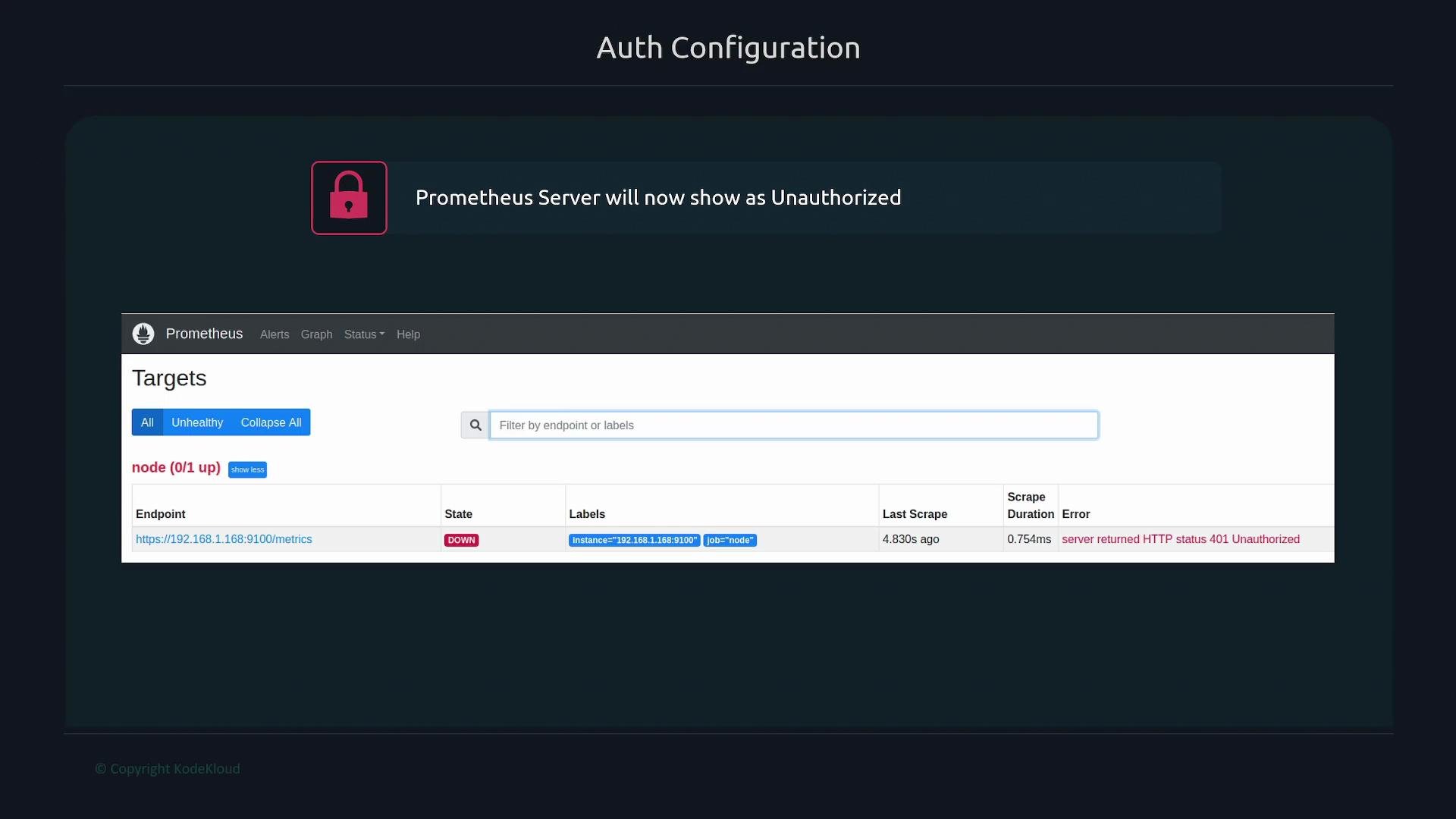
At this point, Prometheus will likely show the target as DOWN and the target page will return HTTP 401 Unauthorized because Prometheus is not yet sending credentials.
Below are the steps and example configurations to enable TLS + basic auth for Node Exporter and to configure Prometheus to scrape it securely.
## 1) Generate TLS certificate and key for the target (Node Exporter)
For testing you can generate a self-signed cert with OpenSSL. In production, use your organization CA or Let's Encrypt. Make sure the certificate's Common Name (CN) and/or subjectAltName (SAN) includes the hostname or IP address Prometheus will use to reach the Node Exporter (for example `node` or `node.example.com`), otherwise TLS name validation will fail.
Example OpenSSL command (run on the target host):
```bash theme={null}
sudo openssl req -new -newkey rsa:2048 -days 365 -nodes -x509 \
-keyout node_exporter.key \
-out node_exporter.crt \
-subj "/C=US/ST=California/L=Oakland/O=MyOrg/CN=node" \
-addext "subjectAltName = DNS:node"
```
This produces `node_exporter.key` and `node_exporter.crt`.
Example listing after generation:
```bash theme={null}
$ ls -l
-rw-r--r-- 1 user2 user2 11357 Dec 5 2021 LICENSE
-rwxr-xr-x 1 user2 user2 18228926 Dec 5 2021 node_exporter
-rw-r--r-- 1 root root 1326 Sep 5 18:04 node_exporter.crt
-r-------- 1 root root 1700 Sep 5 18:04 node_exporter.key
```
## 2) Create a Node Exporter web config (TLS + optional basic auth users)
Create a YAML web config for Node Exporter and store it next to the certificate and key (or use absolute paths). Minimal TLS configuration:
```yaml theme={null}
# /etc/node_exporter/config.yml
tls_server_config:
cert_file: node_exporter.crt
key_file: node_exporter.key
```
Later you can add `basic_auth_users:` to this file for username/password protection (bcrypt hashes).
## 3) Run Node Exporter with the web config file
Update the Node Exporter systemd unit (or the service file you use) so Node Exporter is started with `--web.config.file`:
```ini theme={null}
# /etc/systemd/system/node_exporter.service
[Unit]
Description=Node Exporter
Wants=network-online.target
After=network-online.target
[Service]
User=node_exporter
Group=node_exporter
Type=simple
ExecStart=/usr/local/bin/node_exporter --web.config.file=/etc/node_exporter/config.yml
[Install]
WantedBy=multi-user.target
```
Reload systemd and restart:
```bash theme={null}
sudo systemctl daemon-reload
sudo systemctl restart node_exporter
```
Testing note: with a self-signed cert a client like curl will reject the connection by default. To test locally, use:
```bash theme={null}
curl -k https://localhost:9100/metrics
```
If you use a CA-trusted certificate, `-k` is not necessary.
## 4) Move cert/config into a canonical location and set permissions
Best practice: store config and keys under `/etc/node_exporter` and set appropriate ownership/permissions:
```bash theme={null}
sudo mkdir -p /etc/node_exporter
sudo mv node_exporter.crt node_exporter.key config.yml /etc/node_exporter/
sudo chown -R node_exporter:node_exporter /etc/node_exporter
sudo chmod 640 /etc/node_exporter/*.key
sudo chmod 644 /etc/node_exporter/*.crt
sudo systemctl restart node_exporter
```
## 5) Configure Prometheus to validate TLS when scraping the target
Copy the Node Exporter certificate or the CA cert to the Prometheus server so Prometheus can validate the target:
```bash theme={null}
# On Prometheus server, copy the cert from the target host
scp user@node:/etc/node_exporter/node_exporter.crt /etc/prometheus/node_exporter.crt
sudo chown prometheus:prometheus /etc/prometheus/node_exporter.crt
sudo chmod 644 /etc/prometheus/node_exporter.crt
```
Update the Prometheus scrape job to use HTTPS and a `tls_config` that points to the CA file you copied. This ensures proper verification. For quick testing only, you can set `insecure_skip_verify: true` (not recommended for production).
Example scrape job that validates the target certificate:
```yaml theme={null}
- job_name: "node"
scheme: https
static_configs:
- targets: ['node:9100']
tls_config:
ca_file: /etc/prometheus/node_exporter.crt
insecure_skip_verify: false
```
Setting `insecure_skip_verify: true` disables certificate validation and makes TLS vulnerable to man-in-the-middle attacks. Only use this for testing with self-signed certificates. In production, use a CA-signed certificate and keep `insecure_skip_verify: false`.
After editing `prometheus.yml`, restart Prometheus:
```bash theme={null}
sudo systemctl restart prometheus
```
## 6) Enable basic authentication on Node Exporter
To require basic auth for scraping, add a `basic_auth_users` map to the Node Exporter web config. Node Exporter expects bcrypt password hashes.
Install `apache2-utils` (provides `htpasswd`) on the Node Exporter host:
```bash theme={null}
sudo apt update
sudo apt install -y apache2-utils
```
Generate a bcrypt hash for the password (this prompts for the password):
```bash theme={null}
htpasswd -nBC 12 "" | tr -d ':\n'
```
Example bcrypt output (single line):
```text theme={null}
$2y$12$gfAopKVO008KK063rJe0Z9efGRx30qJEZ9vC8IxBP9.cXkurgucc6
```
Add `basic_auth_users` to `/etc/node_exporter/config.yml` and include the hash (quote the string to preserve characters):
```yaml theme={null}
tls_server_config:
cert_file: node_exporter.crt
key_file: node_exporter.key
basic_auth_users:
prometheus: "$2y$12$gfAopKVO008KK063rJe0Z9efGRx30qJEZ9vC8IxBP9.cXkurgucc6"
```
Restart Node Exporter:
```bash theme={null}
sudo systemctl restart node_exporter
```
At this point, Prometheus will likely show the target as DOWN and the target page will return HTTP 401 Unauthorized because Prometheus is not yet sending credentials.
 ## 7) Configure Prometheus to use basic auth when scraping
Update the Prometheus job in `prometheus.yml` to include `basic_auth`. Prometheus will send the password over the TLS connection configured earlier.
```yaml theme={null}
- job_name: "node"
scheme: https
static_configs:
- targets: ['node:9100']
basic_auth:
username: prometheus
password: "your_plaintext_password_here"
tls_config:
ca_file: /etc/prometheus/node_exporter.crt
insecure_skip_verify: false
```
Replace `"your_plaintext_password_here"` with the actual password used to create the bcrypt hash earlier (Prometheus requires the plaintext in its config to authenticate when scraping).
Restart Prometheus:
```bash theme={null}
sudo systemctl restart prometheus
```
After Prometheus restarts, verify on the Targets page in the Prometheus web UI that the target shows as UP. This confirms successful HTTPS connection and basic authentication.
## Summary checklist
| Step | Action | Example / Notes |
| ---- | ----------------------------------- | -------------------------------------------------------------------------------------------- |
| 1 | Generate cert/key for Node Exporter | Use OpenSSL or CA; ensure CN/SAN match the hostname Prometheus uses |
| 2 | Create Node Exporter web config | Add `tls_server_config` and optionally `basic_auth_users` in `/etc/node_exporter/config.yml` |
| 3 | Start Node Exporter with web config | `--web.config.file=/etc/node_exporter/config.yml` |
| 4 | Set canonical paths & permissions | Store files under `/etc/node_exporter`, `chmod 640` for keys |
| 5 | Configure Prometheus TLS | Copy cert/CA to Prometheus and set `tls_config.ca_file` |
| 6 | Enable basic auth on Node Exporter | Add `basic_auth_users: username: "bcrypt_hash"` |
| 7 | Configure Prometheus basic auth | Add `basic_auth` (plaintext password) to `prometheus.yml` |
## Links and references
* OpenSSL: [https://www.openssl.org/](https://www.openssl.org/)
* curl: [https://curl.se/](https://curl.se/)
* apache2-utils / htpasswd docs: [https://httpd.apache.org/docs/current/programs/htpasswd.html](https://httpd.apache.org/docs/current/programs/htpasswd.html)
* Let's Encrypt: [https://letsencrypt.org/](https://letsencrypt.org/)
* Prometheus documentation (configuration / TLS): [https://prometheus.io/docs/](https://prometheus.io/docs/)
Follow these steps to secure Prometheus scrapes with TLS and basic authentication. For production, prioritize CA-signed certificates and avoid `insecure_skip_verify: true`.
## 7) Configure Prometheus to use basic auth when scraping
Update the Prometheus job in `prometheus.yml` to include `basic_auth`. Prometheus will send the password over the TLS connection configured earlier.
```yaml theme={null}
- job_name: "node"
scheme: https
static_configs:
- targets: ['node:9100']
basic_auth:
username: prometheus
password: "your_plaintext_password_here"
tls_config:
ca_file: /etc/prometheus/node_exporter.crt
insecure_skip_verify: false
```
Replace `"your_plaintext_password_here"` with the actual password used to create the bcrypt hash earlier (Prometheus requires the plaintext in its config to authenticate when scraping).
Restart Prometheus:
```bash theme={null}
sudo systemctl restart prometheus
```
After Prometheus restarts, verify on the Targets page in the Prometheus web UI that the target shows as UP. This confirms successful HTTPS connection and basic authentication.
## Summary checklist
| Step | Action | Example / Notes |
| ---- | ----------------------------------- | -------------------------------------------------------------------------------------------- |
| 1 | Generate cert/key for Node Exporter | Use OpenSSL or CA; ensure CN/SAN match the hostname Prometheus uses |
| 2 | Create Node Exporter web config | Add `tls_server_config` and optionally `basic_auth_users` in `/etc/node_exporter/config.yml` |
| 3 | Start Node Exporter with web config | `--web.config.file=/etc/node_exporter/config.yml` |
| 4 | Set canonical paths & permissions | Store files under `/etc/node_exporter`, `chmod 640` for keys |
| 5 | Configure Prometheus TLS | Copy cert/CA to Prometheus and set `tls_config.ca_file` |
| 6 | Enable basic auth on Node Exporter | Add `basic_auth_users: username: "bcrypt_hash"` |
| 7 | Configure Prometheus basic auth | Add `basic_auth` (plaintext password) to `prometheus.yml` |
## Links and references
* OpenSSL: [https://www.openssl.org/](https://www.openssl.org/)
* curl: [https://curl.se/](https://curl.se/)
* apache2-utils / htpasswd docs: [https://httpd.apache.org/docs/current/programs/htpasswd.html](https://httpd.apache.org/docs/current/programs/htpasswd.html)
* Let's Encrypt: [https://letsencrypt.org/](https://letsencrypt.org/)
* Prometheus documentation (configuration / TLS): [https://prometheus.io/docs/](https://prometheus.io/docs/)
Follow these steps to secure Prometheus scrapes with TLS and basic authentication. For production, prioritize CA-signed certificates and avoid `insecure_skip_verify: true`.