

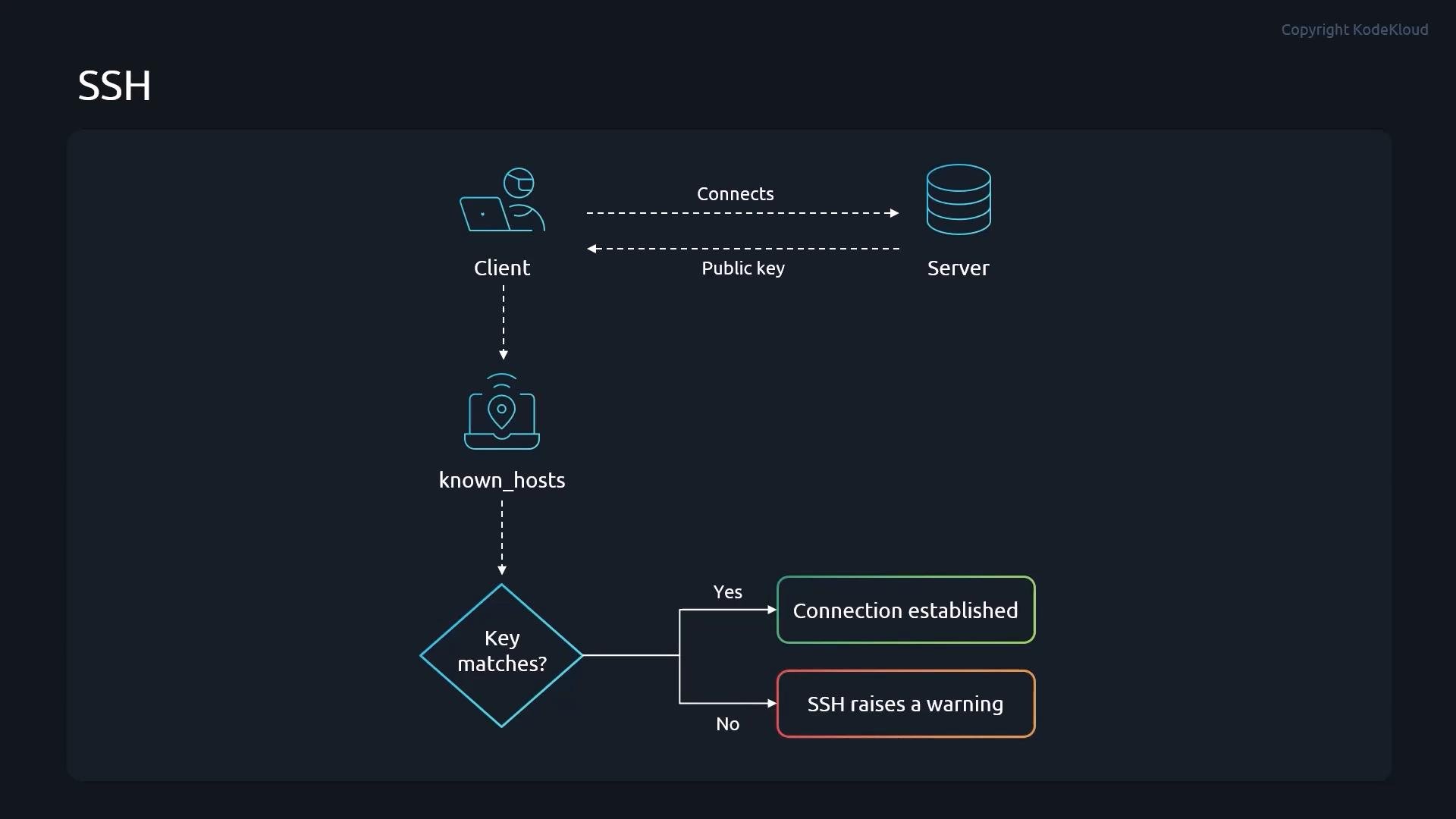
~/.ssh/known_hosts. On subsequent connections the client verifies the presented host key against the stored entry. If the key matches, the connection proceeds; if it differs or is unknown, SSH raises a warning so you can decide how to proceed. This prevents accidental connections to the wrong machine and defends against man‑in‑the‑middle attacks.
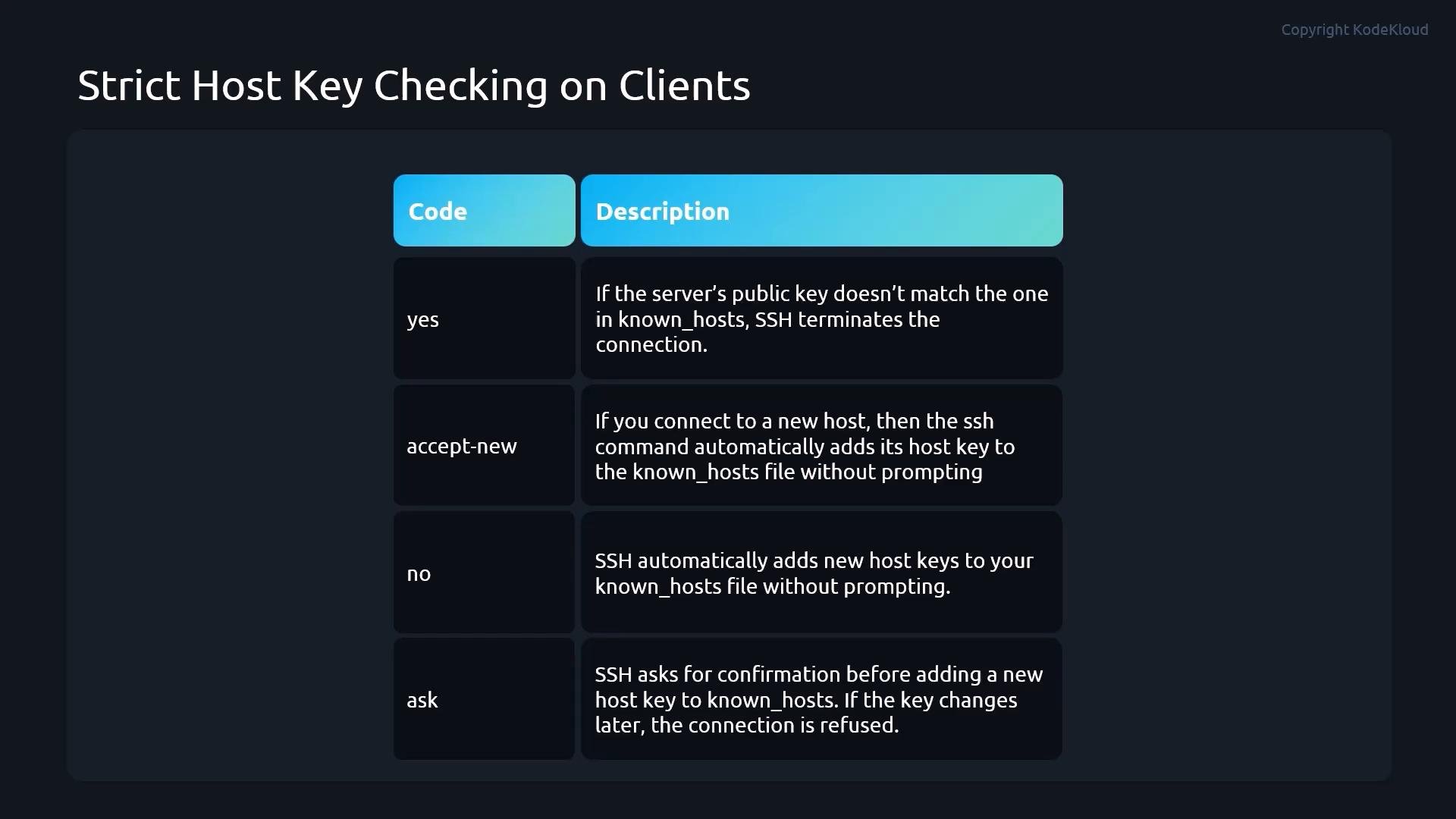
StrictHostKeyChecking option controls how the SSH client handles unknown or changed host keys. Choosing the right policy balances security and automation.
- Verify a server’s host key fingerprint manually with
ssh-keygen -l -f /path/to/key. - Regenerate host keys after reinstalling or cloning a server.
- Use
ssh-keyscanto collect public keys and pre-populateknown_hostsfor automation and fleet management. - Remove or replace stale
known_hostsentries withssh-keygen -R <host>.
Use
ssh-keyscan to seed known_hosts in automated deployments and prefer accept-new over no when you need automation with some safety.- First SSH connection from control to node1 — the client prompts to accept the host key, then asks for a password:
~/.ssh/known_hosts — it now contains the host entries for node1:
- On the server (node1), host keys live under
/etc/ssh. List them to view the server’s identity files:
- If host key files are removed, regenerate them on the server and restart
sshd:
- Back on the control node, attempting to connect now shows a host key mismatch because the server presents new keys that differ from
~/.ssh/known_hosts:
node1 entry in ~/.ssh/known_hosts. The ssh-keygen -R command removes the specified host entry:
- How
StrictHostKeyCheckingchanges the connection behavior
- With strict checking enabled (
StrictHostKeyChecking=yes), SSH refuses to connect to hosts with unknown keys:
- With strict checking disabled (
StrictHostKeyChecking=no), SSH automatically accepts and adds the host key and continues the connection (convenient but less secure):
accept-new is generally safer for automated tasks than no because it only auto-accepts keys that are truly new and still rejects changed (potentially malicious) keys.
Disabling host key verification (
StrictHostKeyChecking=no) is convenient for scripts and automation, but it makes you vulnerable to man‑in‑the‑middle attacks. Use it only in controlled environments and prefer ssh-keyscan to pre-populate known_hosts where possible.
Summary
- SSH host keys are how servers prove identity; clients store trusted host keys in
~/.ssh/known_hosts. StrictHostKeyCheckingdefines how the client treats unknown or changed keys — choose policies based on risk and automation needs.- Regenerate server host keys with
sudo ssh-keygen -Aand restartsshdwhen necessary. - Use
ssh-keyscanto safely seedknown_hostsin automated deployments andssh-keygen -lto verify fingerprints manually. - Avoid disabling strict host key checking in production; prefer
accept-newor pre-populatingknown_hostsfor automation.
- OpenSSH Manual Pages
- SSH Key Management Best Practices (Red Hat)
- ssh-keyscan documentation and examples