> ## Documentation Index
> Fetch the complete documentation index at: https://notes.kodekloud.com/llms.txt
> Use this file to discover all available pages before exploring further.
# Postgres Foreign Keys Configuring
> This article demonstrates configuring a foreign key in PgAdmin using related tables, modifying the posts table, and testing its behavior.
In this article, we demonstrate how to configure a foreign key in PgAdmin using two related tables—posts and users. Follow along as we modify the posts table to add a foreign key column, set up the constraint, and test its behavior.
***
## 1. Preparing Your Data
Begin by opening PgAdmin. Before modifying the table structure, it’s recommended to clear existing data from the posts table. While deleting rows isn’t a requirement in production environments, it simplifies adding columns with NOT NULL constraints.
First, review the current data in the posts table by executing:
```sql theme={null}
SELECT * FROM posts;
```
Then, delete all rows from the posts table:
```sql theme={null}
DELETE FROM posts;
```
You should see a confirmation message, for example:
```sql theme={null}
DELETE 1
Query returned successfully in 29 msec.
```
Clearing the posts table ensures that new columns and constraints can be added without conflicting with existing data.
***
## 2. Configuring the Foreign Key in PgAdmin
### Adding the Foreign Key Column
1. Right-click on the posts table and select **Properties**.
2. Navigate to the **Columns** tab.
3. Add a new column named `user_id`.
Ensure that the data type of `user_id` matches the primary key in the users table (e.g., integer, bigint, smallint, or UUID). In this example, the column is set to NOT NULL to enforce that every post is associated with a valid user.
You should now see an interface similar to the one described below.
### Setting Up the Foreign Key Constraint
1. Switch to the **Constraints** tab and then the **Foreign Key** sub-tab.
2. Click the plus sign (+) to add a new foreign key constraint. While the constraint’s name does not affect functionality, using a clear naming convention such as `posts_users_FKey` is best practice.
3. Under the **Columns** section:
* Select the local column (`user_id`).
* Choose the referenced table (users).
* Select the referenced column (typically, the ID column in the users table).
Next, configure the constraint actions. Since the posts table references a user by ID, set “ON DELETE” to cascade. This ensures that when a user is deleted, all associated posts are automatically removed.
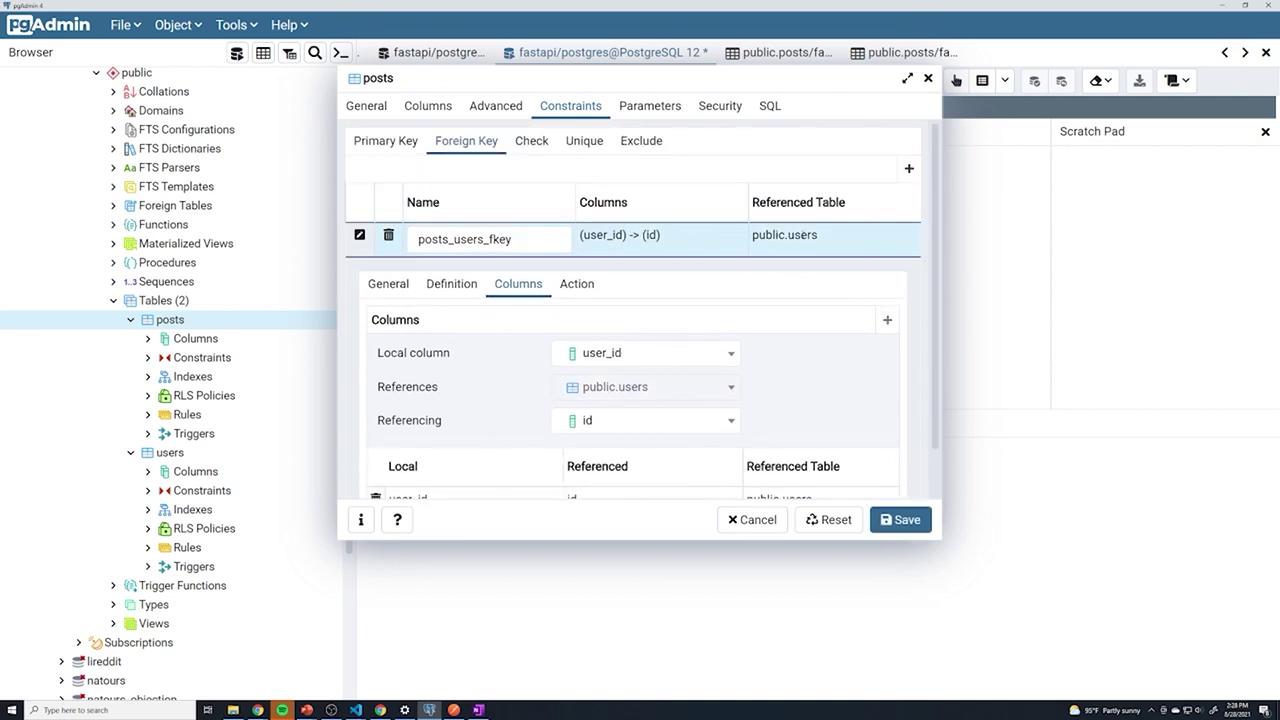
Further configuration options, including “ON UPDATE” actions, can be observed in the following interface:
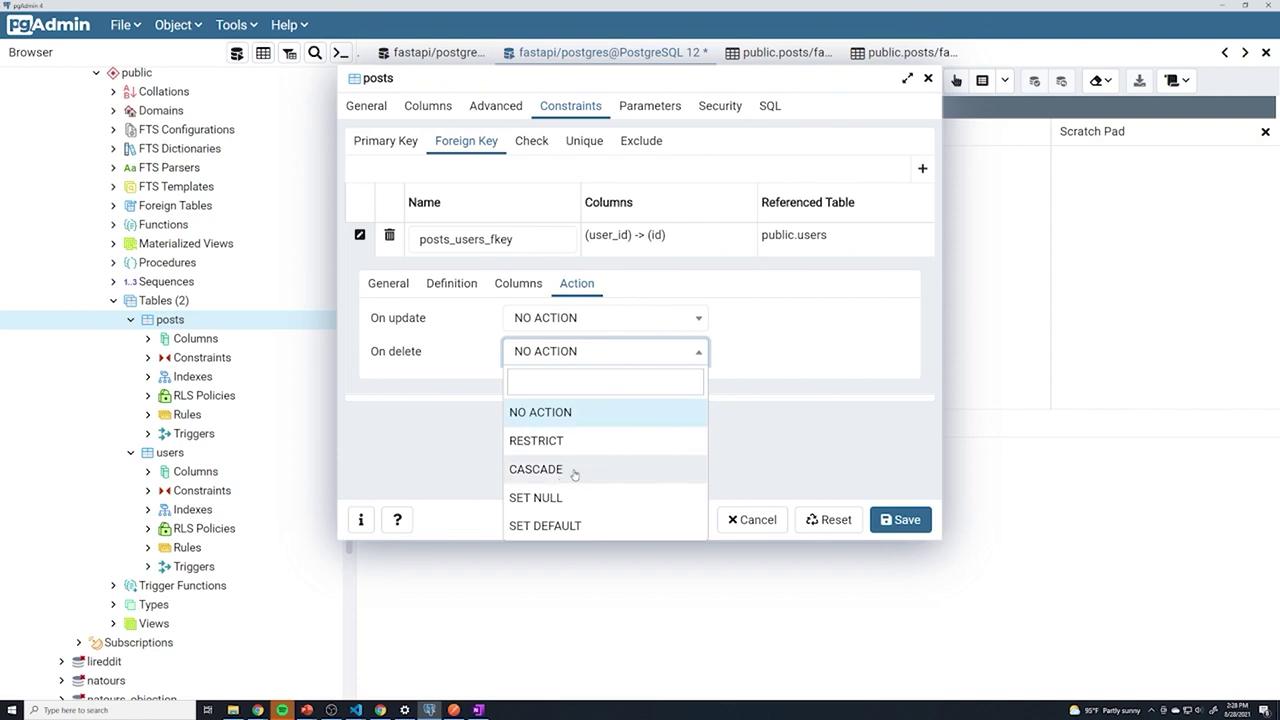
After completing these steps, click **Save** to apply the changes.
***
## 3. Testing the Foreign Key Constraint
Before adding posts, check the current users with:
```sql theme={null}
SELECT * FROM public.users
ORDER BY id ASC;
```
Assume the users have IDs 17, 18, and 19. When creating a new post, ensure you provide a valid `user_id` due to the NOT NULL constraint. For example, assign a valid user ID like 17.
To inspect the posts, execute:
```sql theme={null}
SELECT * FROM public.posts
ORDER BY id ASC;
```
If you try to save a post without specifying `user_id`, PgAdmin will show an error indicating that a non-null column does not have a value.
Next, create another post with `user_id` set to 18. Both posts should be saved and correctly linked to their corresponding users.
To test invalid foreign key behavior, try assigning a non-existent user ID (e.g., 20) for `user_id`:
```sql theme={null}
SELECT * FROM public.posts
ORDER BY id ASC;
```
PgAdmin will generate an error similar to "update on table post violates foreign key constraint" because there is no user with ID 20. Correct the entry by providing a valid user ID.
Always ensure that any new post references an existing user ID to maintain referential integrity.
***
## 4. Querying Posts by User
Filter posts based on the associated user using a simple WHERE clause. For example:
To view all posts from user 17:
```sql theme={null}
SELECT * FROM posts WHERE user_id = 17;
```
To retrieve posts from user 18:
```sql theme={null}
SELECT * FROM posts WHERE user_id = 18;
```
This step demonstrates that while the database enforces referential integrity, your query operations remain standard.
***
## 5. Demonstrating Cascade Deletion
Test the cascade delete functionality by removing a user. With posts referencing user ID 17, run the following command:
```sql theme={null}
DELETE FROM users WHERE id = 17;
```
If cascade deletion is configured correctly, PgAdmin will automatically delete all posts associated with user ID 17. You can verify this by running:
```sql theme={null}
SELECT * FROM posts;
```
The posts with `user_id` 17 should no longer be present.
***
## 6. Cleaning Up the Schema
To revert the changes and test automatic constraint handling via SQLAlchemy, follow these steps:
1. Open the posts table properties and remove the foreign key constraint from the **Constraints** tab.
2. Delete the `user_id` column from the **Columns** tab.
3. Save your changes.
After cleaning up, executing the following query should display the original table structure without the `user_id` column:
```sql theme={null}
SELECT * FROM posts;
```
***
## 7. Next Steps
In upcoming articles, we will explore how to use SQL JOINs to combine data from multiple tables. JOINs enable you to retrieve related user information (like names or emails) along with post details in a single query.
This concludes our guide on configuring foreign keys in PgAdmin. Happy coding and database managing!