> ## Documentation Index
> Fetch the complete documentation index at: https://notes.kodekloud.com/llms.txt
> Use this file to discover all available pages before exploring further.
# Query Parameters
> This article explores query parameters in FastAPI for filtering API results, including implementation of pagination and search functionality.
In this article, we explore how query parameters work in FastAPI and demonstrate how to use them for filtering API results. If you've ever worked with an API—even without realizing it—you've encountered query parameters. They appear in the URL after a "?" and consist of key-value pairs that allow you to control the data you receive. For example, when searching for restaurants in Miami on Yelp, you'll notice that the URL includes a domain, an endpoint such as `/search`, and a query string with parameters.
Everything to the right of the question mark constitutes the query parameters. These optional parameters help refine results, such as retrieving posts created in the last two hours or posts with over 100 likes. In Yelp's case, a parameter like `find_location=Miami, Florida` instructs the API to filter results by location.
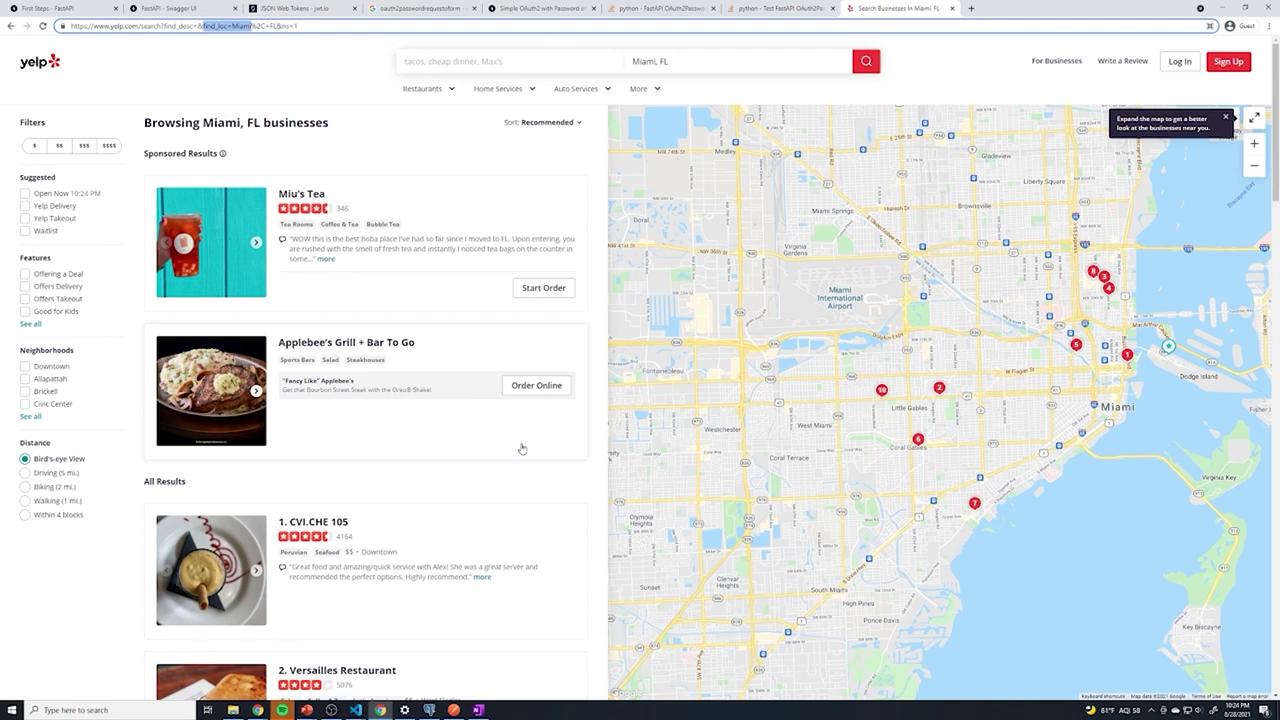
Let's see how you can implement query parameter filtering, pagination, and search in FastAPI.
## Setting Up the Endpoint
Consider a basic endpoint for retrieving posts. Initially, it might look like this:
```python theme={null}
from typing import List
from fastapi import APIRouter, Depends
from sqlalchemy.orm import Session
from .. import models, schemas, oauth2
from ..database import get_db
router = APIRouter(
prefix="/posts",
tags=["Posts"]
)
@router.get("/", response_model=List[schemas.Post])
def get_posts(db: Session = Depends(get_db), current_user: int = Depends(oauth2.get_current_user)):
posts = db.query(models.Post).all()
return posts
```
After making your changes, you might see commit output similar to:
```bash theme={null}
Writing objects: 100% (7/7), 993 bytes | 993.00 KiB/s, done.
Total 7 (delta 4), reused 0 (delta 0), pack-reused 0
Resolving deltas: 100% (4/4), completed with 4 local objects.
To https://github.com/Sanjeev-Thiyagarajan/fastapi-course.git
```
## Adding a Limit Query Parameter
To allow clients to specify the number of posts returned (for example, 10 or 50), add a `limit` query parameter with a default value of 10:
```python theme={null}
@router.get("/", response_model=List[schemas.Post])
def get_posts(
db: Session = Depends(get_db),
current_user: int = Depends(oauth2.get_current_user),
limit: int = 10
):
print(limit)
posts = db.query(models.Post).limit(limit).all()
return posts
```
After deploying, a sample console output might resemble:
```bash theme={null}
Writing objects: 100% (7/7), 993 bytes | 993.00 KiB/s, done.
Total 7 (delta 4), reused 0 (delta 0), pack-reused 0
remote: Resolving deltas: 100% (4/4), completed with 4 local objects.
To https://github.com/Sanjeev-Thiyagarajan/fastapi-course.git
373e50e..acef80a main -> main
```
You can now test the endpoint by sending a GET request to `/posts?limit=3` to ensure that only three posts are returned.
## Implementing Pagination with Skip and Limit
To support pagination, include a `skip` query parameter that allows clients to bypass a specified number of posts. The `skip` parameter is an integer with a default value of 0. SQLAlchemy's `offset` function helps achieve this:
```python theme={null}
@router.get("/", response_model=List[schemas.Post])
def get_posts(
db: Session = Depends(get_db),
current_user: int = Depends(oauth2.get_current_user),
limit: int = 10,
skip: int = 0
):
print(limit)
posts = db.query(models.Post).limit(limit).offset(skip).all()
return posts
```
For example, querying `/posts?limit=2&skip=1` will return posts starting from the second result. Sample log outputs might look like:
```bash theme={null}
INFO: 127.0.0.1:53850 - "GET /posts/?limit=5 HTTP/1.1" 200 OK
INFO: 127.0.0.1:51598 - "GET /posts/?limit=2 HTTP/1.1" 200 OK
```
## Enhancing Search Functionality
In addition to pagination, you can let users search for posts by keywords in the title. Add an optional `search` query parameter, defaulting to an empty string, and use SQLAlchemy's filtering to search within the `title` field:
```python theme={null}
from typing import Optional
@router.get("/", response_model=List[schemas.Post])
def get_posts(
db: Session = Depends(get_db),
current_user: int = Depends(oauth2.get_current_user),
limit: int = 10,
skip: int = 0,
search: Optional[str] = ""
):
print(limit)
posts = db.query(models.Post)\
.filter(models.Post.title.contains(search))\
.limit(limit)\
.offset(skip)\
.all()
return posts
```
For instance, sending a GET request to `/posts?limit=2&skip=1&search=beaches` will filter posts to those whose titles contain "beaches". Console outputs may look like:
```bash theme={null}
INFO: 127.0.0.1:15833 - "GET /posts/?limit=2&skip=2 HTTP/1.1" 200 OK
INFO: 127.0.0.1:16065 - "GET /posts/?limit=2&skip=0 HTTP/1.1" 307 Temporary Redirect
INFO: 127.0.0.1:16066 - "GET /posts/?limit=2&skip=0 HTTP/1.1" 200 OK
```
## Handling Spaces in Search Queries
When the search term contains spaces (for example, "beaches hello"), ensure you URL-encode the space as `%20`. For example:
```text theme={null}
/posts?limit=2&skip=1&search=beaches%20hello
```
This encoding allows the API to correctly filter posts with titles containing the entire phrase.
A sample JSON response for a matching post might look like:
```json theme={null}
[
{
"title": "something something beaches hello",
"content": "something something beaches",
"published": true,
"id": 20,
"created_at": "2021-08-28T22:41:38.237908-04:00",
"owner": {
"id": 21,
"email": "sanjeev@gmail.com",
"created_at": "2021-08-28T21:09:00.032365-04:00"
}
}
]
```
## Final Combined Implementation
Below is the complete implementation of the endpoint that supports limiting, skipping, and searching:
```python theme={null}
from typing import List, Optional
from fastapi import APIRouter, Depends
from sqlalchemy.orm import Session
from .. import models, schemas, oauth2
from ..database import get_db
router = APIRouter(
prefix="/posts",
tags=["Posts"]
)
@router.get("/", response_model=List[schemas.Post])
def get_posts(
db: Session = Depends(get_db),
current_user: int = Depends(oauth2.get_current_user),
limit: int = 10,
skip: int = 0,
search: Optional[str] = ""
):
print(limit)
posts = db.query(models.Post)\
.filter(models.Post.title.contains(search))\
.limit(limit)\
.offset(skip)\
.all()
return posts
@router.post("/", status_code=201, response_model=schemas.Post)
def create_posts(
post: schemas.PostCreate,
db: Session = Depends(get_db),
current_user: int = Depends(oauth2.get_current_user)
):
# Implementation for creating a post
pass
```
You can test the API endpoints using various query parameters:
• `/posts?limit=3` retrieves three posts.
• `/posts?limit=2&skip=1` retrieves posts after skipping the first one.
• `/posts?limit=2&skip=1&search=beaches` filters posts based on the keyword "beaches" in the title.
This implementation demonstrates how query parameters in FastAPI can work together to build robust and flexible APIs that support filtering, pagination, and search functionality.