> ## Documentation Index
> Fetch the complete documentation index at: https://notes.kodekloud.com/llms.txt
> Use this file to discover all available pages before exploring further.
# Router Prefix And Tags
> This article explains how to use router prefixes and tags in FastAPI to simplify route definitions and improve API documentation clarity.
In FastAPI, simplifying route definitions using router prefixes and tags not only reduces code redundancy but also improves the clarity of your automatically generated API documentation. In this guide, we explain how to implement router prefixes and tags to group endpoints logically, making your API more maintainable and easier to understand.
## Defining Routes Without a Prefix
Consider the following example where routes are defined without a common prefix. Both GET and POST operations use the "/posts" path:
```python theme={null}
@router.get("/posts", response_model=List[schemas.Post])
def get_posts(db: Session = Depends(get_db)):
# cursor.execute("""SELECT * FROM posts """)
# posts = cursor.fetchall()
posts = db.query(models.Post).all()
return posts
@router.post("/posts", status_code=status.HTTP_201_CREATED, response_model=schemas.Post)
def create_posts(post: schemas.PostCreate, db: Session = Depends(get_db)):
# cursor.execute("""INSERT INTO posts (title, content, published) VALUES (%s, %s, %s) RETURNING *""", (post.title, post.content, post.published))
pass
```
Example log entries for these routes:
```plaintext theme={null}
INFO: 127.0.0.1:55409 - "POST /posts HTTP/1.1" 201 Created
INFO: 127.0.0.1:55410 - "GET /posts/2 HTTP/1.1" 404 Not Found
INFO: 127.0.0.1:55411 - "GET /posts/1 HTTP/1.1" 200 OK
INFO: 127.0.0.1:55412 - "DELETE /posts/1 HTTP/1.1" 204 No Content
INFO: 127.0.0.1:55413 - "POST /users HTTP/1.1" 201 Created
INFO: 127.0.0.1:55414 - "GET /users/1 HTTP/1.1" 200 OK
```
For operations that target a specific post (such as GET, DELETE, or PUT), the URL path generally includes the post's ID. Consider this snippet for deleting a post:
```python theme={null}
post = db.query(models.Post).filter(models.Post.id == id)
if post.first() is None:
raise HTTPException(status_code=status.HTTP_404_NOT_FOUND,
detail=f"post with id: {id} does not exist")
post.delete(synchronize_session=False)
db.commit()
return Response(status_code=status.HTTP_204_NO_CONTENT)
@router.put("/posts/{id}", response_model=schemas.Post)
def update_post(id: int, updated_post: schemas.PostCreate, db: Session = Depends(get_db)):
...
```
And the corresponding log entries might look like this:
```plaintext theme={null}
INFO: 127.0.0.1:55409 - "POST /posts HTTP/1.1" 201 Created
INFO: 127.0.0.1:55410 - "GET /posts/2 HTTP/1.1" 404 Not Found
INFO: 127.0.0.1:55411 - "GET /posts/1 HTTP/1.1" 200 OK
INFO: 127.0.0.1:55412 - "DELETE /posts/3 HTTP/1.1" 204 No Content
INFO: 127.0.0.1:55413 - "PUT /users/1 HTTP/1.1" 200 OK
INFO: 127.0.0.1:55414 - "GET /users/1 HTTP/1.1" 200 OK
```
For simple APIs, repeating route strings might not seem problematic. However, as applications grow in complexity, consolidating routes with common prefixes minimizes errors and simplifies maintenance.
## Simplifying with Router Prefix
FastAPI enables you to define a common prefix once for all routes within a router. Instead of hardcoding "/posts" in each route, you can specify it when creating the `APIRouter`. This approach cleans up the code significantly.
Here's an updated version of the posts routes using a prefix:
```python theme={null}
from ..database import get_db
router = APIRouter(
prefix="/posts"
)
@router.get("/", response_model=List[schemas.Post])
def get_posts(db: Session = Depends(get_db)):
# cursor.execute("""SELECT * FROM posts """)
# posts = cursor.fetchall()
posts = db.query(models.Post).all()
return posts
@router.post("/", status_code=status.HTTP_201_CREATED, response_model=schemas.Post)
def create_posts(post: schemas.PostCreate, db: Session = Depends(get_db)):
# cursor.execute("""INSERT INTO posts (title, content, published) VALUES (%s, %s, %s) RETURNING *""", (post.title, post.content, post.published))
...
```
The log entries for these operations now update accordingly:
```plaintext theme={null}
INFO: 127.0.0.1:15409 - "POST /posts HTTP/1.1" 201 Created
INFO: 127.0.0.1:15409 - "GET /posts/2 HTTP/1.1" 404 Not Found
INFO: 127.0.0.1:15409 - "GET /posts/1 HTTP/1.1" 200 OK
INFO: 127.0.0.1:15409 - "DELETE /posts/1 HTTP/1.1" 204 No Content
INFO: 127.0.0.1:15409 - "GET /users HTTP/1.1" 201 Created
INFO: 127.0.0.1:15409 - "GET /users/1 HTTP/1.1" 200 OK
```
When targeting a specific post (for example, `/posts/{id}`), only the relative path needs to be specified:
```python theme={null}
new_post = models.Post(**post.dict())
db.add(new_post)
db.commit()
db.refresh(new_post)
return new_post
@router.get("/{id}", response_model=schemas.Post)
def get_post(id: int, db: Session = Depends(get_db)):
# cursor.execute("""SELECT * from posts WHERE id = %s """, (str(id),))
post = db.query(models.Post).filter(models.Post.id == id).first()
if not post:
raise HTTPException(status_code=status.HTTP_404_NOT_FOUND,
detail=f"post with id: {id} was not found")
return post
```
And the resulting logs:
```plaintext theme={null}
INFO: 127.0.0.1:55409 - "POST /posts HTTP/1.1" 201 Created
INFO: 127.0.0.1:55410 - "GET /posts/2 HTTP/1.1" 404 Not Found
INFO: 127.0.0.1:55411 - "GET /posts/1 HTTP/1.1" 200 OK
INFO: 127.0.0.1:55412 - "DELETE /posts/3 HTTP/1.1" 204 No Content
INFO: 127.0.0.1:55413 - "PUT /users/1 HTTP/1.1" 200 OK
INFO: 127.0.0.1:55414 - "GET /users/1 HTTP/1.1" 200 OK
```
Using a router prefix improves code clarity and maintainability, as any changes to the prefix are made in a single location.
## Grouping Related Routes with Tags
Organizing routes into logical groups is essential for scaling your API. For instance, you can group user-related endpoints under a `/users` prefix while applying a tag to clearly separate them in your documentation.
Below is an example of a users router with a defined prefix and tag:
```python theme={null}
from fastapi import FastAPI, Response, status, HTTPException, Depends, APIRouter
from sqlalchemy.orm import Session
from .. import models, schemas, utils
from ..database import get_db
router = APIRouter(
prefix="/users",
tags=["Users"]
)
@router.post("/", status_code=status.HTTP_201_CREATED, response_model=schemas.UserOut)
def create_user(user: schemas.UserCreate, db: Session = Depends(get_db)):
# Hash the password from user.password
hashed_password = utils.hash(user.password)
user.password = hashed_password
new_user = models.User(**user.dict())
...
```
Example log entries for user operations:
```plaintext theme={null}
INFO: 127.0.0.1:15409 - "POST /posts/1 HTTP/1.1" 201 Created
INFO: 127.0.0.1:15409 - "GET /posts/2 HTTP/1.1" 404 Not Found
INFO: 127.0.0.1:15409 - "GET /posts/3 HTTP/1.1" 200 OK
INFO: 127.0.0.1:15410 - "DELETE /posts/3 HTTP/1.1" 204 No Content
INFO: 127.0.0.1:15410 - "PUT /users HTTP/1.1" 201 Created
INFO: 127.0.0.1:15412 - "GET /users/1 HTTP/1.1" 200 OK
```
## Testing and Verifying the Implementation
After refining your routes with prefixes and tags, test your endpoints to ensure everything works as expected. For example, a GET request to `/posts` should return a list of posts:
```json theme={null}
[
{
"title": "new sqlalchemy post",
"content": "some random content",
"published": true,
"id": 4,
"created_at": "2021-08-22T19:29:55.725772-04:00"
},
{
"title": "welcome to funland",
"content": "so much fun",
"published": true
}
]
```
Similarly, creating a new user with a unique email should yield a proper response:
```json theme={null}
{
"id": 1,
"email": "john@gmail.com",
"created_at": "2021-08-22T11:36:27.366223-04:00"
}
```
## Leveraging Automatic Documentation with Swagger UI
One of FastAPI's most powerful features is its automatic generation of interactive API documentation with Swagger UI. Navigate to `/docs` in your browser to explore and test your endpoints. Organizing routes with prefixes and tags further enhances the documentation by grouping related endpoints together.
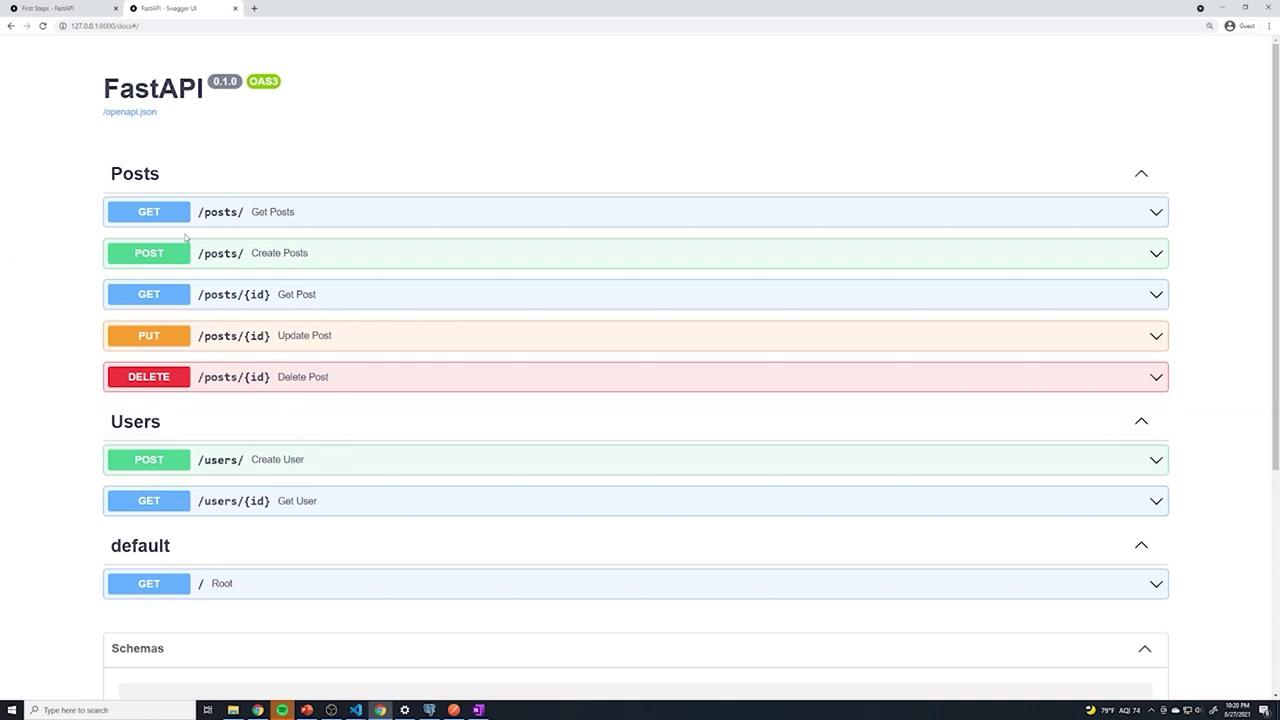
The Swagger UI documentation is generated dynamically by FastAPI. While a static image provides a visual reference, the interactive docs offer comprehensive details about every endpoint.
## Final Version Example
Below is a concise example of the final posts router implementation with a prefix and tag:
```python theme={null}
from fastapi import FastAPI, Response, status, HTTPException, Depends, APIRouter
from sqlalchemy.orm import Session
from typing import List
from .. import models, schemas
from ..database import get_db
router = APIRouter(
prefix="/posts",
tags=["Posts"]
)
@router.get("/", response_model=List[schemas.Post])
def get_posts(db: Session = Depends(get_db)):
# cursor.execute("""SELECT * FROM posts """)
# posts = cursor.fetchall()
posts = db.query(models.Post).all()
return posts
```
And sample logs for these endpoints:
```plaintext theme={null}
INFO: Application startup complete.
INFO: 127.0.0.1:55871 - "GET /posts HTTP/1.1" 307 Temporary Redirect
INFO: 127.0.0.1:55871 - "GET /posts/1 HTTP/1.1" 200 OK
INFO: 127.0.0.1:55871 - "POST /posts HTTP/1.1" 307 Temporary Redirect
INFO: 127.0.0.1:55871 - "GET /users HTTP/1.1" 201 Created
INFO: 127.0.0.1:55871 - "GET /users/1 HTTP/1.1" 200 OK
```
In summary, using router prefixes and tags in FastAPI streamlines your code, reduces redundancy, and enhances the automatic documentation. This results in an API that is easier to maintain and more intuitive for both users and developers.