> ## Documentation Index
> Fetch the complete documentation index at: https://notes.kodekloud.com/llms.txt
> Use this file to discover all available pages before exploring further.
# Update Post Schema To Include User
> This article discusses updating the post schema to include owner information and necessary adjustments for API functionality.
In this article, we review the changes introduced in the previous lesson and outline the necessary updates to our application. Due to recent modifications, certain API requests demonstrate outdated behavior. We will walk through these requests and explain the adjustments required for proper functionality.
## Logging In and Retrieving Posts
First, we log in a user, update a variable, and retrieve all posts using our [Postman Essentials](https://learn.kodekloud.com/user/courses/postman-essentials) application. The image below illustrates a login request using the POST method with form data for the username and password. The response includes an access token and token type.
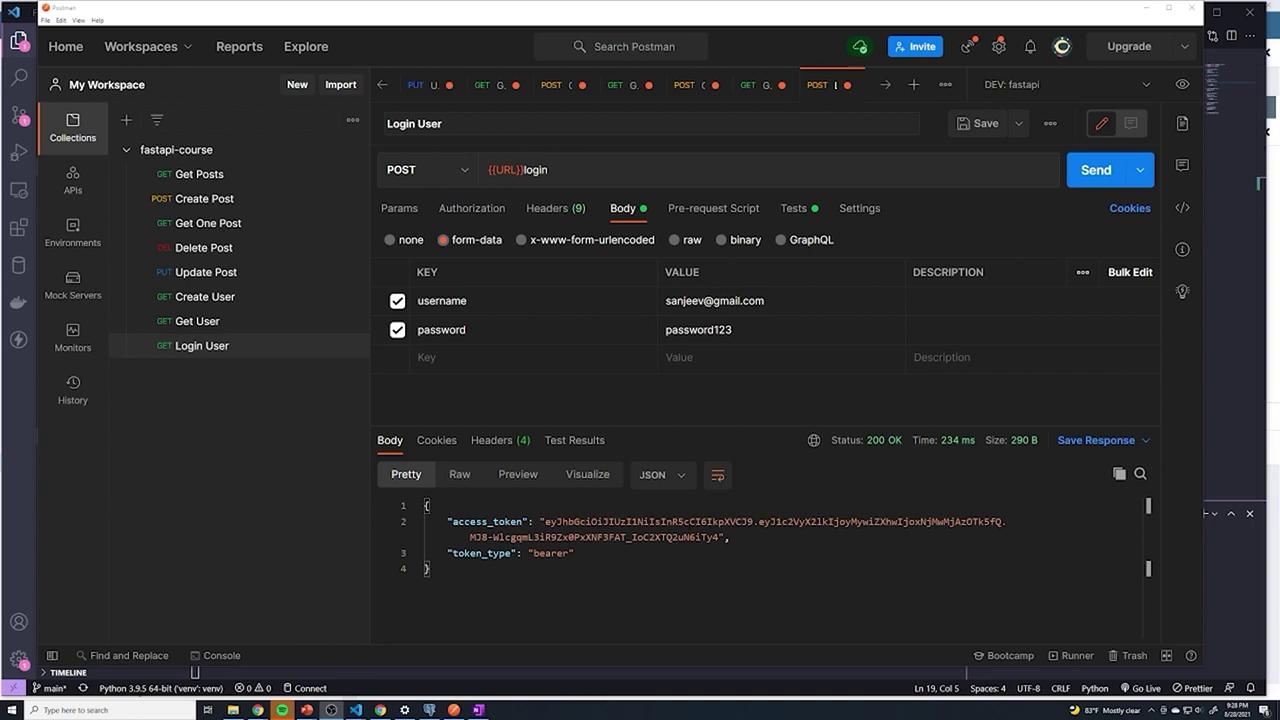
When retrieving posts, even though our application currently returns one post, the response does not include the new "owner\_id" field. For example, the JSON output appears as follows:
```json theme={null}
{
"title": "post2",
"content": "sdf",
"published": true,
"id": 4,
"created_at": "2021-08-28T21:18:13.460858-04:00"
}
```
Since the owner ID is a newly added column, our schema must be updated to include it. This field is crucial as it informs users about the creator of the post.
## Updating the Posts Endpoint
Examine the code in the posts router, specifically the endpoint for retrieving all posts. The response model references `schemas.Post`:
```python theme={null}
from typing import List
from . import models, schemas, oauth2
from ..database import get_db
from fastapi import APIRouter, Depends
from sqlalchemy.orm import Session
router = APIRouter(
prefix="/posts",
tags=["Posts"]
)
@router.get("/", response_model=List[schemas.Post])
def get_posts(db: Session = Depends(get_db), user_id: int = Depends(oauth2.get_current_user)):
# Previously using raw SQL:
# cursor.execute("SELECT * FROM posts")
# posts = cursor.fetchall()
posts = db.query(models.Post).all()
return posts
```
The schema for returning posts is based on `PostBase`, which currently includes fields like "title", "content", and "published". It also defines the "id" and "created\_at" fields that are generated at the database level:
```python theme={null}
from datetime import datetime
from pydantic import BaseModel, EmailStr
class PostBase(BaseModel):
title: str
content: str
published: bool
class Post(PostBase):
id: int
created_at: datetime
class Config:
orm_mode = True
class UserCreate(BaseModel):
email: EmailStr
```
To include the owner information in the response, we add an "owner\_id" field to the output schema. Note that we do not require the owner to supply this field, as it will be derived automatically from the authentication token:
```python theme={null}
class Post(PostBase):
id: int
created_at: datetime
owner_id: int
class Config:
orm_mode = True
```
After updating the schema, hitting the endpoint returns a response that now includes the "owner\_id":
```json theme={null}
{
"title": "post2",
"content": "sdf",
"published": true,
"id": 4,
"created_at": "2021-08-28T21:18:13.460585-04:00",
"owner_id": 21
}
```
## Reviewing the Get Single Post Endpoint
The `post.py` file contains similar schema definitions for retrieving an individual post:
```python theme={null}
published: bool = True
class PostCreate(PostBase):
pass
class Post(PostBase):
id: int
created_at: datetime
owner_id: int
class Config:
orm_mode = True
class UserCreate(BaseModel):
email: EmailStr
password: str
```
The same model is utilized when creating a post. For example, consider the create post endpoint:
```python theme={null}
from fastapi import status, Depends
from sqlalchemy.orm import Session
from . import models, schemas, oauth2
from ..database import get_db
from fastapi import APIRouter
router = APIRouter(
prefix="/posts",
tags=["Posts"]
)
@router.post("/", status_code=status.HTTP_201_CREATED, response_model=schemas.Post)
def create_posts(post: schemas.PostCreate, db: Session = Depends(get_db), current_user: int = Depends(oauth2.get_current_user)):
new_post = models.Post(**post.dict())
db.add(new_post)
db.commit()
db.refresh(new_post)
print(current_user.email)
return new_post
```
Logs confirm the successful execution of these endpoints:
```text theme={null}
INFO 127.0.0.1:64010 "GET /posts HTTP/1.1" 200 OK
INFO 127.0.0.1:64011 "POST /login HTTP/1.1" 307 Temporary Redirect
INFO 127.0.0.1:64012 "GET /posts HTTP/1.1" 200 OK
```
Since all endpoints (retrieving all posts, a single post, creating a post, and updating a post) use the same schema (`schemas.Post`), updating it once is sufficient.
## Updating a Post
The update post endpoint is defined as follows:
```python theme={null}
@router.put("/{id}", response_model=schemas.Post)
def update_post(id: int, updated_post: schemas.PostCreate, db: Session = Depends(get_db), current_user: int = Depends(oauth2.get_current_user)):
# Logic to update the post goes here
...
```
After updating, retrieving a post (for example, with ID 4) returns the following JSON response:
```json theme={null}
[
{
"title": "post2",
"content": "sdf",
"published": true,
"id": 4,
"created_at": "2021-08-28T21:18:13.460585-04:00",
"owner_id": 21
}
]
```
This confirms that the "owner\_id" is now properly included in the response.
All endpoints currently reference the updated `schemas.Post` to include owner information. This single change now propagates across various functionalities like retrieving a post, updating a post, and creating a post.
## Handling Owner ID During Post Creation
An issue arises when creating a post. If a new post is submitted without an owner ID (since this field is not provided in the request body), the database generates an error due to the NOT NULL constraint on the "owner\_id" column:
```text theme={null}
File "c:\users\sanje\documents\courses\fastapi\venv\lib\site-packages\sqlalchemy\engine\default.py", line 717, in do_execute
cursor.execute(statement, parameters)
sqlalchemy.exc.IntegrityError: (psycopg2.errors.NotNullViolation) null value in column "owner_id" violates not-null constraint
DETAIL: Failing row contains (5, top beaches in florida, something something beaches, t, 2021-08-28 21:32:22.480381+01, None).
[SQL: INSERT INTO posts (title, content, published, owner_id) VALUES (%(title)s, %(content)s, %(published)s, %(owner_id)s) RETURNING posts.id]
[parameters: {'title': 'top beaches in Florida', 'content': 'something something beaches', 'published': True, 'owner_id': None}]
(Background on this error at: https://sqlalche.me/e/14/gkpj)
```
This error indicates that while "owner\_id" is mandatory in the database, the current logic does not automatically assign it during post creation. We will address this mechanism in the next article.
## Conclusion
By updating the schema to include the "owner\_id" field, the response for retrieving posts now provides clearer information about the post creator. However, the process for automatically assigning the owner ID during post creation still requires implementation. Stay tuned for the upcoming article, where we will tackle this issue and refine the owner assignment process.