> ## Documentation Index
> Fetch the complete documentation index at: https://notes.kodekloud.com/llms.txt
> Use this file to discover all available pages before exploring further.
# Alembic Finish Rest Of Schema
> This guide explains how to finalize a database schema using Alembic, including creating tables, adding columns, and managing migrations.
In this guide, we will walk through how to complete your database schema using Alembic. We add user functionality by creating a users table, link posts to users using a foreign key, and then add additional columns along with a votes table via Alembic’s auto-generation feature.
***
## Creating the Users Table
After successfully creating the posts table, the next step is implementing user functionality by creating a users table. This table will allow users to register and log in.
Before proceeding, ensure that your existing posts table is functioning correctly.
First, we add a new column to the posts table by executing the following migration:
```python theme={null}
# revision identifiers, used by Alembic.
revision = '01b254928a5'
down_revision = 'cfcc4fd02d18'
branch_labels = None
depends_on = None
def upgrade():
op.add_column('posts', sa.Column('content', sa.String(), nullable=False))
```
The corresponding console output for upgrading and downgrading is:
```plaintext theme={null}
(venv) C:\Users\sanje\Documents\Courses\fastapi>alembic upgrade head
INFO [alembic.runtime.migration] Context impl PostgreSQLImpl.
INFO [alembic.runtime.migration] Will assume transactional DDL.
INFO [alembic.runtime.migration] Running upgrade cfcc4fd02d18 -> 01b254928a5, add content column to posts table
(venv) C:\Users\sanje\Documents\Courses\fastapi>alembic downgrade cfcc4fd02d18
INFO [alembic.runtime.migration] Context impl PostgreSQLImpl.
INFO [alembic.runtime.migration] Will assume transactional DDL.
INFO [alembic.runtime.migration] Running downgrade 01b254928a5 -> cfcc4fd02d18, add content column to posts table
```
Next, generate a new migration for the users table. Instead of typing everything from scratch, copy the following code from your notes:
```python theme={null}
def upgrade():
op.create_table('users',
sa.Column('id', sa.Integer(), nullable=False),
sa.Column('email', sa.String(), nullable=False),
sa.Column('password', sa.String(), nullable=False),
sa.Column('created_at', sa.TIMESTAMP(timezone=True),
server_default=sa.text('now()'), nullable=False),
sa.PrimaryKeyConstraint('id'),
sa.UniqueConstraint('email')
)
```
Alembic will generate a migration file automatically, as seen below:
```plaintext theme={null}
INFO [alembic.runtime.migration] Will assume transactional DDL.
INFO [alembic.runtime.migration] Running downgrade 01b2584928a5 -> cfcc4fd02d18, add content column to posts table
Generating C:\Users\sanje\Documents\Courses\fastapi\alembic\versions\8c82b1632f52_add_user_table.py ...
```
### Key Points in the Users Table Migration
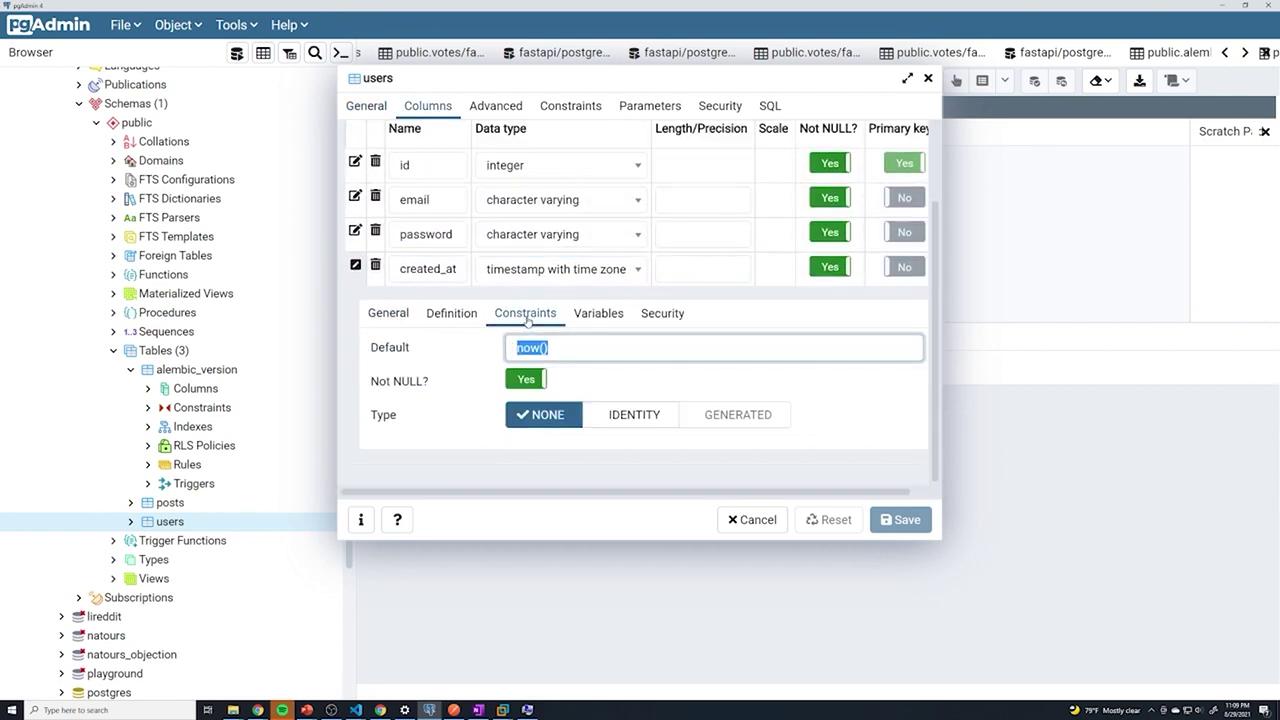
* The `id` column is defined as an integer and set as non-nullable. A primary key is established using either `primary_key=True` or a separate `sa.PrimaryKeyConstraint('id')`.
* The `email` column has a unique constraint to prevent duplicate entries.
* The `created_at` column is defined with TIMESTAMP and timezone support. Its default value is set to `now()` using `server_default=sa.text('now()')`.
This configuration is reflected in your SQLAlchemy models:
```python theme={null}
class User(Base):
__tablename__ = "users"
id = Column(Integer, primary_key=True, nullable=False)
email = Column(String, nullable=False, unique=True)
password = Column(String, nullable=False)
created_at = Column(TIMESTAMP(timezone=True),
nullable=False, server_default=text('now()'))
class Vote(Base):
__tablename__ = "votes"
user_id = Column(Integer, ForeignKey("users.id", ondelete="CASCADE"), primary_key=True)
post_id = Column(Integer, ForeignKey("posts.id"))
```
The same SQL migration for creating the users table is captured here:
```python theme={null}
def upgrade():
op.create_table('users',
sa.Column('id', sa.Integer(), nullable=False),
sa.Column('email', sa.String(), nullable=False),
sa.Column('password', sa.String(), nullable=False),
sa.Column('created_at', sa.TIMESTAMP(timezone=True),
server_default=sa.text('now()'), nullable=False),
sa.PrimaryKeyConstraint('id'),
sa.UniqueConstraint('email')
)
```
After running this migration, verify via your database interface that the users table contains the correct columns and constraints.
***
## Adding a Foreign Key to the Posts Table
Next, establish a relationship between the posts and users tables by adding a foreign key to the posts table. To link the two tables, add a new column `owner_id` to the posts table.
Start by introducing the column without the constraint:
```python theme={null}
import sqlalchemy as sa
# revision identifiers, used by Alembic.
revision = 'af786b740296'
down_revision = '8c82b1632f52'
branch_labels = None
depends_on = None
def upgrade():
op.add_column('posts', sa.Column('owner_id', sa.Integer(), nullable=False))
```
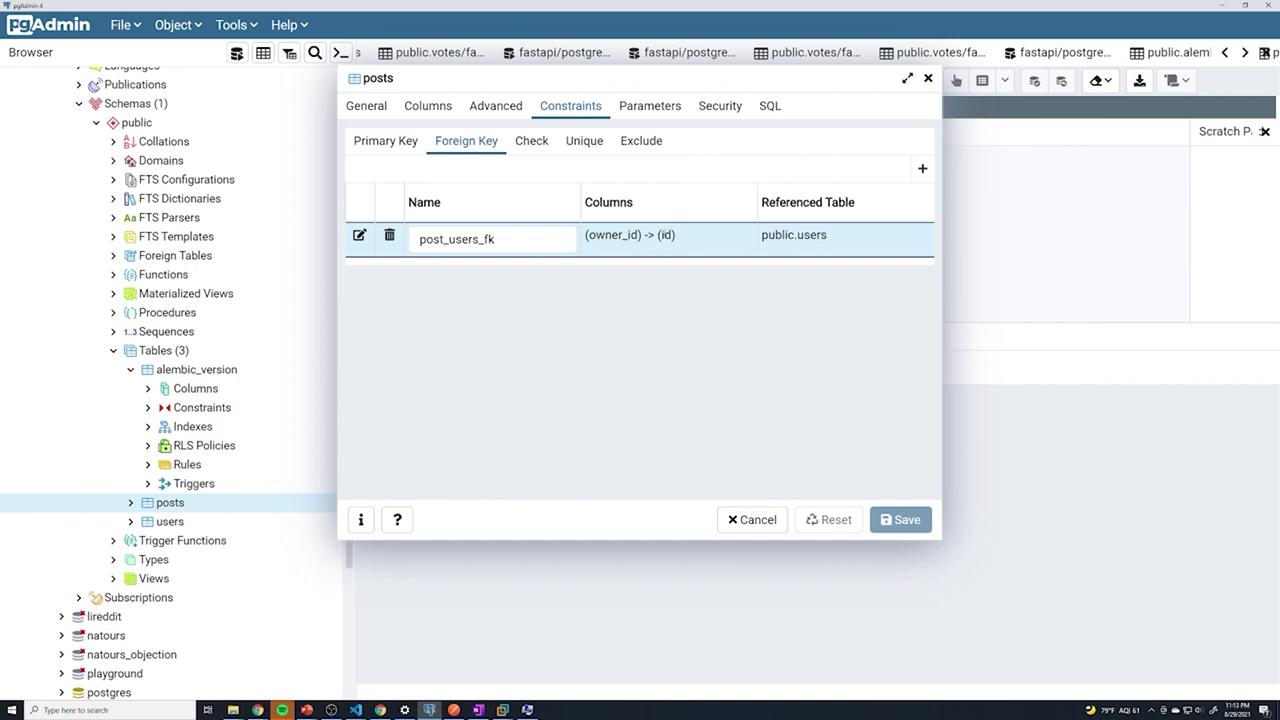
Then, update the migration to set up the foreign key that connects `posts.owner_id` to `users.id` with cascading delete behavior:
```python theme={null}
def upgrade():
op.add_column('posts', sa.Column('owner_id', sa.Integer(), nullable=False))
op.create_foreign_key('post_users_fk', source_table="posts", referent_table="users",
local_cols=['owner_id'], remote_cols=['id'], ondelete="CASCADE")
```
Ensure that your downgrade function reverses these changes properly:
```python theme={null}
def downgrade():
op.drop_constraint('post_users_fk', table_name="posts")
op.drop_column('posts', 'owner_id')
```
After running the migration, use the following command to apply it:
```plaintext theme={null}
(venv) C:\Users\sanje\Documents\Courses\fastapi> alembic upgrade head
INFO [alembic.runtime.migration] Context impl PostgresqlImpl.
INFO [alembic.runtime.migration] Will assume transactional DDL.
INFO [alembic.runtime.migration] Running upgrade cfcc4fd021d8 -> 01b2584928a5, add content column to posts
INFO [alembic.runtime.migration] Running upgrade 01b2584928a5 -> 8c82b1632f52, add user table
INFO [alembic.runtime.migration] Running upgrade af786b740296 -> add foreign-key to posts table
```
After the upgrade, verify in pgAdmin that the foreign key constraint is correctly set up:
***
## Adding Additional Columns to the Posts Table
Your application may require extra functionality that necessitates new columns. In this case, we add a boolean `published` column and a `created_at` timestamp column to the posts table.
The following migration achieves this:
```python theme={null}
# revision identifiers, used by Alembic.
revision = '036d0a4565b7'
down_revision = 'af786b740296'
branch_labels = None
depends_on = None
def upgrade():
op.add_column('posts', sa.Column(
'published', sa.Boolean(), nullable=False, server_default='TRUE')
)
op.add_column('posts', sa.Column(
'created_at', sa.TIMESTAMP(timezone=True), nullable=False, server_default=sa.text('NOW()'))
)
def downgrade():
op.drop_column('posts', 'published')
op.drop_column('posts', 'created_at')
```
Run this migration and check the updated table structure via PostgreSQL. The image below shows the updated posts table schema:

***
## Downgrading and Re-Upgrading Revisions
Alembic provides the flexibility to rollback and upgrade revisions as needed. For instance, to roll back to the revision corresponding to the user table, use the following migration:
```python theme={null}
def upgrade():
op.create_table('posts', sa.Column('id', sa.Integer(), nullable=False,
primary_key=True), sa.Column('title', sa.String(), nullable=False))
def downgrade():
op.drop_table('posts')
```
Then run:
```plaintext theme={null}
alembic downgrade cfcc4fd0218
```
Alternatively, upgrade a single revision:
```plaintext theme={null}
alembic upgrade +1
```
Or upgrade directly to the latest revision using:
```plaintext theme={null}
alembic upgrade head
```
This approach ensures efficient management of your database schema throughout your development lifecycle.
***
## Auto-Generating the Votes Table
With the posts and users tables in place, the next step is creating a votes table. Instead of writing the migration manually, leverage Alembic's auto-generation feature. Alembic compares your SQLAlchemy models with the existing schema and creates the necessary migration.
Below is the SQLAlchemy model for the Post, which includes all required columns:
```python theme={null}
from .database import Base
class Post(Base):
__tablename__ = "posts"
id = Column(Integer, primary_key=True, nullable=False)
title = Column(String, nullable=False)
content = Column(String, nullable=False)
published = Column(Boolean, server_default='TRUE', nullable=False)
created_at = Column(TIMESTAMP(timezone=True),
nullable=False, server_default=text('now()'))
owner_id = Column(Integer, ForeignKey("users.id", ondelete="CASCADE"), nullable=False)
owner = relationship("User")
```
After ensuring your models are imported in Alembic’s configuration, run the following command:
```plaintext theme={null}
alembic revision --autogenerate -m "add votes table"
```
The auto-generated migration for the votes table will resemble this:
```python theme={null}
def upgrade():
# ### commands auto generated by Alembic - please adjust! ###
op.create_table('votes',
sa.Column('user_id', sa.Integer(), nullable=False),
sa.Column('post_id', sa.Integer(), nullable=False),
sa.ForeignKeyConstraint(['post_id'], ['posts.id'], ondelete='CASCADE'),
sa.ForeignKeyConstraint(['user_id'], ['users.id'], ondelete='CASCADE'),
sa.PrimaryKeyConstraint('user_id', 'post_id')
)
# ### end Alembic commands ###
def downgrade():
# ### commands auto generated by Alembic - please adjust! ###
op.drop_table('votes')
# ### end Alembic commands ###
```
After upgrading with `alembic upgrade head`, verify that the votes table is created with the appropriate foreign key constraints.
***
## Updating the User Model with a New Phone Number Column
If you wish to extend your User model with an optional `phone_number` column, update your SQLAlchemy model as shown below:
```python theme={null}
class User(Base):
__tablename__ = "users"
id = Column(Integer, primary_key=True, nullable=False)
email = Column(String, nullable=False, unique=True)
password = Column(String, nullable=False)
created_at = Column(TIMESTAMP(timezone=True), nullable=False, server_default=text('now()'))
phone_number = Column(String)
```
Then, create an auto-migration to reflect this change:
```plaintext theme={null}
(venv) C:\Users\sanje\Documents\Courses\fastapi> alembic revision --autogenerate -m "add phone number"
```
The generated migration file should include:
```python theme={null}
def upgrade():
# ### commands auto generated by Alembic - please adjust! ###
op.add_column('users', sa.Column('phone_number', sa.String(), nullable=True))
# ### end Alembic commands ###
```
Upon running the upgrade, verify through pgAdmin that a new `phone_number` column is present in the users table:

***
## Removing models.Base.metadata.create\_all from main.py
As Alembic now manages your database schema, you can remove the direct table creation command from your main application file. Although keeping it might be useful during early development, it is redundant once migrations are in place.
Below is a sample `main.py` file with the table creation commented out:
```python theme={null}
from fastapi import FastAPI
from . import models
from .database import engine
from .routers import post, user, auth, vote
from .config import settings
print(settings.database_username)
app = FastAPI()
app.include_router(post.router)
app.include_router(user.router)
```
When you start the application, the console will display standard startup messages:
```plaintext theme={null}
INFO: Started server process [18648]
INFO: Waiting for application startup.
INFO: Application startup complete.
INFO: 127.0.0.1:64656 - "POST /users HTTP/1.1" 307 Temporary Redirect
INFO: 127.0.0.1:64656 - "POST /users HTTP/1.1" 201 Created
INFO: 127.0.0.1:64656 - "GET /login HTTP/1.1" 200 OK
INFO: 127.0.0.1:64656 - "GET /users HTTP/1.1" 307 Temporary Redirect
INFO: 127.0.0.1:64656 - "POST /users HTTP/1.1" 201 Created
INFO: 127.0.0.1:64656 - "GET /posts HTTP/1.1" 200 OK
```
***
By following these steps, you can efficiently manage your evolving database schema with Alembic. This process minimizes manual migration work and ensures that your database stays in sync with your SQLAlchemy models as your application grows.
For further reading on Alembic and database migrations, consider exploring [Alembic's official documentation](https://alembic.sqlalchemy.org/).