> ## Documentation Index
> Fetch the complete documentation index at: https://notes.kodekloud.com/llms.txt
> Use this file to discover all available pages before exploring further.
# Conditional Logic
> This article explores conditional logic in shell scripting using a rocket launch status example to demonstrate command execution based on specific conditions.
In this lesson, we explore how conditional logic works in shell scripts by demonstrating a real-world example: checking a rocket's launch status and executing the appropriate commands based on the result.
When executing the script, a command checks the rocket's status. The possible statuses returned are:
* "launching": when the launch is in progress,
* "success": when the launch is successful, or
* "failed": when the rocket crashes and the mission fails.
If the launch fails, the script triggers the `rocket-debug` command to investigate the cause of the failure. This command is executed solely when the launch fails, ensuring that no unnecessary operations occur when the launch is successful. The mechanism behind this behavior is implemented via conditional logic in the shell script.
Conditional logic in shell scripting lets you execute commands only when specific conditions are met. It uses an `if` statement structure similar to natural language constructs, making scripts more readable and maintainable.
## Basic Structure of an If Statement
The fundamental structure of a conditional `if` statement in a shell script includes:
1. The `if` statement, followed by the condition enclosed in square brackets.
2. The `then` keyword, which indicates the start of commands that run if the condition is true.
3. Optionally, the `elif` or `else` blocks for handling alternative cases.
4. The `fi` statement, which marks the end of the if block.
Consider the following example, where we check if the rocket status is "failed":
```bash theme={null}
mission_name=$1
mkdir $mission_name
rocket-add $mission_name
rocket-start-power $mission_name
rocket-internal-power $mission_name
rocket-start-sequence $mission_name
rocket-start-engine $mission_name
rocket-lift-off $mission_name
rocket_status=$(rocket-status $mission_name)
if [ $rocket_status = "failed" ]
then
rocket-debug $mission_name
elif [ $rocket_status = "success" ]
then
echo "This is successful"
fi
```
In this script:
* The `rocket_status` variable stores the result from the `rocket-status` command.
* The condition `[ $rocket_status = "failed" ]` checks if the status equals "failed". If true, it runs the `rocket-debug` command.
* The `elif` clause allows for an alternate procedure when the rocket launch is successful.
**Important Syntax Tips:**
* Use the comparison operator `=` for string equality checks.
* Ensure there is a space between the square brackets, the operator, and the values.
* Use the not equals operator (`!=`) for checking inequality.
## Comparison and Test Operators
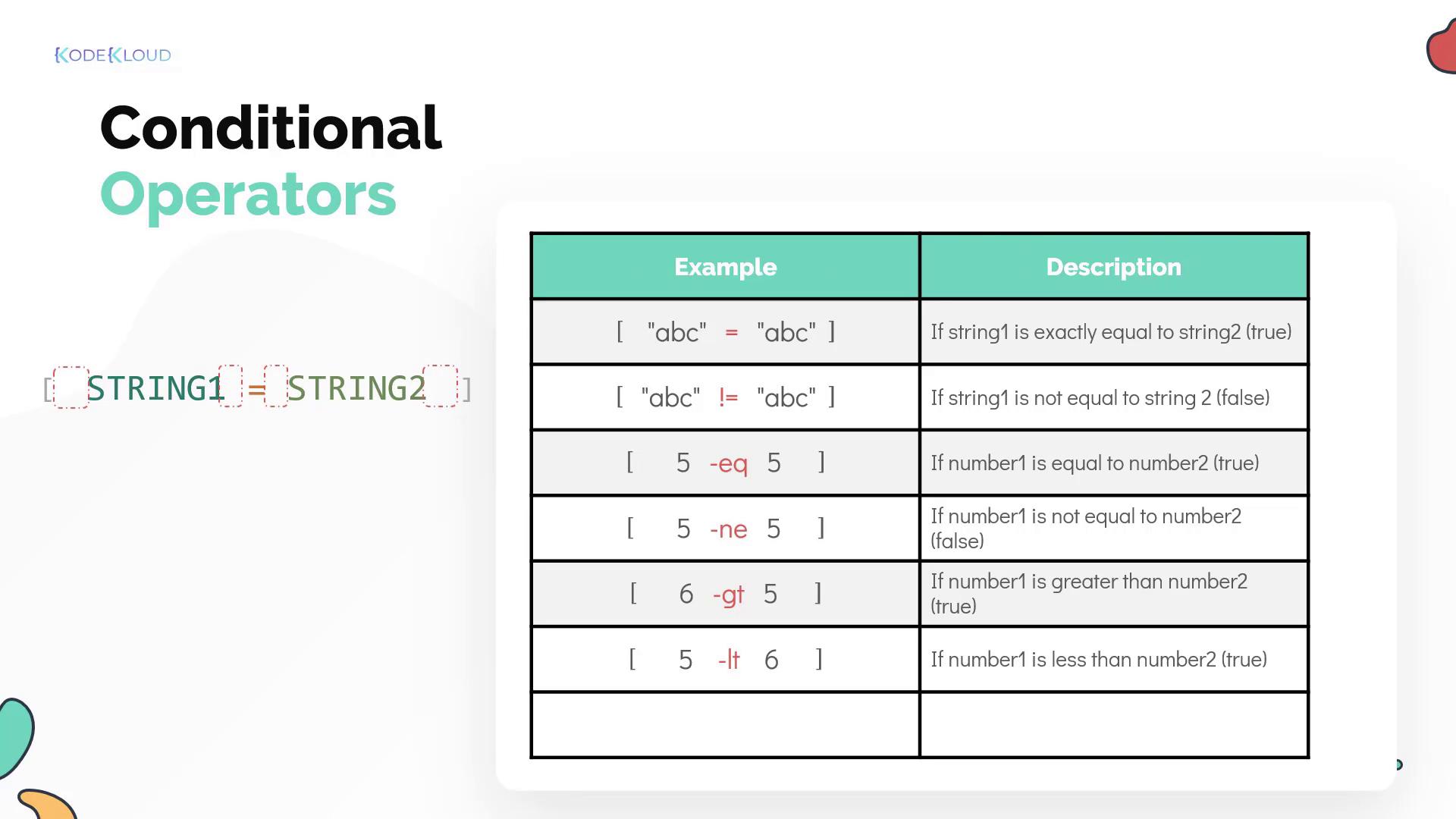
Below is a summary of common operators used in shell scripting for both string and numeric comparisons:
* **String Comparisons:**
* Equality: `=`
* Inequality: `!=` (or use pattern matching with wildcards in the enhanced syntax)
* **Numeric Comparisons:**
* Equal: `-eq`
* Not equal: `-ne`
* Greater than: `-gt`
* Less than: `-lt`
## Enhanced Syntax with Double Square Brackets
For more advanced conditional expression, you can utilize double square brackets `[[ ]]`. This syntax offers the following benefits:
* Supports advanced pattern matching.
* Allows the combination of multiple conditions without needing to separate into multiple expressions.
For example, to check if a substring exists within a string:
```bash theme={null}
[[ "abcd" = *bc* ]]
```
In this expression, the asterisks (`*`) indicate that there can be any collection of characters before or after "bc", making the expression evaluate to true. Remember to avoid enclosing patterns in quotes when using this syntax.
Additional examples of enhanced syntax include:
```bash theme={null}
[[ "abc" = ab[cd] ]] # true, because the third character can be either 'c' or 'd'
[[ "abd" = ab[cd] ]] # true
[[ "abe" = "ab[cd]" ]] # false, the pattern is taken as a literal string
[[ "abc" > "bcd" ]] # compares alphabetical order
[[ "abc" < "bcd" ]] # compares alphabetical order
```
> The operators `>` and `<` are used for comparing strings in lexicographical (alphabetical) order.
## Combining Multiple Conditions
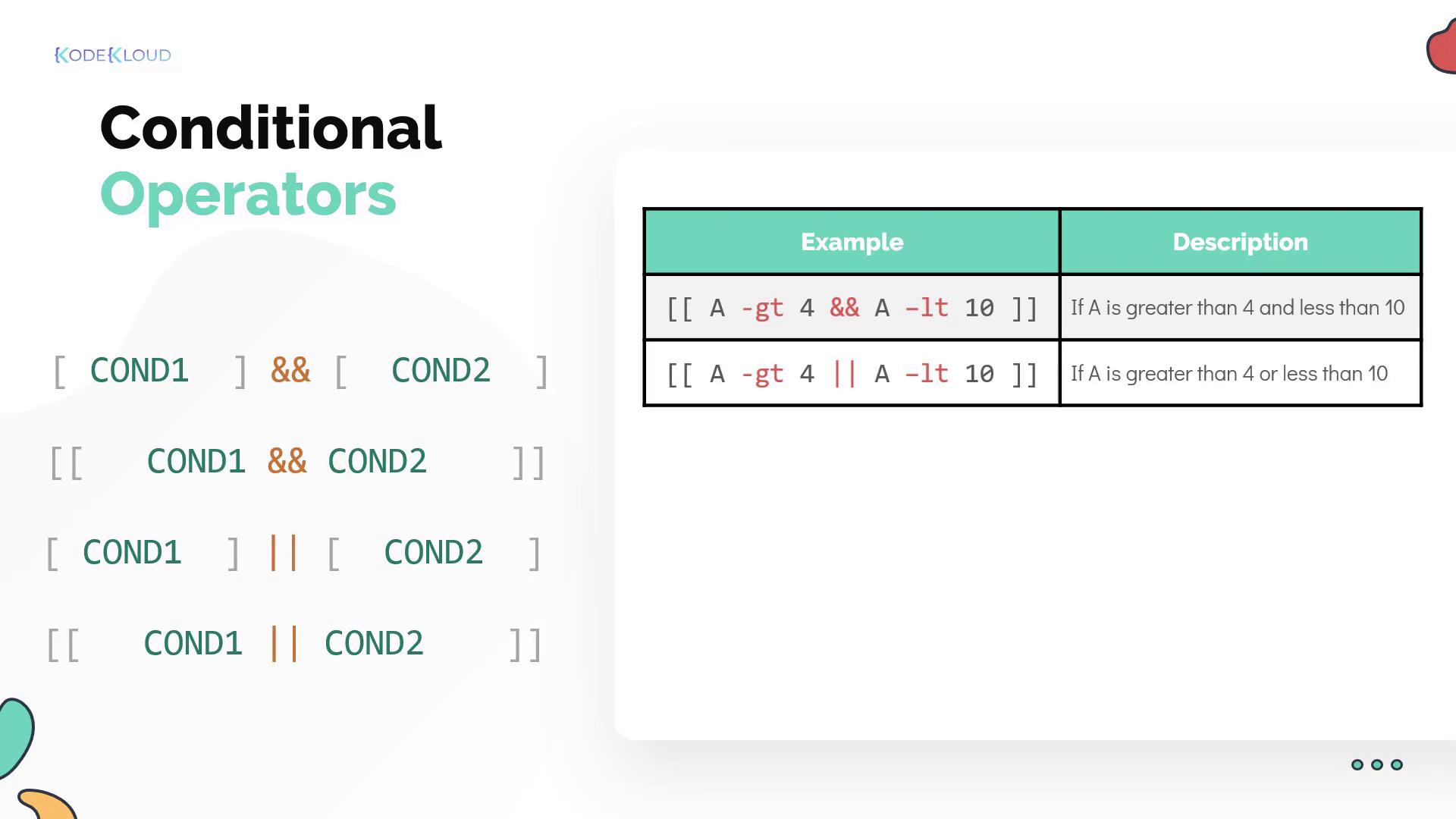
Sometimes, it's necessary to test multiple conditions in a script. There are two basic logical operators:
* **Logical AND (`&&`):** Ensures that both conditions are true.
```bash theme={null}
[ COND1 ] && [ COND2 ]
```
* **Logical OR (`||`):** Executes the command if at least one condition is true.
```bash theme={null}
[ COND1 ] || [ COND2 ]
```
When using the enhanced double square bracket syntax, you can combine conditions within a single statement:
```bash theme={null}
if [[ $value -gt 4 && $value -lt 10 ]]
then
echo "Value is between 5 and 9."
fi
```
Even without the detailed table, the above examples demonstrate how logical operators can be employed to craft effective conditional evaluations.
## File Test Operators
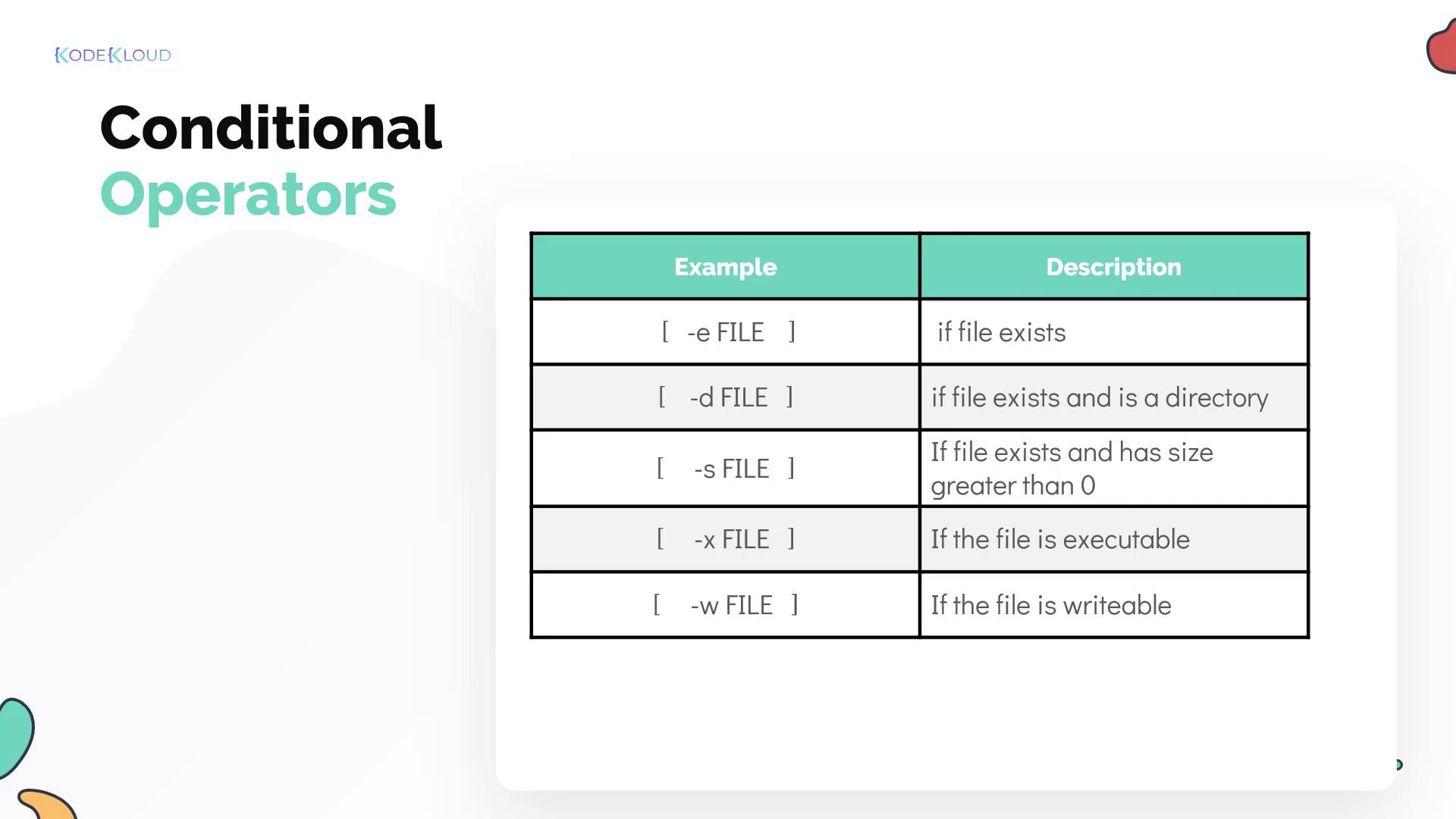
Shell scripts also offer file test operators that allow you to check various file properties:
* `-e`: Checks if a file exists.
* `-d`: Determines if the given path is a directory.
* `-s`: Verifies that the file size is greater than zero.
* `-x`: Confirms if the file is executable.
* `-w`: Checks if the file is writable.
These operators are essential for creating robust scripts that adapt based on file or directory attributes.
By mastering these conditional constructions and operators, you can design shell scripts that make intelligent decisions during runtime. This results in more resilient automation workflows and efficient error handling.