> ## Documentation Index
> Fetch the complete documentation index at: https://notes.kodekloud.com/llms.txt
> Use this file to discover all available pages before exploring further.
# Triggering a run
> Explains how to trigger and run Spacelift Terraform workflows, including initialization, plan generation, review, apply, logs, and best practices for secrets and confirmations
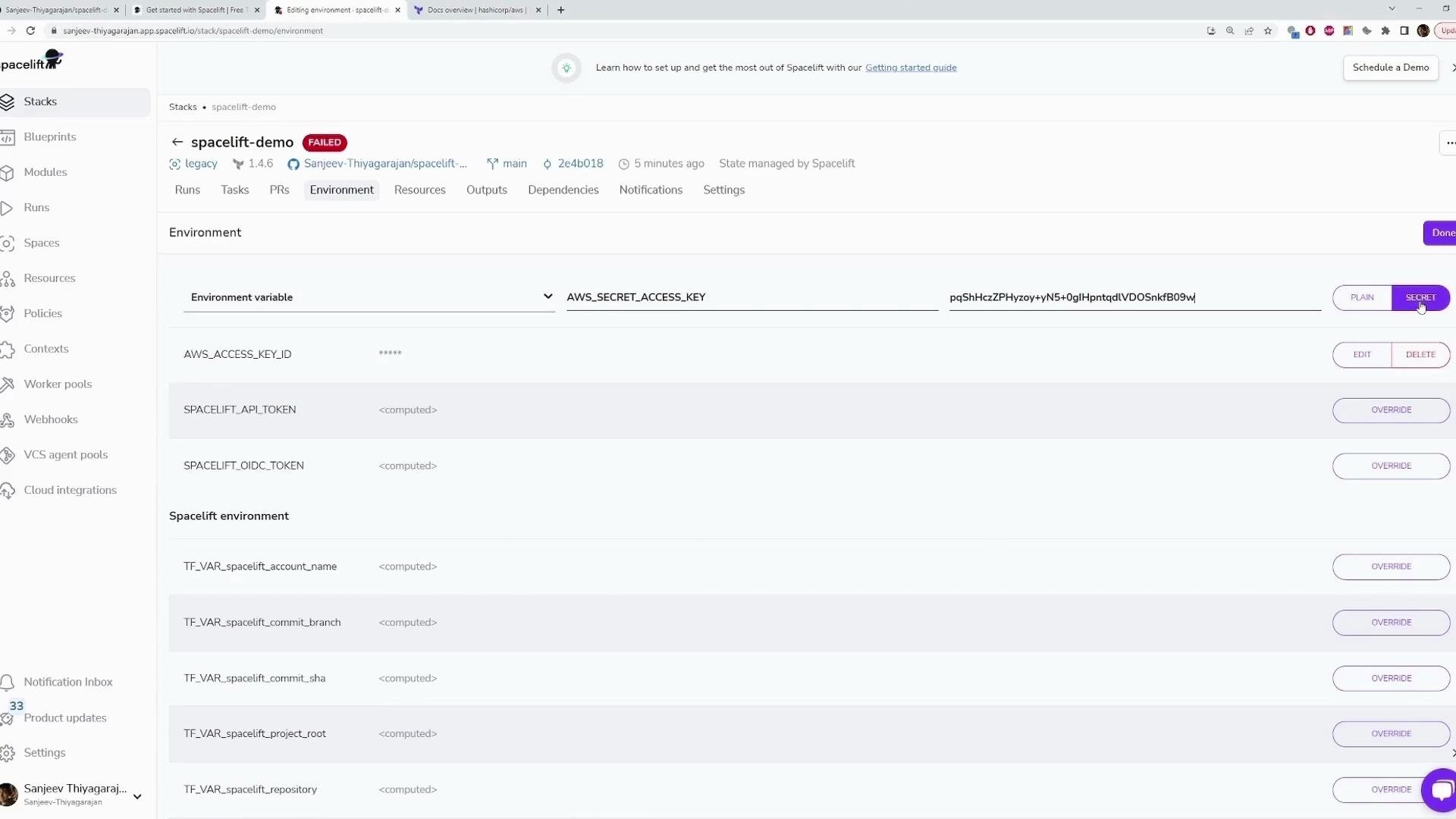
We’ve added the AWS credentials as environment variables and marked both values as secret. With these secrets configured, you can start a Spacelift run to initialize the workspace, generate a Terraform plan, and apply changes.
 You can trigger a run in two ways:
* Push changes to your connected Git repository — the recommended approach for CI-driven, reproducible workflows.
* Use the Trigger button in the Spacelift UI — useful for ad-hoc re-runs when you want to reapply the same configuration without committing code.
Use the Trigger button for one-off or investigative runs. For routine changes, push commits to your repository so your runs remain versioned and reproducible.
What happens after you trigger a run
* Spacelift creates a run and performs the standard initialization sequence.
* The run pulls source code from your repository, sets up files and permissions, pulls the runner image, downloads the Terraform binary, creates and starts the container, verifies prerequisites, then runs Terraform plan.
* The run uploads plan data and a workspace snapshot to the Spacelift backend for review and policy checks (if any are configured).
Run lifecycle at a glance
| Phase | What happens | Outcome |
| --------------- | ---------------------------------------------------------------------------------- | ------------------------------------------ |
| Initialization | Pull source, prepare files, pull runner image, download Terraform, start container | Container ready and prerequisites verified |
| Plan generation | Terraform plan executes; resources and outputs are calculated | Plan created and available for review |
| Review | You inspect the plan in the UI; custom plan policies are evaluated if configured | Run waits for confirmation or discard |
| Apply | (Optional) After confirmation, Terraform apply runs to modify infrastructure | Infrastructure updated; outputs available |
| Finished | Run completes successfully or fails | Logs and artifacts available in UI |
Representative run logs (initialization → plan → workspace upload)
```text theme={null}
[01GZ4JZWTX7X8SQV95DTB2PHZZ] Downloading source code...
[01GZ4JZWTX7X8SQV95DTB2PHZZ] Source code is GO
[01GZ4JZWTX7X8SQV95DTB2PHZZ] Setting up mounted files...
[01GZ4JZWTX7X8SQV95DTB2PHZZ] Mounted files are GO
[01GZ4JZWTX7X8SQV95DTB2PHZZ] Configuring file permissions...
[01GZ4JZWTX7X8SQV95DTB2PHZZ] Permissions are GO
[01GZ4JZWTX7X8SQV95DTB2PHZZ] Evaluating run initialization policy...
[01GZ4JZWTX7X8SQV95DTB2PHZZ] No initialization policies attached
[01GZ4JZWTX7X8SQV95DTB2PHZZ] Pulling Docker image public.ecr.aws/spacelift/runner-terraform:latest...
[01GZ4JZWTX7X8SQV95DTB2PHZZ] Docker image is GO
[01GZ4JZWTX7X8SQV95DTB2PHZZ] Downloading Terraform 1.4.6...
[01GZ4JZWTX7X8SQV95DTB2PHZZ] Terraform 1.4.6 download is GO (/bin/terraform)
[01GZ4JZWTX7X8SQV95DTB2PHZZ] Creating Docker container...
[01GZ4JZWTX7X8SQV95DTB2PHZZ] Starting Docker container...
[01GZ4JZWTX7X8SQV95DTB2PHZZ] Docker container is GO
[01GZ4JZWTX7X8SQV95DTB2PHZZ] Verifying container image prerequisites...
[01GZ4JZWTX7X8SQV95DTB2PHZZ] Successfully verified container image prerequisites
Plan: 1 to add, 0 to change, 0 to destroy.
Changes to Outputs:
+ instance_id = (known after apply)
+ instance_public_ip = (known after apply)
[01GZ4JZWXT7X8SQV95DTB2PHZZ] Changes are GO
[01GZ4JZWXT7X8SQV95DTB2PHZZ] Uploading the list of managed resources...
[01GZ4JZWXT7X8SQV95DTB2PHZZ] Please be aware that Run changes calculation includes Terraform output changes.
[01GZ4JZWXT7X8SQV95DTB2PHZZ] Resource list upload is GO
[01GZ4JZWXT7X8SQV95DTB2PHZZ] Generating JSON representation of the plan...
[01GZ4JZWXT7X8SQV95DTB2PHZZ] JSON representation is GO
[01GZ4JZWXT7X8SQV95DTB2PHZZ] Loading custom plan policy inputs...
[01GZ4JZWXT7X8SQV95DTB2PHZZ] 0 custom plan policy inputs found
[01GZ4JZWXT7X8SQV95DTB2PHZZ] No plan policies to evaluate
[01GZ4JZWXT7X8SQV95DTB2PHZZ] Encrypting workspace...
[01GZ4JZWXT7X8SQV95DTB2PHZZ] Uploading workspace...
[01GZ4JZWXT7X8SQV95DTB2PHZZ] Workspace upload is GO
```
After the plan is generated the run moves into a waiting (unconfirmed) state. From the UI you can:
* Inspect the full plan and generated JSON representation.
* Discard the run if you do not want to proceed.
* Confirm the run to trigger the Terraform apply.
If you confirm, Spacelift executes the apply step. When the apply completes successfully, the run status transitions to "finished" and outputs (for example, instance IDs and public IPs) will be available in the run logs and outputs section.
Useful references
* Spacelift documentation: [https://docs.spacelift.io](https://docs.spacelift.io)
* Terraform documentation: [https://www.terraform.io/docs](https://www.terraform.io/docs)
Confirming an apply will change real infrastructure. Always review the plan carefully and ensure credentials and IAM permissions follow least-privilege best practices before confirming.
You can trigger a run in two ways:
* Push changes to your connected Git repository — the recommended approach for CI-driven, reproducible workflows.
* Use the Trigger button in the Spacelift UI — useful for ad-hoc re-runs when you want to reapply the same configuration without committing code.
Use the Trigger button for one-off or investigative runs. For routine changes, push commits to your repository so your runs remain versioned and reproducible.
What happens after you trigger a run
* Spacelift creates a run and performs the standard initialization sequence.
* The run pulls source code from your repository, sets up files and permissions, pulls the runner image, downloads the Terraform binary, creates and starts the container, verifies prerequisites, then runs Terraform plan.
* The run uploads plan data and a workspace snapshot to the Spacelift backend for review and policy checks (if any are configured).
Run lifecycle at a glance
| Phase | What happens | Outcome |
| --------------- | ---------------------------------------------------------------------------------- | ------------------------------------------ |
| Initialization | Pull source, prepare files, pull runner image, download Terraform, start container | Container ready and prerequisites verified |
| Plan generation | Terraform plan executes; resources and outputs are calculated | Plan created and available for review |
| Review | You inspect the plan in the UI; custom plan policies are evaluated if configured | Run waits for confirmation or discard |
| Apply | (Optional) After confirmation, Terraform apply runs to modify infrastructure | Infrastructure updated; outputs available |
| Finished | Run completes successfully or fails | Logs and artifacts available in UI |
Representative run logs (initialization → plan → workspace upload)
```text theme={null}
[01GZ4JZWTX7X8SQV95DTB2PHZZ] Downloading source code...
[01GZ4JZWTX7X8SQV95DTB2PHZZ] Source code is GO
[01GZ4JZWTX7X8SQV95DTB2PHZZ] Setting up mounted files...
[01GZ4JZWTX7X8SQV95DTB2PHZZ] Mounted files are GO
[01GZ4JZWTX7X8SQV95DTB2PHZZ] Configuring file permissions...
[01GZ4JZWTX7X8SQV95DTB2PHZZ] Permissions are GO
[01GZ4JZWTX7X8SQV95DTB2PHZZ] Evaluating run initialization policy...
[01GZ4JZWTX7X8SQV95DTB2PHZZ] No initialization policies attached
[01GZ4JZWTX7X8SQV95DTB2PHZZ] Pulling Docker image public.ecr.aws/spacelift/runner-terraform:latest...
[01GZ4JZWTX7X8SQV95DTB2PHZZ] Docker image is GO
[01GZ4JZWTX7X8SQV95DTB2PHZZ] Downloading Terraform 1.4.6...
[01GZ4JZWTX7X8SQV95DTB2PHZZ] Terraform 1.4.6 download is GO (/bin/terraform)
[01GZ4JZWTX7X8SQV95DTB2PHZZ] Creating Docker container...
[01GZ4JZWTX7X8SQV95DTB2PHZZ] Starting Docker container...
[01GZ4JZWTX7X8SQV95DTB2PHZZ] Docker container is GO
[01GZ4JZWTX7X8SQV95DTB2PHZZ] Verifying container image prerequisites...
[01GZ4JZWTX7X8SQV95DTB2PHZZ] Successfully verified container image prerequisites
Plan: 1 to add, 0 to change, 0 to destroy.
Changes to Outputs:
+ instance_id = (known after apply)
+ instance_public_ip = (known after apply)
[01GZ4JZWXT7X8SQV95DTB2PHZZ] Changes are GO
[01GZ4JZWXT7X8SQV95DTB2PHZZ] Uploading the list of managed resources...
[01GZ4JZWXT7X8SQV95DTB2PHZZ] Please be aware that Run changes calculation includes Terraform output changes.
[01GZ4JZWXT7X8SQV95DTB2PHZZ] Resource list upload is GO
[01GZ4JZWXT7X8SQV95DTB2PHZZ] Generating JSON representation of the plan...
[01GZ4JZWXT7X8SQV95DTB2PHZZ] JSON representation is GO
[01GZ4JZWXT7X8SQV95DTB2PHZZ] Loading custom plan policy inputs...
[01GZ4JZWXT7X8SQV95DTB2PHZZ] 0 custom plan policy inputs found
[01GZ4JZWXT7X8SQV95DTB2PHZZ] No plan policies to evaluate
[01GZ4JZWXT7X8SQV95DTB2PHZZ] Encrypting workspace...
[01GZ4JZWXT7X8SQV95DTB2PHZZ] Uploading workspace...
[01GZ4JZWXT7X8SQV95DTB2PHZZ] Workspace upload is GO
```
After the plan is generated the run moves into a waiting (unconfirmed) state. From the UI you can:
* Inspect the full plan and generated JSON representation.
* Discard the run if you do not want to proceed.
* Confirm the run to trigger the Terraform apply.
If you confirm, Spacelift executes the apply step. When the apply completes successfully, the run status transitions to "finished" and outputs (for example, instance IDs and public IPs) will be available in the run logs and outputs section.
Useful references
* Spacelift documentation: [https://docs.spacelift.io](https://docs.spacelift.io)
* Terraform documentation: [https://www.terraform.io/docs](https://www.terraform.io/docs)
Confirming an apply will change real infrastructure. Always review the plan carefully and ensure credentials and IAM permissions follow least-privilege best practices before confirming.