> ## Documentation Index
> Fetch the complete documentation index at: https://notes.kodekloud.com/llms.txt
> Use this file to discover all available pages before exploring further.
# Indexes
> Describes database indexes, how they speed queries, when to add them, and trade offs like write latency and storage cost.
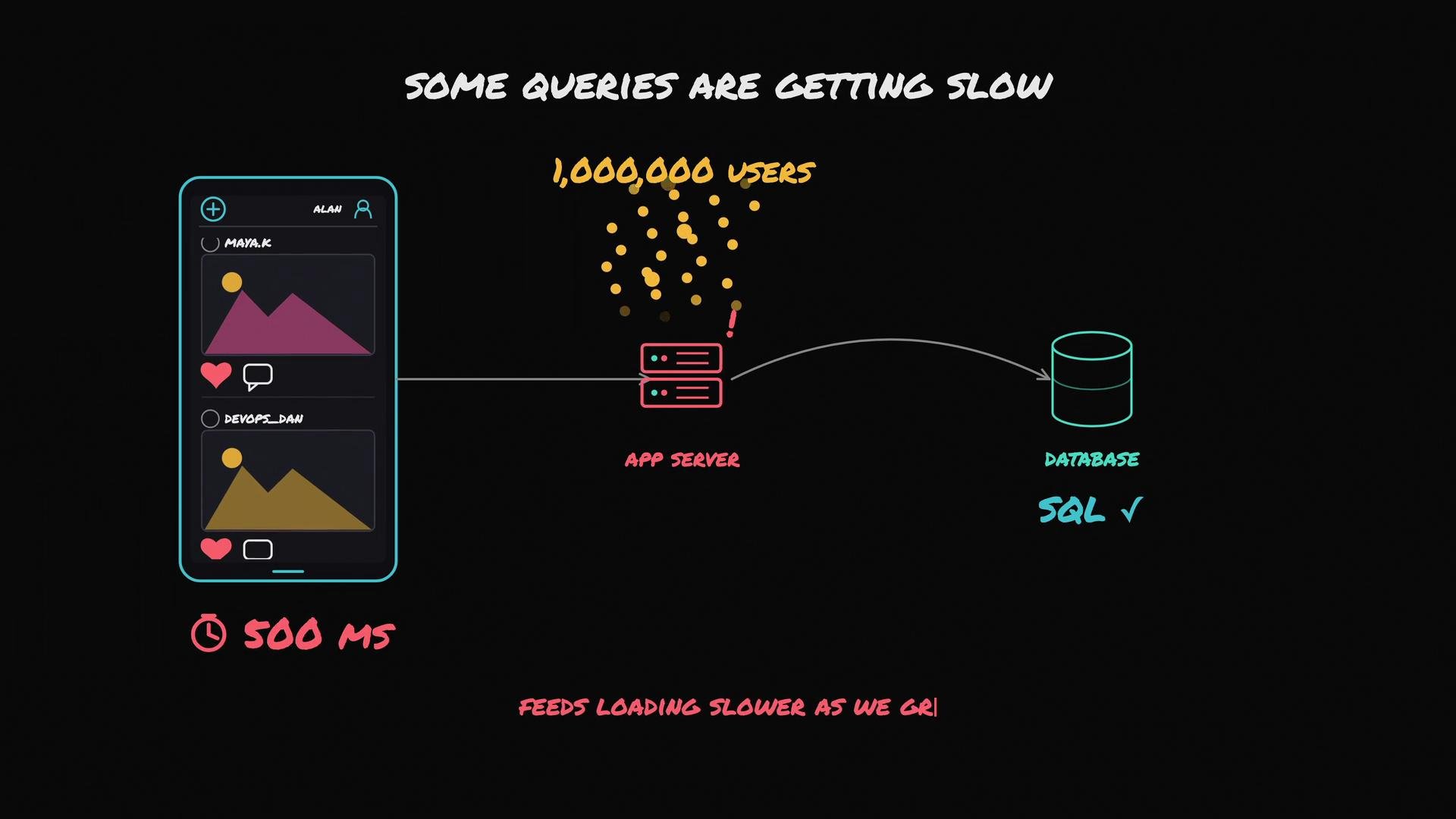
We chose an SQL database for our photo app, and it worked well at ten thousand users. As we scale toward millions of users, some queries begin to slow—pages that used to render in \~200 ms may take \~500 ms. This slowdown is common: as tables grow, certain queries require more work and become bottlenecks.
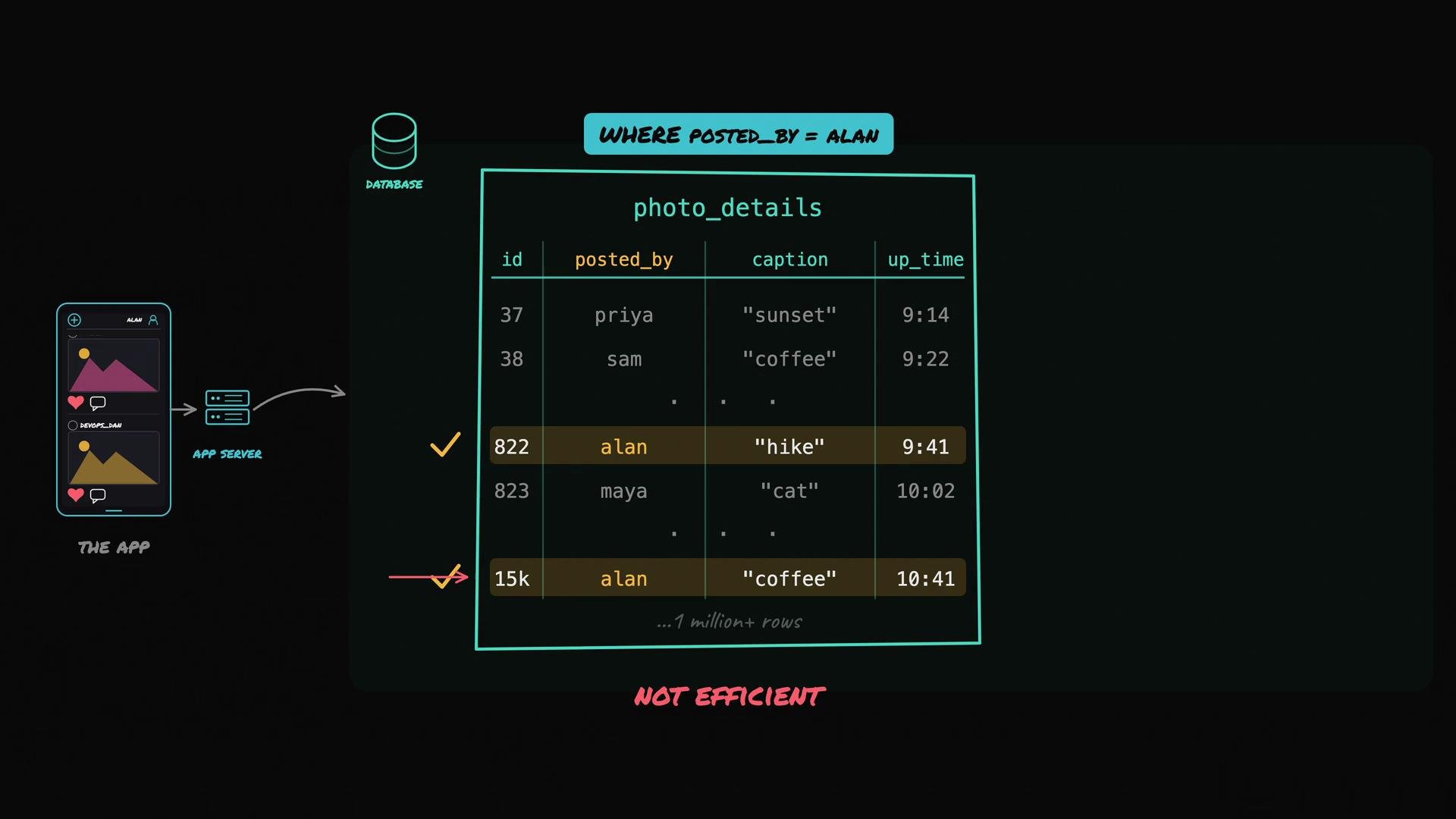
 Why does this happen? Consider a query that fetches all photos uploaded by the user Alan. Without an index, the database must do a full table scan:
* Was this photo uploaded by Alan? No.
* Was this photo uploaded by Alan? No.
* ...
A full table scan checks every row and becomes increasingly inefficient as row count grows.
Why does this happen? Consider a query that fetches all photos uploaded by the user Alan. Without an index, the database must do a full table scan:
* Was this photo uploaded by Alan? No.
* Was this photo uploaded by Alan? No.
* ...
A full table scan checks every row and becomes increasingly inefficient as row count grows.
 What an index does
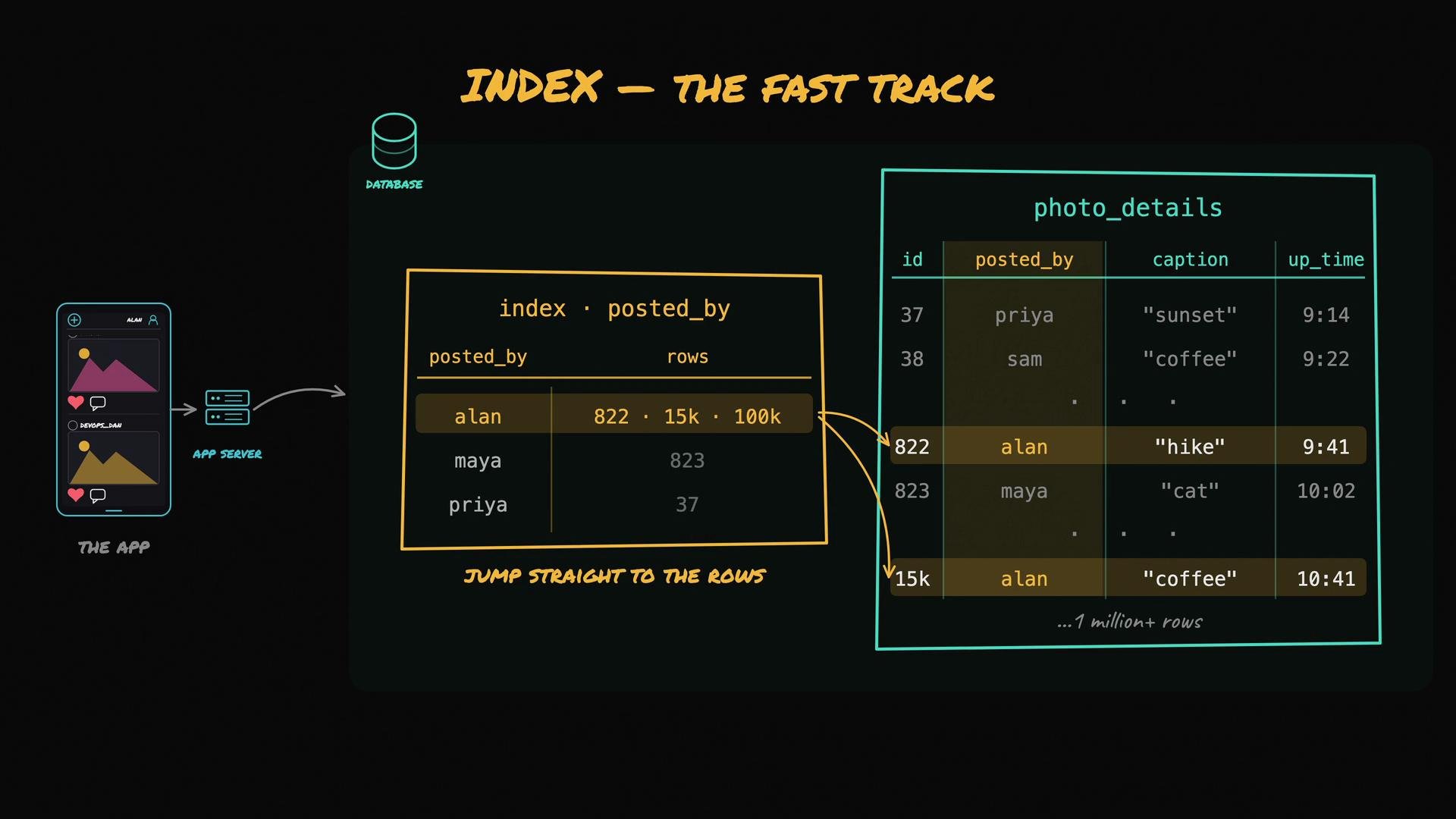
* An index is a data structure (commonly a B-tree) that maps values in a column to the row locations where those values appear.
* Think of it like the index at the back of a book: instead of reading every page, you look up a keyword and jump directly to the relevant pages.
If we create an index on the `posted_by` column in `photo_details`, the database can quickly determine that Alan's photos are at row 822, row 15,000, and row 100,000, and then fetch only those rows.
What an index does
* An index is a data structure (commonly a B-tree) that maps values in a column to the row locations where those values appear.
* Think of it like the index at the back of a book: instead of reading every page, you look up a keyword and jump directly to the relevant pages.
If we create an index on the `posted_by` column in `photo_details`, the database can quickly determine that Alan's photos are at row 822, row 15,000, and row 100,000, and then fetch only those rows.
 How the query planner uses an index
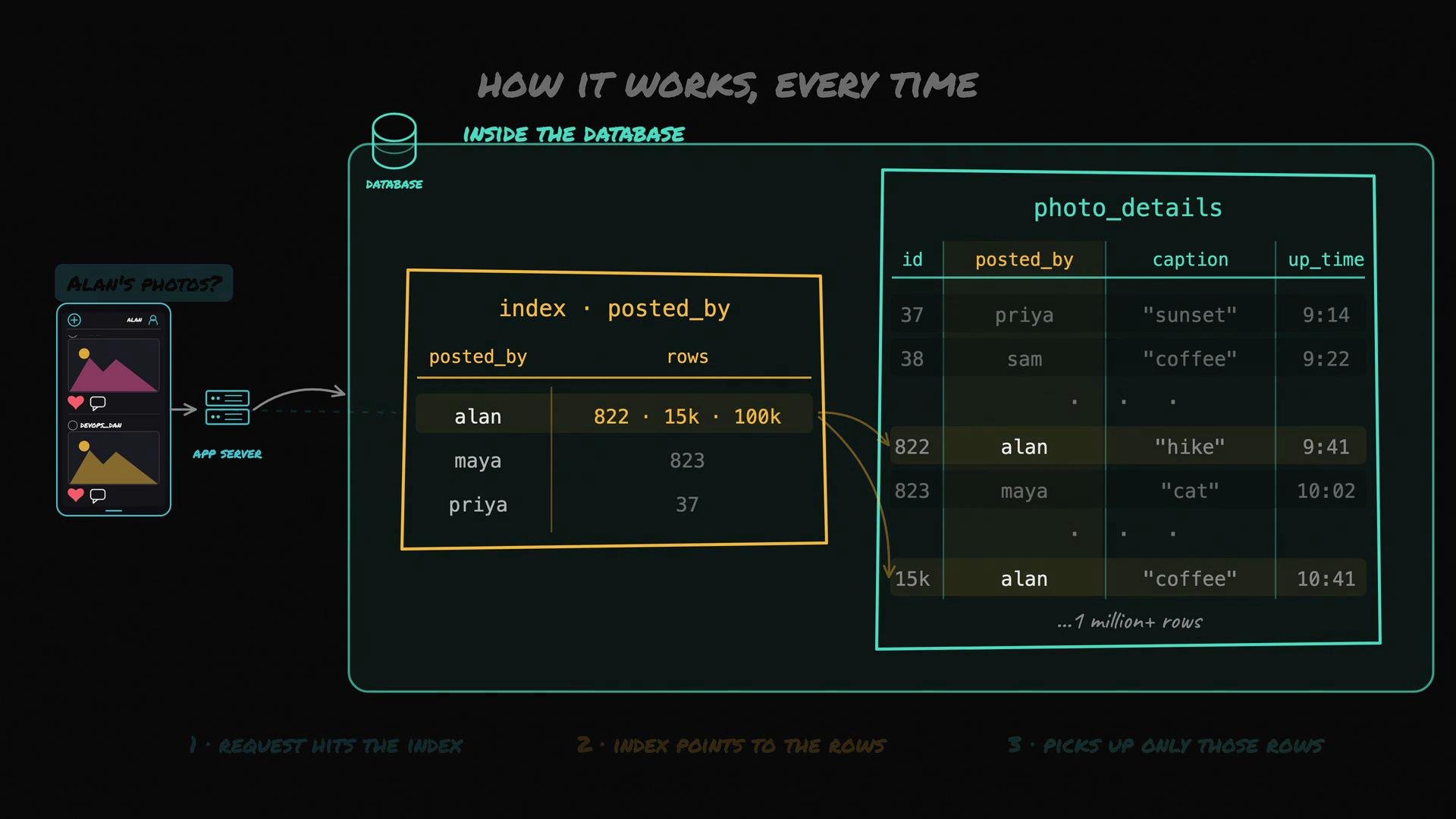
1. The planner checks available indexes for columns used in `WHERE`, `JOIN`, `ORDER BY`, or `GROUP BY`.
2. If a matching index exists, the planner uses it to find row pointers quickly.
3. The database fetches only those rows, avoiding unrelated rows and reducing I/O.
This index lives inside the database engine (often a B-tree) and is transparent to application code.
How the query planner uses an index
1. The planner checks available indexes for columns used in `WHERE`, `JOIN`, `ORDER BY`, or `GROUP BY`.
2. If a matching index exists, the planner uses it to find row pointers quickly.
3. The database fetches only those rows, avoiding unrelated rows and reducing I/O.
This index lives inside the database engine (often a B-tree) and is transparent to application code.
 Quick SQL examples
* Create a simple single-column index:
```SQL theme={null}
CREATE INDEX idx_posted_by ON photo_details (posted_by);
```
* Create a composite index (useful when queries filter on multiple columns). Column order matters:
```SQL theme={null}
CREATE INDEX idx_posted_by_created_at ON photo_details (posted_by, created_at);
```
* PostgreSQL covering index example (stores extra columns in the index so the query can be satisfied from the index alone):
```SQL theme={null}
CREATE INDEX idx_covering_posted_by ON photo_details (posted_by) INCLUDE (photo_url, created_at);
```
When to add an index
* Use monitoring and the database's query planner to identify slow queries first.
* Run `EXPLAIN` or `EXPLAIN ANALYZE` to see how a query is executed and which columns are causing scans.
* Add an index targeted specifically to fix that query pattern (e.g., `WHERE`, `JOIN`, or `ORDER BY` columns).
* Re-measure and iterate.
Index trade-offs and considerations
| Aspect | Why it matters |
| --------------------- | ---------------------------------------------------------------------------------------------------------------------------------------------------------------------- |
| Write overhead | Every `INSERT`, `UPDATE`, or `DELETE` affecting indexed columns must update the index. More indexes → more write latency. |
| Storage | Indexes consume disk space (and memory for caching). |
| Selectivity | Indexes are most effective on high-selectivity columns (many distinct values). Low-selectivity columns (e.g., booleans) usually don’t benefit. |
| Composite indexes | Multi-column indexes can optimize multi-filter queries but are most useful when queries filter starting from the leftmost column. |
| Covering indexes | If the index contains all columns a query needs, the database can satisfy the query using only the index (no table fetch). This is faster but can increase index size. |
| ORDER BY optimization | An appropriate index can eliminate expensive sorts if the query ordering matches the index order. |
Index the columns used by your slow queries—typically those in `WHERE`, `JOIN`, `ORDER BY`, and `GROUP BY`. Use `EXPLAIN` / `EXPLAIN ANALYZE` and slow-query logs to identify which queries will benefit before adding an index.
Best-practice workflow
1. Start with the primary key index only (or a minimal set).
2. Monitor performance: slow-query logs, APM tools, or profiling.
3. For a slow query, run `EXPLAIN` / `EXPLAIN ANALYZE` and inspect the execution plan.
4. Add an index targeted to the query pattern (single-column, composite, or covering).
5. Re-run the query and observe performance and write impact; iterate as needed.
Do not create indexes blindly. Adding many indexes increases write latency and storage cost. Start with no or few indexes, identify slow queries, and add indexes targeted at those queries only.
How many indexes should a table have?
There’s no one-size-fits-all number. Many production tables have 3–5 well-chosen indexes, but the right count depends on query patterns and write throughput. The pragmatic approach is the workflow above: measure, add targeted indexes, and re-measure.
References and further reading
* EXPLAIN query plans: [https://www.postgresql.org/docs/current/using-explain.html](https://www.postgresql.org/docs/current/using-explain.html)
* B-tree indexes overview: [https://www.postgresql.org/docs/current/indexes-types.html](https://www.postgresql.org/docs/current/indexes-types.html)
* General guide to database indexing: [https://use-the-index-luke.com/](https://use-the-index-luke.com/)
By following a measurement-driven approach to indexing—identify slow queries, inspect plans, and add focused indexes—you’ll improve read performance while keeping write overhead and storage costs under control.
Quick SQL examples
* Create a simple single-column index:
```SQL theme={null}
CREATE INDEX idx_posted_by ON photo_details (posted_by);
```
* Create a composite index (useful when queries filter on multiple columns). Column order matters:
```SQL theme={null}
CREATE INDEX idx_posted_by_created_at ON photo_details (posted_by, created_at);
```
* PostgreSQL covering index example (stores extra columns in the index so the query can be satisfied from the index alone):
```SQL theme={null}
CREATE INDEX idx_covering_posted_by ON photo_details (posted_by) INCLUDE (photo_url, created_at);
```
When to add an index
* Use monitoring and the database's query planner to identify slow queries first.
* Run `EXPLAIN` or `EXPLAIN ANALYZE` to see how a query is executed and which columns are causing scans.
* Add an index targeted specifically to fix that query pattern (e.g., `WHERE`, `JOIN`, or `ORDER BY` columns).
* Re-measure and iterate.
Index trade-offs and considerations
| Aspect | Why it matters |
| --------------------- | ---------------------------------------------------------------------------------------------------------------------------------------------------------------------- |
| Write overhead | Every `INSERT`, `UPDATE`, or `DELETE` affecting indexed columns must update the index. More indexes → more write latency. |
| Storage | Indexes consume disk space (and memory for caching). |
| Selectivity | Indexes are most effective on high-selectivity columns (many distinct values). Low-selectivity columns (e.g., booleans) usually don’t benefit. |
| Composite indexes | Multi-column indexes can optimize multi-filter queries but are most useful when queries filter starting from the leftmost column. |
| Covering indexes | If the index contains all columns a query needs, the database can satisfy the query using only the index (no table fetch). This is faster but can increase index size. |
| ORDER BY optimization | An appropriate index can eliminate expensive sorts if the query ordering matches the index order. |
Index the columns used by your slow queries—typically those in `WHERE`, `JOIN`, `ORDER BY`, and `GROUP BY`. Use `EXPLAIN` / `EXPLAIN ANALYZE` and slow-query logs to identify which queries will benefit before adding an index.
Best-practice workflow
1. Start with the primary key index only (or a minimal set).
2. Monitor performance: slow-query logs, APM tools, or profiling.
3. For a slow query, run `EXPLAIN` / `EXPLAIN ANALYZE` and inspect the execution plan.
4. Add an index targeted to the query pattern (single-column, composite, or covering).
5. Re-run the query and observe performance and write impact; iterate as needed.
Do not create indexes blindly. Adding many indexes increases write latency and storage cost. Start with no or few indexes, identify slow queries, and add indexes targeted at those queries only.
How many indexes should a table have?
There’s no one-size-fits-all number. Many production tables have 3–5 well-chosen indexes, but the right count depends on query patterns and write throughput. The pragmatic approach is the workflow above: measure, add targeted indexes, and re-measure.
References and further reading
* EXPLAIN query plans: [https://www.postgresql.org/docs/current/using-explain.html](https://www.postgresql.org/docs/current/using-explain.html)
* B-tree indexes overview: [https://www.postgresql.org/docs/current/indexes-types.html](https://www.postgresql.org/docs/current/indexes-types.html)
* General guide to database indexing: [https://use-the-index-luke.com/](https://use-the-index-luke.com/)
By following a measurement-driven approach to indexing—identify slow queries, inspect plans, and add focused indexes—you’ll improve read performance while keeping write overhead and storage costs under control.