> ## Documentation Index
> Fetch the complete documentation index at: https://notes.kodekloud.com/llms.txt
> Use this file to discover all available pages before exploring further.
# Single Points of Failure
> Explains identifying and mitigating single points of failure using redundancy, failover, backups, RPO/RTO, and operational practices to ensure high availability and recoverability.
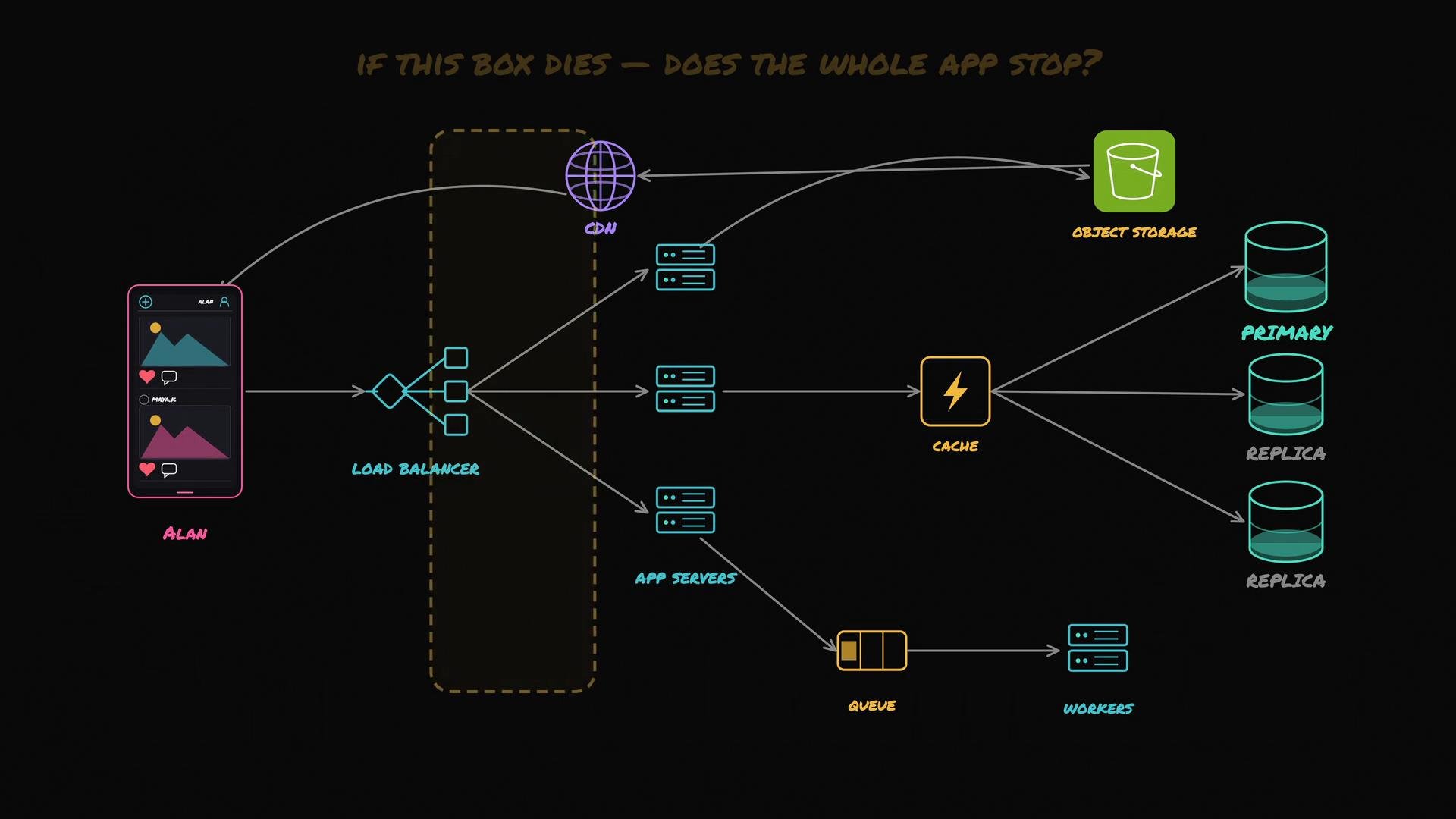
Your photo app has evolved into a full system: a CDN-fronted object store, a load balancer, multiple app servers, a primary database with replicas, a cache, and a queue. It feels robust — but is it actually resilient?
We can validate the system by systematically checking every component for single points of failure: for each component, ask the simple question:
If this component fails, will the whole app (or any critical feature) stop working?
If the answer is yes, that component is a single point of failure (SPOF). Eliminating or mitigating SPOFs is key to designing a reliable, highly available system.
Start by reviewing the overall architecture:
 Component-by-component analysis (short form)
* App servers: Multiple app servers behind a load balancer are not a SPOF. If one server dies, the load balancer routes traffic to the remaining instances.
* Database reads: With replicas, reads can continue if the primary is unavailable. Note: replicas may lag, so reads might be stale.
* Database writes: Typically go to the primary only. If the primary fails, writes stop unless a replica is promoted. Running replicas alone is not sufficient — you must have an automated and safe promotion/failover strategy (or a consensus cluster) to avoid split-brain and data loss.
* Load balancer: Every incoming request passes through the load balancer. If you run a single LB instance, it becomes a SPOF even if app servers are redundant. Many cloud providers offer managed, redundant load balancers; the SPOF risk mainly applies to single self-hosted instances.
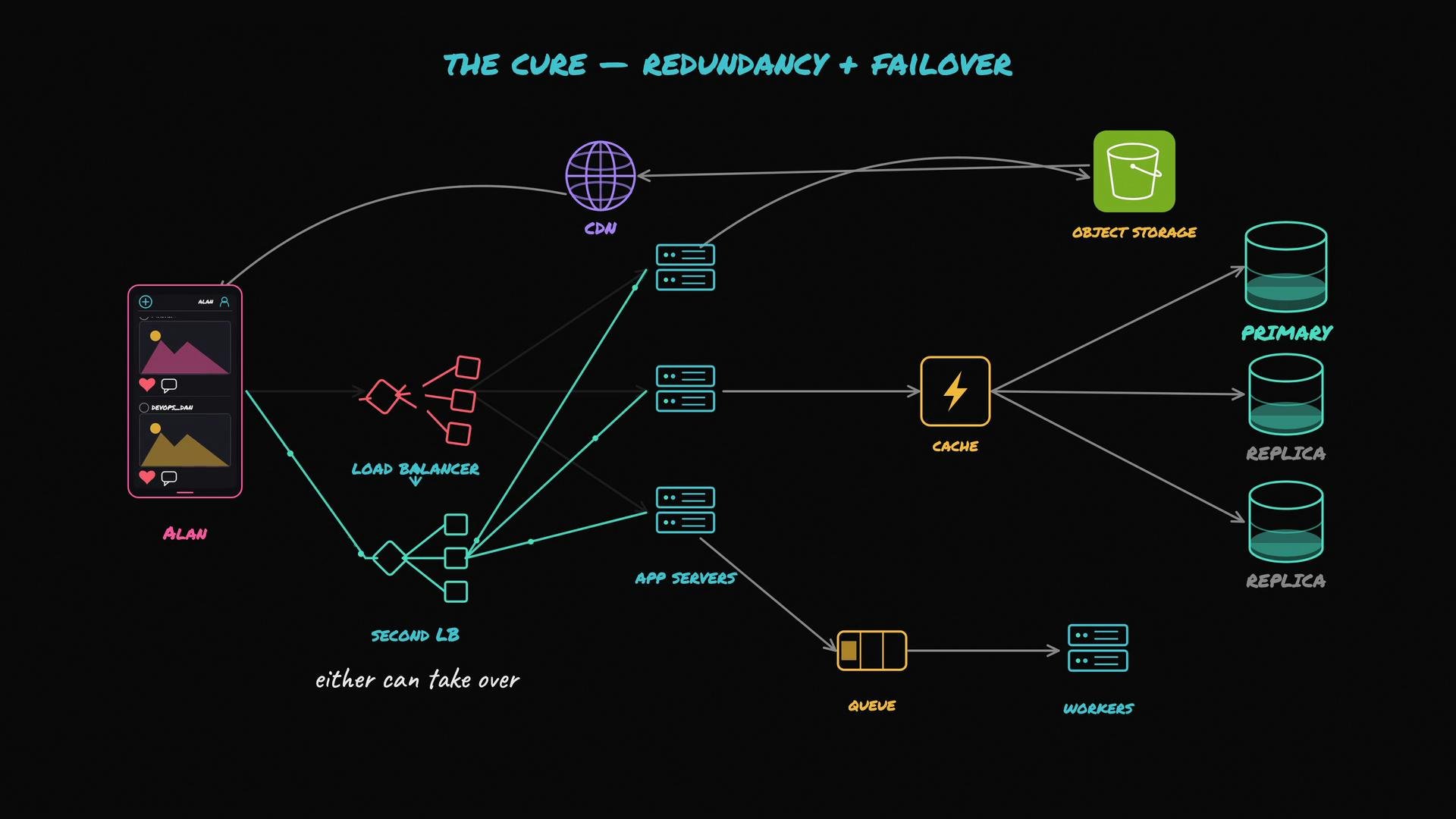
A single load balancer instance can make your whole fleet unreachable. Ensure LB redundancy (active/active or active/passive with automated failover) or use a managed, multi-AZ provider load balancer.
The general cure for any SPOF is redundancy: run at least two independent instances of the critical component and ensure one can take over if the other fails. Automatic takeover is called failover. The goal is that the system tolerates any single failure with minimal impact.
Component-by-component analysis (short form)
* App servers: Multiple app servers behind a load balancer are not a SPOF. If one server dies, the load balancer routes traffic to the remaining instances.
* Database reads: With replicas, reads can continue if the primary is unavailable. Note: replicas may lag, so reads might be stale.
* Database writes: Typically go to the primary only. If the primary fails, writes stop unless a replica is promoted. Running replicas alone is not sufficient — you must have an automated and safe promotion/failover strategy (or a consensus cluster) to avoid split-brain and data loss.
* Load balancer: Every incoming request passes through the load balancer. If you run a single LB instance, it becomes a SPOF even if app servers are redundant. Many cloud providers offer managed, redundant load balancers; the SPOF risk mainly applies to single self-hosted instances.
A single load balancer instance can make your whole fleet unreachable. Ensure LB redundancy (active/active or active/passive with automated failover) or use a managed, multi-AZ provider load balancer.
The general cure for any SPOF is redundancy: run at least two independent instances of the critical component and ensure one can take over if the other fails. Automatic takeover is called failover. The goal is that the system tolerates any single failure with minimal impact.
 Measuring availability
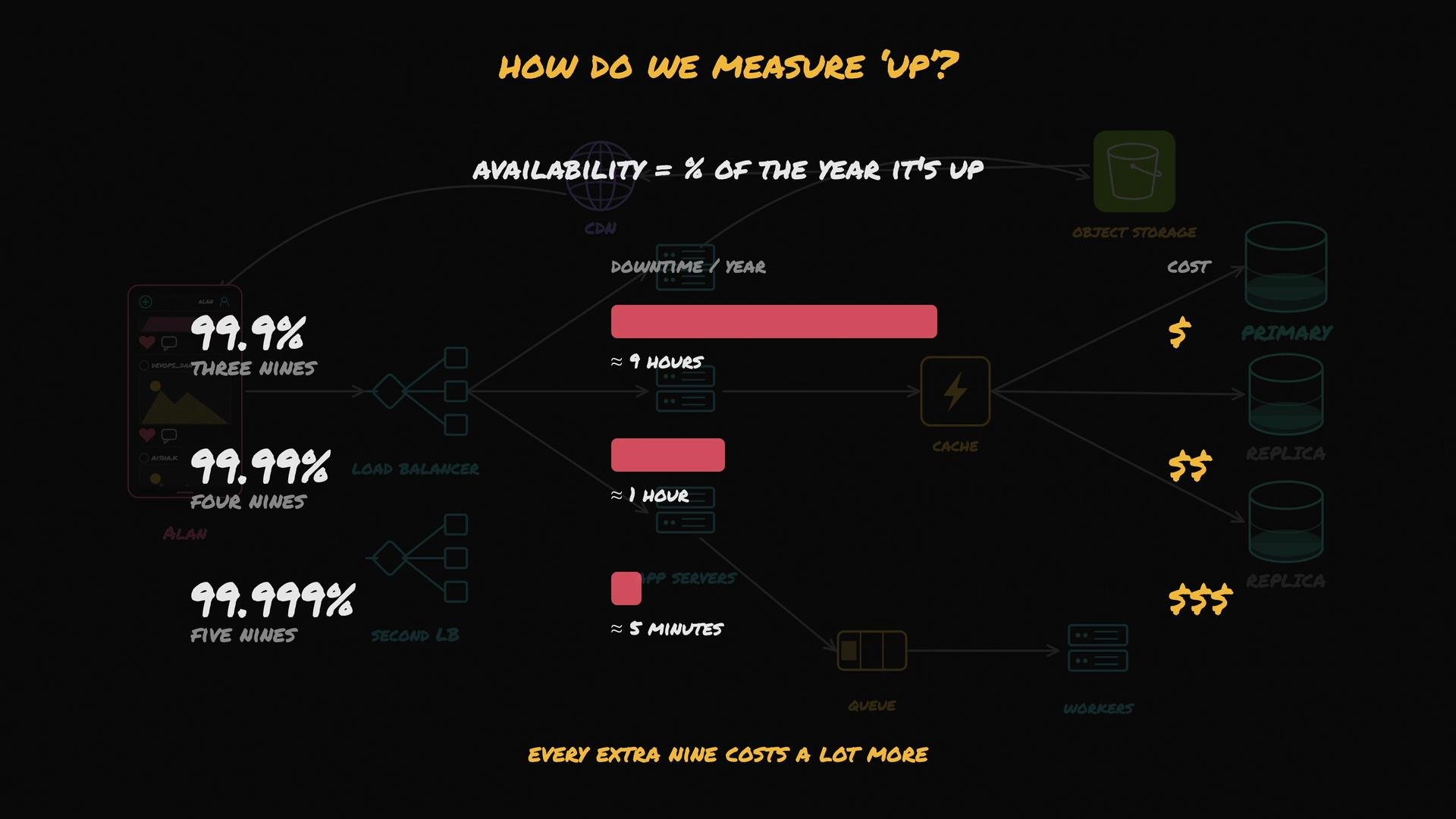
You can quantify how well the system serves users with availability — the percentage of time the service is up. Modern SLAs are often expressed in “nines”:
| Availability | Annual downtime (approx.) | Notes |
| -------------------- | ------------------------- | ----------------------------------------- |
| 90% (one nine) | \~36.5 days | Low availability for production services |
| 99.9% (three nines) | \~8.76 hours | Common entry-level HA target |
| 99.99% (four nines) | \~52.56 minutes | Requires more automation and redundancy |
| 99.999% (five nines) | \~5.26 minutes | Very high cost and operational complexity |
Higher availability generally requires greater redundancy, automated failover, robust testing, and increased operational cost.
Measuring availability
You can quantify how well the system serves users with availability — the percentage of time the service is up. Modern SLAs are often expressed in “nines”:
| Availability | Annual downtime (approx.) | Notes |
| -------------------- | ------------------------- | ----------------------------------------- |
| 90% (one nine) | \~36.5 days | Low availability for production services |
| 99.9% (three nines) | \~8.76 hours | Common entry-level HA target |
| 99.99% (four nines) | \~52.56 minutes | Requires more automation and redundancy |
| 99.999% (five nines) | \~5.26 minutes | Very high cost and operational complexity |
Higher availability generally requires greater redundancy, automated failover, robust testing, and increased operational cost.
 Redundancy vs. backups
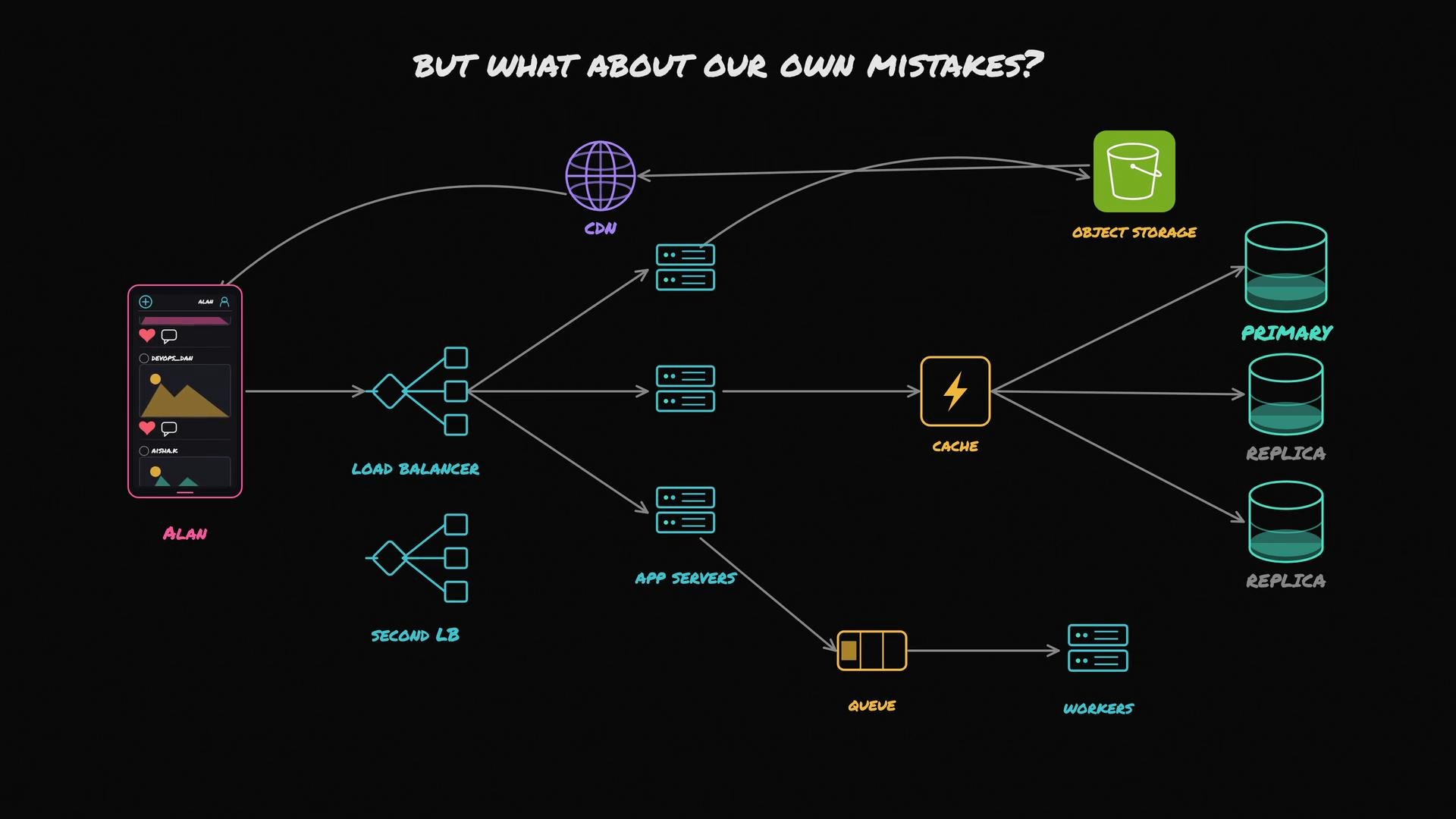
Redundancy keeps the system running when components fail. Backups let you recover from human error, software bugs, or catastrophic data corruption. Redundancy and backups solve different failure modes and are both necessary.
Backup = a snapshot of a component or data at a moment in time. If you delete or corrupt something, you restore from a snapshot to recover.
Redundancy vs. backups
Redundancy keeps the system running when components fail. Backups let you recover from human error, software bugs, or catastrophic data corruption. Redundancy and backups solve different failure modes and are both necessary.
Backup = a snapshot of a component or data at a moment in time. If you delete or corrupt something, you restore from a snapshot to recover.
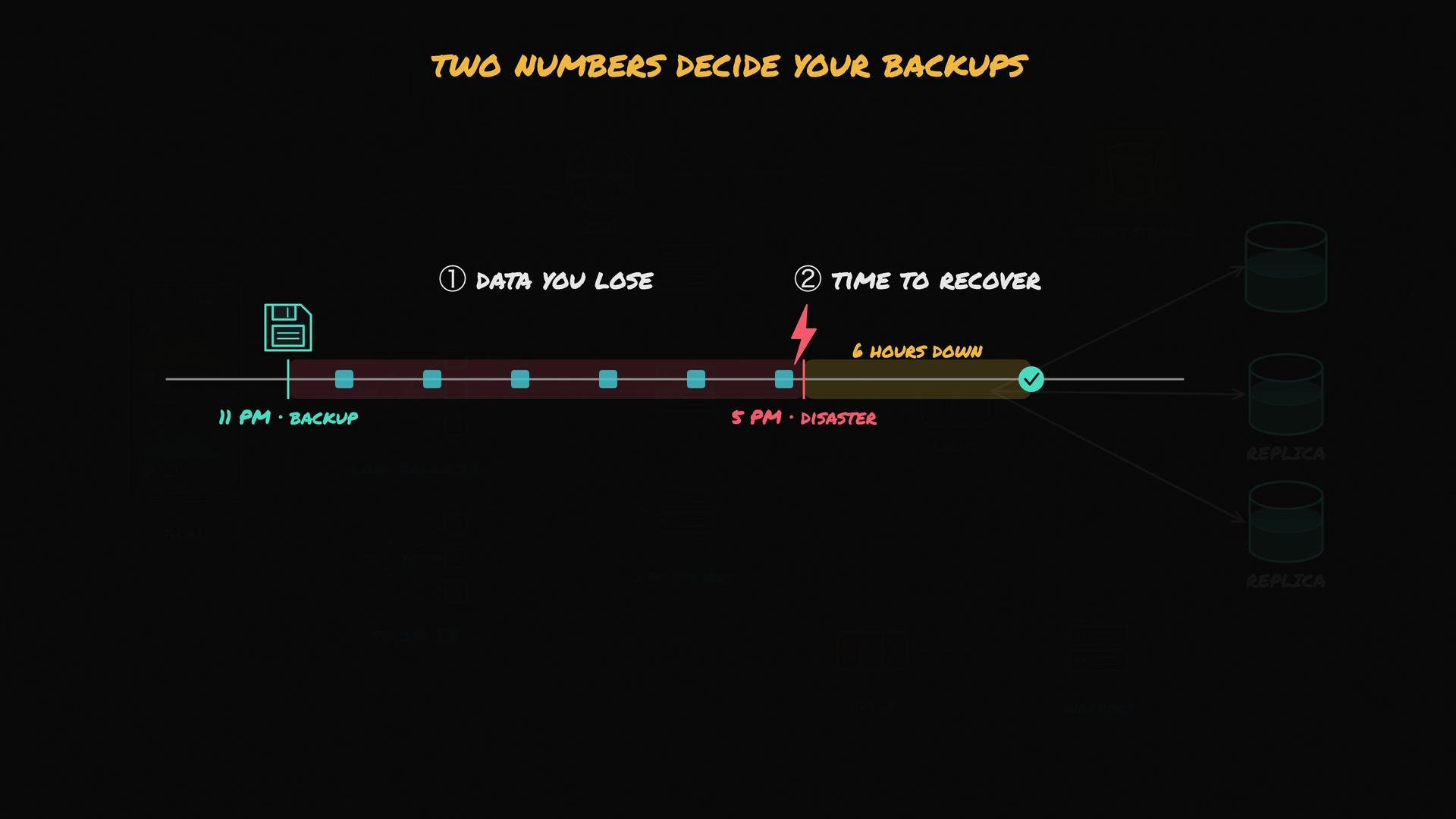
 Two practical questions when planning backups and redundancy
* How much data can you afford to lose? (Backup frequency.)
* How quickly must you restore service? (Restore speed.)
These are formalized as:
Two practical questions when planning backups and redundancy
* How much data can you afford to lose? (Backup frequency.)
* How quickly must you restore service? (Restore speed.)
These are formalized as:
 | Acronym | Meaning | Practical interpretation |
| ------: | ------------------------ | ---------------------------------------------------------------------------------------------------- |
| RPO | Recovery Point Objective | Maximum acceptable data loss measured in time (e.g., minutes/hours). Determines backup frequency. |
| RTO | Recovery Time Objective | Maximum acceptable downtime after a disaster. Determines how fast you must restore systems and data. |
Best practices for backups and recovery
* Decide RPO and RTO based on business needs and SLAs.
* Automate frequent backups for low RPOs (e.g., continuous or hourly) and ensure consistent snapshots for databases.
* Regularly test restores in an isolated environment and run disaster recovery drills to measure realistic RTO.
* For distributed systems, use coordinated backups or transactional snapshots to avoid inconsistent restores.
* Maintain off-site and immutable backups to protect against accidental deletions and ransomware.
Redundancy answers: “What happens when a machine dies?” Backups answer: “What happens when we make a mistake?” Both are required for a reliable system.
Quick checklist to eliminate common SPOFs
* Ensure LB redundancy (multi-AZ or managed LB).
* Use multi-AZ or multi-region database deployments with tested failover and consistent replication.
* Replicate stateful components and ensure data consistency/replication lag is understood.
* Automate failover and monitoring (health checks, alerting, automated promotion).
* Implement regular, tested backups and maintain clear RPO/RTO targets.
* Practice runbooks and DR drills to validate the recovery process.
Further reading and references
* [High Availability and Load Balancing concepts](https://en.wikipedia.org/wiki/High_availability)
* [Database replication and failover patterns](https://www.datastax.com/resources/database-failover-best-practices)
* [Backup and restore best practices](https://aws.amazon.com/backup/)
Reliability is two questions, not one: first, what happens when a machine fails? Answer with redundancy and failover. Second, what happens when humans or software make mistakes? Answer with a backup and recovery strategy.
| Acronym | Meaning | Practical interpretation |
| ------: | ------------------------ | ---------------------------------------------------------------------------------------------------- |
| RPO | Recovery Point Objective | Maximum acceptable data loss measured in time (e.g., minutes/hours). Determines backup frequency. |
| RTO | Recovery Time Objective | Maximum acceptable downtime after a disaster. Determines how fast you must restore systems and data. |
Best practices for backups and recovery
* Decide RPO and RTO based on business needs and SLAs.
* Automate frequent backups for low RPOs (e.g., continuous or hourly) and ensure consistent snapshots for databases.
* Regularly test restores in an isolated environment and run disaster recovery drills to measure realistic RTO.
* For distributed systems, use coordinated backups or transactional snapshots to avoid inconsistent restores.
* Maintain off-site and immutable backups to protect against accidental deletions and ransomware.
Redundancy answers: “What happens when a machine dies?” Backups answer: “What happens when we make a mistake?” Both are required for a reliable system.
Quick checklist to eliminate common SPOFs
* Ensure LB redundancy (multi-AZ or managed LB).
* Use multi-AZ or multi-region database deployments with tested failover and consistent replication.
* Replicate stateful components and ensure data consistency/replication lag is understood.
* Automate failover and monitoring (health checks, alerting, automated promotion).
* Implement regular, tested backups and maintain clear RPO/RTO targets.
* Practice runbooks and DR drills to validate the recovery process.
Further reading and references
* [High Availability and Load Balancing concepts](https://en.wikipedia.org/wiki/High_availability)
* [Database replication and failover patterns](https://www.datastax.com/resources/database-failover-best-practices)
* [Backup and restore best practices](https://aws.amazon.com/backup/)
Reliability is two questions, not one: first, what happens when a machine fails? Answer with redundancy and failover. Second, what happens when humans or software make mistakes? Answer with a backup and recovery strategy.