> ## Documentation Index
> Fetch the complete documentation index at: https://notes.kodekloud.com/llms.txt
> Use this file to discover all available pages before exploring further.
# PubSub and Fan Out
> Explains pub/sub and fan-out for decoupling photo upload events so multiple independent services like thumbnails, feeds, indexing, and scanners process their own copies.
When a user uploads a photo, the application saves the file and emits a message to a messaging system. In a simple queue-based design, a single worker picks up that message and resizes the image. That works well when exactly one thing must happen for every event.
However, as the product grows, a single upload typically triggers many independent actions at once. For example, beyond creating thumbnails, an upload might need to:
* Update the home feeds of everyone who follows the uploader.
* Add the photo to the search index.
* Run a banned-content scanner.
* And more as features are added.
Each of these is a separate reaction to the same upload event.
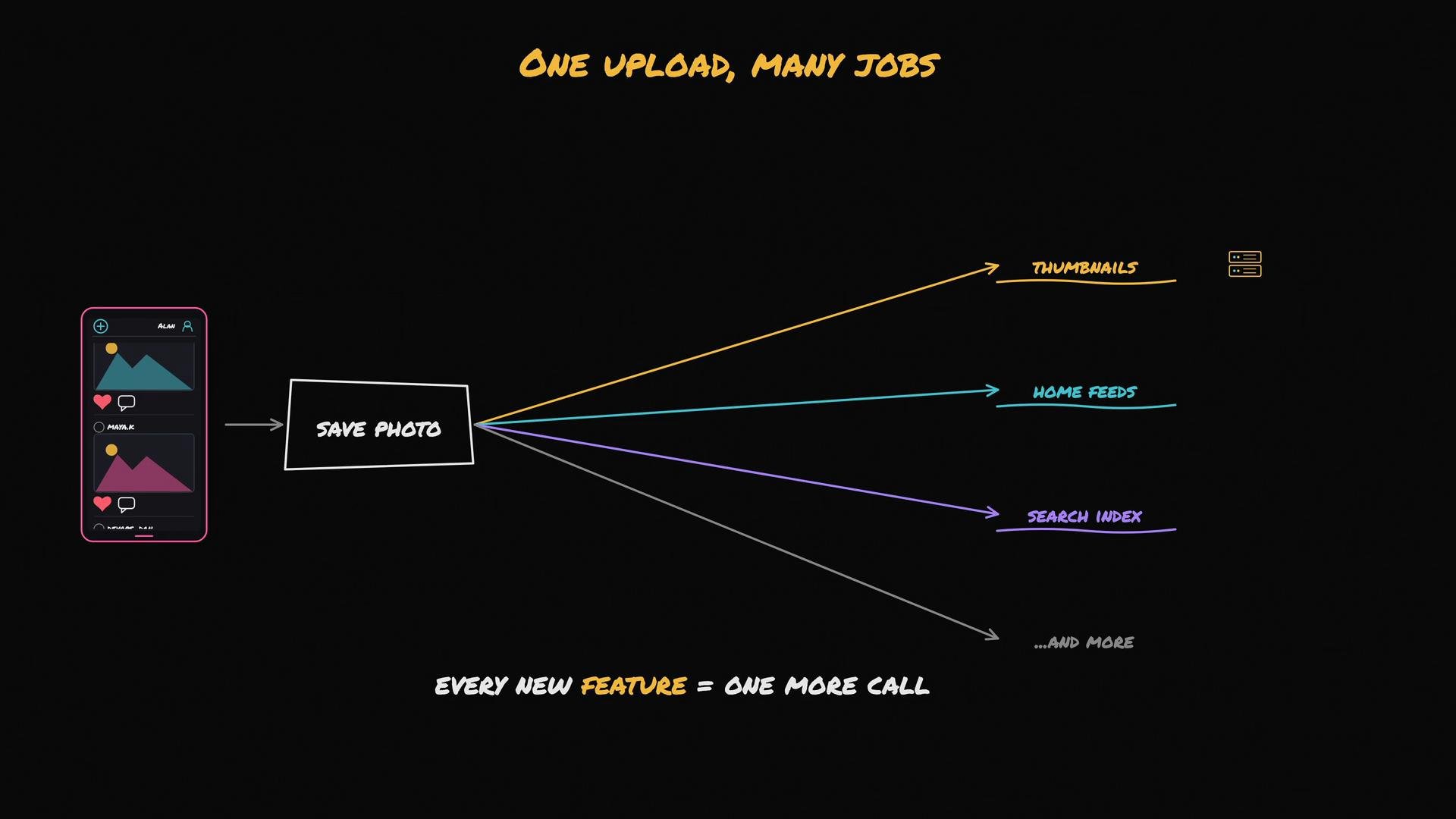 For situations where one event must trigger many independent reactions, the publish–subscribe (pub/sub) pattern is a better fit.
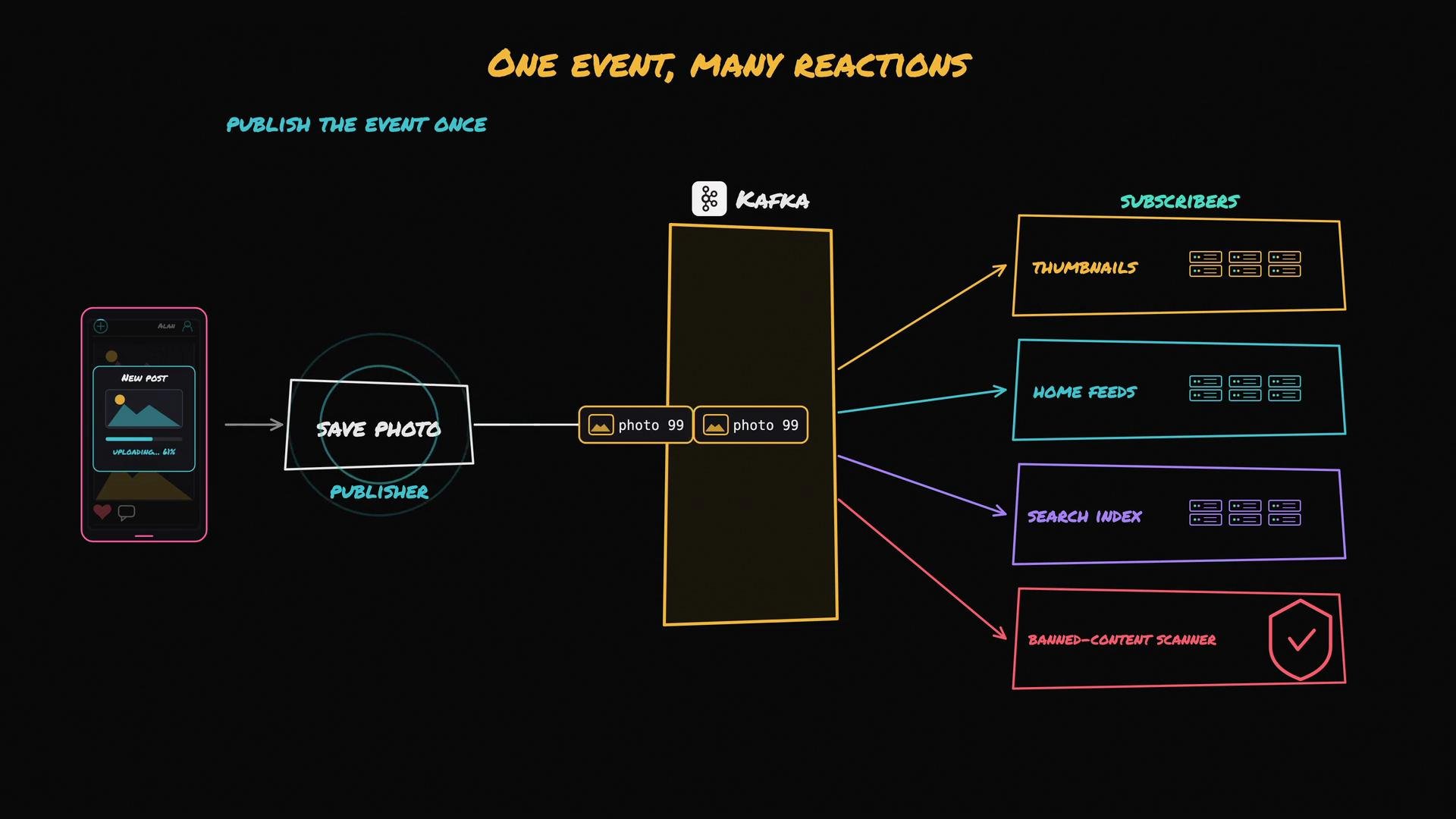
Instead of the `SavePhoto` function calling each downstream service directly, `SavePhoto` publishes a single event (for example, `photo:99:posted`) to a topic and moves on. The publisher does not need to know who subscribes — it only announces what happened.
Subscribers register interest in that topic and process their own copy of the event:
* The Thumbnail Service subscribes to create thumbnails.
* The Feed Service subscribes to update followers’ home feeds.
* The Search Indexer subscribes to add the photo to the search index.
* The Banned Content Scanner subscribes to check for illicit content.
When the event is published, each subscriber receives its own copy and processes it independently. If a service runs multiple instances that should share the work for the same subscription, those instances typically use a shared subscription or consumer group so messages are partitioned among them. Different services that should each receive the event use separate subscriptions so each gets its own copy. Inside a subscriber, a pool of workers can further parallelize processing (for example, multiple thumbnail workers handling a batch).
This pattern — one event fanning out to many listeners — is called fan-out.
Compare queue and pub/sub:
For situations where one event must trigger many independent reactions, the publish–subscribe (pub/sub) pattern is a better fit.
Instead of the `SavePhoto` function calling each downstream service directly, `SavePhoto` publishes a single event (for example, `photo:99:posted`) to a topic and moves on. The publisher does not need to know who subscribes — it only announces what happened.
Subscribers register interest in that topic and process their own copy of the event:
* The Thumbnail Service subscribes to create thumbnails.
* The Feed Service subscribes to update followers’ home feeds.
* The Search Indexer subscribes to add the photo to the search index.
* The Banned Content Scanner subscribes to check for illicit content.
When the event is published, each subscriber receives its own copy and processes it independently. If a service runs multiple instances that should share the work for the same subscription, those instances typically use a shared subscription or consumer group so messages are partitioned among them. Different services that should each receive the event use separate subscriptions so each gets its own copy. Inside a subscriber, a pool of workers can further parallelize processing (for example, multiple thumbnail workers handling a batch).
This pattern — one event fanning out to many listeners — is called fan-out.
Compare queue and pub/sub:
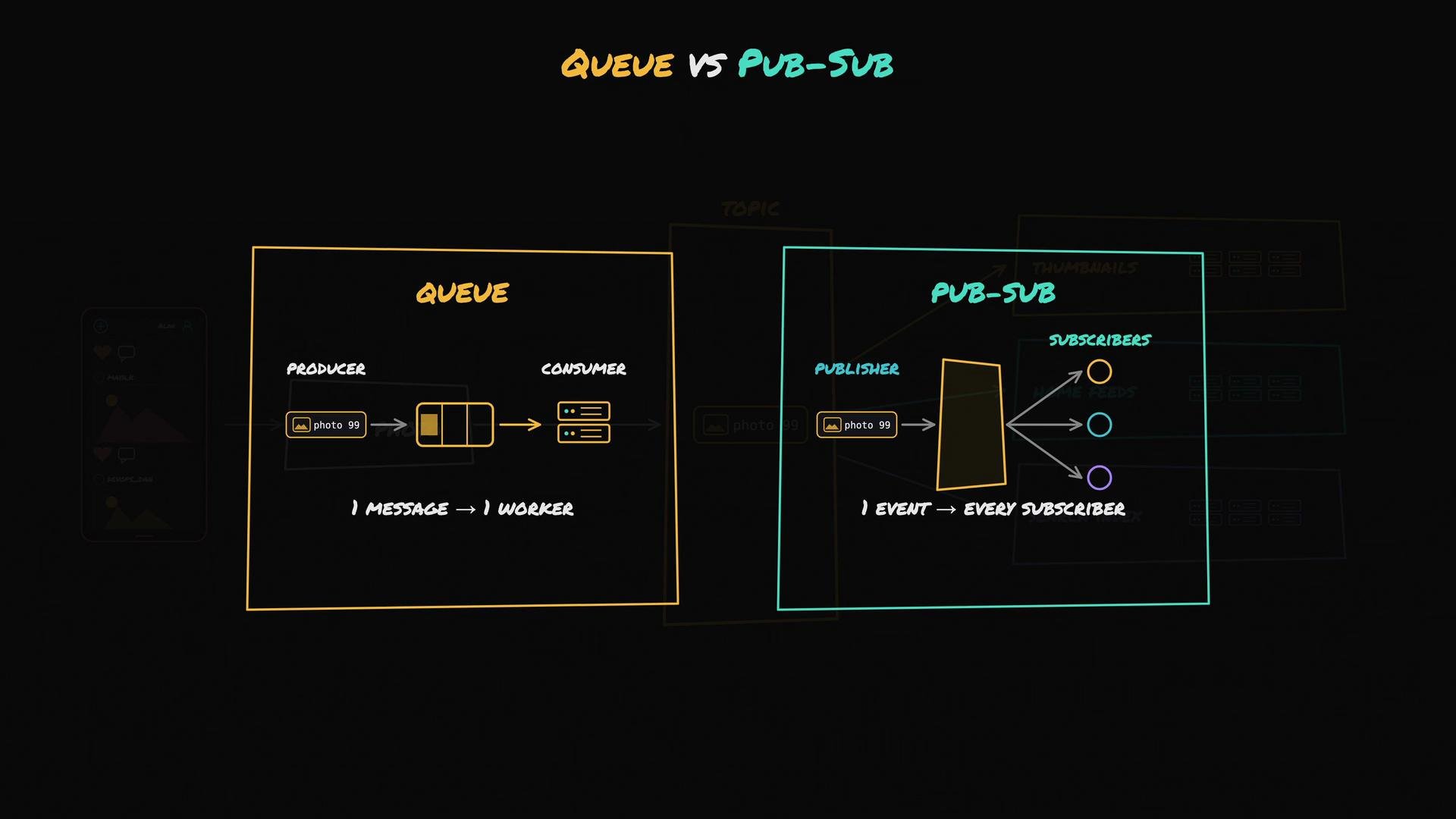 A quick comparison:
| System | Behavior | When to use |
| ------- | -------------------------------------------------------------- | ----------------------------------------------------------------------------------------------------------- |
| Queue | `one message → one worker` — work is partitioned among workers | Single responsibility tasks where exactly one consumer should process each job (e.g., background job queue) |
| Pub/Sub | `one event → many subscribers` — each subscriber gets a copy | Events that should trigger many independent reactions (e.g., analytics, indexing, notifications) |
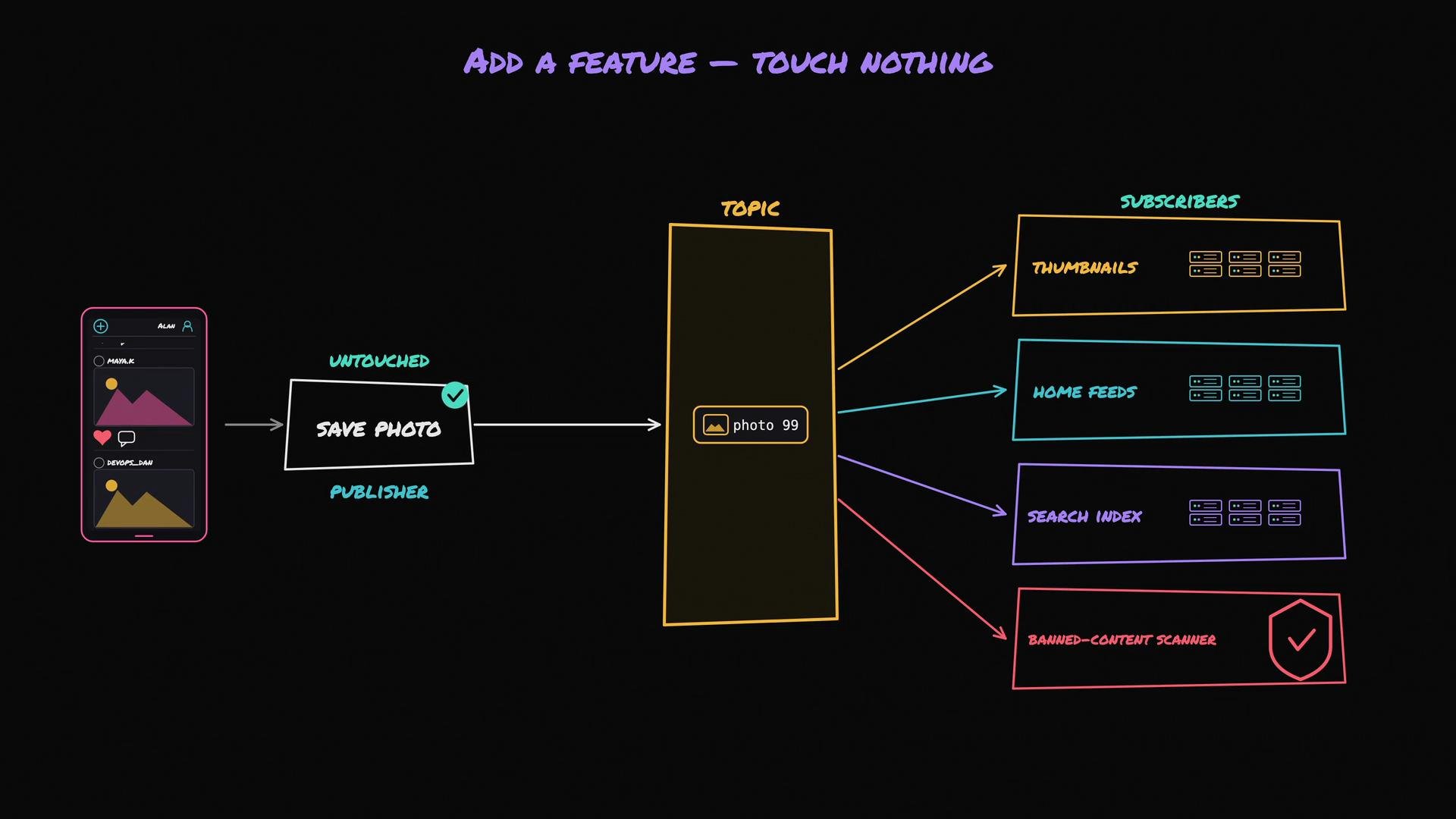
The main advantages of pub/sub are loose coupling and fault isolation. Services don’t need to know about one another: to add a new feature (such as a banned-content scanner), you don’t modify `SavePhoto`; you simply subscribe the scanner to the `photo:posted` topic and it starts receiving events.
Fault isolation: each subscriber can be slow or fail without blocking others. With a durable pub/sub system, events are retained so a subscriber that was down can resume and catch up. For example, if the Search Indexer is down when an upload happens, the Thumbnail and Feed updates still run; when the indexer restarts it consumes the backlog and updates the index.
A quick comparison:
| System | Behavior | When to use |
| ------- | -------------------------------------------------------------- | ----------------------------------------------------------------------------------------------------------- |
| Queue | `one message → one worker` — work is partitioned among workers | Single responsibility tasks where exactly one consumer should process each job (e.g., background job queue) |
| Pub/Sub | `one event → many subscribers` — each subscriber gets a copy | Events that should trigger many independent reactions (e.g., analytics, indexing, notifications) |
The main advantages of pub/sub are loose coupling and fault isolation. Services don’t need to know about one another: to add a new feature (such as a banned-content scanner), you don’t modify `SavePhoto`; you simply subscribe the scanner to the `photo:posted` topic and it starts receiving events.
Fault isolation: each subscriber can be slow or fail without blocking others. With a durable pub/sub system, events are retained so a subscriber that was down can resume and catch up. For example, if the Search Indexer is down when an upload happens, the Thumbnail and Feed updates still run; when the indexer restarts it consumes the backlog and updates the index.
 Durable event streaming platforms (for example, Kafka) implement pub/sub semantics that make replay and catch-up straightforward. Kafka persists events in a commit log for a configurable retention period so services can replay messages or catch up after downtime. Independent services read the same events at their own pace by using separate consumer groups (each service typically uses its own consumer group to receive its own copy). Kafka provides ordering guarantees per-partition and usually offers at-least-once delivery semantics, so consumers should handle duplicates or implement idempotent processing when exactly-once behavior is required.
 When to choose pub/sub
* Use pub/sub when one occurrence must trigger many independent reactions and those reactions should evolve independently.
* Use a queue when exactly one worker must process each job and the work is a single responsibility.
Shift your mental model from “after I upload, I call A, B, and C” to “I announce that an upload happened, and interested systems subscribe and handle it independently.”
Pub/Sub is ideal for decoupling and scaling many independent reactions to the same event. For simple one-off work items where exactly one worker must process the job, a queue is still the simpler and more appropriate choice.
## Links and references
* Kafka (event streaming): [https://learn.kodekloud.com/user/courses/event-streaming-with-kafka](https://learn.kodekloud.com/user/courses/event-streaming-with-kafka)
* Pub/Sub pattern overview: [https://en.wikipedia.org/wiki/Publish%E2%80%93subscribe\_pattern](https://en.wikipedia.org/wiki/Publish%E2%80%93subscribe_pattern)
When to choose pub/sub
* Use pub/sub when one occurrence must trigger many independent reactions and those reactions should evolve independently.
* Use a queue when exactly one worker must process each job and the work is a single responsibility.
Shift your mental model from “after I upload, I call A, B, and C” to “I announce that an upload happened, and interested systems subscribe and handle it independently.”
Pub/Sub is ideal for decoupling and scaling many independent reactions to the same event. For simple one-off work items where exactly one worker must process the job, a queue is still the simpler and more appropriate choice.
## Links and references
* Kafka (event streaming): [https://learn.kodekloud.com/user/courses/event-streaming-with-kafka](https://learn.kodekloud.com/user/courses/event-streaming-with-kafka)
* Pub/Sub pattern overview: [https://en.wikipedia.org/wiki/Publish%E2%80%93subscribe\_pattern](https://en.wikipedia.org/wiki/Publish%E2%80%93subscribe_pattern)