> ## Documentation Index
> Fetch the complete documentation index at: https://notes.kodekloud.com/llms.txt
> Use this file to discover all available pages before exploring further.
# The Upload Path
> Explains storing photo metadata in a database and image binaries in object storage, using pre-signed uploads and background workers for resizing to optimize uploads and serving
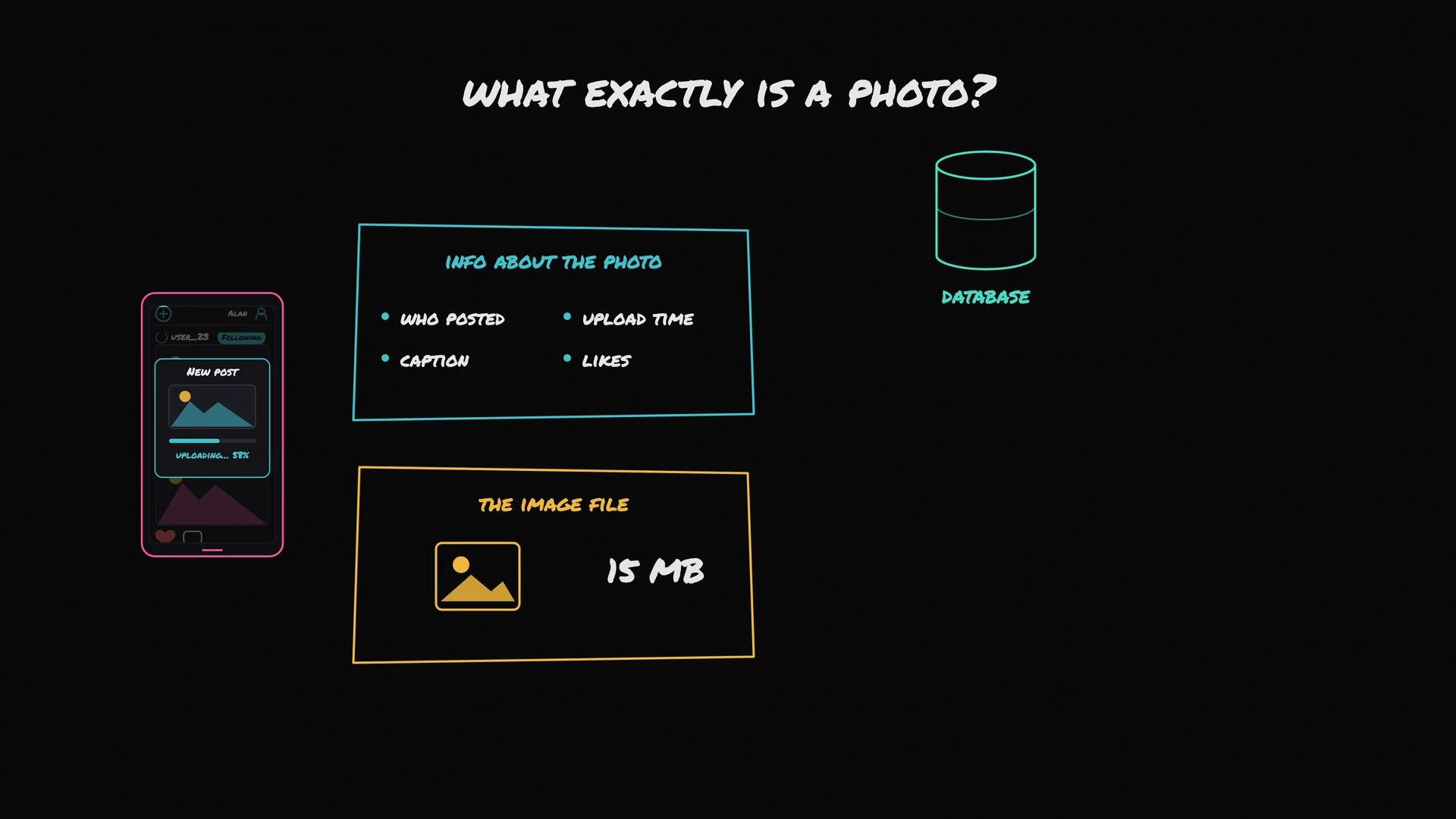
Let’s clarify one question that often confuses designers: when a user like Alan uploads a “photo,” what exactly is the system storing and where does each piece belong?
There are two distinct things hidden under the single word “photo”:
* Small, structured metadata: who posted it, the caption, upload time, like count — data you query and join.
* The large image file: the multi-megabyte binary (pixels) produced by Alan’s phone camera.
 Why you should not store the full image binary in your relational database
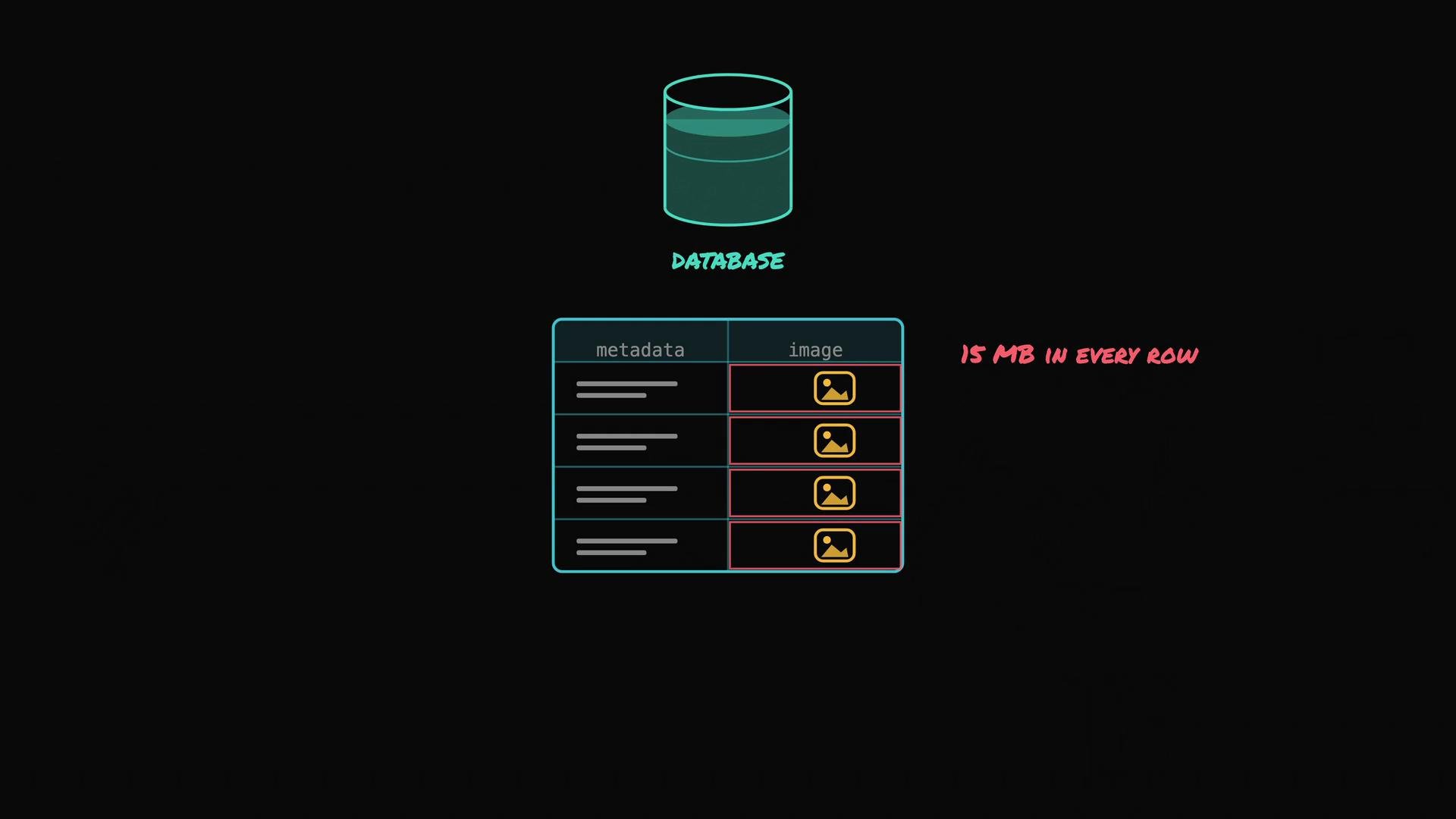
* Relational databases such as [PostgreSQL](https://www.postgresql.org) are optimized for many small, structured rows and fast relational queries.
* A photo’s metadata row is typically a few hundred bytes. If you embed a 15 MB binary in that row, tables that should be gigabytes will balloon to terabytes.
* Large binaries increase backup times, slow down replication and queries, and complicate scaling and maintenance.
Why you should not store the full image binary in your relational database
* Relational databases such as [PostgreSQL](https://www.postgresql.org) are optimized for many small, structured rows and fast relational queries.
* A photo’s metadata row is typically a few hundred bytes. If you embed a 15 MB binary in that row, tables that should be gigabytes will balloon to terabytes.
* Large binaries increase backup times, slow down replication and queries, and complicate scaling and maintenance.
 Recommended pattern: split photo metadata from the image file
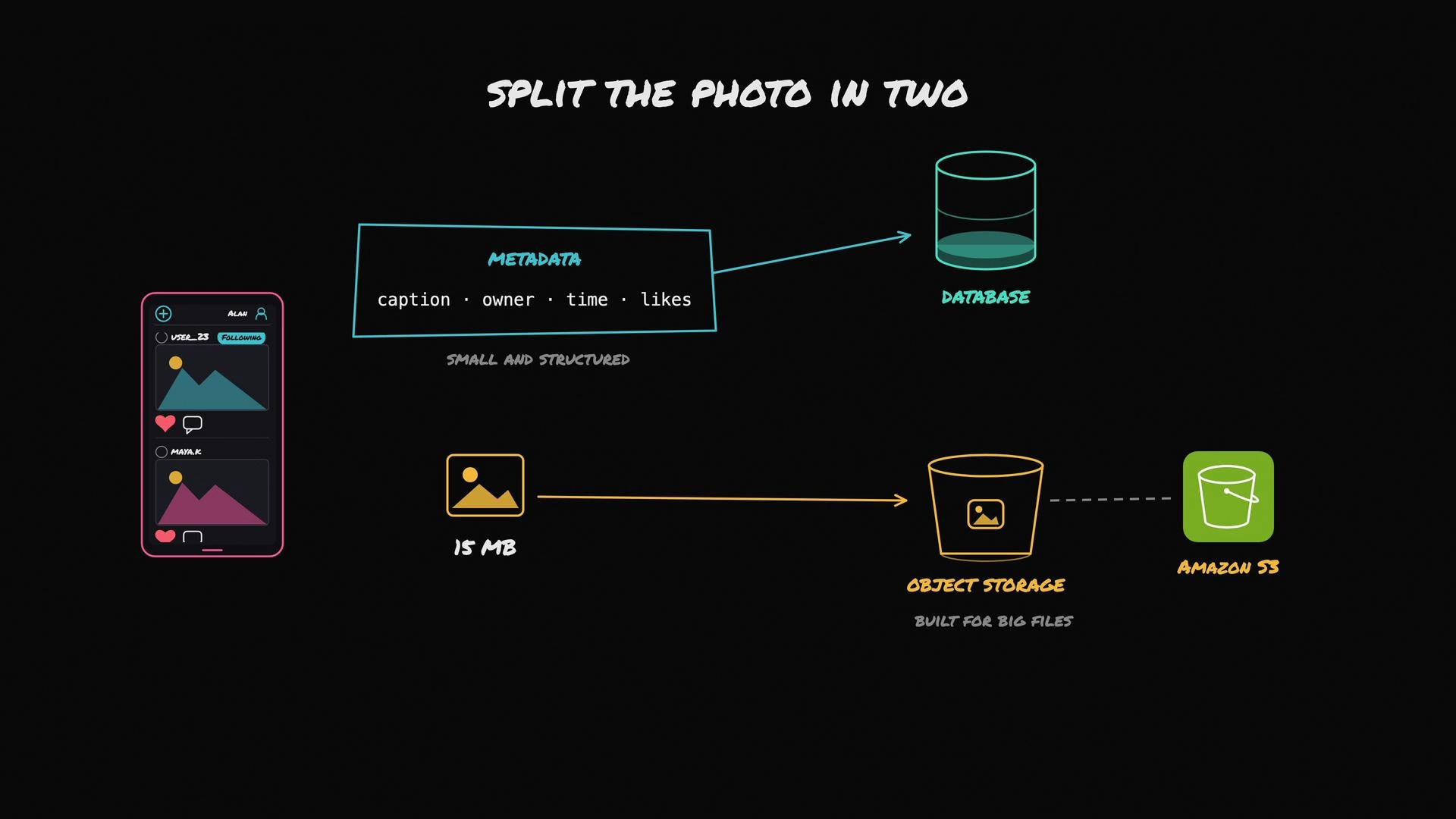
* Store the small, structured metadata (caption, owner, upload time, like count) in your SQL database.
* Store the large image file in object storage (designed for large, durable blobs). The most common example is [Amazon S3](https://aws.amazon.com/s3).
* Save the object location (object key or URL) in the database so metadata points to the file’s location.
Recommended pattern: split photo metadata from the image file
* Store the small, structured metadata (caption, owner, upload time, like count) in your SQL database.
* Store the large image file in object storage (designed for large, durable blobs). The most common example is [Amazon S3](https://aws.amazon.com/s3).
* Save the object location (object key or URL) in the database so metadata points to the file’s location.
 Quick storage comparison
| What to store | Recommended location | Why |
| ----------------------------------------------------- | ---------------------------------- | ------------------------------------------- |
| Photo metadata (owner, caption, timestamps, counters) | SQL database (e.g., `PostgreSQL`) | Small rows, searchable, transactional |
| Full-resolution image files | Object storage (e.g., `Amazon S3`) | Cheap, durable, scalable for large binaries |
| Resized image variants (thumbnails) | Object storage (separate keys) | Fast to serve, cached, small size |
How the upload flow should work (end-to-end)
1. Alan selects and uploads an image from the app.
2. The app or app server writes the raw image file to object storage.
3. Object storage returns an object key or URL for the uploaded file.
4. The app writes one small row in the database containing owner, caption, upload time, and that object location.
At the end of this flow the large binary resides in object storage and the small, queryable record lives in the database.
Optimizing transfer with pre-signed URLs
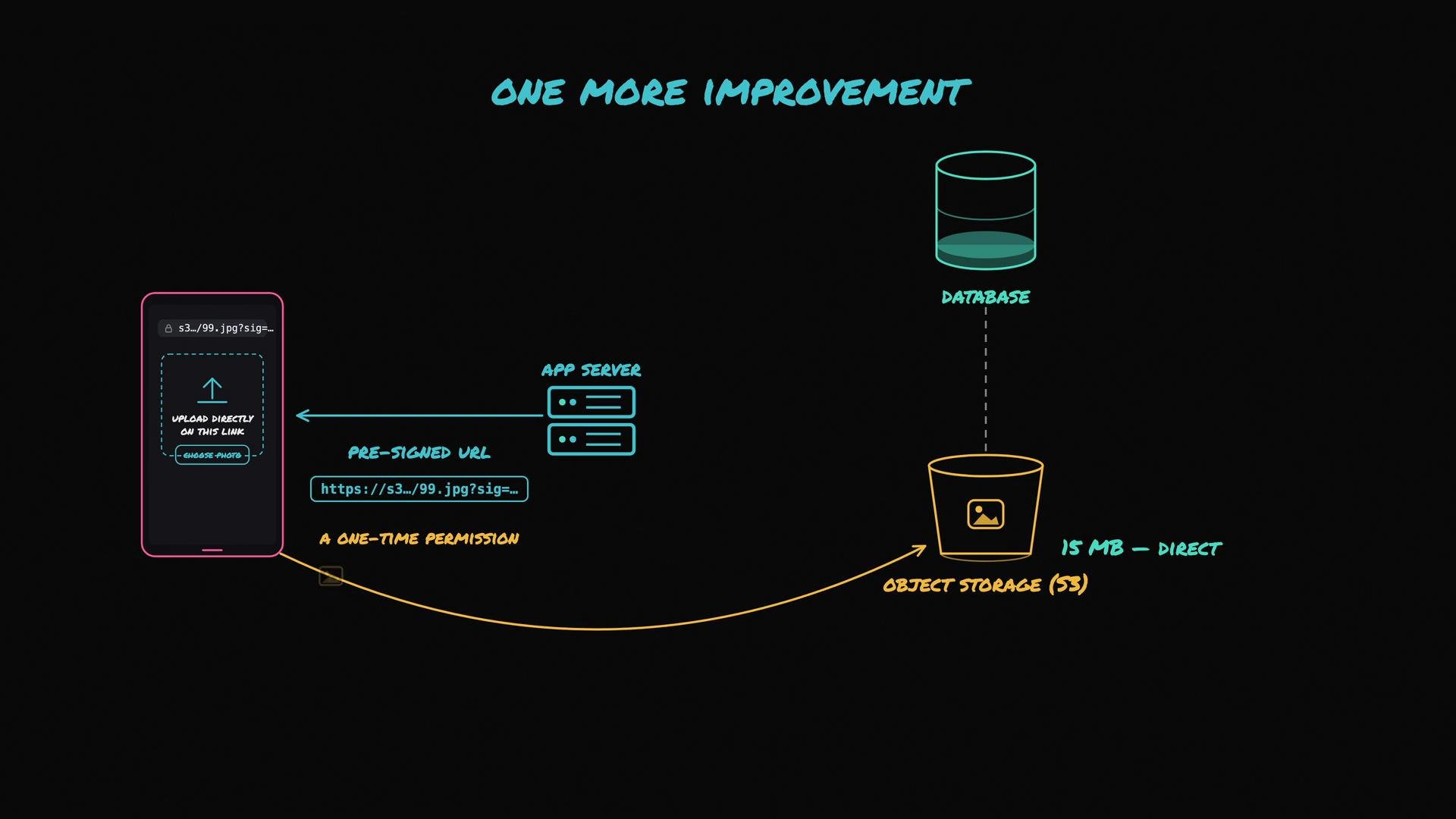
* To avoid routing the 15 MB binary through your app servers, have your backend issue a pre-signed URL that allows the client to upload directly to object storage.
* A pre-signed URL grants a temporary, scoped permission to upload to a specific object key, so the heavy upload goes straight from the client to S3.
* Advantages: reduced bandwidth and CPU usage on your servers and faster perceived upload time for the user.
Quick storage comparison
| What to store | Recommended location | Why |
| ----------------------------------------------------- | ---------------------------------- | ------------------------------------------- |
| Photo metadata (owner, caption, timestamps, counters) | SQL database (e.g., `PostgreSQL`) | Small rows, searchable, transactional |
| Full-resolution image files | Object storage (e.g., `Amazon S3`) | Cheap, durable, scalable for large binaries |
| Resized image variants (thumbnails) | Object storage (separate keys) | Fast to serve, cached, small size |
How the upload flow should work (end-to-end)
1. Alan selects and uploads an image from the app.
2. The app or app server writes the raw image file to object storage.
3. Object storage returns an object key or URL for the uploaded file.
4. The app writes one small row in the database containing owner, caption, upload time, and that object location.
At the end of this flow the large binary resides in object storage and the small, queryable record lives in the database.
Optimizing transfer with pre-signed URLs
* To avoid routing the 15 MB binary through your app servers, have your backend issue a pre-signed URL that allows the client to upload directly to object storage.
* A pre-signed URL grants a temporary, scoped permission to upload to a specific object key, so the heavy upload goes straight from the client to S3.
* Advantages: reduced bandwidth and CPU usage on your servers and faster perceived upload time for the user.
 Handling resized variants and UX expectations
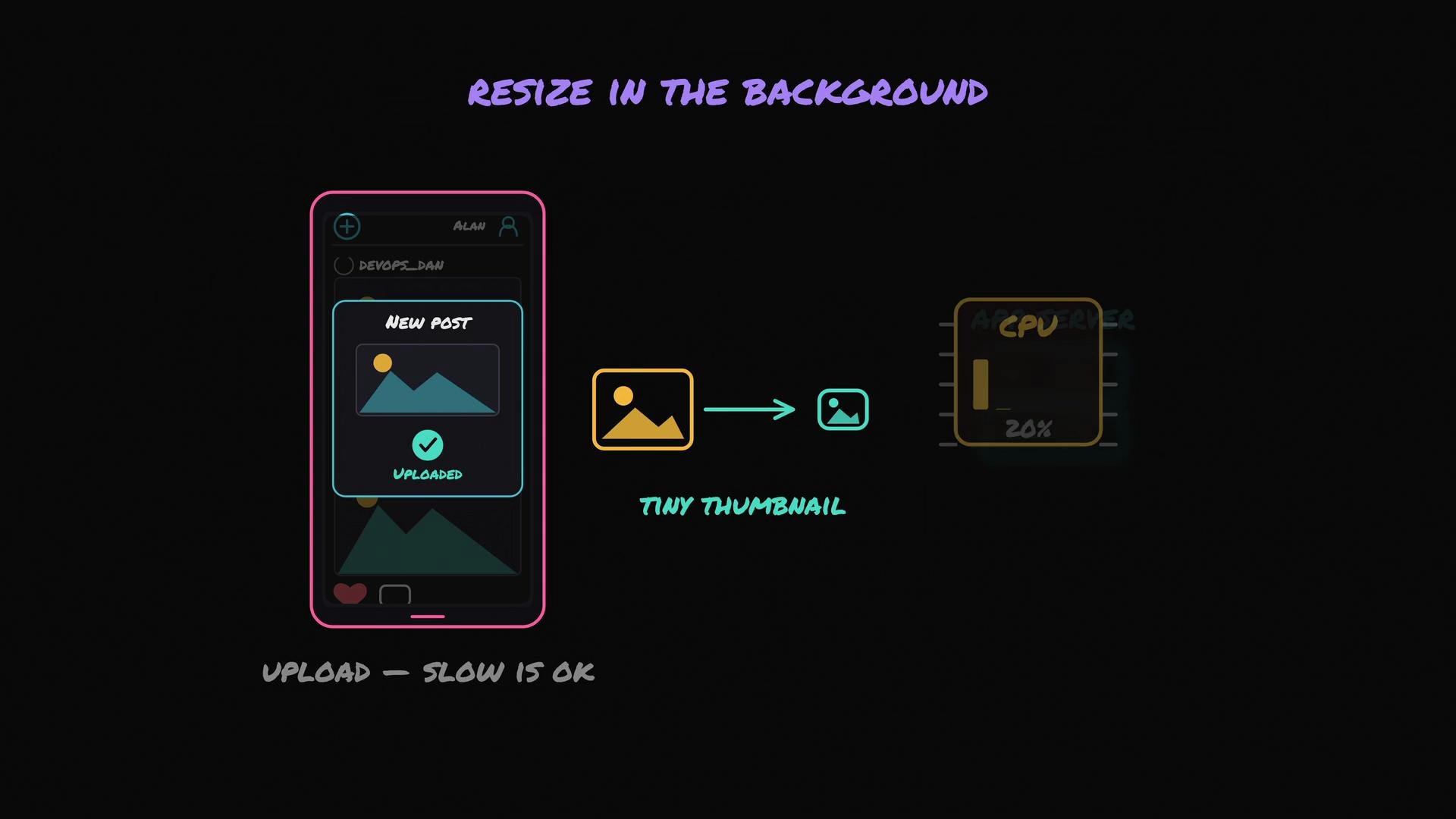
* Users expect the feed to feel instant even if the full upload takes a few seconds.
* Serving a 15 MB original inline in a scrolling feed is unacceptable. Instead create multiple resized variants:
* Tiny thumbnails for the feed (fast, low bandwidth).
* Medium images for the post detail view.
* The original/high-quality image for downloads or zoom.
* Image resizing is CPU-intensive. Don’t block the user’s upload on resizing. Instead:
* Record the metadata and original object reference immediately.
* Return success to the client.
* Enqueue background work to create resized variants and store them back to object storage.
Handling resized variants and UX expectations
* Users expect the feed to feel instant even if the full upload takes a few seconds.
* Serving a 15 MB original inline in a scrolling feed is unacceptable. Instead create multiple resized variants:
* Tiny thumbnails for the feed (fast, low bandwidth).
* Medium images for the post detail view.
* The original/high-quality image for downloads or zoom.
* Image resizing is CPU-intensive. Don’t block the user’s upload on resizing. Instead:
* Record the metadata and original object reference immediately.
* Return success to the client.
* Enqueue background work to create resized variants and store them back to object storage.
 Putting it all together: simplified process summary
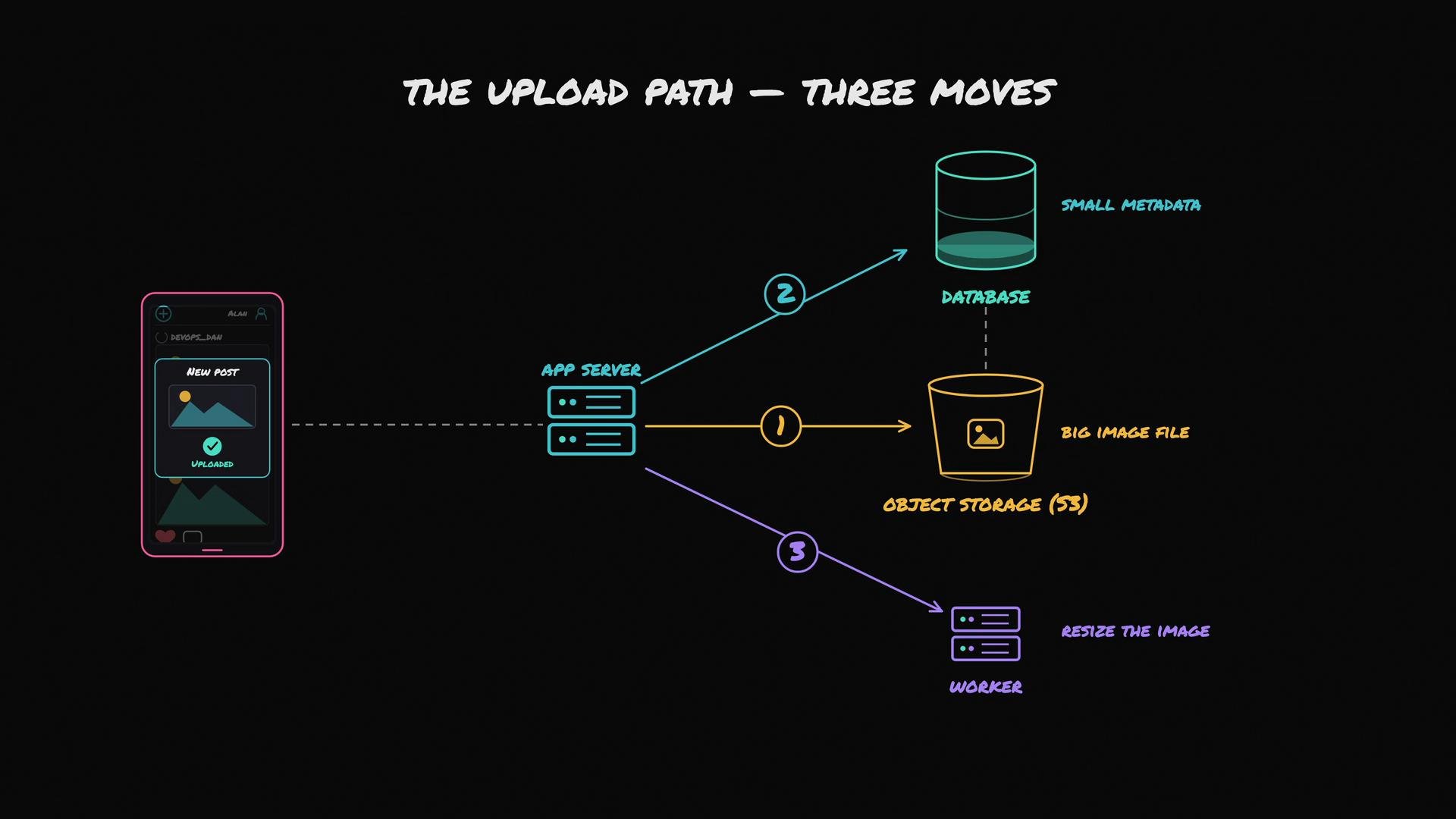
* Upload the original to object storage (or issue a pre-signed URL and let the client upload).
* Write small metadata records to the database with the object location.
* Offload resizing, transcoding, and other heavy tasks to background workers.
1. Keep large files in object storage (`S3`).
2. Keep small, structured metadata in your database (`PostgreSQL`) with a reference to the file.
3. Offload slow processing (resizing, transcodes) to background workers to keep the request path fast.
Putting it all together: simplified process summary
* Upload the original to object storage (or issue a pre-signed URL and let the client upload).
* Write small metadata records to the database with the object location.
* Offload resizing, transcoding, and other heavy tasks to background workers.
1. Keep large files in object storage (`S3`).
2. Keep small, structured metadata in your database (`PostgreSQL`) with a reference to the file.
3. Offload slow processing (resizing, transcodes) to background workers to keep the request path fast.
 Never store large binary files in your transactional database. Use object storage for big blobs and move slow, CPU-bound processing off the user-facing request path.
Further reading and references
* Amazon S3 pre-signed URLs: [https://docs.aws.amazon.com/AmazonS3/latest/userguide/PresignedUrlUploadObject.html](https://docs.aws.amazon.com/AmazonS3/latest/userguide/PresignedUrlUploadObject.html)
* PostgreSQL documentation: [https://www.postgresql.org](https://www.postgresql.org)
* Object storage design patterns and best practices: search for “object storage vs relational database for media” for architecture guides and examples.
Never store large binary files in your transactional database. Use object storage for big blobs and move slow, CPU-bound processing off the user-facing request path.
Further reading and references
* Amazon S3 pre-signed URLs: [https://docs.aws.amazon.com/AmazonS3/latest/userguide/PresignedUrlUploadObject.html](https://docs.aws.amazon.com/AmazonS3/latest/userguide/PresignedUrlUploadObject.html)
* PostgreSQL documentation: [https://www.postgresql.org](https://www.postgresql.org)
* Object storage design patterns and best practices: search for “object storage vs relational database for media” for architecture guides and examples.