> ## Documentation Index
> Fetch the complete documentation index at: https://notes.kodekloud.com/llms.txt
> Use this file to discover all available pages before exploring further.
# Notification System Retries and the Dead Letter Queue
> Designing polite retry strategies with exponential backoff and jitter and using dead-letter queues to handle failed notifications, preserve messages, and enable monitoring and replay
We have four queues, and workers pull notification tickets from all four queues and call external service providers (for example, an email provider). On a normal day, everything works fine. But when an external provider becomes unresponsive — for example, the email provider is down for 30 minutes — the design of our retry and failure-handling strategy determines whether the incident becomes a short outage or a cascading failure.
The core design questions:
* What should a worker do when a provider call fails?
* How many times should we retry, and how should we schedule those retries?
* When should we stop retrying and move work to a dead-letter queue (DLQ)?
Design goals
* Avoid amplifying the outage by sending many immediate retries (prevent a thundering herd).
* Ensure transient failures are retried automatically and successfully.
* Preserve failed messages for investigation and reprocessing if necessary.
* Keep behavior predictable: cap retry attempts and delays, monitor DLQ growth, and provide tooling for replay.
Retry politely: exponential backoff with jitter
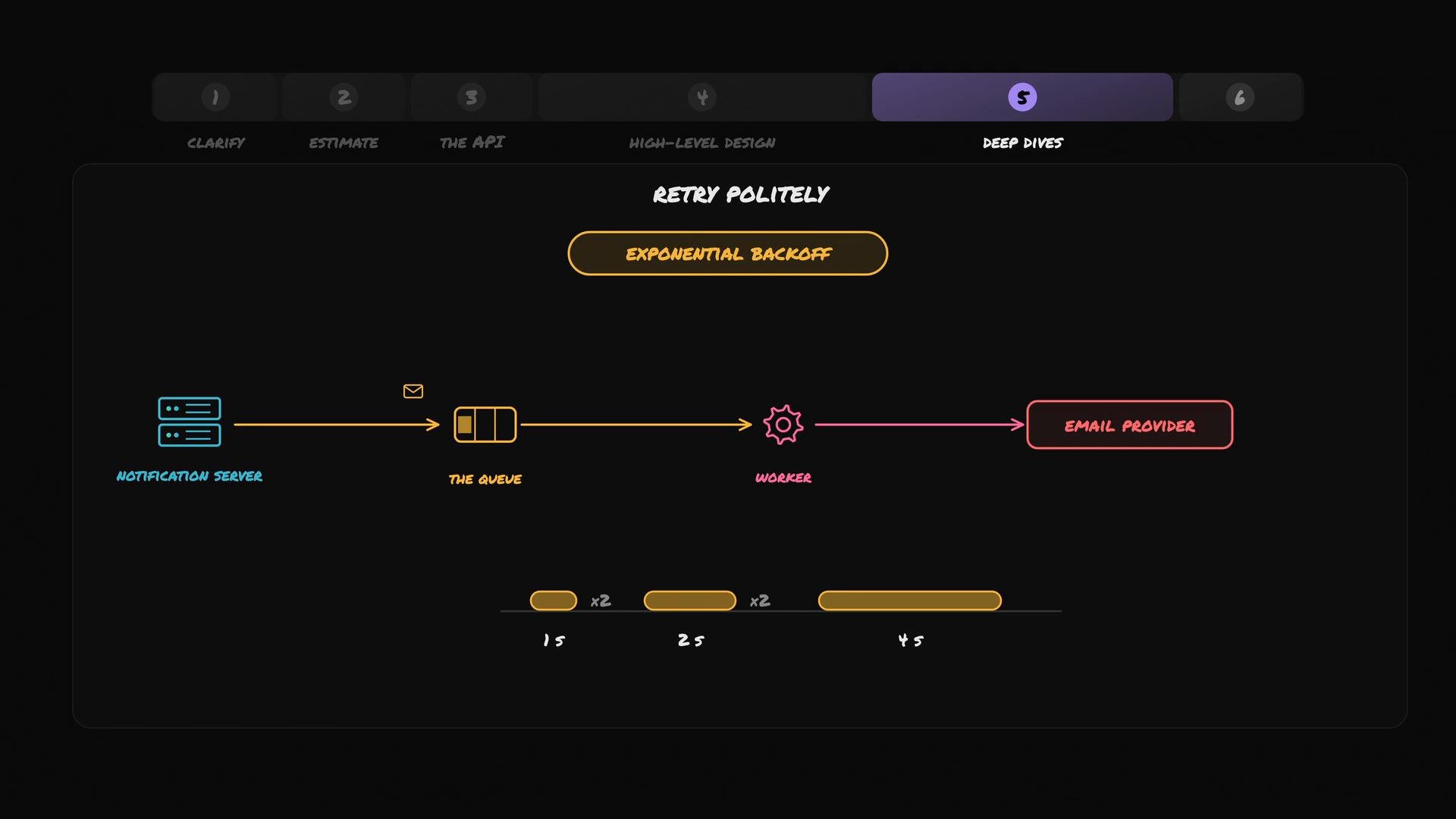
If the email provider is already down and hundreds of workers retry immediately and repeatedly, they can overwhelm the provider’s API and make recovery slower. Use exponential backoff so each retry waits progressively longer, giving the provider time to recover.
A typical exponential backoff schedule doubles the wait time after each failed attempt. Example sequence:
* Wait 1 second before the first retry.
* If that fails, wait 2 seconds before the second retry.
* If that fails, wait 4 seconds before the third retry.
Formula examples:
* If attempts are 1-indexed: backoff = base\_delay \* 2^(attempt\_number - 1)
* If attempts are 0-indexed (attempt 0 = first retry): backoff = base\_delay \* 2^(attempt\_number)
Code-style examples:
* base\_delay = 1s → attempt 1 = 1s, attempt 2 = 2s, attempt 3 = 4s
* Apply an upper cap: `max_delay = 60s` (so backoff never exceeds this)
* Add jitter: `delay = random_between(backoff * 0.5, backoff * 1.5)`
Small example table of delays (base\_delay = 1s, no cap, deterministic):
| Attempt | Delay |
| - | - |
| 1 | 1s |
| 2 | 2s |
| 3 | 4s |
| 4 | 8s |
| 5 | 16s |
Include jitter (a randomized offset) with exponential backoff to prevent a thundering herd when many workers retry simultaneously. Also cap the maximum delay and limit the number of retries to keep behavior predictable and measurable.
 When to move to a Dead-Letter Queue (DLQ)
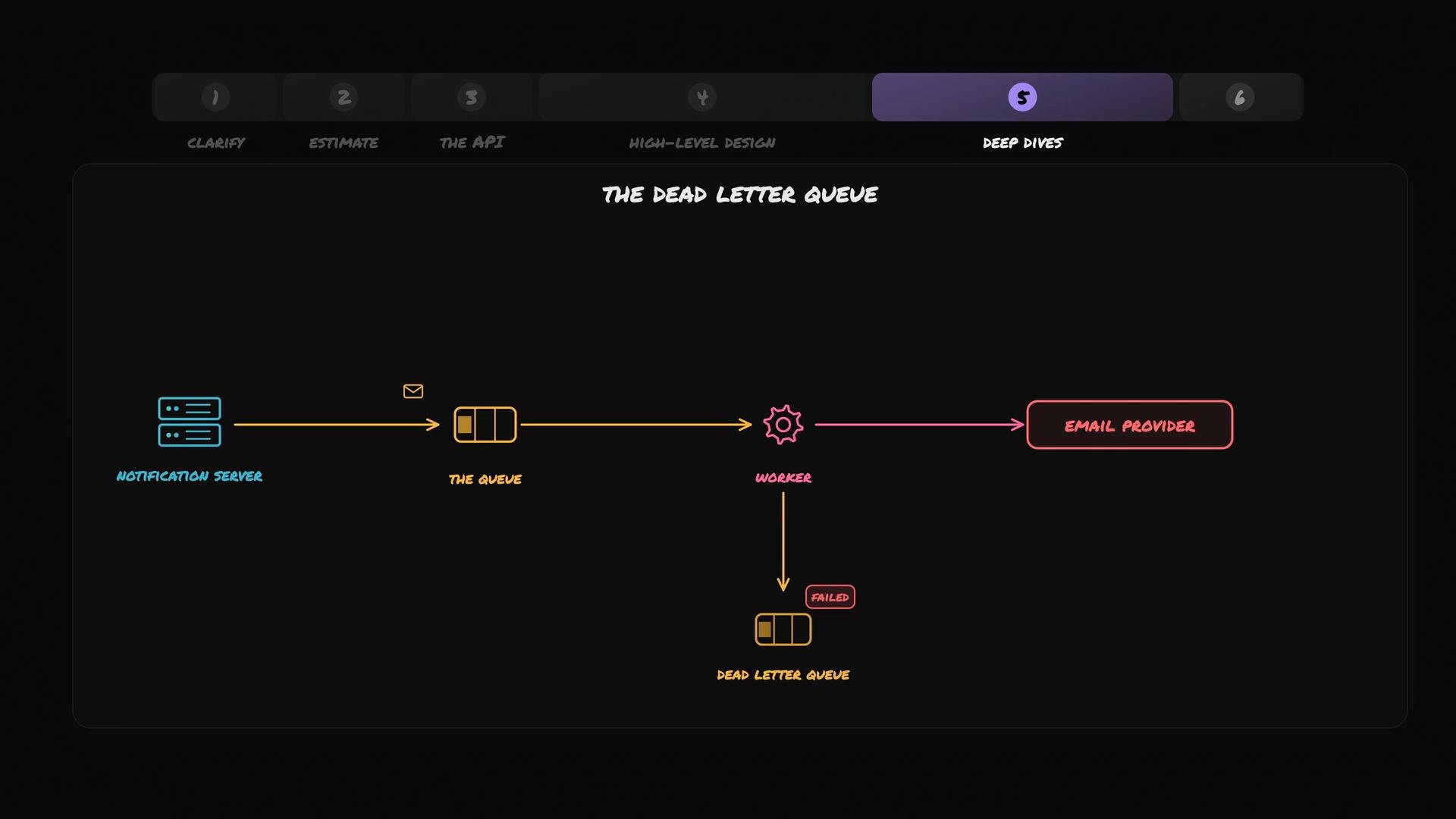
After a configured number of retries (a common range is 3–5 attempts, but this depends on business needs and SLA constraints), if the external provider still does not respond, do not discard the notification. Move the failed message to a dead-letter queue (DLQ). The DLQ is a special queue that stores messages which repeatedly fail processing so support engineers or automated systems can investigate, alert, and optionally reprocess them.
Why DLQs matter
* Preserve failed messages for debugging and auditing.
* Prevent poison messages (bad or malformed payloads) from blocking normal processing.
* Allow manual inspection and corrective actions (e.g., fix data and replay).
* Trigger alerts and metrics when DLQ size grows beyond a threshold.
Best practices for DLQ handling
| Area | Recommendation |
| - | - |
| Retry count | Configure a sensible limit (3–5 attempts) based on throughput and business impact. |
| Max delay | Cap exponential backoff (e.g., `max_delay = 60s` or higher) to bound latency. |
| Jitter | Add randomized jitter to each retry to avoid synchronization across workers. |
| Monitoring | Emit metrics for retry failures and DLQ depth; alert on sustained growth. |
| Retention & access | Set a retention policy and provide tooling/UI for inspection and replay. |
| Reprocessing | Support automated or manual replay after fix; track idempotency to avoid duplicates. |
Operational considerations
* Distinguish between provider outages and poison messages: persistent 5xx/provider-timeout errors are candidates for DLQing, while malformed payloads should be DLQed immediately.
* Define SLAs for how fast problems must be fixed and what constitutes an outage that requires paging.
* Implement visibility: annotate DLQ messages with failure reason, attempt count, timestamps, and correlation IDs to make debugging easier.
* Use idempotent operations or deduplication when reprocessing messages from DLQ to prevent side effects.
Do not silently drop failed notifications. Moving messages to a DLQ preserves them for post-mortem analysis and prevents repeated failed processing from affecting healthy traffic.
When to move to a Dead-Letter Queue (DLQ)
After a configured number of retries (a common range is 3–5 attempts, but this depends on business needs and SLA constraints), if the external provider still does not respond, do not discard the notification. Move the failed message to a dead-letter queue (DLQ). The DLQ is a special queue that stores messages which repeatedly fail processing so support engineers or automated systems can investigate, alert, and optionally reprocess them.
Why DLQs matter
* Preserve failed messages for debugging and auditing.
* Prevent poison messages (bad or malformed payloads) from blocking normal processing.
* Allow manual inspection and corrective actions (e.g., fix data and replay).
* Trigger alerts and metrics when DLQ size grows beyond a threshold.
Best practices for DLQ handling
| Area | Recommendation |
| - | - |
| Retry count | Configure a sensible limit (3–5 attempts) based on throughput and business impact. |
| Max delay | Cap exponential backoff (e.g., `max_delay = 60s` or higher) to bound latency. |
| Jitter | Add randomized jitter to each retry to avoid synchronization across workers. |
| Monitoring | Emit metrics for retry failures and DLQ depth; alert on sustained growth. |
| Retention & access | Set a retention policy and provide tooling/UI for inspection and replay. |
| Reprocessing | Support automated or manual replay after fix; track idempotency to avoid duplicates. |
Operational considerations
* Distinguish between provider outages and poison messages: persistent 5xx/provider-timeout errors are candidates for DLQing, while malformed payloads should be DLQed immediately.
* Define SLAs for how fast problems must be fixed and what constitutes an outage that requires paging.
* Implement visibility: annotate DLQ messages with failure reason, attempt count, timestamps, and correlation IDs to make debugging easier.
* Use idempotent operations or deduplication when reprocessing messages from DLQ to prevent side effects.
Do not silently drop failed notifications. Moving messages to a DLQ preserves them for post-mortem analysis and prevents repeated failed processing from affecting healthy traffic.
 References and further reading
* Exponential backoff and jitter patterns — industry best practices for retries.
* Dead-letter queue patterns — for preserving failed messages, monitoring, and replay.
* [AWS SQS Dead-Letter Queues](https://docs.aws.amazon.com/AWSSimpleQueueService/latest/SQSDeveloperGuide/sqs-dead-letter-queues.html) (example platform docs).
* For general system-design concepts: queueing, idempotency, monitoring, and alerting strategies.
This documentation is built and hosted on [Mintlify](https://mintlify.com), a developer documentation platform.
References and further reading
* Exponential backoff and jitter patterns — industry best practices for retries.
* Dead-letter queue patterns — for preserving failed messages, monitoring, and replay.
* [AWS SQS Dead-Letter Queues](https://docs.aws.amazon.com/AWSSimpleQueueService/latest/SQSDeveloperGuide/sqs-dead-letter-queues.html) (example platform docs).
* For general system-design concepts: queueing, idempotency, monitoring, and alerting strategies.
This documentation is built and hosted on [Mintlify](https://mintlify.com), a developer documentation platform.