> ## Documentation Index
> Fetch the complete documentation index at: https://notes.kodekloud.com/llms.txt
> Use this file to discover all available pages before exploring further.
# Rate Limiter Fixed and Sliding Windows
> Explains fixed-window and sliding-window rate limiting techniques, their tradeoffs, implementation patterns, and recommended HTTP responses and headers for throttling APIs.
Step three is defining the API. A rate limiter has a single responsibility: for every incoming request, answer the question "is this request allowed?" and communicate the result to the client.
* If the request is disallowed, respond with HTTP 429 (Too Many Requests) and a `Retry-After` header indicating when the client may retry (either seconds or an HTTP-date). This prevents aggressive clients from repeatedly retrying and amplifying traffic on a throttled service.
* For allowed responses, include headers that help clients behave politely, for example how many requests remain and when the quota resets. Typical headers are `Retry-After`, `X-RateLimit-Limit`, `X-RateLimit-Remaining`, and `X-RateLimit-Reset` (or semantic equivalents your API consumers expect).
A minimal interaction looks like:
```http theme={null}
POST /create
...
HTTP/1.1 429 Too Many Requests
Retry-After: 40
```
Provide `Retry-After` plus remaining/quota-reset headers whenever possible. These signals let well-behaved clients back off proactively and reduce needless retry storms.
Placement: put the rate limiter as early as possible — ideally in the API gateway — so rejected requests are stopped before consuming internal resources.
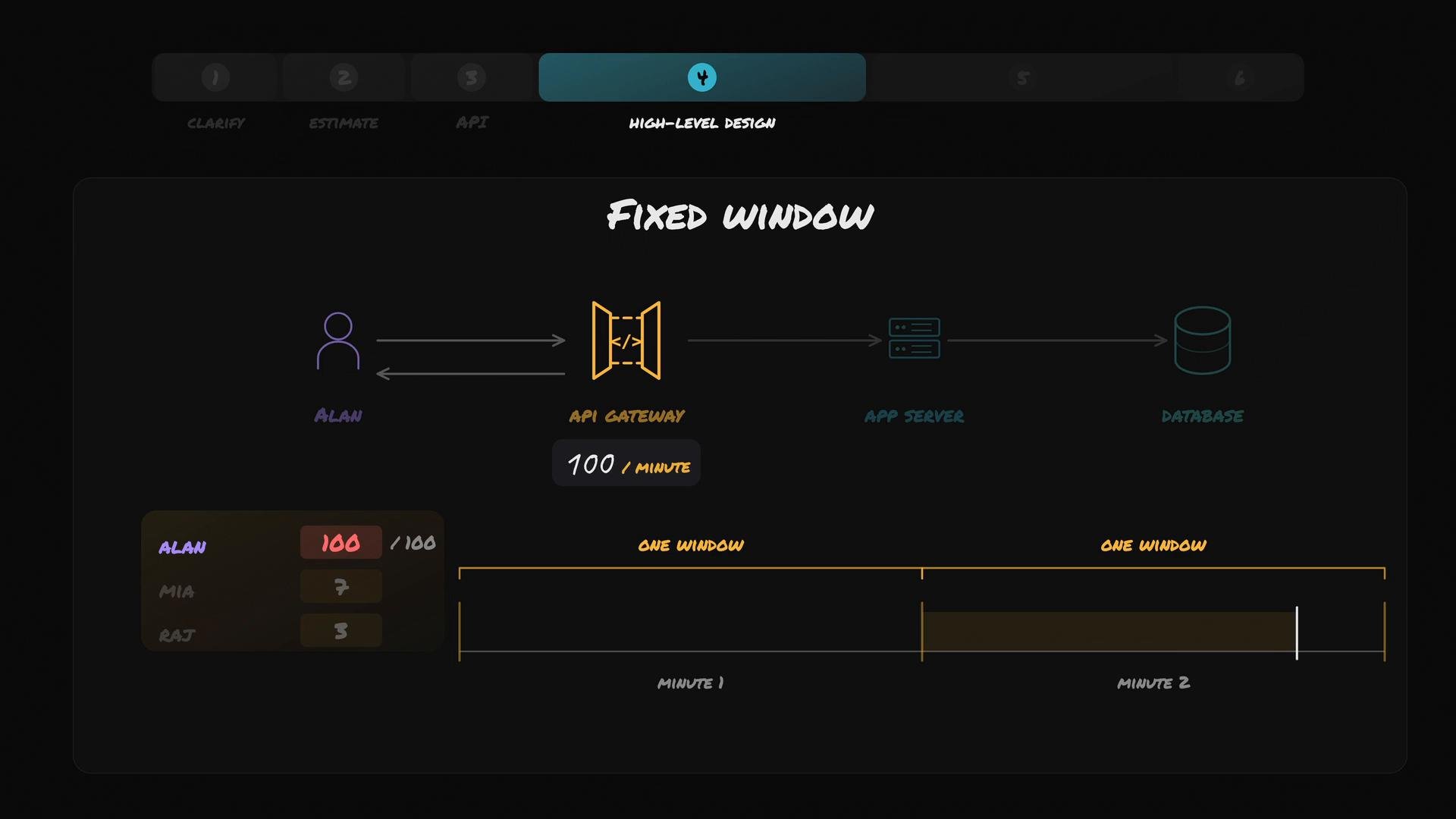
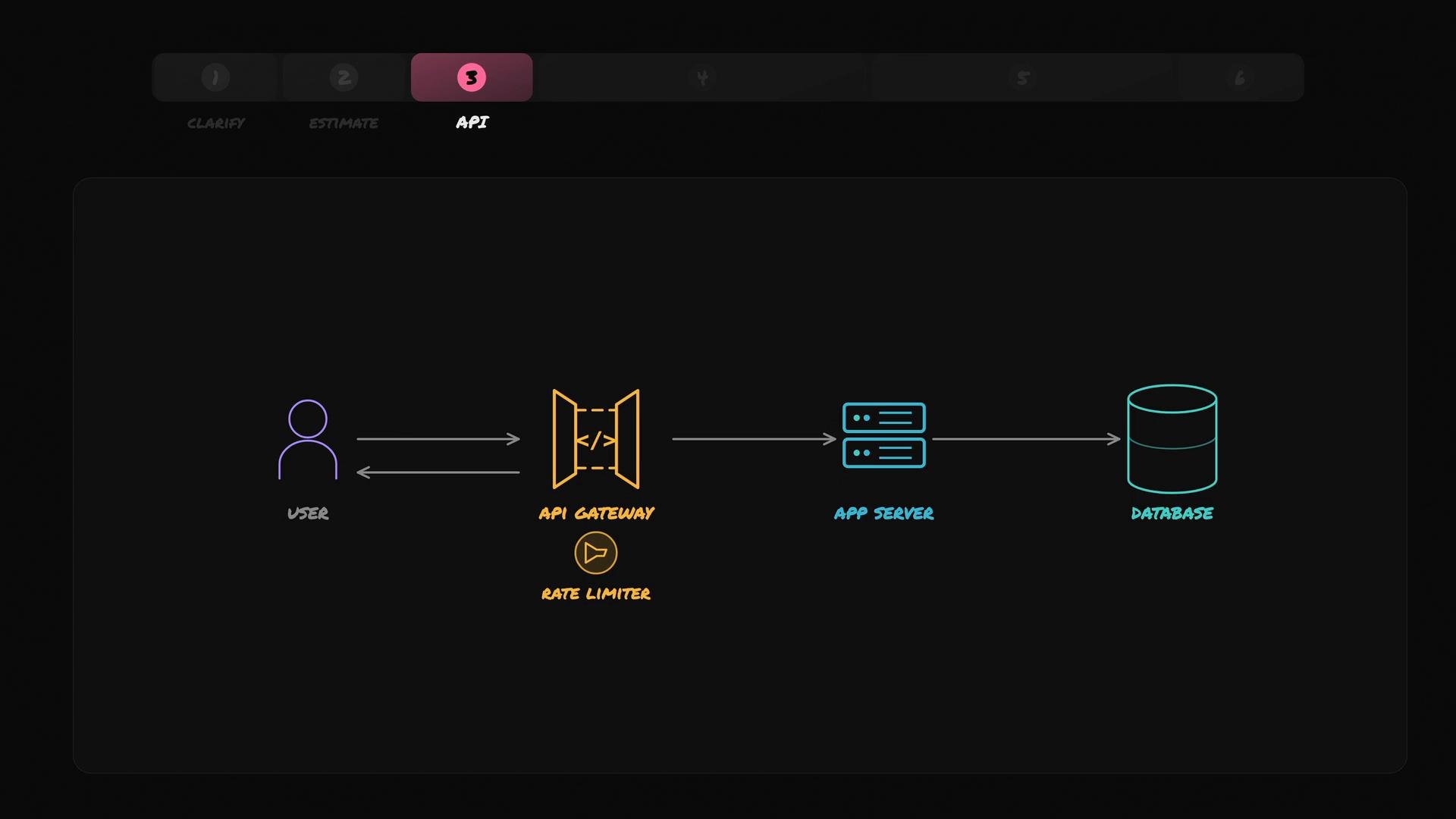 Step four is the high-level design. Start with the simplest, most common implementation: a single gateway server that keeps one counter per user in memory.
Fixed window (simple approach)
* Track counts per fixed, clock-aligned window (for example: per minute).
* When Alan's request arrives:
* If Alan's counter for the current minute is less than 100, increment it and allow the request.
* When the minute rolls over, reset Alan's counter to zero.
* If the counter has reached 100, reject the request.
This is called the fixed-window technique. It's easy to implement and works for many use-cases where occasional bursts around window boundaries are acceptable.
Minimal pseudocode (fixed window):
```text theme={null}
onRequest(user):
window = currentMinute()
if counters[user].window != window:
counters[user] = { window: window, count: 0 }
if counters[user].count < 100:
counters[user].count += 1
allow()
else:
reject(429, Retry-After)
```
Step four is the high-level design. Start with the simplest, most common implementation: a single gateway server that keeps one counter per user in memory.
Fixed window (simple approach)
* Track counts per fixed, clock-aligned window (for example: per minute).
* When Alan's request arrives:
* If Alan's counter for the current minute is less than 100, increment it and allow the request.
* When the minute rolls over, reset Alan's counter to zero.
* If the counter has reached 100, reject the request.
This is called the fixed-window technique. It's easy to implement and works for many use-cases where occasional bursts around window boundaries are acceptable.
Minimal pseudocode (fixed window):
```text theme={null}
onRequest(user):
window = currentMinute()
if counters[user].window != window:
counters[user] = { window: window, count: 0 }
if counters[user].count < 100:
counters[user].count += 1
allow()
else:
reject(429, Retry-After)
```
 Limitation: boundary bursts
* If Alan sends 100 requests in the last second of minute N and 100 more in the first second of minute N+1, the fixed-window limiter still allows 200 requests within \~2 seconds while promising "100 per minute". This is the sharp-edge or boundary-burst problem.
Ask yourself: how would you count requests over the "last 60 seconds" more precisely so that those 200 requests wouldn’t be allowed in such a short period?
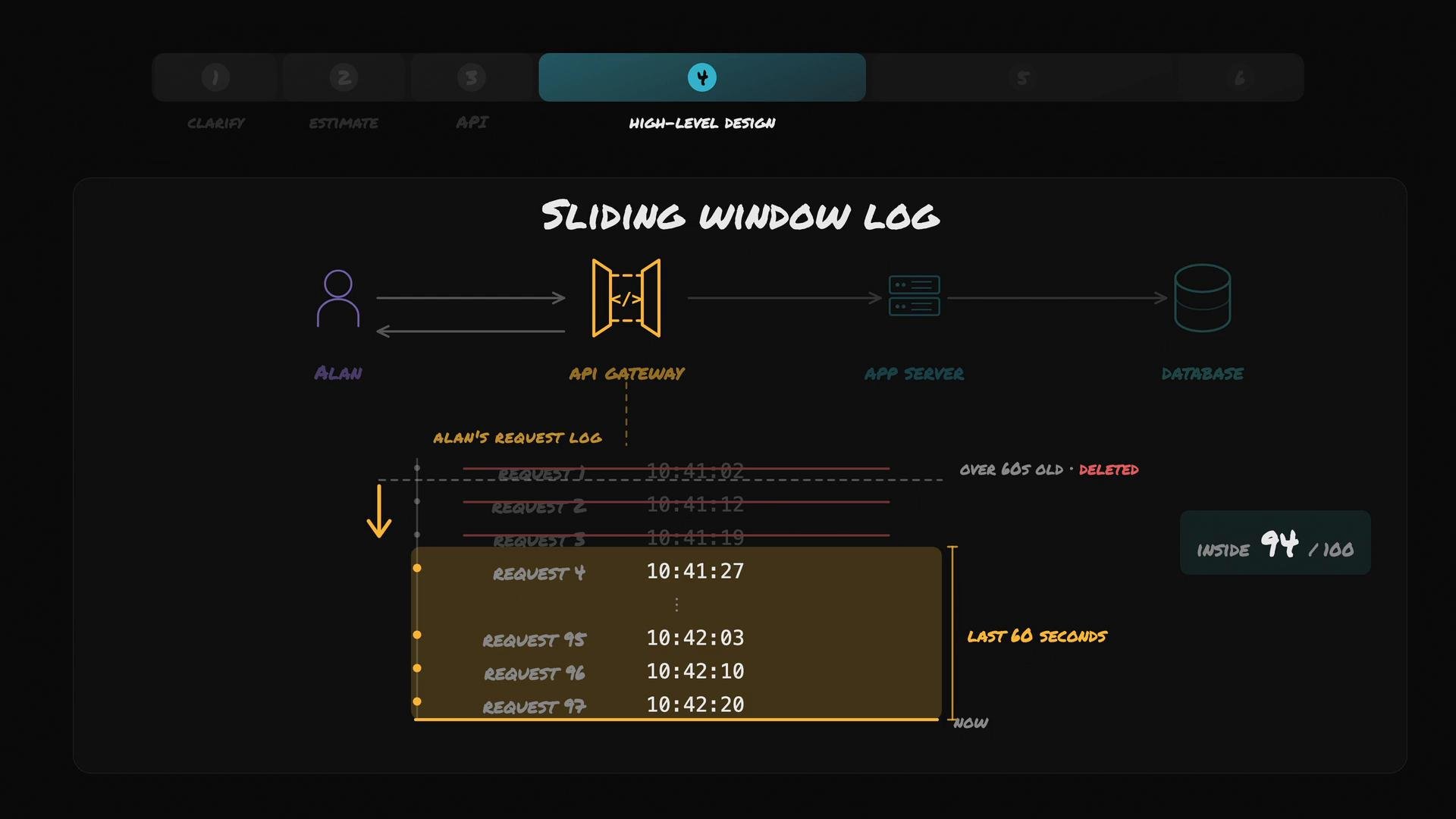
Sliding window log (accurate, more expensive)
* Keep a log of exact timestamps for each request per user.
* On each new request, remove timestamps older than 60 seconds and count the remainder.
* If the count is below the quota (100), allow the request and append its timestamp; otherwise, reject it.
Because the window is "last 60 seconds" and moves continuously, this eliminates the boundary-burst problem.
Minimal pseudocode (sliding window log):
```text theme={null}
onRequest(user, now):
timestamps = logs[user] // ordered list of timestamps
evict timestamps < now - 60s
if length(timestamps) < 100:
append(now) to logs[user]
allow()
else:
reject(429, Retry-After)
```
Limitation: boundary bursts
* If Alan sends 100 requests in the last second of minute N and 100 more in the first second of minute N+1, the fixed-window limiter still allows 200 requests within \~2 seconds while promising "100 per minute". This is the sharp-edge or boundary-burst problem.
Ask yourself: how would you count requests over the "last 60 seconds" more precisely so that those 200 requests wouldn’t be allowed in such a short period?
Sliding window log (accurate, more expensive)
* Keep a log of exact timestamps for each request per user.
* On each new request, remove timestamps older than 60 seconds and count the remainder.
* If the count is below the quota (100), allow the request and append its timestamp; otherwise, reject it.
Because the window is "last 60 seconds" and moves continuously, this eliminates the boundary-burst problem.
Minimal pseudocode (sliding window log):
```text theme={null}
onRequest(user, now):
timestamps = logs[user] // ordered list of timestamps
evict timestamps < now - 60s
if length(timestamps) < 100:
append(now) to logs[user]
allow()
else:
reject(429, Retry-After)
```
 Summary of sliding-window-log behavior:
* Store precise timestamps of recent requests per user.
* On each request, evict timestamps older than the configured window (e.g., 60s), then count remaining timestamps.
* Reject when the count meets or exceeds the quota.
Sliding-window logs provide accurate limiting but are costly: storage grows with request volume, and eviction/counting work increases per request. For large user bases or high quotas, CPU and memory usage may become significant.
Comparison: fixed window vs sliding-window-log
| Technique | Accuracy | Memory cost | CPU cost per request | Typical use cases |
| -: | :-: | :-: | :-: | :- |
| Fixed window | Low (boundary bursts possible) | Low (one counter per user) | O(1) | Simple rate caps where small bursts are acceptable |
| Sliding-window-log | High (true last-N-seconds window) | High (one timestamp per request) | O(n) unless optimized | Strict rate guarantees, preventing boundary bursts |
When to choose which:
* Choose fixed window when simplicity, low memory, and low CPU overhead matter and occasional short bursts are acceptable.
* Choose sliding-window-log when you need precise enforcement of "last X seconds" windows and can afford extra memory and CPU. Consider hybrid or approximate alternatives (e.g., sliding window counter with buckets, token bucket, leaky bucket) if you need a middle ground.
References and further reading
* RFC 6585 — 429 Too Many Requests (HTTP status code): [https://tools.ietf.org/html/rfc6585](https://tools.ietf.org/html/rfc6585)
* MDN: HTTP 429 Too Many Requests — [https://developer.mozilla.org/en-US/docs/Web/HTTP/Status/429](https://developer.mozilla.org/en-US/docs/Web/HTTP/Status/429)
* Articles on rate limiting algorithms (token bucket, leaky bucket, sliding window): search for "rate limiting token bucket vs leaky bucket vs sliding window"
This documentation is built and hosted on [Mintlify](https://mintlify.com), a developer documentation platform.
Summary of sliding-window-log behavior:
* Store precise timestamps of recent requests per user.
* On each request, evict timestamps older than the configured window (e.g., 60s), then count remaining timestamps.
* Reject when the count meets or exceeds the quota.
Sliding-window logs provide accurate limiting but are costly: storage grows with request volume, and eviction/counting work increases per request. For large user bases or high quotas, CPU and memory usage may become significant.
Comparison: fixed window vs sliding-window-log
| Technique | Accuracy | Memory cost | CPU cost per request | Typical use cases |
| -: | :-: | :-: | :-: | :- |
| Fixed window | Low (boundary bursts possible) | Low (one counter per user) | O(1) | Simple rate caps where small bursts are acceptable |
| Sliding-window-log | High (true last-N-seconds window) | High (one timestamp per request) | O(n) unless optimized | Strict rate guarantees, preventing boundary bursts |
When to choose which:
* Choose fixed window when simplicity, low memory, and low CPU overhead matter and occasional short bursts are acceptable.
* Choose sliding-window-log when you need precise enforcement of "last X seconds" windows and can afford extra memory and CPU. Consider hybrid or approximate alternatives (e.g., sliding window counter with buckets, token bucket, leaky bucket) if you need a middle ground.
References and further reading
* RFC 6585 — 429 Too Many Requests (HTTP status code): [https://tools.ietf.org/html/rfc6585](https://tools.ietf.org/html/rfc6585)
* MDN: HTTP 429 Too Many Requests — [https://developer.mozilla.org/en-US/docs/Web/HTTP/Status/429](https://developer.mozilla.org/en-US/docs/Web/HTTP/Status/429)
* Articles on rate limiting algorithms (token bucket, leaky bucket, sliding window): search for "rate limiting token bucket vs leaky bucket vs sliding window"
This documentation is built and hosted on [Mintlify](https://mintlify.com), a developer documentation platform.