> ## Documentation Index
> Fetch the complete documentation index at: https://notes.kodekloud.com/llms.txt
> Use this file to discover all available pages before exploring further.
# Rate Limiter The Token Bucket
> Overview of token bucket rate limiting, explaining per-user token buckets, refill behavior, burst handling, implementation, headers, and distributed deployment considerations.
The token bucket is a practical rate-limiting strategy used by many production systems (Stripe, GitHub, and popular API gateways). It combines a sustained refill rate with a configurable burst capacity, making it ideal for real-world traffic that often includes short bursts.
## How it works
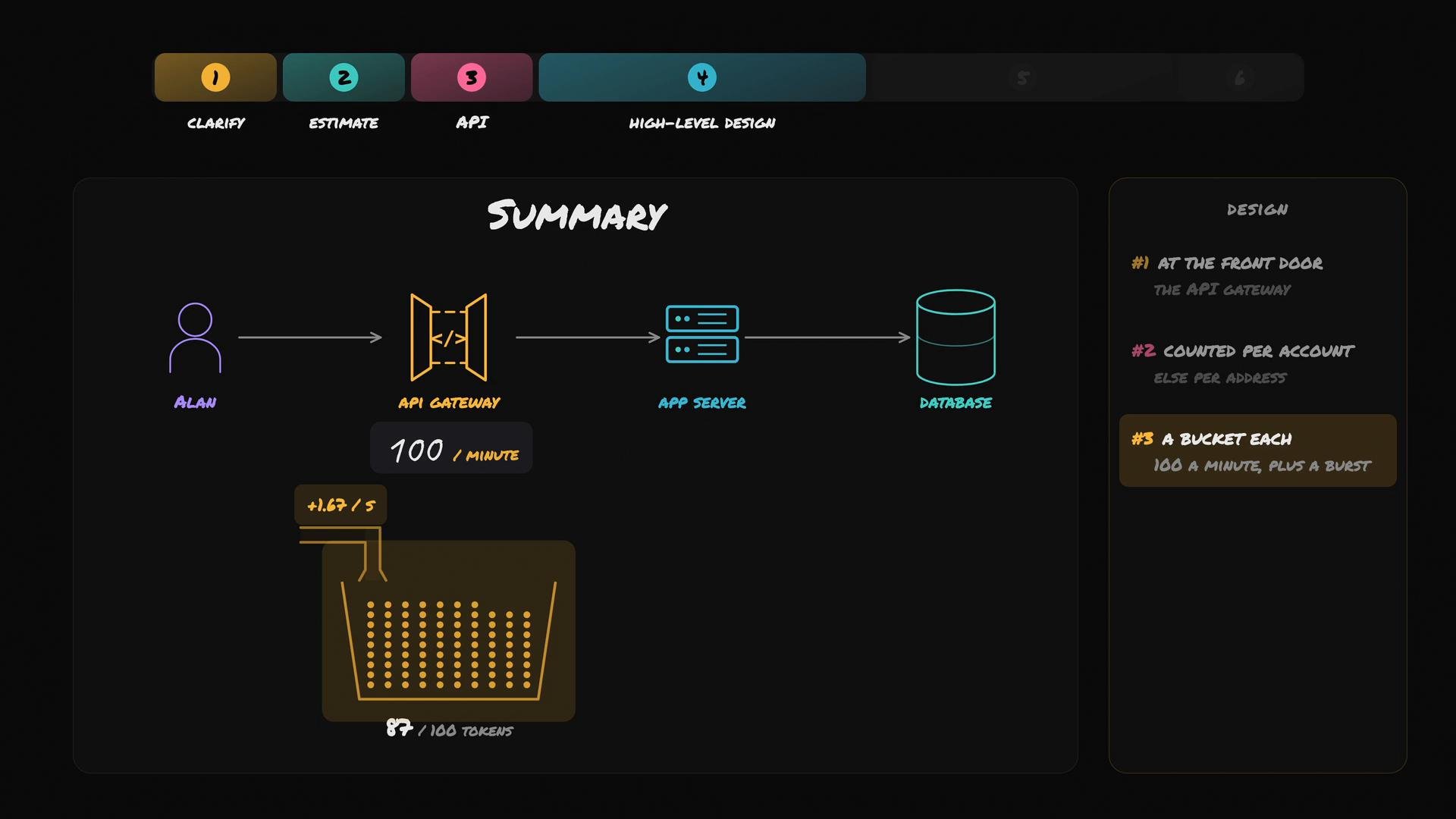
* Each user (or client) has a bucket that holds up to 100 tokens.
* Each API request consumes one token (or a configurable `cost`).
* The bucket refills continuously at 100 tokens per minute (100 / 60 ≈ 1.67 tokens/s).
* Tokens stop accumulating once the bucket reaches its capacity (100 tokens).
* If the bucket has insufficient tokens when a request arrives, the request is rejected with HTTP 429 (Too Many Requests).
 ## Example behavior
* If Alan makes 100 requests back-to-back, he can drain the bucket almost instantly.
* Immediately after the burst, tokens will replenish at ≈1.67 tokens/sec, allowing him to continue making requests at the sustained rate (roughly 1–2 calls/sec).
* The token bucket never fully locks a user out — tokens keep replenishing, and requests can resume as soon as enough tokens accumulate.
## Properties and guarantees
* The token bucket does not enforce a strict ceiling of 100 requests per rolling 60-second window. If a bucket is full, a user can spend all 100 tokens at once (explicit burst).
* It guarantees a sustained refill rate of 100 tokens/minute.
* Burst capacity is explicit and configurable via the bucket size (e.g., reduce capacity to 20 tokens for a smaller allowed burst while keeping the same refill rate).
* For each user we store the minimal state needed to compute token availability at any moment — the current token count and the timestamp of the last refill.
## What we store per user
| Field | Type | Description |
| - | - | - |
| `current_tokens` | `float` | Current number of tokens in the bucket (can be fractional during refill). |
| `last_refill_ts` | `timestamp` | Unix timestamp (seconds) when we last updated/refilled tokens. |
This state is compact — typically on the order of tens of bytes per user.
## Comparison to other approaches
| Approach | Strengths | Trade-offs |
| - | - | - |
| Token bucket | Continuous refill, explicit bursts, easy to expose `X-RateLimit-Remaining` | Requires per-user state and synchronization across hosts in distributed setups |
| Sliding window | Exact ceiling for rolling windows | Needs many timestamps per user (higher memory/compute) |
| Fixed window | Simple to implement | Boundary effects can allow brief accidental bursts at window edges |
## Responses and headers
* When a user exceeds available tokens, return:
* HTTP 429 (Too Many Requests)
* `Retry-After` header with seconds to wait (or an estimated time until tokens are available)
* Optionally: `X-RateLimit-Remaining` to show available tokens
Example: to compute `Retry-After` (for a request that costs 1 token)
* If `tokens >= 1`, allow immediately.
* Otherwise: `seconds = ceil((1 - tokens) / REFILL_PER_SEC)`.
Include remaining tokens in every response to help clients adapt their behavior.
## Basic refill/check logic (Python example)
```python theme={null}
import time
import math
CAPACITY = 100.0 # max tokens in bucket
REFILL_PER_SEC = 100.0 / 60.0 # tokens added per second
class TokenBucket:
def __init__(self, tokens=CAPACITY, last_refill=None):
self.tokens = float(tokens)
self.last_refill = last_refill or time.time()
def _refill(self):
now = time.time()
elapsed = now - self.last_refill
if elapsed <= 0:
return
added = elapsed * REFILL_PER_SEC
self.tokens = min(CAPACITY, self.tokens + added)
self.last_refill = now
def allow_request(self, cost=1.0):
"""Return (allowed: bool, remaining_tokens: float)."""
self._refill()
if self.tokens >= cost:
self.tokens -= cost
return True, self.tokens
return False, self.tokens
def retry_after_seconds(self, cost=1.0):
"""Estimate seconds until `cost` tokens are available."""
self._refill()
if self.tokens >= cost:
return 0
needed = cost - self.tokens
return math.ceil(needed / REFILL_PER_SEC)
```
This implementation:
* Uses fractional tokens so refills are continuous.
* Updates `last_refill` only on refill/check to minimize write churn.
* Exposes a `retry_after_seconds` helper to populate `Retry-After` headers.
## Deployment notes and distributed considerations
* Single gateway: token-bucket state can be stored in memory on one instance.
* Horizontally scaled gateways: when requests for the same user hit different instances, you must keep state consistent. Common strategies:
* Centralized store (e.g., Redis) to store tokens and timestamps atomically.
* Sticky routing (consistent hashing) so a user is routed to the same gateway instance.
* Best-effort synchronization or probabilistic algorithms (less strict, but simpler and faster).
* When using Redis, prefer commands that perform read-modify-write atomically (e.g., Lua scripts or Redis tokens implementation) to avoid race conditions.
## Practical headers and client guidance
* Return these headers to help clients:
* `X-RateLimit-Limit: 100` (configured capacity or sustained rate)
* `X-RateLimit-Remaining: ` (fractional value is acceptable)
* `Retry-After: ` when returning 429
* Encourage clients to back off (exponential or jittered) when they receive 429 and to use `X-RateLimit-Remaining` to pace requests.
Token bucket advantages:
* Allows explicit bursts while enforcing a long-term rate.
* Continuous refill avoids hard lockouts and lets clients resume as soon as tokens accumulate.
* Easy to report remaining capacity to clients via response headers.
## Summary
* Implement rate limiting at the API gateway (front door).
* For authenticated users, rate-limit per-account; for unauthenticated traffic, consider per-IP limits.
* Each user/account receives a token bucket that enforces a sustained rate of 100 requests/minute and allows bursts up to the bucket capacity (100 tokens).
* When tokens are exhausted, return 429 with helpful headers (`Retry-After`, `X-RateLimit-Remaining`).
## Next topic
How do we keep token buckets consistent when traffic for the same user lands on multiple gateway instances? Next we will explore distributed strategies: centralized stores (Redis), sticky routing, and best-effort synchronization.
## Links and references
* [Redis](https://redis.io/) — common choice for centralized counters and token buckets
* [RFC 6585 — 429 Too Many Requests](https://tools.ietf.org/html/rfc6585)
* [Rate Limiting Patterns and Practices](https://en.wikipedia.org/wiki/Rate_limiting)
This documentation is built and hosted on [Mintlify](https://mintlify.com), a developer documentation platform.
## Example behavior
* If Alan makes 100 requests back-to-back, he can drain the bucket almost instantly.
* Immediately after the burst, tokens will replenish at ≈1.67 tokens/sec, allowing him to continue making requests at the sustained rate (roughly 1–2 calls/sec).
* The token bucket never fully locks a user out — tokens keep replenishing, and requests can resume as soon as enough tokens accumulate.
## Properties and guarantees
* The token bucket does not enforce a strict ceiling of 100 requests per rolling 60-second window. If a bucket is full, a user can spend all 100 tokens at once (explicit burst).
* It guarantees a sustained refill rate of 100 tokens/minute.
* Burst capacity is explicit and configurable via the bucket size (e.g., reduce capacity to 20 tokens for a smaller allowed burst while keeping the same refill rate).
* For each user we store the minimal state needed to compute token availability at any moment — the current token count and the timestamp of the last refill.
## What we store per user
| Field | Type | Description |
| - | - | - |
| `current_tokens` | `float` | Current number of tokens in the bucket (can be fractional during refill). |
| `last_refill_ts` | `timestamp` | Unix timestamp (seconds) when we last updated/refilled tokens. |
This state is compact — typically on the order of tens of bytes per user.
## Comparison to other approaches
| Approach | Strengths | Trade-offs |
| - | - | - |
| Token bucket | Continuous refill, explicit bursts, easy to expose `X-RateLimit-Remaining` | Requires per-user state and synchronization across hosts in distributed setups |
| Sliding window | Exact ceiling for rolling windows | Needs many timestamps per user (higher memory/compute) |
| Fixed window | Simple to implement | Boundary effects can allow brief accidental bursts at window edges |
## Responses and headers
* When a user exceeds available tokens, return:
* HTTP 429 (Too Many Requests)
* `Retry-After` header with seconds to wait (or an estimated time until tokens are available)
* Optionally: `X-RateLimit-Remaining` to show available tokens
Example: to compute `Retry-After` (for a request that costs 1 token)
* If `tokens >= 1`, allow immediately.
* Otherwise: `seconds = ceil((1 - tokens) / REFILL_PER_SEC)`.
Include remaining tokens in every response to help clients adapt their behavior.
## Basic refill/check logic (Python example)
```python theme={null}
import time
import math
CAPACITY = 100.0 # max tokens in bucket
REFILL_PER_SEC = 100.0 / 60.0 # tokens added per second
class TokenBucket:
def __init__(self, tokens=CAPACITY, last_refill=None):
self.tokens = float(tokens)
self.last_refill = last_refill or time.time()
def _refill(self):
now = time.time()
elapsed = now - self.last_refill
if elapsed <= 0:
return
added = elapsed * REFILL_PER_SEC
self.tokens = min(CAPACITY, self.tokens + added)
self.last_refill = now
def allow_request(self, cost=1.0):
"""Return (allowed: bool, remaining_tokens: float)."""
self._refill()
if self.tokens >= cost:
self.tokens -= cost
return True, self.tokens
return False, self.tokens
def retry_after_seconds(self, cost=1.0):
"""Estimate seconds until `cost` tokens are available."""
self._refill()
if self.tokens >= cost:
return 0
needed = cost - self.tokens
return math.ceil(needed / REFILL_PER_SEC)
```
This implementation:
* Uses fractional tokens so refills are continuous.
* Updates `last_refill` only on refill/check to minimize write churn.
* Exposes a `retry_after_seconds` helper to populate `Retry-After` headers.
## Deployment notes and distributed considerations
* Single gateway: token-bucket state can be stored in memory on one instance.
* Horizontally scaled gateways: when requests for the same user hit different instances, you must keep state consistent. Common strategies:
* Centralized store (e.g., Redis) to store tokens and timestamps atomically.
* Sticky routing (consistent hashing) so a user is routed to the same gateway instance.
* Best-effort synchronization or probabilistic algorithms (less strict, but simpler and faster).
* When using Redis, prefer commands that perform read-modify-write atomically (e.g., Lua scripts or Redis tokens implementation) to avoid race conditions.
## Practical headers and client guidance
* Return these headers to help clients:
* `X-RateLimit-Limit: 100` (configured capacity or sustained rate)
* `X-RateLimit-Remaining: ` (fractional value is acceptable)
* `Retry-After: ` when returning 429
* Encourage clients to back off (exponential or jittered) when they receive 429 and to use `X-RateLimit-Remaining` to pace requests.
Token bucket advantages:
* Allows explicit bursts while enforcing a long-term rate.
* Continuous refill avoids hard lockouts and lets clients resume as soon as tokens accumulate.
* Easy to report remaining capacity to clients via response headers.
## Summary
* Implement rate limiting at the API gateway (front door).
* For authenticated users, rate-limit per-account; for unauthenticated traffic, consider per-IP limits.
* Each user/account receives a token bucket that enforces a sustained rate of 100 requests/minute and allows bursts up to the bucket capacity (100 tokens).
* When tokens are exhausted, return 429 with helpful headers (`Retry-After`, `X-RateLimit-Remaining`).
## Next topic
How do we keep token buckets consistent when traffic for the same user lands on multiple gateway instances? Next we will explore distributed strategies: centralized stores (Redis), sticky routing, and best-effort synchronization.
## Links and references
* [Redis](https://redis.io/) — common choice for centralized counters and token buckets
* [RFC 6585 — 429 Too Many Requests](https://tools.ietf.org/html/rfc6585)
* [Rate Limiting Patterns and Practices](https://en.wikipedia.org/wiki/Rate_limiting)
This documentation is built and hosted on [Mintlify](https://mintlify.com), a developer documentation platform.