> ## Documentation Index
> Fetch the complete documentation index at: https://notes.kodekloud.com/llms.txt
> Use this file to discover all available pages before exploring further.
# LifeCycle Rules
> This article explores configuring lifecycle rules in Terraform to manage resource creation and deletion effectively, ensuring service continuity during infrastructure updates.
In this article, we explore how to configure lifecycle rules in Terraform to control the order of resource creation and deletion. Managing resource lifecycles can help ensure service continuity and prevent unintended disruptions during your infrastructure updates.
By default, when Terraform updates a resource, it treats it as immutable. This means the existing resource is deleted before a new one is created with the updated configuration. For example, if you update the file permissions on a local file resource from 0777 to 0700 and then run `terraform apply`, Terraform will first delete the old file and then create a new one.
By default, Terraform’s update process deletes the existing resource before creating a new one, which may not be desirable in all scenarios.
## Understanding Terraform's Update Mechanism
Consider the following example where we update the file permission of a local file resource:
```hcl theme={null}
resource "local_file" "pet" {
filename = "/root/pets.txt"
content = "We love pets!"
file_permission = "0700"
}
```
When you run the `terraform apply` command, you might see an output similar to:
```bash theme={null}
$ terraform apply
# local_file.pet must be replaced
-/+ resource "local_file" "pet" {
content = "We love pets!"
directory_permission = "0777"
~ file_permission = "0777" -> "0700" # forces replacement
filename = "/root/pet.txt"
~ id = "5f8fb950ac60f7f23ef968097cda0a1fd3c11bdf" -> (known after apply)
}
Plan: 1 to add, 0 to change, 1 to destroy.
local_file.pet: Destroying...
[id=5f8fb950ac60f7f23ef968097cda0a1fd3c11bdf]
local_file.pet: Destruction complete after 0s
local_file.pet: Creating...
[id=5f8fb950ac60f7f23ef968097cda0a1fd3c11bdf]
Apply complete! Resources: 1 added, 0 changed, 1 destroyed.
```
## Lifecycle Rules
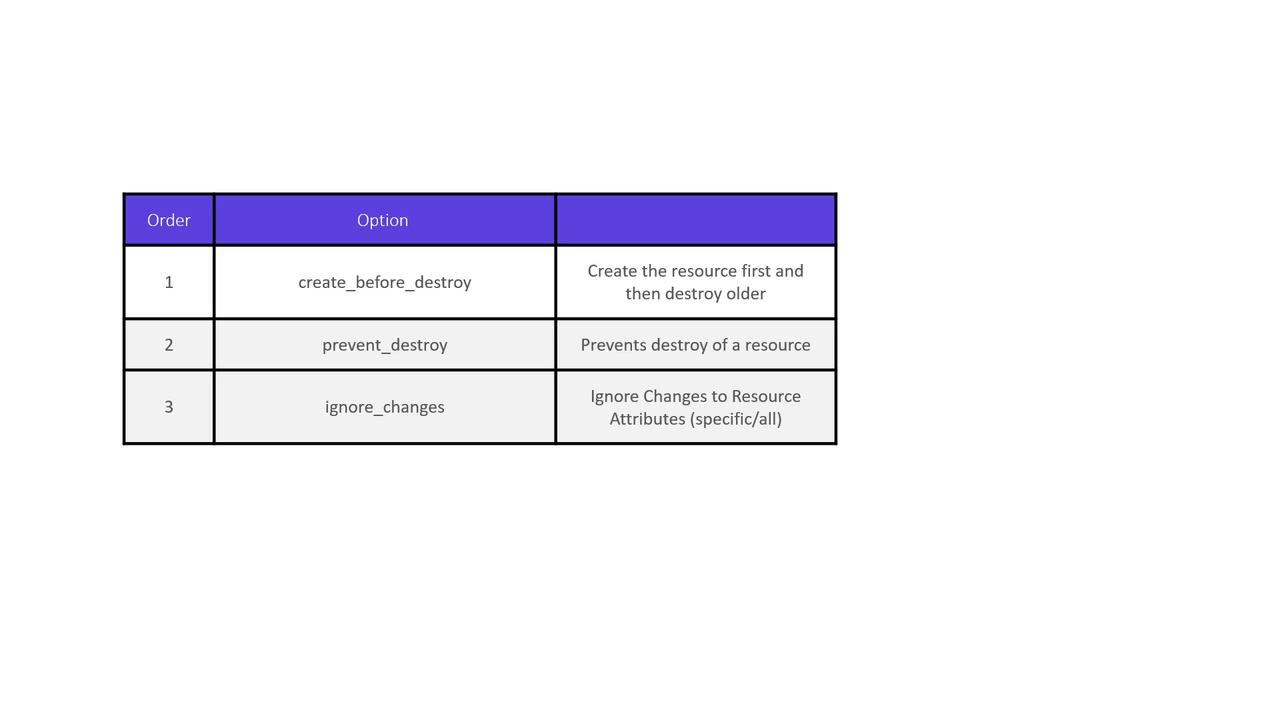
Terraform offers several lifecycle rules to modify this default behavior. These rules can be configured within the resource block to either create the new resource before destroying the old one, prevent resource deletion, or ignore specific attribute changes.
### The create\_before\_destroy Rule
The `create_before_destroy` lifecycle rule instructs Terraform to create a new resource before deleting the old one. This is particularly useful when maintaining service availability is critical.
```hcl theme={null}
resource "local_file" "pet" {
filename = "/root/pets.txt"
content = "We love pets!"
file_permission = "0700"
lifecycle {
create_before_destroy = true
}
}
```
When you update a resource using this rule, Terraform will generate a plan that creates the new resource first and then removes the old one:
```bash theme={null}
$ terraform apply
# local_file.pet must be replaced
-/+ resource "local_file" "pet" {
content = "We love pets!"
directory_permission = "0777"
~ file_permission = "0777" -> "0755" # forces replacement
filename = "/root/pet.txt"
~ id = "5f8fb950ac60f723ef968097cda0a1fd3c11bdf" -> (known after apply)
}
Plan: 1 to add, 0 to change, 1 to destroy.
...
local_file.pet: Creating...
local_file.pet: Creation complete after 0s [id=5f8fb950ac60f723ef968097cda0a1fd3c11bdf]
local_file.pet: Destroying...
local_file.pet: Destruction complete after 0s [id=5f8fb950ac60f723ef968097cda0a1fd3c11bdf]
Apply complete! Resources: 1 added, 0 changed, 1 destroyed.
```
### The prevent\_destroy Rule
In some cases, you might want to ensure a resource is never accidentally deleted—even if a configuration change would normally force a replacement. Terraform allows you to achieve this using the `prevent_destroy` rule.
```hcl theme={null}
resource "local_file" "pet" {
filename = "/root/pets.txt"
content = "We love pets!"
file_permission = "0700"
lifecycle {
prevent_destroy = true
}
}
```
If you run `terraform apply` and the plan includes destroying the resource, Terraform will generate an error similar to the following:
```bash theme={null}
$ terraform apply
local_file.my-pet: Refreshing state...
[id=cba595b7d9f94ba1107a46f731912d95fb3d2c]
Error: Instance cannot be destroyed
on main.tf line 1:
1: resource "local_file" "my-pet" {
Resource local_file.my-pet has lifecycle.prevent_destroy set, but the plan calls for this resource to be destroyed. To avoid this error and continue with the plan, either disable lifecycle.prevent_destroy or reduce the scope of the plan using the -target flag.
```
Even with `prevent_destroy` enabled, running `terraform destroy` explicitly will still remove the resource. This rule only prevents destruction triggered by configuration changes.
### The ignore\_changes Rule
The `ignore_changes` rule is beneficial when you want Terraform to disregard modifications made to specific attributes. For example, if an external process updates the tags on an AWS EC2 instance, Terraform can be configured to ignore these changes during subsequent runs.
Consider the following AWS EC2 instance configuration:
```hcl theme={null}
resource "aws_instance" "webserver" {
ami = "ami-0edab43b6fa892279"
instance_type = "t2.micro"
tags = {
Name = "ProjectA-Webserver"
}
}
```
By default, if the tags are updated externally (e.g., changing the tag from "ProjectA-Webserver" to "ProjectB-Webserver"), Terraform will detect the drift and attempt to revert the change:
```bash theme={null}
$ terraform apply
aws_instance.webserver: Refreshing state... [id=i-05cd83b221911acd5]
An execution plan has been generated and is shown below.
Resource actions are indicated with the following symbols:
~ update in-place
Terraform will perform the following actions:
# aws_instance.webserver will be updated in-place
~ resource "aws_instance" "webserver" {
...
tags = {
~ "Name" = "ProjectB-WebServer" -> "ProjectA-WebServer"
}
...
}
Apply complete! Resources: 0 added, 1 changed, 0 destroyed.
```
To prevent Terraform from reverting such external changes, add the `ignore_changes` rule to the lifecycle block:
```hcl theme={null}
resource "aws_instance" "webserver" {
ami = "ami-0edab43b6fa892279"
instance_type = "t2.micro"
tags = {
Name = "ProjectA-Webserver"
}
lifecycle {
ignore_changes = [
tags
]
}
}
```
Alternatively, to ignore changes across all attributes, you can use the special keyword `all`:
```hcl theme={null}
resource "aws_instance" "webserver" {
ami = "ami-0edab43b6fa892279"
instance_type = "t2.micro"
tags = {
Name = "ProjectA-Webserver"
}
lifecycle {
ignore_changes = all
}
}
```
After applying these settings, Terraform will refresh the state without making any changes:
```bash theme={null}
$ terraform apply
aws_instance.webserver: Refreshing state... [id=i-05cd83b221911acd5]
Apply complete! Resources: 0 added, 0 changed, 0 destroyed.
```
## Lifecycle Rules at a Glance
| Lifecycle Rule | Description | Use Case |
| ----------------------- | ---------------------------------------------------------- | ----------------------------------------------------------------- |
| create\_before\_destroy | Creates the new resource before deleting the old one | Ensures continuous availability during updates |
| prevent\_destroy | Prevents resource destruction during configuration changes | Protects critical resources from accidental deletion |
| ignore\_changes | Ignores changes to specified attributes or all attributes | Allows external modifications without triggering unwanted changes |
## Summary
In this article, we reviewed three key lifecycle rules in Terraform:
* The **create\_before\_destroy** rule ensures uninterrupted resource availability by creating the new resource first.
* The **prevent\_destroy** rule safeguards critical resources from unintentional deletion.
* The **ignore\_changes** rule allows you to specify attributes that Terraform should ignore during state comparisons, accommodating external changes.
Now, put these lifecycle rules into practice in your Terraform configurations for better resource management and more predictable infrastructure deployments.