> ## Documentation Index
> Fetch the complete documentation index at: https://notes.kodekloud.com/llms.txt
> Use this file to discover all available pages before exploring further.
# Terraform Workflow in CICD
> Guide to running Terraform in Azure DevOps CI/CD, covering plan review, approvals, remote state, secure service identities, and applying saved plans for auditable infrastructure deployments
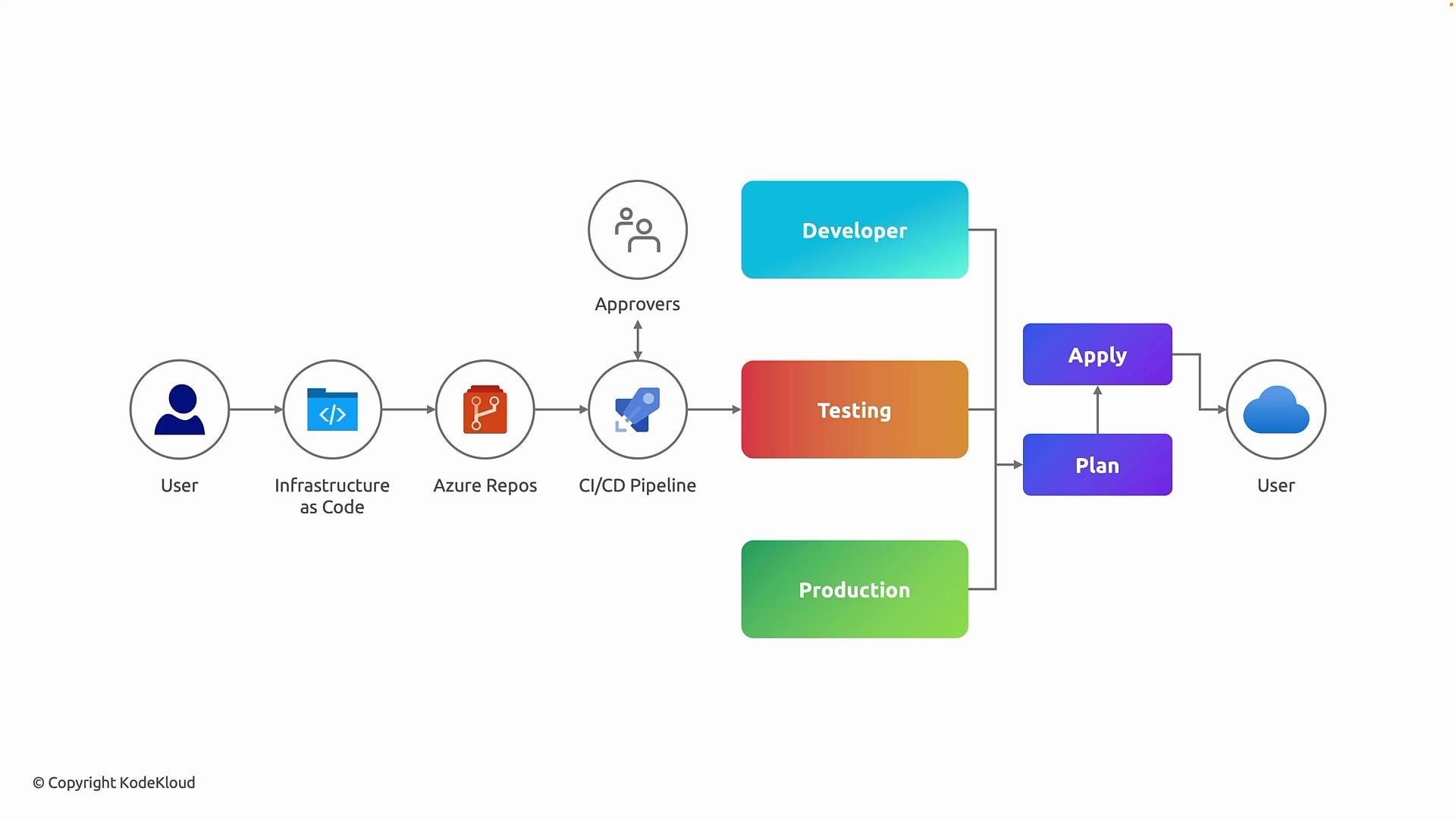
This guide explains how Terraform is executed inside a CI/CD pipeline—covering the path from a developer commit to a production deployment. It describes the enterprise-grade workflow for Infrastructure as Code (IaC) using Terraform and Azure DevOps, including state management, plan review, approval gates, and secure execution.
## Why run Terraform in CI/CD?
Running Terraform inside CI/CD (instead of locally) ensures changes are:
* Auditable and versioned via Git.
* Consistently validated and formatted.
* Reviewed using the exact execution plan that will be applied.
* Applied by controlled service identities with least-privilege access.
* Safe from state corruption by using a shared remote backend and locking.
This approach reduces human error, prevents configuration drift, and provides a clear audit trail of what changed, when, and why.
## Developer workflow (high level)
1. Developers write Terraform code locally (resources, modules, variables).
2. They commit changes to a version-controlled repository (e.g., Azure Repos), which becomes the source of truth.
3. A CI/CD pipeline is triggered by the commit or a pull request.
4. The pipeline runs standardized validation, formatting, and planning steps, then publishes the generated plan as an artifact for reviewers.
5. After review and approval, the pipeline applies the saved plan using the pipeline agent and service connection (not from developer laptops).
6. Optionally promote using staged environments (dev → staging → production) with gates and automated tests between promotions.
## Typical pipeline stages and their purpose
| Stage | Purpose | Example commands |
| --------- | ----------------------------------------------------------------------- | -------------------------------------------------------------- |
| Validate | Check init, formatting, and basic configuration correctness | `terraform init`, `terraform fmt -check`, `terraform validate` |
| Plan | Produce an execution plan and save it as an artifact for review | `terraform plan -out=tfplan` |
| Approvals | Manual or automated gates to review the plan artifact before applying | Review `tfplan` artifact in Azure DevOps |
| Apply | Use the saved plan to make changes in cloud using a controlled identity | `terraform apply -input=false tfplan` |
## Recommended production practices
| Practice | Benefit |
| ---------------------------------------------------------- | -------------------------------------------------------- |
| Remote backend (e.g., Azure Storage) | Shared persisted state outside agent machines |
| State locking and concurrency controls | Prevent race conditions and state corruption |
| Service principal or managed identity with least privilege | Secure, auditable pipeline permissions |
| Save and publish the `tfplan` artifact | Ensures reviewers can inspect the exact proposed changes |
Enforce least-privilege on the service connection used by your pipeline. Avoid using broad contributor permissions; scope the identity to only the required resource groups and actions.
## Approval gates and plan review
Before applying changes to sensitive environments, require a plan review step. This is commonly implemented as:
* The Plan stage publishes the `tfplan` artifact.
* A reviewer (senior engineer or platform team) inspects the plan using `terraform show -no-color tfplan` or Azure DevOps artifact viewer.
* A manual approval gate (or an automated policy) allows or blocks the Apply stage.
* The Apply stage downloads the exact saved plan artifact and executes `terraform apply -input=false tfplan`.
This guarantees the pipeline applies exactly what was reviewed—no surprises or drift between review and execution.
## Local commands (for context)
Use these locally for development, formatting, and quick validation. Note: production changes should be applied through CI/CD.
```bash theme={null}
# Initialize backend and providers
terraform init
# Check formatting
terraform fmt -check
# Validate configurations
terraform validate
# Create a plan file that can be reviewed and applied by the pipeline
terraform plan -out=tfplan
# (Locally) inspect the plan
terraform show -no-color tfplan
# Apply an existing plan file
terraform apply -input=false tfplan
```
## Example Azure DevOps pipeline (simplified)
This YAML demonstrates separation of Validate, Plan, and Apply stages. The Plan stage publishes the `tfplan` artifact and the Apply stage uses an environment (which can be protected with approvals in Azure DevOps).
```yaml theme={null}
trigger:
branches:
include:
- main
stages:
- stage: Validate
jobs:
- job: Validate
pool:
vmImage: 'ubuntu-latest'
steps:
- script: |
terraform init -backend-config="storage_account_name=${{ variables.storageAccount }}" -backend-config="container_name=${{ variables.container }}" -backend-config="key=${{ variables.key }}"
terraform fmt -check
terraform validate
displayName: 'Terraform Init, Fmt, Validate'
- stage: Plan
dependsOn: Validate
jobs:
- job: Plan
pool:
vmImage: 'ubuntu-latest'
steps:
- script: |
terraform init -backend-config="storage_account_name=${{ variables.storageAccount }}" -backend-config="container_name=${{ variables.container }}" -backend-config="key=${{ variables.key }}"
terraform plan -out=tfplan
displayName: 'Terraform Init and Plan'
- publish: tfplan
artifact: terraform-plan
- stage: Apply
dependsOn: Plan
condition: succeeded()
jobs:
- deployment: Apply
displayName: 'Apply to Production (requires approval)'
environment: 'production' # Protect this environment with approval gates in Azure DevOps
strategy:
runOnce:
deploy:
steps:
- download: current
artifact: terraform-plan
- script: |
terraform init -backend-config="storage_account_name=${{ variables.storageAccount }}" -backend-config="container_name=${{ variables.container }}" -backend-config="key=${{ variables.key }}"
terraform apply -input=false tfplan
displayName: 'Terraform Apply (using saved plan)'
```
Always save and publish the exact `tfplan` produced by the plan stage and use that saved plan in the apply stage. This ensures reviewers are approving the exact changes that will be applied, preventing drift between review and execution.
 ## Summary
Running Terraform in CI/CD with remote state, state locking, controlled service identities, saved plan artifacts, and approval gates delivers a robust, auditable, and repeatable IaC workflow. This reduces risk, enforces review and compliance, and provides a reliable promotion path from development to production.
## Links and references
* [Terraform documentation](https://www.terraform.io/docs)
* [Azure DevOps pipelines](https://docs.microsoft.com/azure/devops/pipelines/)
* [Azure Storage as Terraform backend](https://www.terraform.io/language/settings/backends/azurerm)
* [Best practices for Terraform in CI/CD](https://www.terraform.io/docs/cloud/vs/cli.html)
## Summary
Running Terraform in CI/CD with remote state, state locking, controlled service identities, saved plan artifacts, and approval gates delivers a robust, auditable, and repeatable IaC workflow. This reduces risk, enforces review and compliance, and provides a reliable promotion path from development to production.
## Links and references
* [Terraform documentation](https://www.terraform.io/docs)
* [Azure DevOps pipelines](https://docs.microsoft.com/azure/devops/pipelines/)
* [Azure Storage as Terraform backend](https://www.terraform.io/language/settings/backends/azurerm)
* [Best practices for Terraform in CI/CD](https://www.terraform.io/docs/cloud/vs/cli.html)