> ## Documentation Index
> Fetch the complete documentation index at: https://notes.kodekloud.com/llms.txt
> Use this file to discover all available pages before exploring further.
# Update and Destroy Infrastructure
> Explains Terraform lifecycle operations for updating and destroying Azure resources with examples of planning, applying, in-place updates, destroys, multi-resource interactions, and resulting state file.
This lesson focuses on two essential lifecycle operations in Terraform: updating existing infrastructure to match changed requirements, and safely removing resources when they are no longer needed. Real environments change regularly—Terraform models the desired end state and produces safe, predictable plans to reconcile your cloud resources with that state.
Below you'll find clear examples showing:
* an initial Azure resource group configuration,
* how Terraform plans and applies an in-place update when you add tags,
* how Terraform shows a destroy plan and performs destruction,
* how multiple resources interact during updates and removals,
* and what the state file looks like after a full destroy.
For further reading, see the Terraform documentation: [https://www.terraform.io/docs](https://www.terraform.io/docs) and the Azure Provider docs: [https://registry.terraform.io/providers/hashicorp/azurerm/latest/docs](https://registry.terraform.io/providers/hashicorp/azurerm/latest/docs)
Terraform models desired state rather than imperative commands. Always run `terraform plan` before `terraform apply` to review what will change, and keep your state file backed up or versioned.
## Initial configuration
Here is a minimal Terraform configuration that configures the Azure provider and creates one resource group.
```hcl theme={null}
provider "azurerm" {
features {}
}
resource "azurerm_resource_group" "rg" {
name = "my-workshop-rg"
location = "East US"
}
```
When you run `terraform apply` the first time, Terraform compares this configuration to the current Azure state. Since the resource group does not yet exist, Terraform will create it.
## Updating resources (adding tags)
Suppose you modify the same resource group to include tags. Terraform will compare the desired state (your HCL) with the current state and plan an in-place update if the provider supports updating the attribute without replacement.
Updated configuration with a `tags` block:
```hcl theme={null}
provider "azurerm" {
features {}
}
resource "azurerm_resource_group" "rg" {
name = "my-workshop-rg"
location = "East US"
tags = {
Owner = "Workshop"
}
}
```
Running `terraform plan` will show the detected change as an in-place update. The tilde (`~`) symbol means "update in-place".
Example plan output:
```bash theme={null}
$ terraform plan
azurerm_resource_group.rg: Refreshing state...
[id=/subscriptions/1b228746-75fd-46ed-8a6b-6a9066d6d3a3/resourceGroups/my-workshop-rg]
Terraform used the selected providers to generate the following execution plan.
Resource actions are indicated with the following symbols:
~ update in-place
Terraform will perform the following actions:
# azurerm_resource_group.rg will be updated in-place
~ resource "azurerm_resource_group" "rg" {
id = "/subscriptions/1b228746-75fd-46ed-8a6b-6a9066d6d3a3/resourceGroups/my-workshop-rg"
name = "my-workshop-rg"
~ tags = {
+ "Owner" = "Workshop"
}
}
Plan: 0 to add, 1 to change, 0 to destroy.
```
The plan clearly indicates which attribute will change (`Owner` tag) and confirms the resource will be modified in-place instead of being replaced.
## Quick reference: plan symbols
| Symbol | Meaning |
| ------ | ----------------------------------------------------- |
| `+` | Create (resource/attribute will be added) |
| `~` | Update in-place (resource remains, attributes change) |
| `-` | Destroy (resource/attribute will be removed) |
> Note: Whether an attribute change causes an in-place update or a full replacement depends on the provider and the specific attribute. For details check the Azure provider docs.
## Destroying resources
To remove managed resources from Azure, use `terraform destroy`. Terraform will build a destroy plan showing resources that will be removed; a minus (`-`) symbol denotes destruction. If the entire resource is scheduled for removal, the minus applies to the resource block; if just an attribute is removed from the configuration, the minus may apply only to that attribute.
Example interactive `terraform destroy` output:
```bash theme={null}
$ terraform destroy
azurerm_resource_group.rg: Refreshing state...
[id=/subscriptions/1b228746-75fd-46ed-8a6b-6a9066d6d3a3/resourceGroups/my-workshop-rg]
Terraform used the selected providers to generate the following execution plan.
Resource actions are indicated with the following symbols:
- destroy
Terraform will perform the following actions:
# azurerm_resource_group.rg will be destroyed
- resource "azurerm_resource_group" "rg" {
id = "/subscriptions/1b228746-75fd-46ed-8a6b-6a9066d6d3a3/resourceGroups/my-workshop-rg"
location = "eastus" -> null
name = "my-workshop-rg" -> null
tags = {} -> null
}
Plan: 0 to add, 0 to change, 1 to destroy.
Do you really want to destroy all resources?
Terraform will destroy all your managed infrastructure, as shown above.
There is no undo. Only 'yes' will be accepted to confirm.
Enter a value: yes
azurerm_resource_group.rg: Destroying...
azurerm_resource_group.rg: Destruction complete after 16s
Destroy complete! Resources: 1 destroyed.
```
Destroy is destructive and irreversible through Terraform. Always review the plan carefully and ensure you have backups or snapshots if required.
## Working with multiple resources
Real-world Terraform configurations typically manage many resources together. The example below shows a storage account and a virtual network managed alongside a resource group.
```hcl theme={null}
resource "azurerm_storage_account" "sa" {
name = "stkodekloudfsa45778"
resource_group_name = "kodekloud-tf-rg"
location = "eastus"
account_tier = "Standard"
account_replication_type = "LRS"
}
resource "azurerm_virtual_network" "vnet" {
name = "kodekloud-tf-vnet"
resource_group_name = "kodekloud-tf-rg"
location = "eastus"
address_space = ["10.0.0.0/16"]
}
```
Applying these resources:
```bash theme={null}
terraform apply --auto-approve
azurerm_resource_group.rg: Modifying... [id=/subscriptions/1b228746-75fd-46ed-8a6b-6a9066d6d3a3/resourceGroups/kodekloud-tf-rg]
azurerm_virtual_network.vnet: Creating...
azurerm_storage_account.sa: Creating...
azurerm_resource_group.rg: Modifications complete after 2s [id=/subscriptions/1b228746-75fd-46ed-8a6b-6a9066d6d3a3/resourceGroups/kodekloud-tf-rg]
azurerm_virtual_network.vnet: Creation complete after 7s [id=/subscriptions/1b228746-75fd-46ed-8a6b-6a9066d6d3a3/resourceGroups/kodekloud-tf-rg/providers/Microsoft.Network/virtualNetworks/kodekloud-tf-vnet]
azurerm_storage_account.sa: Still creating... [10s elapsed]
azurerm_storage_account.sa: Still creating... [20s elapsed]
azurerm_storage_account.sa: Still creating... [30s elapsed]
azurerm_storage_account.sa: Creation complete after 1m12s
Apply complete! Resources: 2 added, 1 changed, 0 destroyed.
```
If you later remove the storage account block from your configuration and update resource group tags, `terraform plan` will present both an in-place update and a planned destroy for the storage account:
```bash theme={null}
Terraform used the selected providers to generate the following execution plan.
Resource actions are indicated with the following symbols:
~ update in-place
- destroy
Terraform will perform the following actions:
# azurerm_resource_group.rg will be updated in-place
~ resource "azurerm_resource_group" "rg" {
id = "/subscriptions/1b228746-75fd-46ed-8a6b-6a9066d6d3a3/resourceGroups/kodekloud-tf-rg"
~ tags = {
+ "environment" = "testing"
}
}
# azurerm_storage_account.sa will be destroyed
- resource "azurerm_storage_account" "sa" {
- id = "/subscriptions/1b228746-75fd-46ed-8a6b-6a9066d6d3a3/resourceGroups/kodekloud-tf-rg/providers/Microsoft.Storage/storageAccounts/stkodekloudtfsa45778" -> null
- name = "stkodekloudtfsa45778" -> null
- location = "eastus" -> null
# (other attributes hidden)
}
Plan: 0 to add, 1 to change, 1 to destroy.
```
If your goal is simply to remove all resources managed in state without editing the configuration, `terraform destroy` will remove everything after confirmation.
## State file after a full destroy
After successfully destroying all managed resources, Terraform updates the state file. A state file showing no managed resources will have an empty `resources` array, for example:
```json theme={null}
{
"version": 4,
"terraform_version": "1.5.7",
"serial": 9,
"lineage": "0753e9c2-a985-24ba-0ebd-ea12e056aa6f",
"outputs": {},
"resources": []
}
```
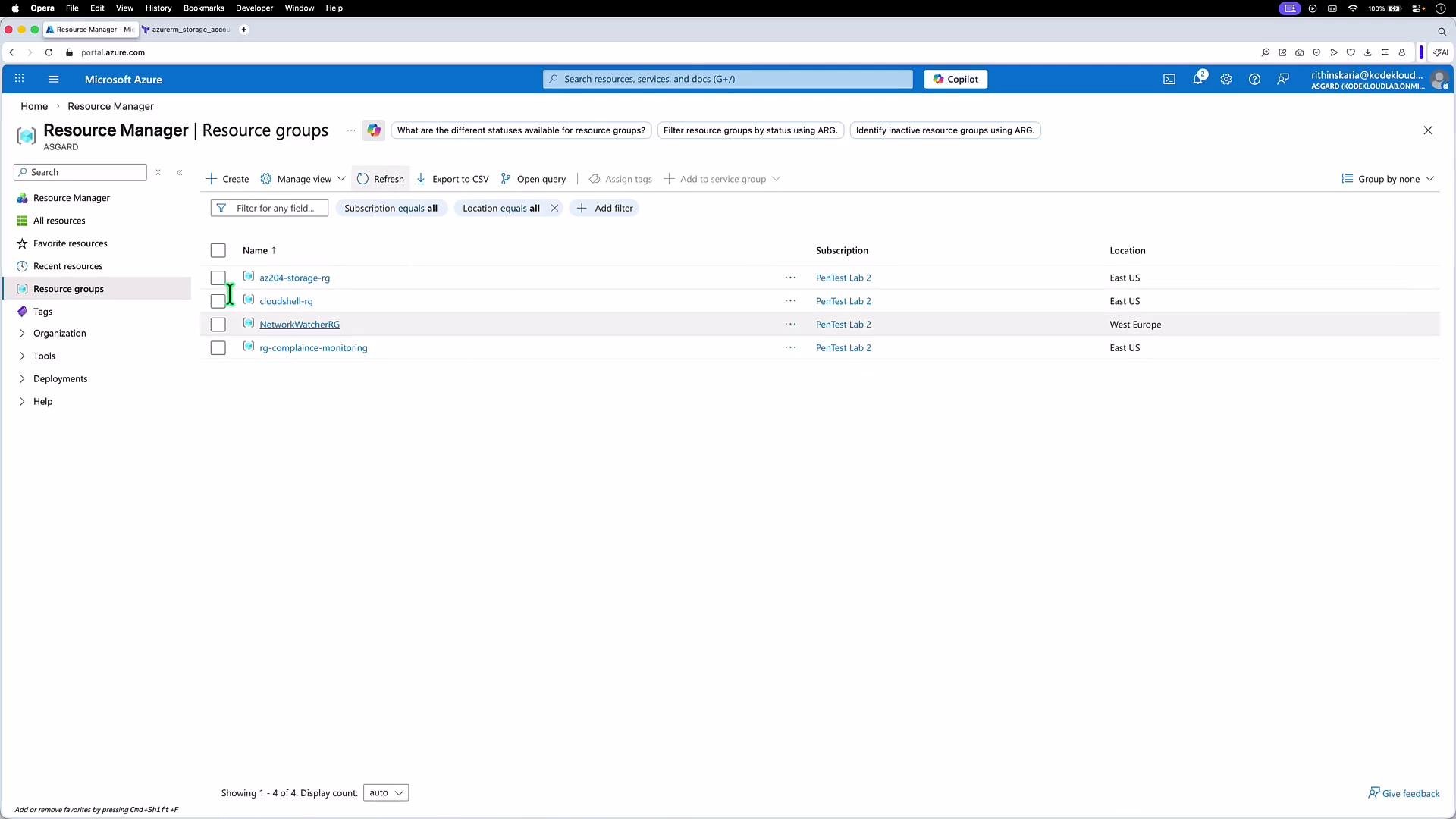
You can also verify in the Azure portal that the resource group and its related resources have been removed.
 ## Links and references
* Terraform: [https://www.terraform.io/docs](https://www.terraform.io/docs)
* Azure Provider (azurerm): [https://registry.terraform.io/providers/hashicorp/azurerm/latest/docs](https://registry.terraform.io/providers/hashicorp/azurerm/latest/docs)
* Azure Portal: [https://portal.azure.com](https://portal.azure.com)
## Links and references
* Terraform: [https://www.terraform.io/docs](https://www.terraform.io/docs)
* Azure Provider (azurerm): [https://registry.terraform.io/providers/hashicorp/azurerm/latest/docs](https://registry.terraform.io/providers/hashicorp/azurerm/latest/docs)
* Azure Portal: [https://portal.azure.com](https://portal.azure.com)