> ## Documentation Index
> Fetch the complete documentation index at: https://notes.kodekloud.com/llms.txt
> Use this file to discover all available pages before exploring further.
# What is Terraform Cloud
> Overview of Terraform Cloud, a HashiCorp managed platform that centralizes Terraform execution, remote state management, collaboration, policy enforcement, and Git workflow integration for teams.
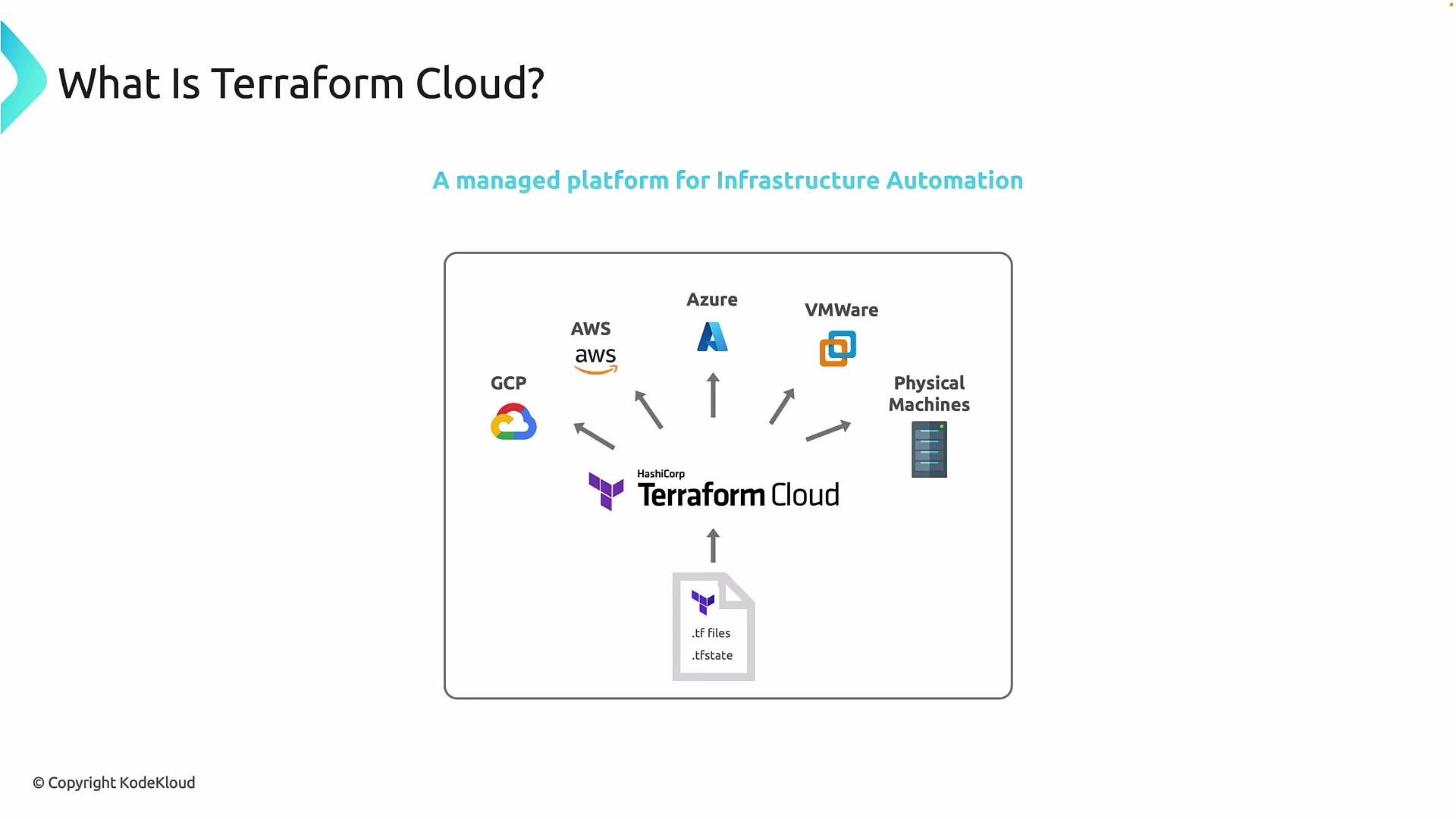
Terraform Cloud is a HashiCorp-managed platform that centralizes Terraform execution, state management, and collaboration. Instead of running Terraform locally on individual developer machines, teams use Terraform Cloud as a hosted control plane that takes Terraform configuration files and state, runs plans and applies in a secure cloud environment, and interacts with infrastructure providers such as AWS, Azure, Google Cloud, VMware, or physical servers.
 Why teams choose Terraform Cloud
* Provides a consistent, repeatable environment for `terraform plan` and `terraform apply`, removing variability caused by developer workstations.
* Stores Terraform state remotely and securely, reducing the risk of lost or corrupted state files.
* Enables collaboration through shared workspaces, role-based access controls, and approval workflows.
* Improves traceability and auditability by centralizing run logs and change history.
How Terraform Cloud works
Terraform Cloud operates as the intermediary between your Terraform configurations and the providers you target. You commit your `.tf` files to a Git repository (or upload them directly), and Terraform Cloud will:
1. Run `terraform plan` and `terraform apply` in a managed environment.
2. Store and version Terraform state securely, and serve it to remote runs.
3. Communicate with cloud providers and on-premises systems to create, update, or delete resources.
Core capabilities at a glance
| Capability | Description | Typical benefits |
| --------------------------------------- | --------------------------------------------------------------------: | ----------------------------------------------------------- |
| Hosted, managed service | HashiCorp runs Terraform plans/applies and manages state in the cloud | No need to operate backend infrastructure for runs or state |
| Shared workspaces & access controls | Group related configurations and states with role-based permissions | Prevents conflicting changes, improves visibility |
| Remote state management | Secure, versioned storage of `.tfstate` used by remote runs | Reduces risk of accidental deletion or corruption |
| Policy enforcement (HashiCorp Sentinel) | Implement policy-as-code to enforce security and compliance | Block unsafe changes before they are applied |
| Git-based workflow integrations | Connect VCS to trigger runs on commits or PRs | Aligns infrastructure changes with proven CI/CD practices |
State is critical for Terraform. Treat remote state as the single source of truth for your infrastructure. This article includes a detailed discussion of Terraform state.
Benefits summarized
* Predictable execution: All plans and applies run in the same environment, minimizing "works on my machine" problems.
* Secure, centralized state: State is protected, versioned, and available for remote operations.
* Collaboration and governance: Role-based access, policy checks, and run approvals support multi-person teams and compliance needs.
* Integration-ready: Git integrations and webhooks connect Terraform Cloud to your existing CI/CD and code review workflows.
Plans and sizing
HashiCorp offers multiple Terraform Cloud plans to match different team sizes and feature needs, from free tiers for individuals and small teams to enterprise offerings with advanced governance and support. For details and pricing, see the official Terraform Cloud plans page.
Links and references
* Terraform Cloud documentation: [https://developer.hashicorp.com/terraform/cloud](https://developer.hashicorp.com/terraform/cloud)
* Terraform: [https://www.terraform.io/](https://www.terraform.io/)
* HashiCorp Sentinel (policy-as-code): [https://www.hashicorp.com/sentinel](https://www.hashicorp.com/sentinel)
Why teams choose Terraform Cloud
* Provides a consistent, repeatable environment for `terraform plan` and `terraform apply`, removing variability caused by developer workstations.
* Stores Terraform state remotely and securely, reducing the risk of lost or corrupted state files.
* Enables collaboration through shared workspaces, role-based access controls, and approval workflows.
* Improves traceability and auditability by centralizing run logs and change history.
How Terraform Cloud works
Terraform Cloud operates as the intermediary between your Terraform configurations and the providers you target. You commit your `.tf` files to a Git repository (or upload them directly), and Terraform Cloud will:
1. Run `terraform plan` and `terraform apply` in a managed environment.
2. Store and version Terraform state securely, and serve it to remote runs.
3. Communicate with cloud providers and on-premises systems to create, update, or delete resources.
Core capabilities at a glance
| Capability | Description | Typical benefits |
| --------------------------------------- | --------------------------------------------------------------------: | ----------------------------------------------------------- |
| Hosted, managed service | HashiCorp runs Terraform plans/applies and manages state in the cloud | No need to operate backend infrastructure for runs or state |
| Shared workspaces & access controls | Group related configurations and states with role-based permissions | Prevents conflicting changes, improves visibility |
| Remote state management | Secure, versioned storage of `.tfstate` used by remote runs | Reduces risk of accidental deletion or corruption |
| Policy enforcement (HashiCorp Sentinel) | Implement policy-as-code to enforce security and compliance | Block unsafe changes before they are applied |
| Git-based workflow integrations | Connect VCS to trigger runs on commits or PRs | Aligns infrastructure changes with proven CI/CD practices |
State is critical for Terraform. Treat remote state as the single source of truth for your infrastructure. This article includes a detailed discussion of Terraform state.
Benefits summarized
* Predictable execution: All plans and applies run in the same environment, minimizing "works on my machine" problems.
* Secure, centralized state: State is protected, versioned, and available for remote operations.
* Collaboration and governance: Role-based access, policy checks, and run approvals support multi-person teams and compliance needs.
* Integration-ready: Git integrations and webhooks connect Terraform Cloud to your existing CI/CD and code review workflows.
Plans and sizing
HashiCorp offers multiple Terraform Cloud plans to match different team sizes and feature needs, from free tiers for individuals and small teams to enterprise offerings with advanced governance and support. For details and pricing, see the official Terraform Cloud plans page.
Links and references
* Terraform Cloud documentation: [https://developer.hashicorp.com/terraform/cloud](https://developer.hashicorp.com/terraform/cloud)
* Terraform: [https://www.terraform.io/](https://www.terraform.io/)
* HashiCorp Sentinel (policy-as-code): [https://www.hashicorp.com/sentinel](https://www.hashicorp.com/sentinel)