> ## Documentation Index
> Fetch the complete documentation index at: https://notes.kodekloud.com/llms.txt
> Use this file to discover all available pages before exploring further.
# Version Constraints
> Explains Terraform provider version constraints, how to declare, resolve, and lock provider versions with .terraform.lock.hcl plus best practices for stable reproducible provider selection
In this lesson we cover Terraform provider version constraints: how to declare them, why they matter, and how Terraform resolves and locks provider versions for reproducible infrastructure deployments.
Version constraints control which provider versions Terraform is allowed to install. They are essential for stability and repeatability because providers are released frequently—sometimes multiple times per month. Without explicit constraints, each `terraform init` could download a newer provider with breaking changes. Constraints make your configuration deterministic and prevent accidental upgrades.
Example: pin a provider to an exact version
```hcl theme={null}
terraform {
required_providers {
azurerm = {
source = "hashicorp/azurerm"
version = "4.27.0"
}
}
}
provider "azurerm" {
# Configuration options
}
```
With this constraint Terraform will only install `hashicorp/azurerm` version `4.27.0`. When you run `terraform init`, Terraform reads the constraints, queries the registry, and installs the matching version instead of the latest:
```plaintext theme={null}
$ terraform init
Initializing the backend...
Initializing provider plugins...
- Finding registry.terraform.io/hashicorp/azurerm version matching "4.27.0"...
- Installing registry.terraform.io/hashicorp/azurerm v4.27.0...
- Installed registry.terraform.io/hashicorp/azurerm v4.27.0 (signed by HashiCorp)
Terraform has been successfully initialized!
```
This deterministic behavior prevents accidental upgrades and unexpected changes during runs.
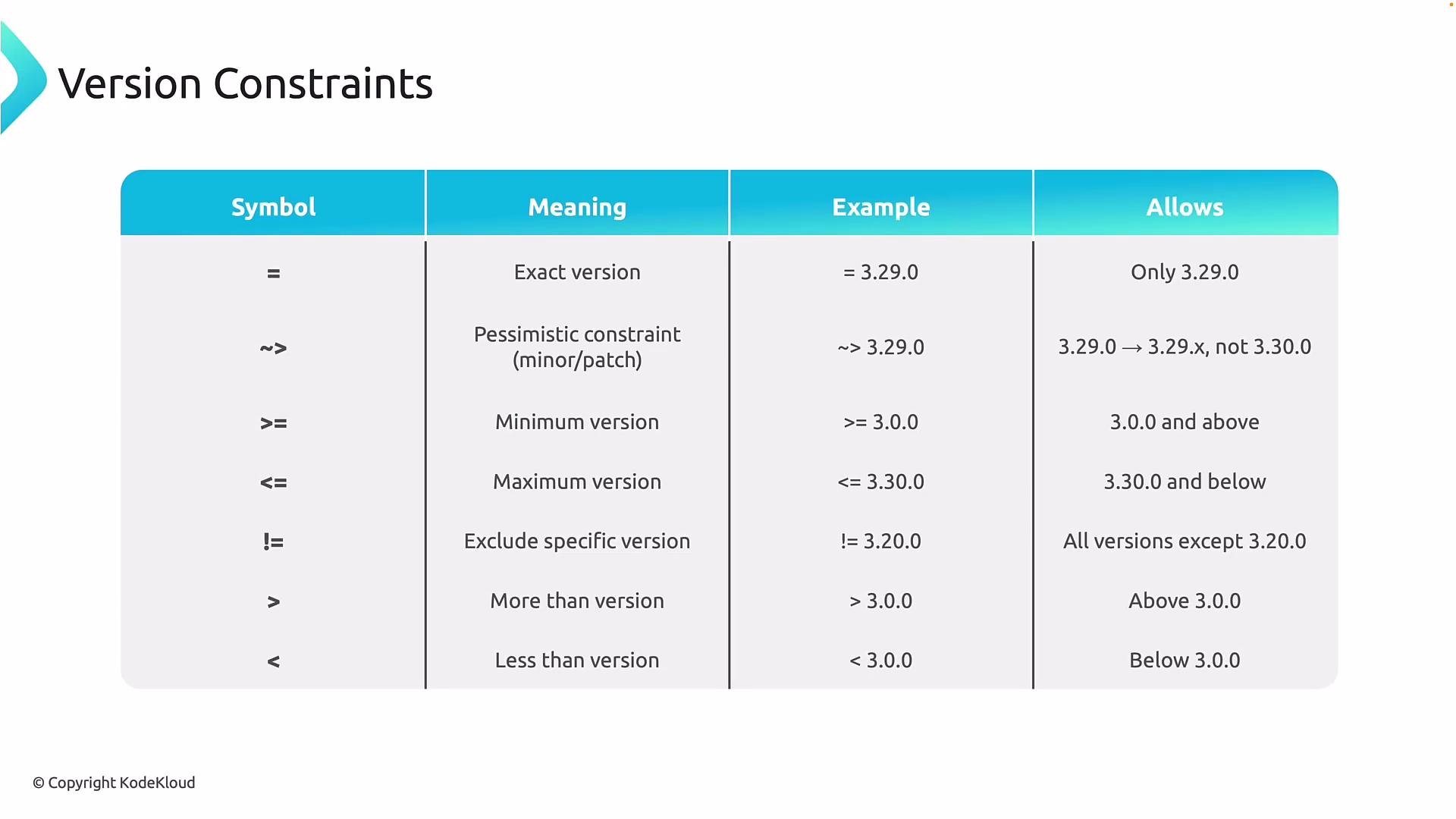 Common operators and patterns
* Exact version: `= 3.29.0` or simply `3.29.0` — only that exact version will be used.
* Pessimistic constraint: `~> 3.29.0` — allows patch releases within the same minor version (e.g., `3.29.x`) but prevents upgrading to `3.30.0`.
* Range operators: `>=`, `<=`, `>`, `<` — specify minimum/maximum allowed versions.
* Exclusion: `!= 4.28.0` — exclude specific versions known to be problematic.
* Combine multiple operators to express complex rules like minimum + exclusion.
Operators quick reference
| Constraint type | Meaning | Example |
| ----------------- | -------------------------------------: | --------------------------- |
| Exact | Only this version | `3.29.0` |
| Pessimistic | Allow patch updates within same minor | `~> 3.29.0` allows `3.29.x` |
| Minimum / Maximum | Permit ranges | `> 4.26.0`, `< 4.58.0` |
| Exclude | Disallow specific versions | `!= 4.28.0` |
| Combined | Complex constraints (range + excludes) | `> 4.26.0, != 4.28.0` |
Example: allow any azurerm version greater than `4.26.0` but exclude `4.28.0`
```hcl theme={null}
terraform {
required_providers {
azurerm = {
source = "hashicorp/azurerm"
version = "> 4.26.0, != 4.28.0"
}
}
}
```
Terraform evaluates the combined constraints and selects the highest compatible version that satisfies them. In the example above, `terraform init` would select `4.27.0` as the best match. Once a provider version is selected, Terraform records the exact version and its checksums in the `.terraform.lock.hcl` file so future runs are reproducible.
Include the generated `.terraform.lock.hcl` file in version control so everyone running the configuration uses the same provider binaries.
A typical lock file entry (generated by `terraform init`):
```hcl theme={null}
# This file is maintained automatically by "terraform init".
provider "registry.terraform.io/hashicorp/azurerm" {
version = "4.55.0"
constraints = "4.55.0"
hashes = [
"h1:1DbkylsqsoK2K8s1NsMkuR8GtCxxFdXyEshkQM=",
"zh:3504c212166cb0da721e38b2be8e176f7adb199b599d5c52961e84f3c",
"zh:49ad233a950c6a6815b014b5c7eb68c251deac5763e519cebadcbad5259",
"zh:58ad6ecf8ab1eb670555804a3390a25fb2f11b39ea925037bd510faf9b",
]
}
```
When a `.terraform.lock.hcl` file exists, subsequent `terraform init` runs will reuse the recorded versions:
```bash theme={null}
$ terraform init
Initializing provider plugins...
- Reusing previous version of registry.terraform.io/hashicorp/azurerm from the dependency lock file
- Using previously-installed registry.terraform.io/hashicorp/azurerm 4.55.0
Terraform has been successfully initialized!
```
Real-world workflow: modular code and provider separation
A common pattern is to keep provider configuration in `provider.tf` and resources in `main.tf` (or split by resource types). This keeps configuration modular and easier to manage in editors like Visual Studio Code.
Example files
provider.tf
```hcl theme={null}
terraform {
required_providers {
azurerm = {
source = "hashicorp/azurerm"
version = "4.55.0"
}
}
}
provider "azurerm" {
features {}
subscription_id = "1b228746-75fd-46ed-8a6b-6a9066d6d3a3"
}
```
main.tf
```hcl theme={null}
resource "azurerm_resource_group" "rg" {
name = "kodekloud-tf-rg"
location = "eastus"
tags = {
environment = "testing"
}
}
resource "azurerm_virtual_network" "vnet" {
name = "kodekloud-tf-vnet"
resource_group_name = azurerm_resource_group.rg.name
location = azurerm_resource_group.rg.location
address_space = ["10.0.0.0/16"]
}
```
With `version = "4.55.0"`, `terraform init` will fetch that exact provider instead of any newer release:
```plaintext theme={null}
$ terraform init
- Finding registry.terraform.io/hashicorp/azurerm version matching "4.55.0"...
- Installing registry.terraform.io/hashicorp/azurerm v4.55.0...
- Installed registry.terraform.io/hashicorp/azurerm v4.55.0 (signed by HashiCorp)
Terraform has been successfully initialized!
```
Refreshing provider selection and updating the lock file
If you change version constraints and want Terraform to re-evaluate available versions and update `.terraform.lock.hcl`, run `terraform init --upgrade`. Example: allow versions greater than `4.55.0` but less than `4.58.0`:
```hcl theme={null}
terraform {
required_providers {
azurerm = {
source = "hashicorp/azurerm"
version = "> 4.55.0, < 4.58.0"
}
}
}
```
Then run:
```bash theme={null}
$ terraform init --upgrade
Initializing provider plugins...
- Finding registry.terraform.io/hashicorp/azurerm versions matching "> 4.55.0, < 4.58.0"...
- Installing registry.terraform.io/hashicorp/azurerm v4.57.0...
- Installed registry.terraform.io/hashicorp/azurerm v4.57.0 (signed by HashiCorp)
Terraform has been successfully initialized!
```
If you modify constraints but do not use `--upgrade` and the new constraint conflicts with the locked version, Terraform will refuse to proceed and instruct you to run `terraform init --upgrade`. Example error:
```plaintext theme={null}
Error: Failed to query available provider packages
Could not retrieve the list of available versions for provider registry.terraform.io/hashicorp/azurerm: locked provider registry.terraform.io/hashicorp/azurerm 4.59.0 does not match configured version constraint > 4.55.0, != 4.59.0; must use "terraform init --upgrade" to allow selection of new versions
```
Summary and best practices
* Declare version constraints in the `terraform` block under `required_providers` to control which provider versions Terraform can install.
* Use exact pins for maximum stability in production, or ranges/pessimistic constraints for controlled patch updates.
* Combine operators to express ranges and exclusions for known problematic releases.
* Commit `.terraform.lock.hcl` to version control to ensure all users and CI environments use the same provider binaries.
* Use `terraform init --upgrade` intentionally to refresh provider selections and update the lock file.
Links and references
* [Terraform CLI: init](https://www.terraform.io/cli/commands/init)
* [Terraform Provider Version Constraints](https://www.terraform.io/language/providers/requirements)
* [HashiCorp Provider Registry](https://registry.terraform.io/)
Common operators and patterns
* Exact version: `= 3.29.0` or simply `3.29.0` — only that exact version will be used.
* Pessimistic constraint: `~> 3.29.0` — allows patch releases within the same minor version (e.g., `3.29.x`) but prevents upgrading to `3.30.0`.
* Range operators: `>=`, `<=`, `>`, `<` — specify minimum/maximum allowed versions.
* Exclusion: `!= 4.28.0` — exclude specific versions known to be problematic.
* Combine multiple operators to express complex rules like minimum + exclusion.
Operators quick reference
| Constraint type | Meaning | Example |
| ----------------- | -------------------------------------: | --------------------------- |
| Exact | Only this version | `3.29.0` |
| Pessimistic | Allow patch updates within same minor | `~> 3.29.0` allows `3.29.x` |
| Minimum / Maximum | Permit ranges | `> 4.26.0`, `< 4.58.0` |
| Exclude | Disallow specific versions | `!= 4.28.0` |
| Combined | Complex constraints (range + excludes) | `> 4.26.0, != 4.28.0` |
Example: allow any azurerm version greater than `4.26.0` but exclude `4.28.0`
```hcl theme={null}
terraform {
required_providers {
azurerm = {
source = "hashicorp/azurerm"
version = "> 4.26.0, != 4.28.0"
}
}
}
```
Terraform evaluates the combined constraints and selects the highest compatible version that satisfies them. In the example above, `terraform init` would select `4.27.0` as the best match. Once a provider version is selected, Terraform records the exact version and its checksums in the `.terraform.lock.hcl` file so future runs are reproducible.
Include the generated `.terraform.lock.hcl` file in version control so everyone running the configuration uses the same provider binaries.
A typical lock file entry (generated by `terraform init`):
```hcl theme={null}
# This file is maintained automatically by "terraform init".
provider "registry.terraform.io/hashicorp/azurerm" {
version = "4.55.0"
constraints = "4.55.0"
hashes = [
"h1:1DbkylsqsoK2K8s1NsMkuR8GtCxxFdXyEshkQM=",
"zh:3504c212166cb0da721e38b2be8e176f7adb199b599d5c52961e84f3c",
"zh:49ad233a950c6a6815b014b5c7eb68c251deac5763e519cebadcbad5259",
"zh:58ad6ecf8ab1eb670555804a3390a25fb2f11b39ea925037bd510faf9b",
]
}
```
When a `.terraform.lock.hcl` file exists, subsequent `terraform init` runs will reuse the recorded versions:
```bash theme={null}
$ terraform init
Initializing provider plugins...
- Reusing previous version of registry.terraform.io/hashicorp/azurerm from the dependency lock file
- Using previously-installed registry.terraform.io/hashicorp/azurerm 4.55.0
Terraform has been successfully initialized!
```
Real-world workflow: modular code and provider separation
A common pattern is to keep provider configuration in `provider.tf` and resources in `main.tf` (or split by resource types). This keeps configuration modular and easier to manage in editors like Visual Studio Code.
Example files
provider.tf
```hcl theme={null}
terraform {
required_providers {
azurerm = {
source = "hashicorp/azurerm"
version = "4.55.0"
}
}
}
provider "azurerm" {
features {}
subscription_id = "1b228746-75fd-46ed-8a6b-6a9066d6d3a3"
}
```
main.tf
```hcl theme={null}
resource "azurerm_resource_group" "rg" {
name = "kodekloud-tf-rg"
location = "eastus"
tags = {
environment = "testing"
}
}
resource "azurerm_virtual_network" "vnet" {
name = "kodekloud-tf-vnet"
resource_group_name = azurerm_resource_group.rg.name
location = azurerm_resource_group.rg.location
address_space = ["10.0.0.0/16"]
}
```
With `version = "4.55.0"`, `terraform init` will fetch that exact provider instead of any newer release:
```plaintext theme={null}
$ terraform init
- Finding registry.terraform.io/hashicorp/azurerm version matching "4.55.0"...
- Installing registry.terraform.io/hashicorp/azurerm v4.55.0...
- Installed registry.terraform.io/hashicorp/azurerm v4.55.0 (signed by HashiCorp)
Terraform has been successfully initialized!
```
Refreshing provider selection and updating the lock file
If you change version constraints and want Terraform to re-evaluate available versions and update `.terraform.lock.hcl`, run `terraform init --upgrade`. Example: allow versions greater than `4.55.0` but less than `4.58.0`:
```hcl theme={null}
terraform {
required_providers {
azurerm = {
source = "hashicorp/azurerm"
version = "> 4.55.0, < 4.58.0"
}
}
}
```
Then run:
```bash theme={null}
$ terraform init --upgrade
Initializing provider plugins...
- Finding registry.terraform.io/hashicorp/azurerm versions matching "> 4.55.0, < 4.58.0"...
- Installing registry.terraform.io/hashicorp/azurerm v4.57.0...
- Installed registry.terraform.io/hashicorp/azurerm v4.57.0 (signed by HashiCorp)
Terraform has been successfully initialized!
```
If you modify constraints but do not use `--upgrade` and the new constraint conflicts with the locked version, Terraform will refuse to proceed and instruct you to run `terraform init --upgrade`. Example error:
```plaintext theme={null}
Error: Failed to query available provider packages
Could not retrieve the list of available versions for provider registry.terraform.io/hashicorp/azurerm: locked provider registry.terraform.io/hashicorp/azurerm 4.59.0 does not match configured version constraint > 4.55.0, != 4.59.0; must use "terraform init --upgrade" to allow selection of new versions
```
Summary and best practices
* Declare version constraints in the `terraform` block under `required_providers` to control which provider versions Terraform can install.
* Use exact pins for maximum stability in production, or ranges/pessimistic constraints for controlled patch updates.
* Combine operators to express ranges and exclusions for known problematic releases.
* Commit `.terraform.lock.hcl` to version control to ensure all users and CI environments use the same provider binaries.
* Use `terraform init --upgrade` intentionally to refresh provider selections and update the lock file.
Links and references
* [Terraform CLI: init](https://www.terraform.io/cli/commands/init)
* [Terraform Provider Version Constraints](https://www.terraform.io/language/providers/requirements)
* [HashiCorp Provider Registry](https://registry.terraform.io/)