> ## Documentation Index
> Fetch the complete documentation index at: https://notes.kodekloud.com/llms.txt
> Use this file to discover all available pages before exploring further.
# When to Use azurerm vs azapi
> Guide to choosing between Terraform azurerm and azapi providers, recommending azurerm by default and azapi as an escape hatch for unsupported or preview Azure ARM features, with best practices
Now that you understand what the `azurerm` and `azapi` Terraform providers do, the next question is: when should you use each? This guide focuses on practical decision-making to help you choose the right provider for the task—rather than relying on habit or guessing.
Use this guidance to reduce risk, improve maintainability, and keep your Terraform code aligned with Azure features and lifecycle practices.
## Quick decision summary
* Prefer `azurerm` for standard, well-supported Azure resources where stability, validation, and long-term maintainability matter.
* Use `azapi` as an escape hatch when `azurerm` does not yet support a resource or property (including preview APIs), or when you need immediate access to specific ARM features.
* Mix both providers in the same configuration when appropriate: `azurerm` for most resources, `azapi` only where necessary.
## High-level comparison
Below is a concise comparison of the most important criteria to consider when choosing between `azurerm` and `azapi`.
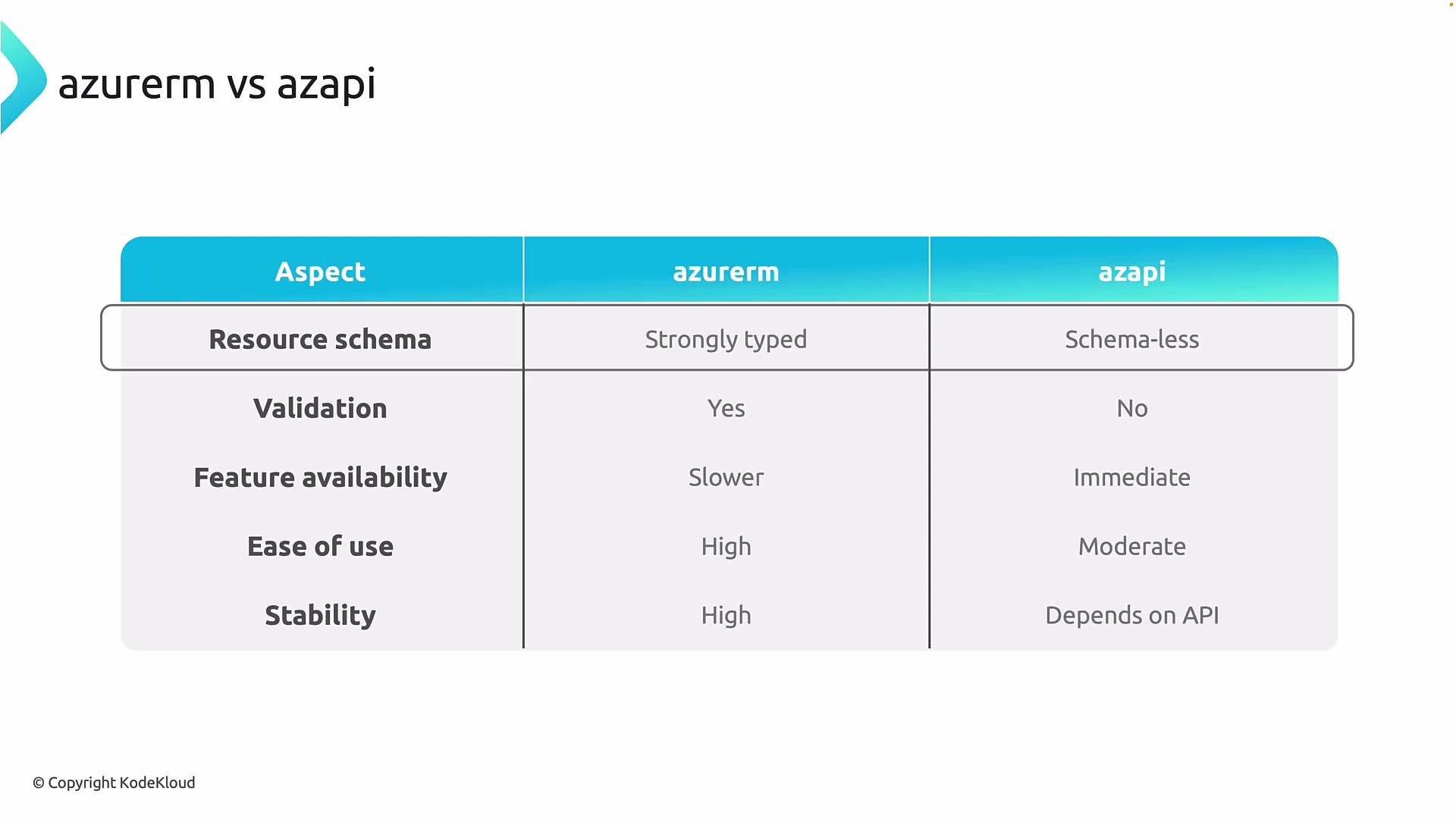 | Aspect | `azurerm` | `azapi` |
| -------------------- | --------------------------------------------------------------------- | ------------------------------------------------------------------------------------------------------- |
| Resource schema | Strongly typed provider schema with explicit arguments and types | Effectively schema-less from Terraform’s perspective—passes ARM resource body directly |
| Validation | Provider-side validation detects many errors at `terraform plan` time | Minimal provider validation; many errors surface only when Azure processes the request (often at apply) |
| Feature availability | New Azure features arrive after provider updates and releases | Immediate access to ARM APIs and API versions (including preview APIs) |
| Ease of use | High — comprehensive docs, examples, and typed resource blocks | Moderate — requires knowledge of ARM resource types, API versions, and JSON property shapes |
| Stability | High — conservative, production-ready behavior | Varies — depends on the underlying ARM API (preview APIs may change) |
## Detailed guidance
Resource schema and validation
* `azurerm` is strongly typed: the provider exposes documented arguments and types for each resource. This enables provider-side validation, clearer error messages, and better editor autocompletion.
* `azapi` treats the ARM resource body as a payload. Terraform (via `azapi`) performs minimal schema validation for ARM properties and forwards the JSON to Azure Resource Manager (ARM). This gives flexibility but removes many safety nets.
Validation behavior:
* `azurerm`: many mistakes are caught in `terraform plan` before modifications reach Azure.
* `azapi`: you are more likely to encounter validation errors at `terraform apply` (or later), so authors must validate ARM properties and API version choices carefully.
Feature availability and release cadence
* `azurerm`: waits for provider maintainers to model new Azure features. There can be a delay between the ARM API release and `azurerm` support.
* `azapi`: can target the ARM API version you need and access new or preview functionality immediately.
Ease of use and author experience
* `azurerm`: better for most teams—well-documented, consistent patterns, and lower cognitive load.
* `azapi`: better for advanced scenarios where direct ARM control is required. Expect to author JSON blocks, choose API versions explicitly, and handle raw ARM property shapes.
Stability and production risk
* `azurerm`: generally the safer choice for production workloads.
* `azapi`: powerful but riskier when used with preview APIs or unstable ARM endpoints. Use with caution and document intent.
## Combining providers (recommended pattern)
You do not need to pick one provider for everything. A pragmatic pattern:
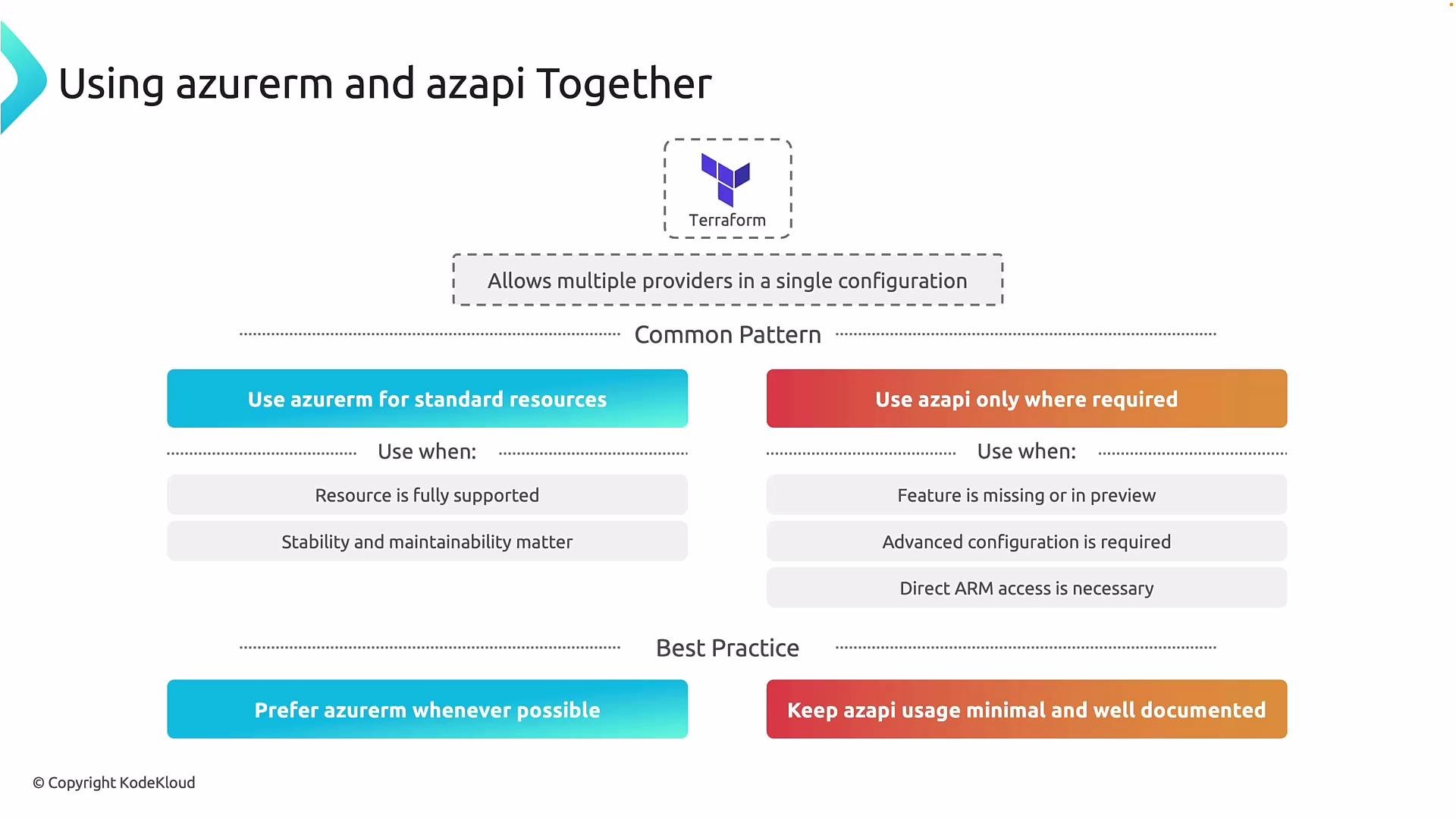
1. Use `azurerm` for the majority of resources—those that are supported, stable, and commonly managed.
2. Introduce `azapi` only for:
* Resources not yet implemented in `azurerm`.
* Features only exposed in preview APIs.
* Cases where you need to set ARM properties that `azurerm` does not expose.
This hybrid approach keeps your configuration readable and safer while still enabling access to the latest Azure capabilities.
## Best practices
* Prefer `azurerm` by default to reduce complexity and operational risk.
* Restrict `azapi` usage to well-justified exceptions. Keep such usages minimal and isolated.
* Document every `azapi` resource with:
* The exact ARM resource type (e.g., `Microsoft.Service/resourceType`).
* The targeted ARM API version.
* The concrete reason `azurerm` couldn’t be used.
* Validate `azapi` configurations against the ARM API reference and test in non-production environments.
* Use version control and code reviews to ensure `azapi` payloads remain maintainable.
* Periodically review `azapi` resources—migrate them to `azurerm` if/when provider support becomes available.
Prefer `azurerm` by default. Use `azapi` as an escape hatch for missing or preview features, and document each `azapi` usage with the targeted ARM API version and the reason it was chosen.
## When to choose which provider — short checklist
* Choose `azurerm` when:
* The resource is supported by the provider.
* You want provider-side validation and safer `plan` behavior.
* You need stability and maintainability for production workloads.
* Choose `azapi` when:
* The resource or property is not yet supported in `azurerm`.
* You must use a preview or very recent ARM API.
* You require direct access to ARM properties not surfaced by `azurerm`.
In summary: `azurerm` is the default, stable choice. `azapi` is a powerful tool to access recent or unsupported ARM features, but it requires additional care. Use them together strategically to keep Terraform aligned with Azure’s pace of innovation without sacrificing reliability.
| Aspect | `azurerm` | `azapi` |
| -------------------- | --------------------------------------------------------------------- | ------------------------------------------------------------------------------------------------------- |
| Resource schema | Strongly typed provider schema with explicit arguments and types | Effectively schema-less from Terraform’s perspective—passes ARM resource body directly |
| Validation | Provider-side validation detects many errors at `terraform plan` time | Minimal provider validation; many errors surface only when Azure processes the request (often at apply) |
| Feature availability | New Azure features arrive after provider updates and releases | Immediate access to ARM APIs and API versions (including preview APIs) |
| Ease of use | High — comprehensive docs, examples, and typed resource blocks | Moderate — requires knowledge of ARM resource types, API versions, and JSON property shapes |
| Stability | High — conservative, production-ready behavior | Varies — depends on the underlying ARM API (preview APIs may change) |
## Detailed guidance
Resource schema and validation
* `azurerm` is strongly typed: the provider exposes documented arguments and types for each resource. This enables provider-side validation, clearer error messages, and better editor autocompletion.
* `azapi` treats the ARM resource body as a payload. Terraform (via `azapi`) performs minimal schema validation for ARM properties and forwards the JSON to Azure Resource Manager (ARM). This gives flexibility but removes many safety nets.
Validation behavior:
* `azurerm`: many mistakes are caught in `terraform plan` before modifications reach Azure.
* `azapi`: you are more likely to encounter validation errors at `terraform apply` (or later), so authors must validate ARM properties and API version choices carefully.
Feature availability and release cadence
* `azurerm`: waits for provider maintainers to model new Azure features. There can be a delay between the ARM API release and `azurerm` support.
* `azapi`: can target the ARM API version you need and access new or preview functionality immediately.
Ease of use and author experience
* `azurerm`: better for most teams—well-documented, consistent patterns, and lower cognitive load.
* `azapi`: better for advanced scenarios where direct ARM control is required. Expect to author JSON blocks, choose API versions explicitly, and handle raw ARM property shapes.
Stability and production risk
* `azurerm`: generally the safer choice for production workloads.
* `azapi`: powerful but riskier when used with preview APIs or unstable ARM endpoints. Use with caution and document intent.
## Combining providers (recommended pattern)
You do not need to pick one provider for everything. A pragmatic pattern:
1. Use `azurerm` for the majority of resources—those that are supported, stable, and commonly managed.
2. Introduce `azapi` only for:
* Resources not yet implemented in `azurerm`.
* Features only exposed in preview APIs.
* Cases where you need to set ARM properties that `azurerm` does not expose.
This hybrid approach keeps your configuration readable and safer while still enabling access to the latest Azure capabilities.
## Best practices
* Prefer `azurerm` by default to reduce complexity and operational risk.
* Restrict `azapi` usage to well-justified exceptions. Keep such usages minimal and isolated.
* Document every `azapi` resource with:
* The exact ARM resource type (e.g., `Microsoft.Service/resourceType`).
* The targeted ARM API version.
* The concrete reason `azurerm` couldn’t be used.
* Validate `azapi` configurations against the ARM API reference and test in non-production environments.
* Use version control and code reviews to ensure `azapi` payloads remain maintainable.
* Periodically review `azapi` resources—migrate them to `azurerm` if/when provider support becomes available.
Prefer `azurerm` by default. Use `azapi` as an escape hatch for missing or preview features, and document each `azapi` usage with the targeted ARM API version and the reason it was chosen.
## When to choose which provider — short checklist
* Choose `azurerm` when:
* The resource is supported by the provider.
* You want provider-side validation and safer `plan` behavior.
* You need stability and maintainability for production workloads.
* Choose `azapi` when:
* The resource or property is not yet supported in `azurerm`.
* You must use a preview or very recent ARM API.
* You require direct access to ARM properties not surfaced by `azurerm`.
In summary: `azurerm` is the default, stable choice. `azapi` is a powerful tool to access recent or unsupported ARM features, but it requires additional care. Use them together strategically to keep Terraform aligned with Azure’s pace of innovation without sacrificing reliability.
 ## Links and references
* [azurerm provider (Terraform Registry)](https://registry.terraform.io/providers/hashicorp/azurerm/latest)
* [azapi provider (Terraform Registry)](https://registry.terraform.io/providers/azure/azapi/latest)
* [Azure Resource Manager REST API reference](https://learn.microsoft.com/azure/azure-resource-manager/management/rest-api-resources)
* [Terraform documentation](https://www.terraform.io/docs)
## Links and references
* [azurerm provider (Terraform Registry)](https://registry.terraform.io/providers/hashicorp/azurerm/latest)
* [azapi provider (Terraform Registry)](https://registry.terraform.io/providers/azure/azapi/latest)
* [Azure Resource Manager REST API reference](https://learn.microsoft.com/azure/azure-resource-manager/management/rest-api-resources)
* [Terraform documentation](https://www.terraform.io/docs)