> ## Documentation Index
> Fetch the complete documentation index at: https://notes.kodekloud.com/llms.txt
> Use this file to discover all available pages before exploring further.
# Intersite connectivity
> Overview of Azure intersite connectivity options and guidance for choosing between VNet peering, VPN gateways, ExpressRoute, and P2S based on latency, bandwidth, encryption, cost, and topology
This article explains inter-site connectivity options in Azure and how to choose between them. Two broad categories are covered:
* Azure-to-Azure connectivity (VNet-to-VNet)
* Azure-to-on-premises connectivity
Each option varies by latency, bandwidth, encryption, cost, topology, and management overhead. Below are concise descriptions, comparison tables, and diagrams to help you pick the best approach for your scenario.
## Azure-to-Azure connectivity
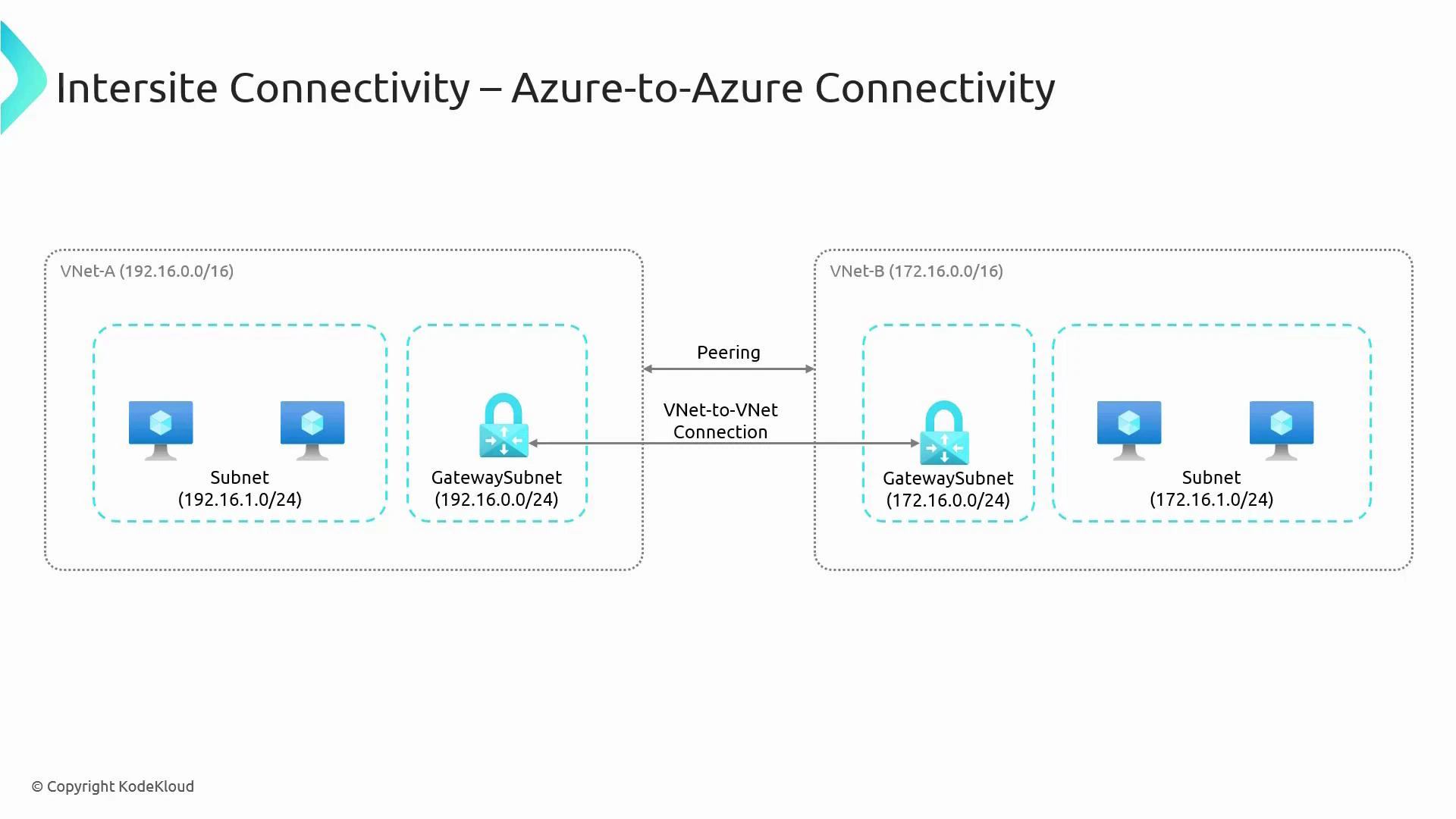
Two common ways to connect separate VNets (for example, VNet-A and VNet-B) are VNet Peering and VPN Gateway (VNet-to-VNet).
* By default VNets are isolated. To enable communication you must explicitly connect them.
* Consider region, throughput needs, whether traffic must traverse the public internet, and whether you require encryption in transit for your selection.
Comparison of the two approaches:
| Option | How it works | Best for | Pros | Cons |
| -------------------------- | -------------------------------------------------------------------------------------------- | --------------------------------------------------------------------------------- | -------------------------------------------------------------------------------------------- | ------------------------------------------------------------------------------------------------------------- |
| VNet Peering | Direct connection over the Azure backbone between two VNets (same region or global) | Low-latency, high-throughput intra-Azure connectivity | Low latency, high bandwidth, simple, no gateway cost | Requires non-overlapping address spaces; traffic is not encrypted over the internet (stays on Azure backbone) |
| VPN Gateway (VNet-to-VNet) | GatewaySubnet with Azure VPN Gateway establishes IPsec/IKE encrypted tunnel between gateways | Encrypted connectivity across regions or when you need site-to-site-style tunnels | Encrypts traffic end-to-end across public internet; supports cross-region gateway-to-gateway | Higher latency and cost vs peering; requires GatewaySubnet and gateway SKUs |
When to choose which:
* Choose VNet Peering when both VNets are in Azure and you want the lowest latency and highest throughput without extra gateway costs.
* Choose VPN Gateway (VNet-to-VNet) when you need encryption across the public internet, or you must use a gateway topology (for example, transitive scenarios with on-premises integration).
 ## Azure-to-on-premises connectivity
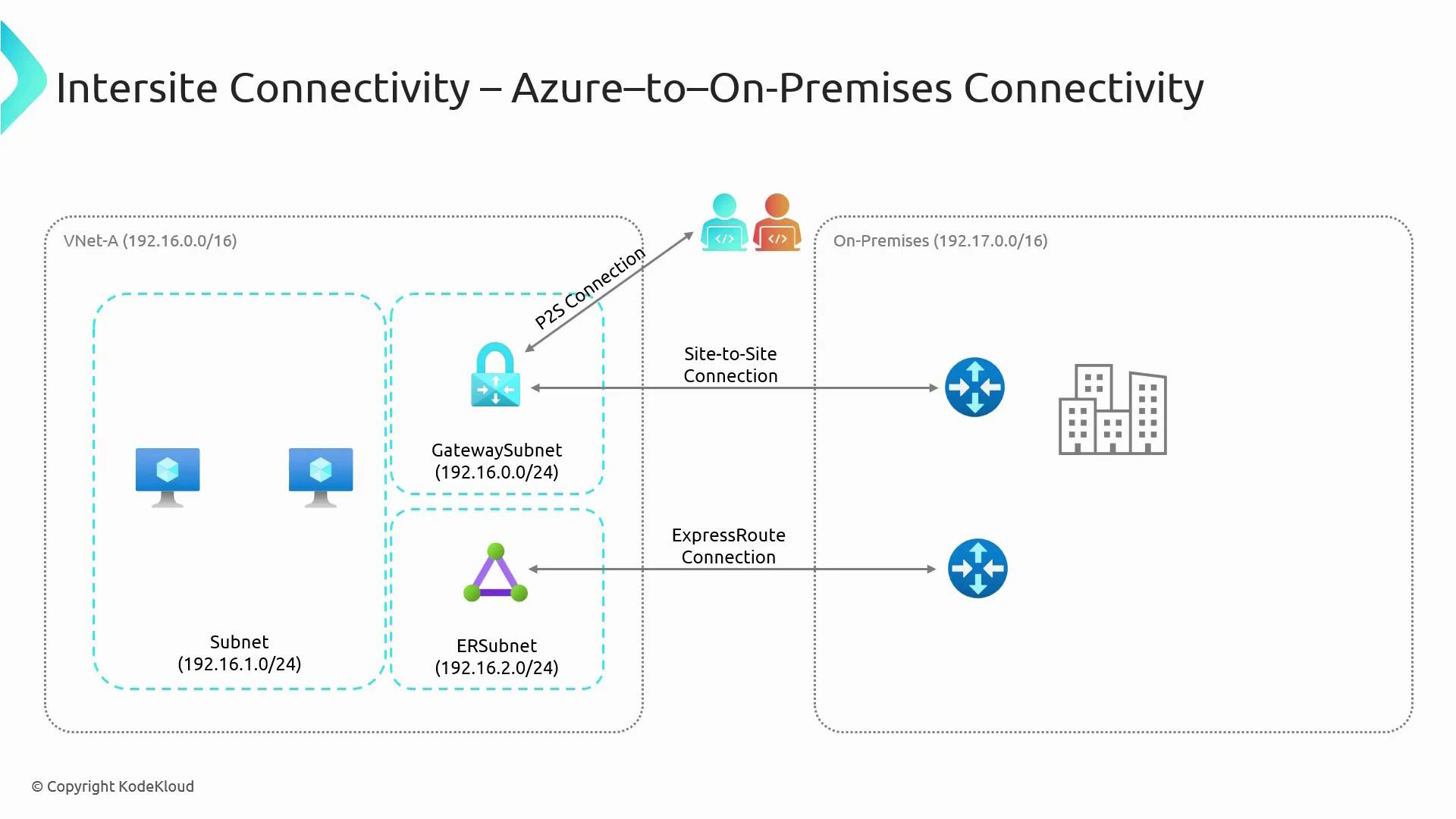
Connecting Azure VNets to your on-premises network typically uses one of the following methods: Site-to-Site VPN, ExpressRoute, or Point-to-Site (P2S) VPN. Each approach addresses different needs for performance, security, and cost.
| Option | How it works | Best for | Pros | Cons |
| ---------------------------- | ------------------------------------------------------------------------------------------------------- | ----------------------------------------------------------------- | ---------------------------------------------------------------------------- | ------------------------------------------------------------------ |
| Site-to-Site VPN (IPsec/IKE) | Azure VPN Gateway in GatewaySubnet establishes IPsec/IKE tunnel to on-prem VPN device over the internet | Secure datacenter-to-Azure connectivity without a private circuit | Encrypted over internet; straightforward to deploy; cost-effective | Traverses public internet (higher latency and variable throughput) |
| ExpressRoute | Dedicated private circuit through a connectivity provider | High-throughput, low-latency enterprise links to Azure | Private connection (no public internet), SLA-backed, predictable performance | Higher cost; requires provider coordination and provisioning |
| Point-to-Site (P2S) VPN | Individual client devices connect to Azure via VPN Gateway (SSTP/OpenVPN/IKEv2) | Remote workers, developers, ad-hoc access | Simple remote access for users; supports multiple protocols depending on SKU | Not intended for large-scale site connectivity |
Guidance:
* Use Site-to-Site VPN when you need encrypted connectivity quickly or cost-effectively.
* Use ExpressRoute when you require predictable performance, large bandwidth, and a private, SLA-backed link.
* Use P2S for remote-user access to resources in Azure without exposing your on-premises network.
## Azure-to-on-premises connectivity
Connecting Azure VNets to your on-premises network typically uses one of the following methods: Site-to-Site VPN, ExpressRoute, or Point-to-Site (P2S) VPN. Each approach addresses different needs for performance, security, and cost.
| Option | How it works | Best for | Pros | Cons |
| ---------------------------- | ------------------------------------------------------------------------------------------------------- | ----------------------------------------------------------------- | ---------------------------------------------------------------------------- | ------------------------------------------------------------------ |
| Site-to-Site VPN (IPsec/IKE) | Azure VPN Gateway in GatewaySubnet establishes IPsec/IKE tunnel to on-prem VPN device over the internet | Secure datacenter-to-Azure connectivity without a private circuit | Encrypted over internet; straightforward to deploy; cost-effective | Traverses public internet (higher latency and variable throughput) |
| ExpressRoute | Dedicated private circuit through a connectivity provider | High-throughput, low-latency enterprise links to Azure | Private connection (no public internet), SLA-backed, predictable performance | Higher cost; requires provider coordination and provisioning |
| Point-to-Site (P2S) VPN | Individual client devices connect to Azure via VPN Gateway (SSTP/OpenVPN/IKEv2) | Remote workers, developers, ad-hoc access | Simple remote access for users; supports multiple protocols depending on SKU | Not intended for large-scale site connectivity |
Guidance:
* Use Site-to-Site VPN when you need encrypted connectivity quickly or cost-effectively.
* Use ExpressRoute when you require predictable performance, large bandwidth, and a private, SLA-backed link.
* Use P2S for remote-user access to resources in Azure without exposing your on-premises network.
 Key operational notes:
* GatewaySubnet: When deploying any Azure VPN Gateway (VNet-to-VNet, Site-to-Site, or Point-to-Site), create a subnet named exactly `GatewaySubnet`. Size it according to the gateway SKU you choose. See Azure VPN Gateway guidance: [https://learn.microsoft.com/azure/vpn-gateway/vpn-gateway-about-gateway-subnet](https://learn.microsoft.com/azure/vpn-gateway/vpn-gateway-about-gateway-subnet).
* VNet Peering: Uses Azure’s private backbone, requires non-overlapping address spaces, and provides low-latency/high-throughput connectivity without explicit gateways.
* ExpressRoute: Provides a private circuit via connectivity providers—better throughput and latency than internet VPNs but requires provider setup and higher cost.
Important caveats:
* VNet Peering does not encrypt traffic across public internet because peering traffic stays on Azure’s backbone; if you require encryption end-to-end, use VPN Gateway (IPsec/IKE) or implement application-level encryption.
* Address space overlap prevents peering and can complicate routing for all connection types—plan IP addressing to avoid conflicts.
## Quick decision checklist
* Need lowest latency and highest bandwidth within Azure? -> VNet Peering
* Need encrypted site-to-site connectivity across the internet? -> VPN Gateway (Site-to-Site or VNet-to-VNet)
* Need a private, high-throughput connection with SLA? -> ExpressRoute
* Need secure remote access for individual users? -> Point-to-Site VPN
## References and further reading
* Azure VPN Gateway documentation: [https://learn.microsoft.com/azure/vpn-gateway/](https://learn.microsoft.com/azure/vpn-gateway/)
* VNet Peering documentation: [https://learn.microsoft.com/azure/virtual-network/virtual-network-peering-overview](https://learn.microsoft.com/azure/virtual-network/virtual-network-peering-overview)
* ExpressRoute documentation: [https://learn.microsoft.com/azure/expressroute/](https://learn.microsoft.com/azure/expressroute/)
* IPsec/IKE overview: [https://learn.microsoft.com/azure/vpn-gateway/vpn-gateway-about-ipsec](https://learn.microsoft.com/azure/vpn-gateway/vpn-gateway-about-ipsec)
This article introduced the main inter-site connectivity options in Azure. For deeper configuration steps, gateway SKU selection, IPsec/IKE version support, P2S transport protocols, and cost tradeoffs, refer to the linked Microsoft documentation above.
Key operational notes:
* GatewaySubnet: When deploying any Azure VPN Gateway (VNet-to-VNet, Site-to-Site, or Point-to-Site), create a subnet named exactly `GatewaySubnet`. Size it according to the gateway SKU you choose. See Azure VPN Gateway guidance: [https://learn.microsoft.com/azure/vpn-gateway/vpn-gateway-about-gateway-subnet](https://learn.microsoft.com/azure/vpn-gateway/vpn-gateway-about-gateway-subnet).
* VNet Peering: Uses Azure’s private backbone, requires non-overlapping address spaces, and provides low-latency/high-throughput connectivity without explicit gateways.
* ExpressRoute: Provides a private circuit via connectivity providers—better throughput and latency than internet VPNs but requires provider setup and higher cost.
Important caveats:
* VNet Peering does not encrypt traffic across public internet because peering traffic stays on Azure’s backbone; if you require encryption end-to-end, use VPN Gateway (IPsec/IKE) or implement application-level encryption.
* Address space overlap prevents peering and can complicate routing for all connection types—plan IP addressing to avoid conflicts.
## Quick decision checklist
* Need lowest latency and highest bandwidth within Azure? -> VNet Peering
* Need encrypted site-to-site connectivity across the internet? -> VPN Gateway (Site-to-Site or VNet-to-VNet)
* Need a private, high-throughput connection with SLA? -> ExpressRoute
* Need secure remote access for individual users? -> Point-to-Site VPN
## References and further reading
* Azure VPN Gateway documentation: [https://learn.microsoft.com/azure/vpn-gateway/](https://learn.microsoft.com/azure/vpn-gateway/)
* VNet Peering documentation: [https://learn.microsoft.com/azure/virtual-network/virtual-network-peering-overview](https://learn.microsoft.com/azure/virtual-network/virtual-network-peering-overview)
* ExpressRoute documentation: [https://learn.microsoft.com/azure/expressroute/](https://learn.microsoft.com/azure/expressroute/)
* IPsec/IKE overview: [https://learn.microsoft.com/azure/vpn-gateway/vpn-gateway-about-ipsec](https://learn.microsoft.com/azure/vpn-gateway/vpn-gateway-about-ipsec)
This article introduced the main inter-site connectivity options in Azure. For deeper configuration steps, gateway SKU selection, IPsec/IKE version support, P2S transport protocols, and cost tradeoffs, refer to the linked Microsoft documentation above.