> ## Documentation Index
> Fetch the complete documentation index at: https://notes.kodekloud.com/llms.txt
> Use this file to discover all available pages before exploring further.
# VPN Gateway
> VPN Gateways facilitate connectivity within and between Azure virtual networks, supporting VNet-to-VNet, Site-to-Site, and Point-to-Site connections to on-premises infrastructures.
VPN Gateways enable various types of connectivity within and between Azure virtual networks (VNets). They can establish VNet-to-VNet connections as well as Site-to-Site and Point-to-Site connections to on-premises infrastructures.
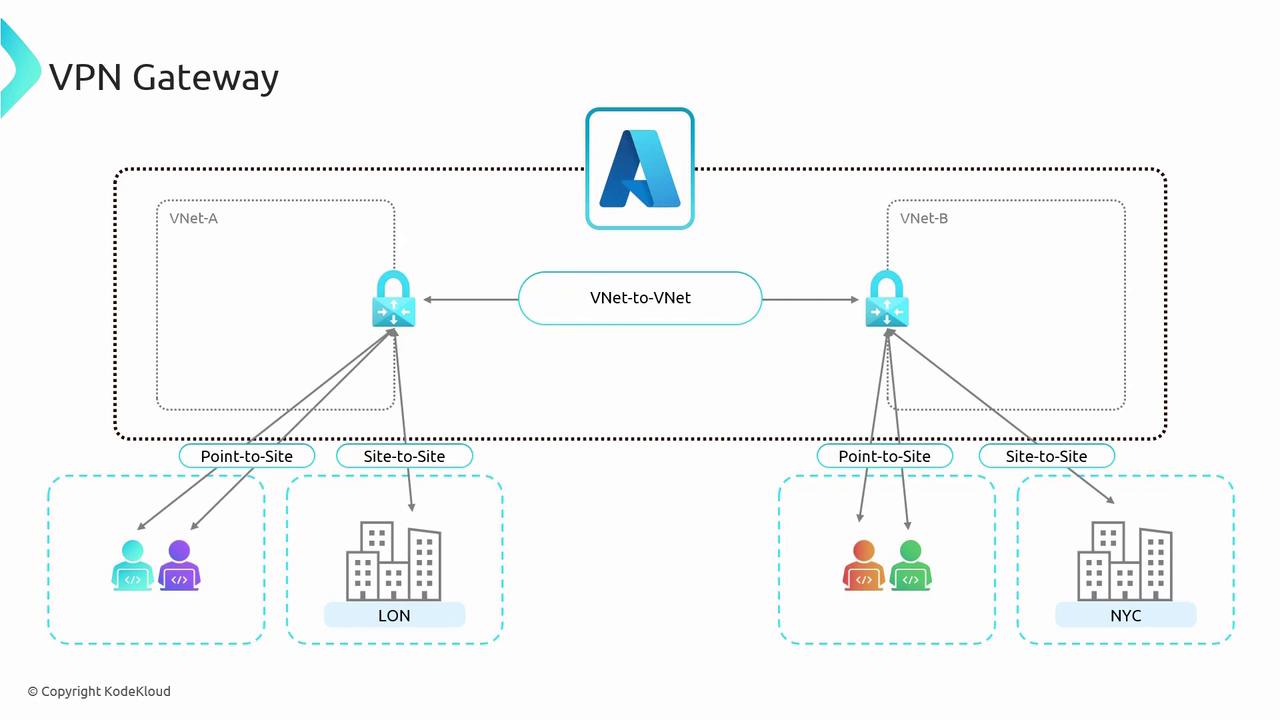
In the architecture depicted above, VNet A is configured with a VPN Gateway (also known as a virtual network gateway) and connected to VNet B via a VNet-to-VNet connection. It is important to note that both VNets must have their own gateway to establish this connection—a key difference from VNet peering, which does not require a gateway on both sides. For example, VNet A can serve the London office using its Site-to-Site connection, while VNet B serves the New York office; the New York office can access VNet A through the established connectivity.
Understanding VPN Gateway concepts is crucial, as they serve as the foundation for Gateway Transit—a concept that is particularly relevant for exam scenarios.
There are multiple SKUs available for VPN Gateways, including Generation 1 (Gen 1) and Generation 2 (Gen 2), with some SKUs even supporting zone redundancy. The SKU selection depends on the number of required connections and throughput needs. Within the same generation, a VPN Gateway can be resized (for instance, from a Gen 1 GW1 to a Gen 1 GW2). However, resizing between generations (from Gen 1 to Gen 2) is not supported and requires the gateway to be completely redeployed. Additionally, a Basic SKU is available; however, it is considered legacy and is not recommended for production environments.
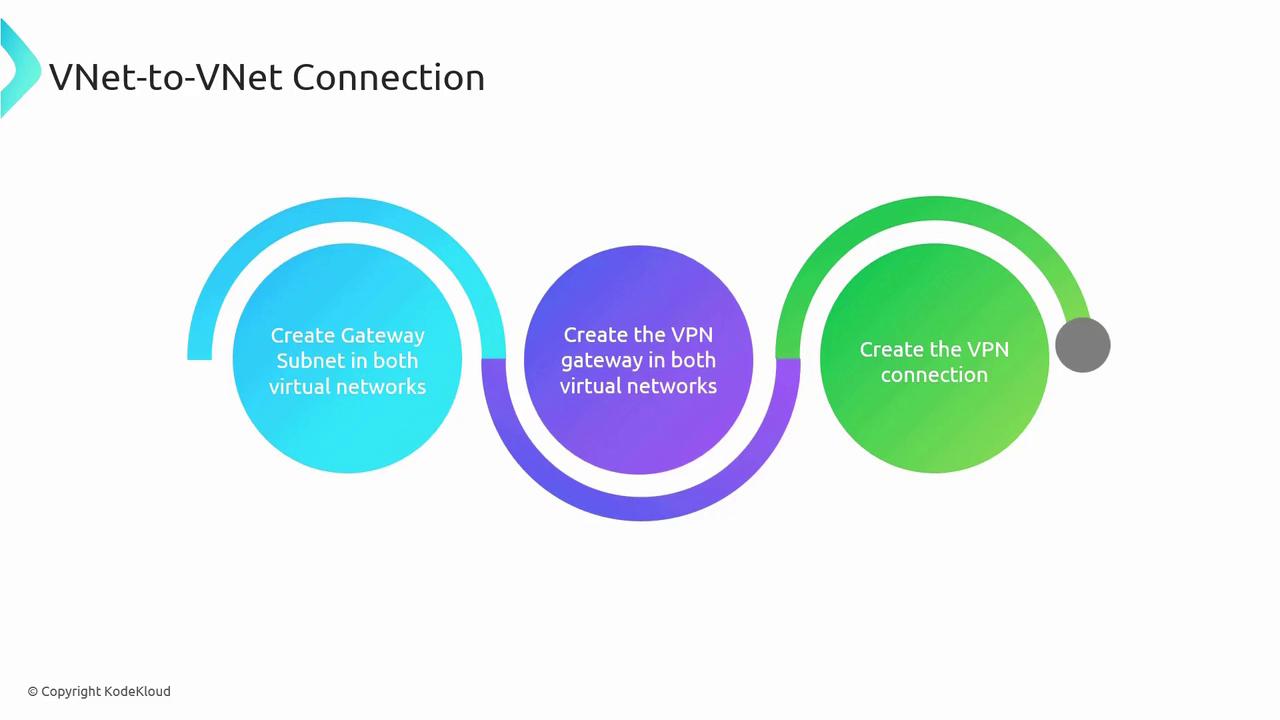
To set up a VNet-to-VNet connection using VPN gateways, ensure that each VNet has a dedicated gateway subnet. The process involves three major steps:
1. Create a gateway subnet in each VNet.
2. Deploy a VPN Gateway in each virtual network.
3. Establish the VNet-to-VNet connection between the two gateways.
Many organizations continue to use VPN Gateways, largely due to their built-in encryption capabilities. The following section provides a detailed comparison between VNet peering and VNet-to-VNet connections.
## Comparison Between VNet Peering and VNet-to-VNet Connections
| Feature | VNet Peering | VNet-to-VNet Connection |
| ------------------------- | ----------------------------------------------------------------------------------------------------------------------------------------------- | ----------------------------------------------------------------------------------------------------------------------------------------------------------- |
| **Number of Connections** | Supports up to 500 peerings per VNet. For example, VNet A can peer with VNets B, C, D, etc. | Supports a single VPN Gateway per VNet, but a gateway can handle multiple connections as determined by the SKU (up to 300 in some cases). |
| **Pricing** | Only data ingress and egress charges apply; you pay solely for data transfers. | In addition to data egress charges, there is an hourly cost for the gateway, regardless of active usage. |
| **Encryption** | Lacks built-in encryption; however, software-level encryption can be implemented. | Offers built-in encryption using IPsec or Internet Key Exchange (IKE), making it ideal for scenarios where encryption is mandatory. |
| **Bandwidth** | Utilizes Microsoft’s backbone network without bandwidth restrictions; suitable for high data transfers with low latency. | Bandwidth is determined by the chosen SKU, with higher-end SKUs offering up to 10 Gbps. |
| **Routing** | Traffic is routed through Microsoft’s backbone network, ensuring fast and private connectivity. | Uses the public internet via an encrypted VPN tunnel, which may affect performance depending on the SKU and network conditions. |
| **Public IP Requirement** | Does not require public IP addresses as traffic remains within the Microsoft backbone. | Requires a public IP for the deployment of the virtual network gateway. |
| **Transitivity** | Non-transitive; for example, if VNet A peers with VNet B and VNet B peers with VNet C, connectivity between VNet A and VNet C is not automatic. | Can be configured as transitive with Border Gateway Protocol (BGP) enabled, allowing routes from other networks to be published and used for communication. |
| **Initial Setup Time** | Can be configured rapidly. | Takes between 30 to 40 minutes per VPN gateway. With two gateways, expect an overall deployment time of around 45 to 50 minutes. |
| **Use Cases** | Ideal for data replication, failover, and large-scale backups due to its high-speed, low-latency connectivity. | Preferred in environments where encryption is critical, despite reliance on the public internet and SKU-dependent performance. |
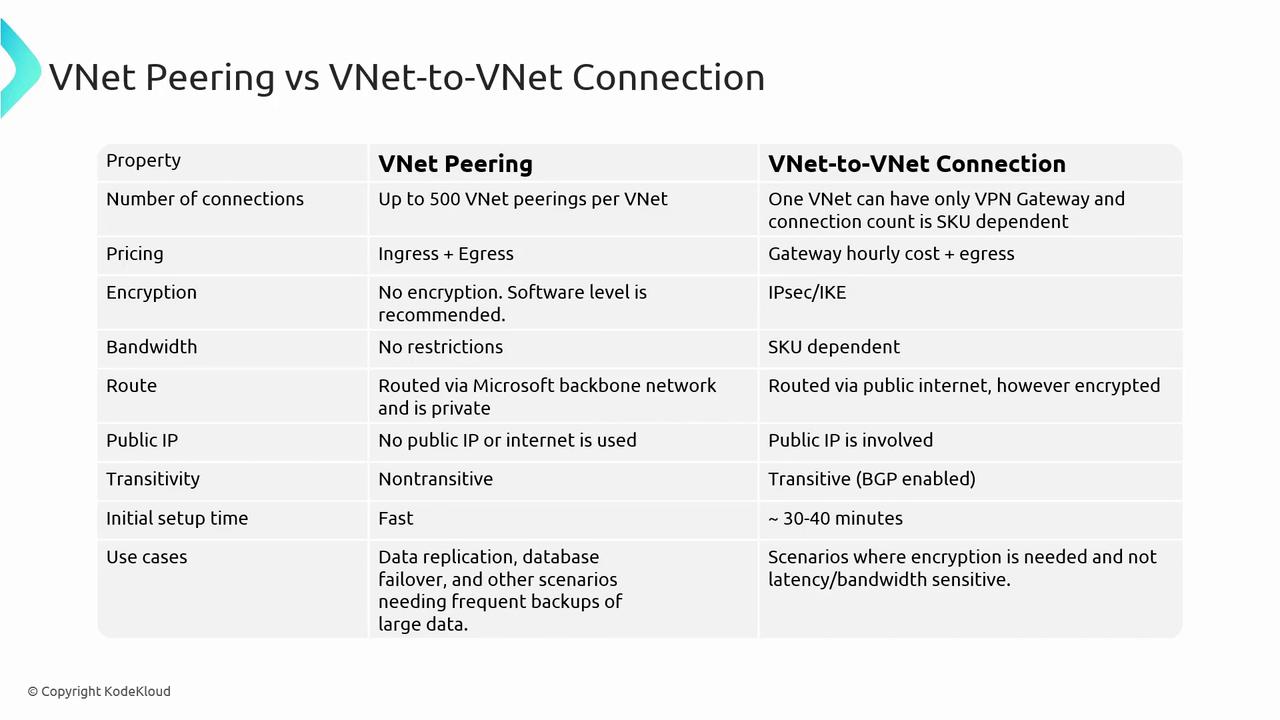
This detailed comparison outlines the key differences between VNet peering and VNet-to-VNet connections. In the following sections, we will explore Site-to-Site and Point-to-Site connections to further expand on VPN connectivity solutions.