> ## Documentation Index
> Fetch the complete documentation index at: https://notes.kodekloud.com/llms.txt
> Use this file to discover all available pages before exploring further.
# Azure Application Gateway
> Azure Application Gateway is a Layer 7 load balancing solution for managing HTTP, HTTPS, and WebSocket traffic with advanced routing and security features.
Azure Application Gateway is a robust Layer 7 load balancing solution in Microsoft Azure. It is designed to efficiently handle HTTP, HTTPS, HTTP/2, and WebSocket traffic while providing advanced routing capabilities and enhanced security through features such as a Web Application Firewall.
## Key Features
* **Advanced Routing:** Utilizes path-based routing to direct requests based on URL, making it possible to host multiple websites behind one gateway.
* **Enhanced Security:** Optionally integrates with a Web Application Firewall to protect backend resources.
* **URL Redirection & SSL Termination:** Supports URL redirection, SSL termination, and HTTP header rewriting.
* **Custom Error Pages:** Allows customization of error messages for improved user experience.
* **Broad Backend Support:** Unlike the Azure Load Balancer—which is limited to virtual machines and virtual machine scale sets—the Application Gateway supports a variety of resources, including:
| Resource Type | Supported Backend Resources |
| -------------------------- | ------------------------------------- |
| Virtual Machines | Traditional virtual machines in Azure |
| Virtual Machine Scale Sets | Scalable VM deployments |
| Azure App Services | Includes support for deployment slots |
| Other Cloud/On-Premises | Servers hosted outside of Azure |
## How It Works
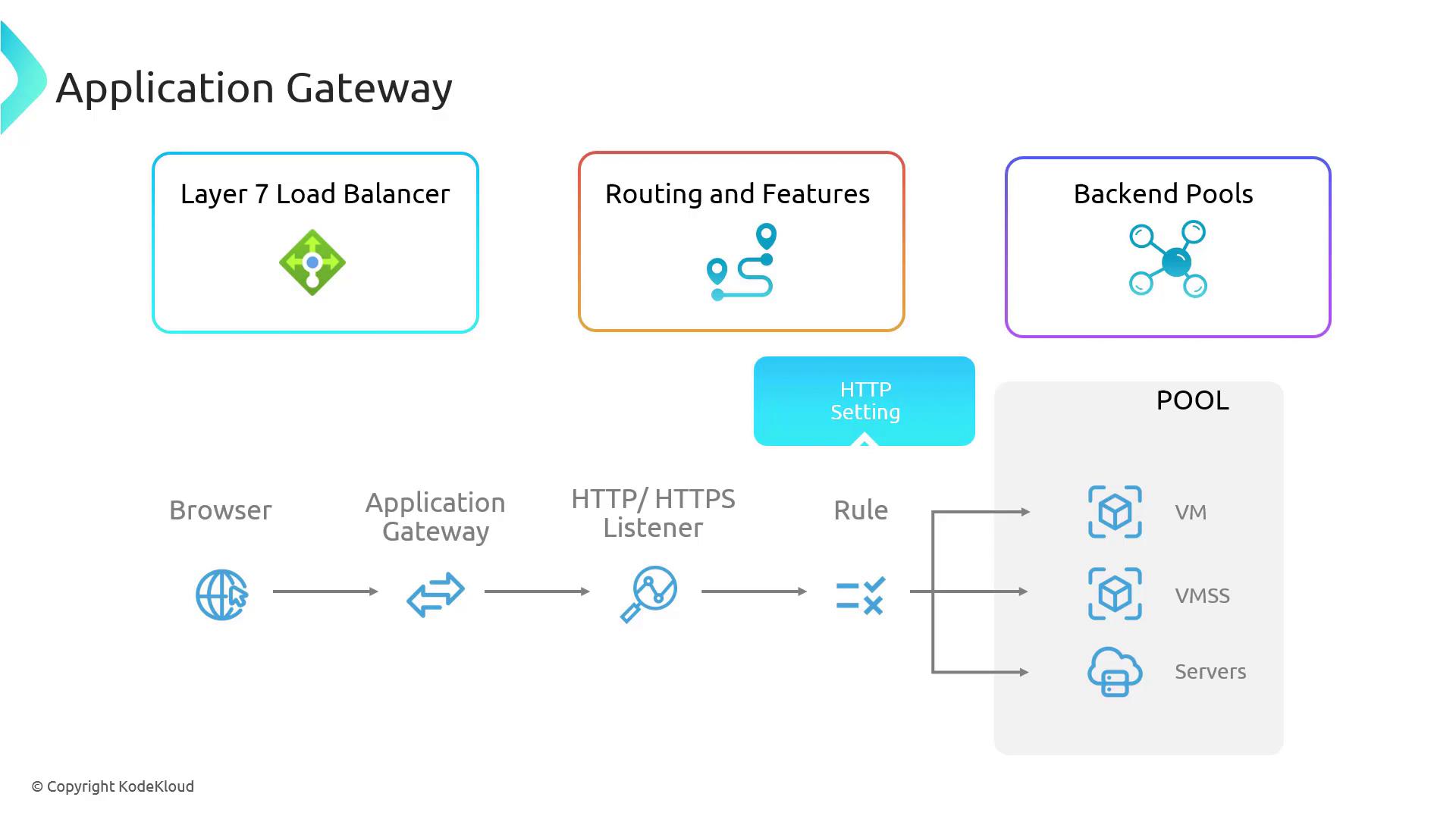
The following workflow illustrates how Azure Application Gateway manages incoming traffic:
1. **Request Initiation:**\
A user initiates a request for a webpage, image, or any other resource via their browser.
2. **Traffic Management:**\
The request is first received by the Azure Application Gateway, which manages all incoming web traffic.
3. **Listener Interception:**\
An HTTP or HTTPS listener on the gateway intercepts the request, configured to respond based on specific criteria such as URL path and host header.
4. **Routing Rule Application:**\
The listener applies predefined routing rules. Based on evaluating the URL path or other attributes, the rules determine the appropriate backend pool to which the request should be forwarded.
5. **HTTP Settings Enforcement:**\
Before sending the request to the backend, the gateway applies HTTP settings, which set parameters for communication. These include timeout settings, cookie-based affinity for session persistence, and rewrite rules to modify headers if needed.
6. **Request Forwarding:**\
With routing and HTTP settings in place, the gateway forwards the request to a selected backend pool comprising resources like virtual machines, App Services, or other servers.
7. **Load Balancing:**\
Within the backend pool, load balancing algorithms (e.g., round-robin, least connections) are employed to distribute incoming requests evenly across multiple servers, ensuring optimal performance and reliability.
Azure Application Gateway seamlessly integrates listeners, routing rules, HTTP settings, and backend pools to ensure efficient and secure management of user requests.
## Architecture Diagram
Below is a visual representation of the Azure Application Gateway architecture. The diagram illustrates the various components such as the Layer 7 load balancer, routing features, backend pools, and how traffic flows from a user's browser to different types of backend resources including virtual machines, virtual machine scale sets, and external servers.
For more detailed information on Azure networking and load balancing, you may refer to the official [Azure Documentation](https://docs.microsoft.com/azure/application-gateway/overview).