> ## Documentation Index
> Fetch the complete documentation index at: https://notes.kodekloud.com/llms.txt
> Use this file to discover all available pages before exploring further.
# Demo Text Embedding with sentence transformer
> Hands-on tutorial converting a Markdown policy into SentenceTransformer embeddings, storing vectors in LanceDB, and performing semantic search with code examples and chunking strategies.
Welcome — in this hands-on demo we'll convert a Markdown policy document into vector embeddings using a SentenceTransformer, store them in LanceDB (an open-source vector database), and run semantic search over the document. All code runs in a Jupyter notebook; the examples below show the essential code, explanations, and sample outputs so you can reproduce the workflow.
Table of contents
* 1. Imports and prerequisites
* 2. Load the policy document
* 3. Chunk the document by headings
* 4. Load the embedding model
* 5. Encode chunks and store in LanceDB
* 6. Define search utilities
* 7. Example queries
* 8. Notes on behavior and limitations
* 9. Wrap-up and resources
## 1) Imports and prerequisites
Install dependencies (example):
```bash theme={null}
pip install sentence-transformers lancedb pandas numpy
```
Then import the Python modules required for file handling, text processing, embeddings, and the vector DB:
```python theme={null}
import os
import re
from pathlib import Path
import lancedb
import numpy as np
import pandas as pd
from sentence_transformers import SentenceTransformer
```
Helpful links:
* SentenceTransformers: [https://www.sbert.net/](https://www.sbert.net/)
* LanceDB: [https://lancedb.ai/](https://lancedb.ai/)
Below is a short table of the key libraries used in this tutorial.
| Resource | Purpose | Example / Link |
| ----------------------- | -------------------------------- | ----------------------------------------- |
| `sentence-transformers` | Convert text to dense embeddings | `SentenceTransformer("all-MiniLM-L6-v2")` |
| `lancedb` | Store and query vectors locally | `lancedb.connect(DB_PATH)` |
| `pandas`, `numpy` | Data manipulation & numeric ops | - |
## 2) Load the policy document
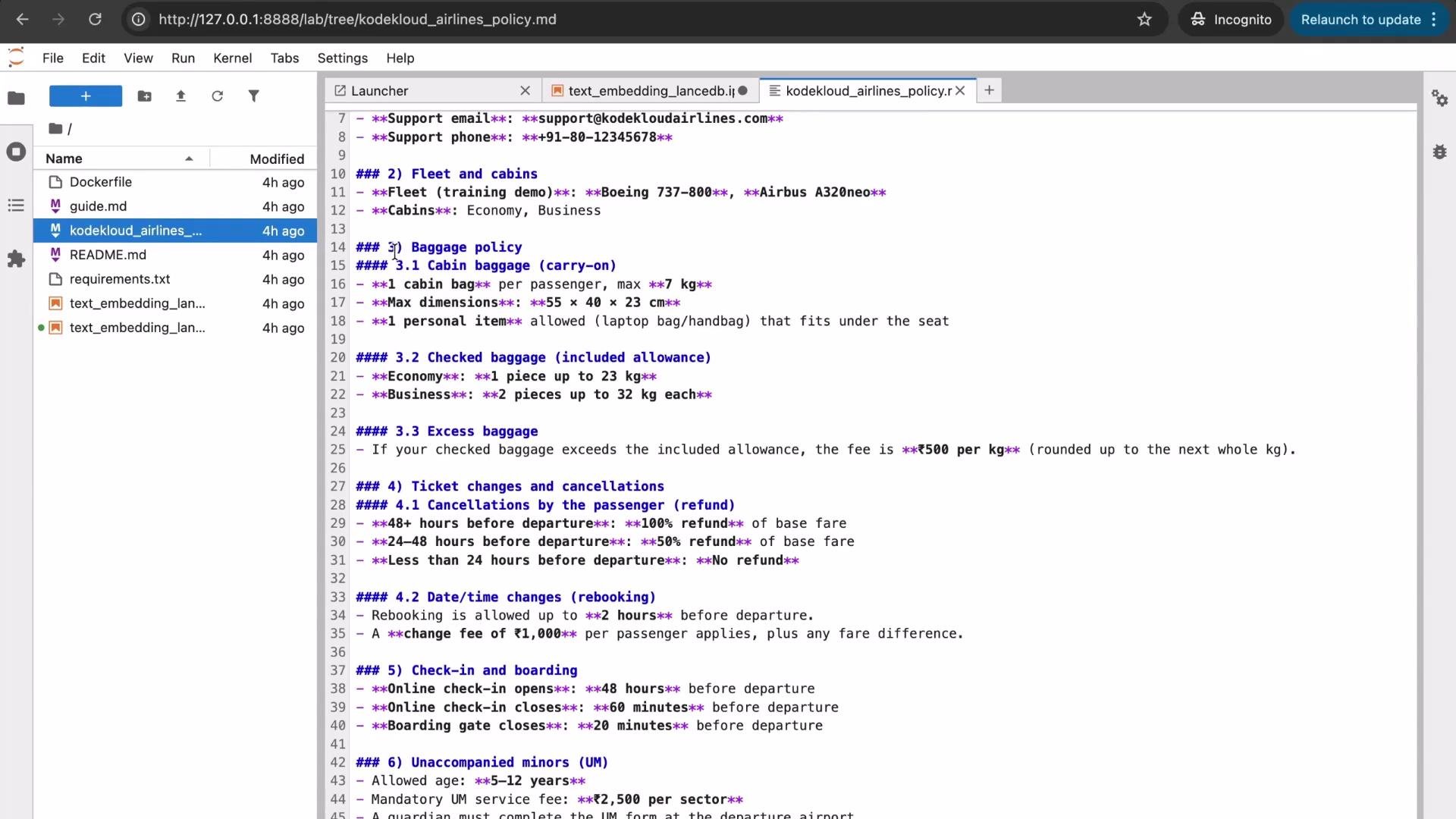
Load the Markdown file (here: `kodekloud_airlines_policy.md`) and print a short preview to confirm successful load.
```python theme={null}
BASE_DIR = Path.cwd()
POLICY_PATH = BASE_DIR / "kodekloud_airlines_policy.md"
policy_text = POLICY_PATH.read_text(encoding="utf-8")
print(f"Loaded policy: {POLICY_PATH.name}")
print(f"Characters: {len(policy_text):,}")
print("\n--- Preview (first 400 chars) ---\n")
print(policy_text[:400])
```
This policy includes sections for baggage, ticket changes and cancellations, pets, check-in, boarding, and more. We'll create semantic chunks from these sections and embed them.
 ## 3) Chunk the document
Embedding an entire long document at once reduces retrieval granularity. The recommended approach is to split into semantic chunks (for example, by headings) and embed each chunk independently.
The following `chunk_by_headings` function groups content by top-level headings (`#`, `##`, `###`) and discards very short buffers. It returns a list of dictionaries with `section` and `text` keys.
```python theme={null}
def chunk_by_headings(md: str) -> list[dict]:
"""
Split markdown text into chunks grouped by the most recent heading.
- Headings: lines starting with '#', '##', or '###'.
- Ignore very short chunks.
"""
lines = md.splitlines()
chunks = []
current_section = "(start)"
buffer_lines = []
def flush_buffer():
text = "\n".join(buffer_lines).strip()
if len(text) >= 60:
chunks.append({"section": current_section, "text": text})
for line in lines:
heading_match = re.match(r'^(#{1,3})\s+(.*)', line)
if heading_match:
# Flush previous buffer
flush_buffer()
buffer_lines = []
current_section = heading_match.group(2).strip()
else:
buffer_lines.append(line)
# Flush the final buffer
flush_buffer()
return chunks
```
Run the chunker and inspect the first few chunks:
```python theme={null}
chunks = chunk_by_headings(policy_text)
print("Number of chunks:", len(chunks))
for i, c in enumerate(chunks[:5], 1):
print(f"Chunk {i} section: {c['section']}; chars: {len(c['text'])}")
```
## 4) Load the embedding model
We use the `all-MiniLM-L6-v2` SentenceTransformer (compact, high-quality for semantic search). If you pull from the Hugging Face Hub frequently, consider setting `HF_TOKEN` as an environment variable to avoid unauthenticated rate limits.
If you see warnings about unauthenticated Hugging Face Hub requests, set a `HF_TOKEN` environment variable to increase rate limits and speed up downloads.
Load the model and encode a test string:
```python theme={null}
MODEL_NAME = "all-MiniLM-L6-v2"
model = SentenceTransformer(MODEL_NAME)
example = "What is the cabin baggage limit?"
v = model.encode(example)
print("Model:", MODEL_NAME)
print("Vector shape:", v.shape)
print("Vector preview:", np.array2string(v[:10], precision=3))
```
Example console output (actual numbers may differ):
```plaintext theme={null}
Warning: You are sending unauthenticated requests to the HF Hub. Please set a HF_TOKEN to enable higher rate limits and faster downloads.
BertModel LOAD REPORT from: sentence-transformers/all-MiniLM-L6-v2
Model: all-MiniLM-L6-v2
Vector shape: (384,)
Vector preview: [ 0.063 -0.030 -0.080 0.035 0.013 0.002 0.059 0.028 -0.015 0.032]
```
## 5) Encode chunks and store in LanceDB
Create (or recreate) a local LanceDB store, encode each chunk into a normalized embedding vector, and store rows with `section`, `text`, and `vector` fields.
```python theme={null}
DB_PATH = str(BASE_DIR / "lancedb_kodekloud_airline")
TABLE_NAME = "policy_chunks"
# Optional: recreate DB folder each run for a clean demo.
if Path(DB_PATH).exists():
import shutil
shutil.rmtree(DB_PATH)
db = lancedb.connect(DB_PATH)
texts = [c["text"] for c in chunks]
sections = [c["section"] for c in chunks]
# Encode and normalize embeddings
vectors = model.encode(texts, normalize_embeddings=True)
rows = [
{"section": sections[i], "text": texts[i], "vector": vectors[i].tolist()}
for i in range(len(texts))
]
if TABLE_NAME in db.table_names():
db.drop_table(TABLE_NAME)
tbl = db.create_table(TABLE_NAME, data=rows)
print("Rows in table:", tbl.count_rows())
```
You should see the row count equal to the number of chunks created (for example, 10).
## 6) Define search utilities
Create two helper functions:
* `search_policy(question, k)` — performs a vector search in LanceDB and returns top-k hits as a pandas DataFrame
* `pretty_print_results(question, k, preview_chars)` — prints results with section context and distance score
```python theme={null}
def search_policy(question: str, k: int = 3) -> pd.DataFrame:
qvec = model.encode(question, normalize_embeddings=True).tolist()
df = (
tbl.search(qvec)
.limit(k)
.to_pandas()
)
cols = [c for c in df.columns if c in ("section", "text", "_distance", "score")]
return df[cols]
def pretty_print_results(question: str, k: int = 2, preview_chars: int = 500) -> None:
print("Question:", question)
results = search_policy(question, k)
for i, row in results.iterrows():
section = row.get("section", "")
text = row.get("text", "")
dist = row.get("_distance", None)
print("\n--- Match", i + 1, "---")
if dist is not None:
print("Distance:", float(dist))
print("Section:", section)
print(text[:preview_chars])
```
Notes:
* Using `normalize_embeddings=True` ensures cosine similarity is computed as a simple dot product in many vector DBs.
* The `_distance` field returned by LanceDB is typically the computed metric (lower is closer depending on configuration).
## 7) Example queries
Try a few representative questions to demonstrate semantic search behavior.
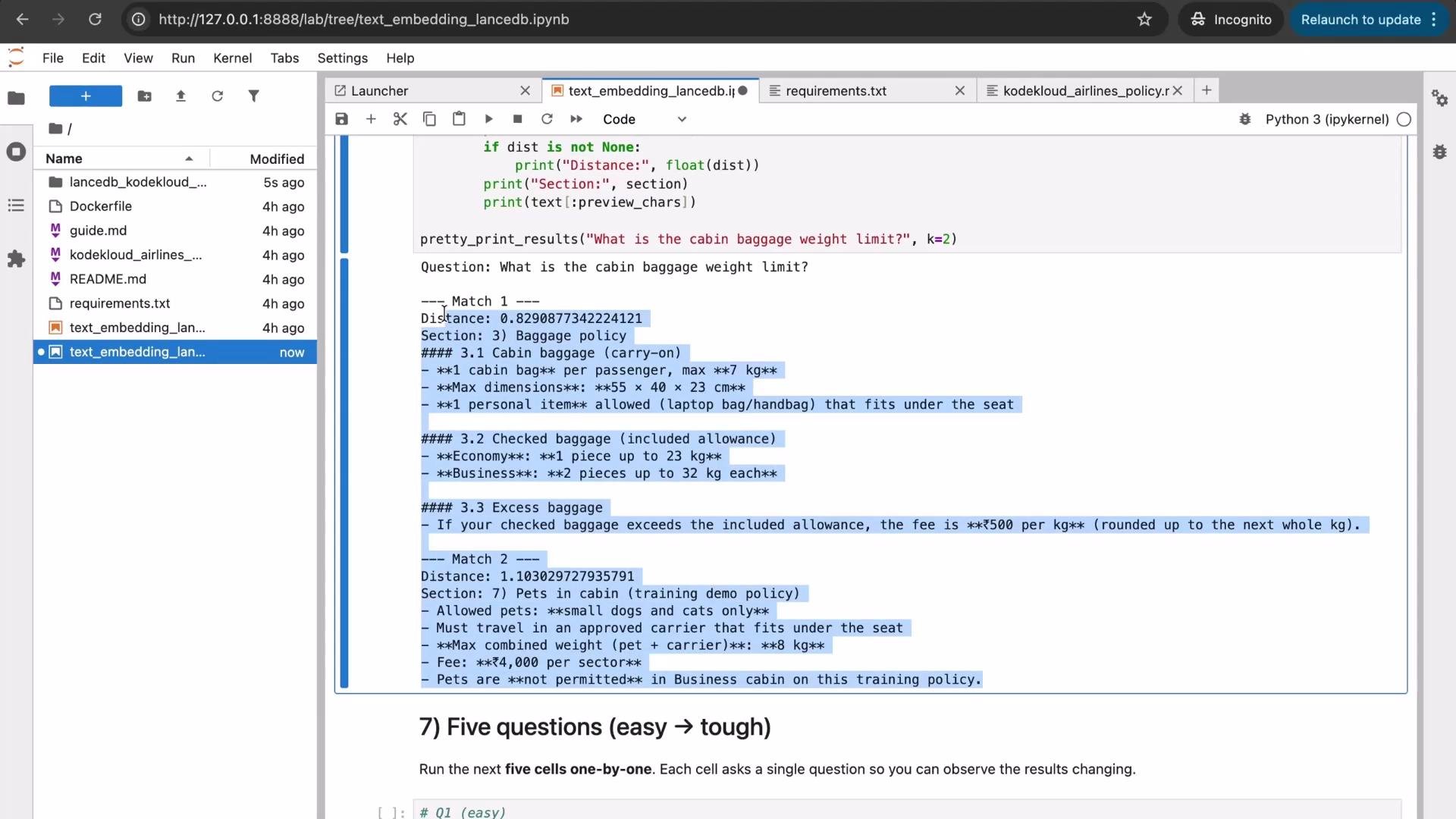
* Example: "What is the cabin baggage weight limit?"
```python theme={null}
pretty_print_results("What is the cabin baggage weight limit?", k=2, preview_chars=600)
```
Sample output:
```plaintext theme={null}
Question: What is the cabin baggage weight limit?
--- Match 1 ---
Distance: 0.8290877342242142
Section: 3) Baggage policy
### 3.1 Cabin baggage (carry-on)
- **1 cabin bag** per passenger, max **7 kg**
- **Max dimensions:** **55 x 40 x 23 cm**
- **1 personal item** allowed (laptop bag/handbag) that fits under the seat
### 3.2 Checked baggage (included allowance)
- **Economy:** **1 piece up to 23 kg**
- **Business:** **2 pieces up to 32 kg each**
--- Match 2 ---
Distance: 1.103027927395791
Section: 7) Pets in cabin (training demo policy)
- Allowed pets: **small dogs and cats only**
- Must travel in an approved carrier that fits under the seat
- **Max combined weight (pet + carrier):** **8 kg**
```
The top match is the baggage policy chunk. The second match references pet weight (pet + carrier), which can be returned because embeddings capture semantic relationships — sometimes leading to plausible but different interpretations.
## 3) Chunk the document
Embedding an entire long document at once reduces retrieval granularity. The recommended approach is to split into semantic chunks (for example, by headings) and embed each chunk independently.
The following `chunk_by_headings` function groups content by top-level headings (`#`, `##`, `###`) and discards very short buffers. It returns a list of dictionaries with `section` and `text` keys.
```python theme={null}
def chunk_by_headings(md: str) -> list[dict]:
"""
Split markdown text into chunks grouped by the most recent heading.
- Headings: lines starting with '#', '##', or '###'.
- Ignore very short chunks.
"""
lines = md.splitlines()
chunks = []
current_section = "(start)"
buffer_lines = []
def flush_buffer():
text = "\n".join(buffer_lines).strip()
if len(text) >= 60:
chunks.append({"section": current_section, "text": text})
for line in lines:
heading_match = re.match(r'^(#{1,3})\s+(.*)', line)
if heading_match:
# Flush previous buffer
flush_buffer()
buffer_lines = []
current_section = heading_match.group(2).strip()
else:
buffer_lines.append(line)
# Flush the final buffer
flush_buffer()
return chunks
```
Run the chunker and inspect the first few chunks:
```python theme={null}
chunks = chunk_by_headings(policy_text)
print("Number of chunks:", len(chunks))
for i, c in enumerate(chunks[:5], 1):
print(f"Chunk {i} section: {c['section']}; chars: {len(c['text'])}")
```
## 4) Load the embedding model
We use the `all-MiniLM-L6-v2` SentenceTransformer (compact, high-quality for semantic search). If you pull from the Hugging Face Hub frequently, consider setting `HF_TOKEN` as an environment variable to avoid unauthenticated rate limits.
If you see warnings about unauthenticated Hugging Face Hub requests, set a `HF_TOKEN` environment variable to increase rate limits and speed up downloads.
Load the model and encode a test string:
```python theme={null}
MODEL_NAME = "all-MiniLM-L6-v2"
model = SentenceTransformer(MODEL_NAME)
example = "What is the cabin baggage limit?"
v = model.encode(example)
print("Model:", MODEL_NAME)
print("Vector shape:", v.shape)
print("Vector preview:", np.array2string(v[:10], precision=3))
```
Example console output (actual numbers may differ):
```plaintext theme={null}
Warning: You are sending unauthenticated requests to the HF Hub. Please set a HF_TOKEN to enable higher rate limits and faster downloads.
BertModel LOAD REPORT from: sentence-transformers/all-MiniLM-L6-v2
Model: all-MiniLM-L6-v2
Vector shape: (384,)
Vector preview: [ 0.063 -0.030 -0.080 0.035 0.013 0.002 0.059 0.028 -0.015 0.032]
```
## 5) Encode chunks and store in LanceDB
Create (or recreate) a local LanceDB store, encode each chunk into a normalized embedding vector, and store rows with `section`, `text`, and `vector` fields.
```python theme={null}
DB_PATH = str(BASE_DIR / "lancedb_kodekloud_airline")
TABLE_NAME = "policy_chunks"
# Optional: recreate DB folder each run for a clean demo.
if Path(DB_PATH).exists():
import shutil
shutil.rmtree(DB_PATH)
db = lancedb.connect(DB_PATH)
texts = [c["text"] for c in chunks]
sections = [c["section"] for c in chunks]
# Encode and normalize embeddings
vectors = model.encode(texts, normalize_embeddings=True)
rows = [
{"section": sections[i], "text": texts[i], "vector": vectors[i].tolist()}
for i in range(len(texts))
]
if TABLE_NAME in db.table_names():
db.drop_table(TABLE_NAME)
tbl = db.create_table(TABLE_NAME, data=rows)
print("Rows in table:", tbl.count_rows())
```
You should see the row count equal to the number of chunks created (for example, 10).
## 6) Define search utilities
Create two helper functions:
* `search_policy(question, k)` — performs a vector search in LanceDB and returns top-k hits as a pandas DataFrame
* `pretty_print_results(question, k, preview_chars)` — prints results with section context and distance score
```python theme={null}
def search_policy(question: str, k: int = 3) -> pd.DataFrame:
qvec = model.encode(question, normalize_embeddings=True).tolist()
df = (
tbl.search(qvec)
.limit(k)
.to_pandas()
)
cols = [c for c in df.columns if c in ("section", "text", "_distance", "score")]
return df[cols]
def pretty_print_results(question: str, k: int = 2, preview_chars: int = 500) -> None:
print("Question:", question)
results = search_policy(question, k)
for i, row in results.iterrows():
section = row.get("section", "")
text = row.get("text", "")
dist = row.get("_distance", None)
print("\n--- Match", i + 1, "---")
if dist is not None:
print("Distance:", float(dist))
print("Section:", section)
print(text[:preview_chars])
```
Notes:
* Using `normalize_embeddings=True` ensures cosine similarity is computed as a simple dot product in many vector DBs.
* The `_distance` field returned by LanceDB is typically the computed metric (lower is closer depending on configuration).
## 7) Example queries
Try a few representative questions to demonstrate semantic search behavior.
* Example: "What is the cabin baggage weight limit?"
```python theme={null}
pretty_print_results("What is the cabin baggage weight limit?", k=2, preview_chars=600)
```
Sample output:
```plaintext theme={null}
Question: What is the cabin baggage weight limit?
--- Match 1 ---
Distance: 0.8290877342242142
Section: 3) Baggage policy
### 3.1 Cabin baggage (carry-on)
- **1 cabin bag** per passenger, max **7 kg**
- **Max dimensions:** **55 x 40 x 23 cm**
- **1 personal item** allowed (laptop bag/handbag) that fits under the seat
### 3.2 Checked baggage (included allowance)
- **Economy:** **1 piece up to 23 kg**
- **Business:** **2 pieces up to 32 kg each**
--- Match 2 ---
Distance: 1.103027927395791
Section: 7) Pets in cabin (training demo policy)
- Allowed pets: **small dogs and cats only**
- Must travel in an approved carrier that fits under the seat
- **Max combined weight (pet + carrier):** **8 kg**
```
The top match is the baggage policy chunk. The second match references pet weight (pet + carrier), which can be returned because embeddings capture semantic relationships — sometimes leading to plausible but different interpretations.
 Try additional queries:
```python theme={null}
pretty_print_results("If I cancel 30 hours before departure, what refund do I get?", k=2, preview_chars=600)
pretty_print_results("How can I contact Kodekloud Airlines support?", k=2, preview_chars=600)
pretty_print_results("What is the unaccompanied minor service fee?", k=2, preview_chars=600)
pretty_print_results("Can I take a dog in the cabin if my pet + carrier is 10 kg?", k=2, preview_chars=600)
```
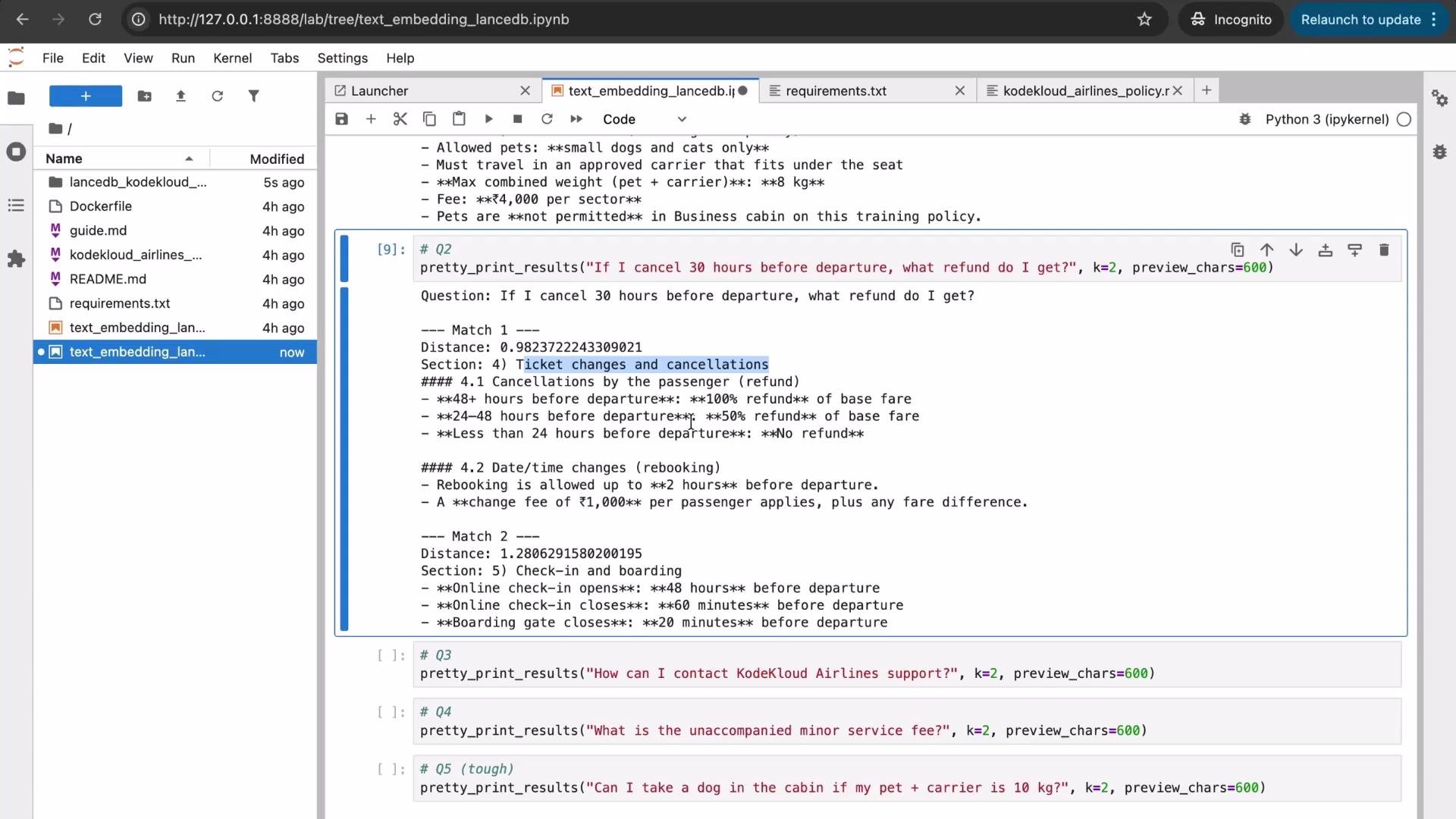
A sample cancellation-related query should return the ticket change and cancellation policy as the top match; ambiguous queries can return multiple sections that are semantically related.
Try additional queries:
```python theme={null}
pretty_print_results("If I cancel 30 hours before departure, what refund do I get?", k=2, preview_chars=600)
pretty_print_results("How can I contact Kodekloud Airlines support?", k=2, preview_chars=600)
pretty_print_results("What is the unaccompanied minor service fee?", k=2, preview_chars=600)
pretty_print_results("Can I take a dog in the cabin if my pet + carrier is 10 kg?", k=2, preview_chars=600)
```
A sample cancellation-related query should return the ticket change and cancellation policy as the top match; ambiguous queries can return multiple sections that are semantically related.
 ## 8) Notes on behavior and limitations
* Embeddings provide semantic matching, not exact keyword/string matching: paraphrases and related concepts can match.
* Retrieval quality depends on chunking strategy, model selection, and the currency of the embedded document.
* Ambiguous queries may return plausible but incorrect sections. Combining retrieval with a downstream RAG (Retrieval-Augmented Generation) pipeline, intent classification, or rule-based filters can improve precision.
* If the source document changes, re-embed the affected chunks and update the vector store to reflect the latest content.
Quick summary table: pros/cons
| Topic | Advantages | Considerations |
| -------------------- | -------------------------------------------- | ----------------------------------------------------------------------------------------- |
| Chunking by headings | Captures natural semantic boundaries | Short headings may produce sparse chunks — tune the minimum length |
| all-MiniLM-L6-v2 | Small, fast, effective for semantic search | Not specialized for domain-specific vocabulary; consider larger or tuned models if needed |
| LanceDB | Lightweight local vector DB with search APIs | For production, consider managed/vector DBs with sharding and persistence policies |
## 9) Wrap-up and resources
What we covered:
* Loading a Markdown policy document
* Chunking by headings for semantic units
* Encoding chunks with a SentenceTransformer
* Storing vectors in LanceDB
* Performing semantic search and displaying top matches
Embedding documents into a vector database simplifies semantic retrieval and enhances search experiences across knowledge bases and documentation.
Further reading and references:
* SentenceTransformers: [https://www.sbert.net/](https://www.sbert.net/)
* LanceDB: [https://lancedb.ai/](https://lancedb.ai/)
* RAG (Retrieval-Augmented Generation) concepts: [https://learn.kodekloud.com/user/courses/fundamentals-of-rag](https://learn.kodekloud.com/user/courses/fundamentals-of-rag)
Thank you for following this demo — feel free to reuse and adapt the code for other policy or documentation search tasks.
## 8) Notes on behavior and limitations
* Embeddings provide semantic matching, not exact keyword/string matching: paraphrases and related concepts can match.
* Retrieval quality depends on chunking strategy, model selection, and the currency of the embedded document.
* Ambiguous queries may return plausible but incorrect sections. Combining retrieval with a downstream RAG (Retrieval-Augmented Generation) pipeline, intent classification, or rule-based filters can improve precision.
* If the source document changes, re-embed the affected chunks and update the vector store to reflect the latest content.
Quick summary table: pros/cons
| Topic | Advantages | Considerations |
| -------------------- | -------------------------------------------- | ----------------------------------------------------------------------------------------- |
| Chunking by headings | Captures natural semantic boundaries | Short headings may produce sparse chunks — tune the minimum length |
| all-MiniLM-L6-v2 | Small, fast, effective for semantic search | Not specialized for domain-specific vocabulary; consider larger or tuned models if needed |
| LanceDB | Lightweight local vector DB with search APIs | For production, consider managed/vector DBs with sharding and persistence policies |
## 9) Wrap-up and resources
What we covered:
* Loading a Markdown policy document
* Chunking by headings for semantic units
* Encoding chunks with a SentenceTransformer
* Storing vectors in LanceDB
* Performing semantic search and displaying top matches
Embedding documents into a vector database simplifies semantic retrieval and enhances search experiences across knowledge bases and documentation.
Further reading and references:
* SentenceTransformers: [https://www.sbert.net/](https://www.sbert.net/)
* LanceDB: [https://lancedb.ai/](https://lancedb.ai/)
* RAG (Retrieval-Augmented Generation) concepts: [https://learn.kodekloud.com/user/courses/fundamentals-of-rag](https://learn.kodekloud.com/user/courses/fundamentals-of-rag)
Thank you for following this demo — feel free to reuse and adapt the code for other policy or documentation search tasks.