> ## Documentation Index
> Fetch the complete documentation index at: https://notes.kodekloud.com/llms.txt
> Use this file to discover all available pages before exploring further.
# Video Embedding Models
> Overview of video embedding models that encode spatial and temporal video content into fixed-length vectors, covering architectures, challenges, applications, and practical considerations for retrieval and action recognition.
Hello and welcome back.
This lesson builds on audio embedding models and introduces video embedding models. At a high level, video embedding models are encoders that convert video content into fixed-length vector representations (embeddings). Compared with image or audio embeddings, video embeddings must represent both spatial content (what appears in each frame) and temporal dynamics (how that content changes over time). In short, they compress a temporal visual sequence into a single vector so downstream systems can reason about both appearance and motion.
Think of the difference this way: a photograph captures a single moment, while a short film captures a story. Video embeddings capture both the moment-to-moment visual details and the movement that connects them.
Temporal modeling is the key distinction for video embeddings: models must learn not only what objects look like, but how they move and interact across frames. This is why video models are usually more complex and compute-intensive than image encoders.
Why video embeddings matter
* Semantic video search: retrieve clips by content, action, or scene rather than keywords.
* Action recognition: classify activities (e.g., “jumping”, “cooking”) by modeling motion patterns.
* Content moderation: automatically detect policy violations across massive video catalogs.
* Sports analytics: detect events and player actions from broadcast footage.
* Personalized recommendations: serve short, relevant clips based on both visual content and temporal cues (e.g., TikTok, YouTube, Netflix).
For example, platforms like YouTube use video embeddings to support recommendations across billions of hours of watch time and to automate policy enforcement—tasks impossible to perform manually at scale.
Core design challenges
* Spatial vs. temporal modeling: Must capture high-fidelity spatial features per frame and coherent temporal relationships across frames.
* Efficiency and scale: Video inputs are orders of magnitude larger than single images—designs must trade off compute, memory, and latency.
* Data and supervision: Self-supervised and contrastive approaches can reduce the need for labeled video data.
Notable video embedding models
Below are three representative designs that illustrate common trade-offs in video representation learning.
| Model | Key idea | Strengths | Typical uses |
| ----------------------------------------------------------------------- | ---------------------------------------------------------------------------------------- | ------------------------------------------------------------------------------------------ | ------------------------------------------------------------ |
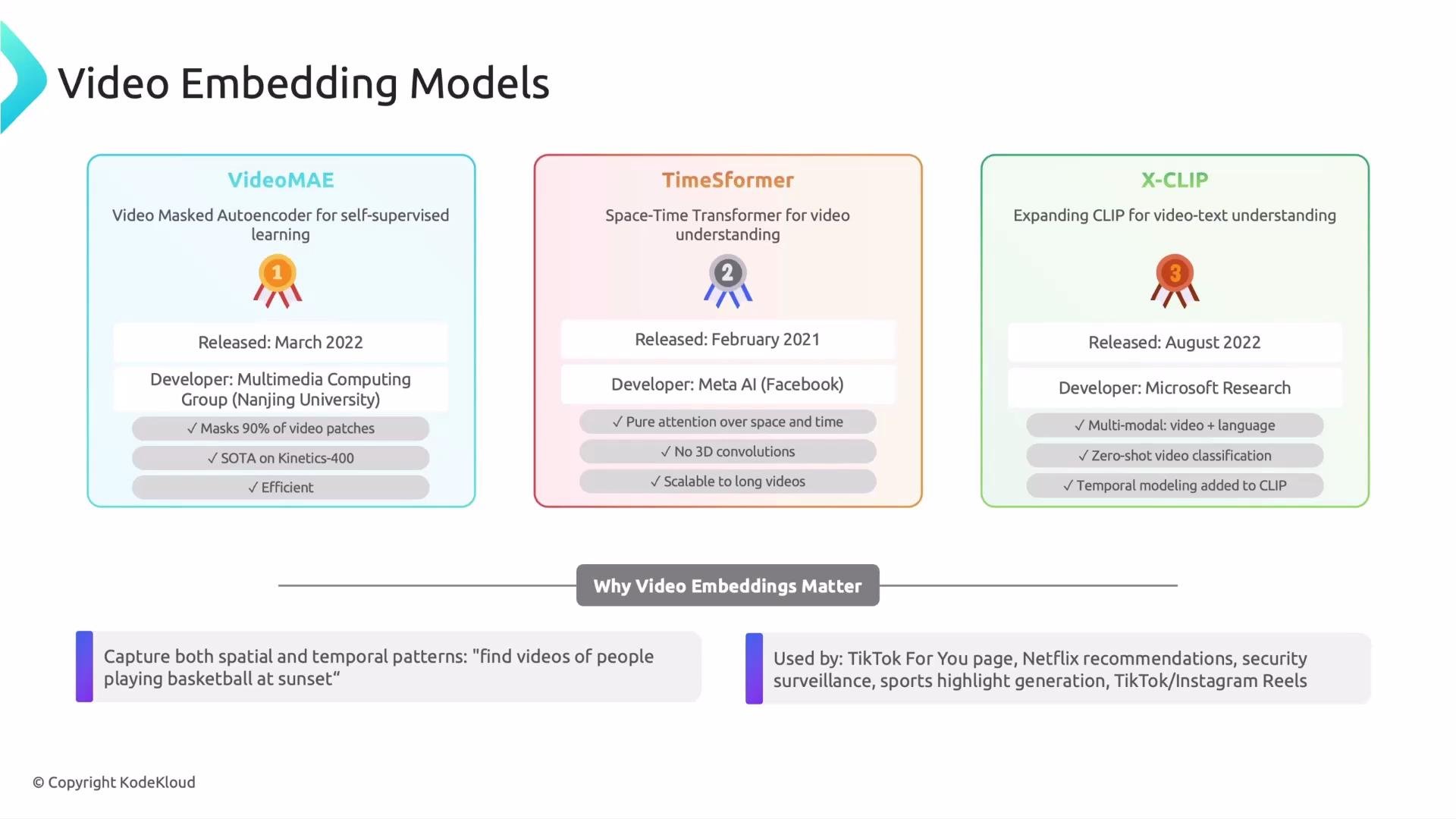
| Video MAE (Video Masked Autoencoder) — Nanjing University (Mar 2022) | Mask a large proportion of spatio-temporal patches and reconstruct missing content | Efficient self-supervised pretraining; learns spatio-temporal inference from sparse inputs | Video understanding, downstream finetuning, AI video editing |
| TimeSformer (Space–Time Transformer) — Meta AI (Feb 2021) | Apply transformer attention across space and time (joint or divided attention) | Scales to longer temporal contexts; replaces heavy 3D convolutions | Long-range temporal modeling, action recognition |
| X-CLIP — CLIP-based Video-Language Model (Microsoft Research, Aug 2022) | Extend CLIP’s image-text contrastive pretraining to video by adding temporal aggregation | Strong visual-language alignment; supports zero-shot classification and retrieval | Video-language retrieval, zero-shot video tasks |
Detailed summaries
1. Video MAE — Video Masked Autoencoder (Nanjing University, March 2022)\
Video MAE extends masked autoencoders to the spatio-temporal domain. By masking a very large portion of spatio-temporal patches (reports show masking up to \~90%), the model must reconstruct missing patches from very sparse input. This forces the encoder to infer spatial structure and temporal dynamics simultaneously. Video MAE has shown strong performance on benchmarks such as Kinetics-400 while remaining relatively efficient, making it a good candidate for downstream video understanding tasks and some AI-assisted video editing pipelines.
2. TimeSformer — Space–Time Transformer (Meta AI, February 2021)\
TimeSformer brings transformer attention to video by operating across both spatial and temporal dimensions. Variants either apply attention jointly across space and time or split attention into separate spatial and temporal components (divided attention). The primary advantage is replacing computationally expensive 3D convolutions with attention mechanisms that scale well and can model long temporal contexts, enabling efficient learning of spatio-temporal patterns for tasks like action recognition.
3. X-CLIP — CLIP-based Video-Language Model (Microsoft Research, August 2022)\
X-CLIP adapts CLIP’s strong image-text alignment to video by incorporating temporal modeling and aggregation across frames. This ties visual sequences to language embeddings and enables zero-shot video classification and retrieval. By leveraging CLIP’s pretraining paradigm, X-CLIP benefits from strong multimodal alignment while adding temporal mechanisms to handle videos.
 Practical considerations for adopting video embeddings
* Preprocessing: frame sampling strategy (uniform, keyframe, or motion-aware) and frame resolution heavily affect performance and cost.
* Downstream pooling: choose temporal pooling or attention-based aggregation to produce fixed-length embeddings for indexing and retrieval.
* Evaluation: test on multi-label action benchmarks, retrieval tasks, and real-world temporal queries (e.g., “find clips of people playing basketball at sunset”).
* Scalability: consider quantization, dimensionality reduction (PCA, product quantization), and vector databases for large-scale retrieval.
Suggested next steps and resources
* Explore self-supervised pretraining paradigms (masked reconstruction, contrastive learning).
* Experiment with frame sampling and temporal aggregation methods for your application.
* Benchmark on standard datasets such as Kinetics and AVA for action recognition and temporal localization.
Links and references
* TimeSformer (paper): [https://arxiv.org/abs/2102.05095](https://arxiv.org/abs/2102.05095)
* VideoMAE (paper): [https://arxiv.org/abs/2203.12602](https://arxiv.org/abs/2203.12602)
* CLIP (paper): [https://arxiv.org/abs/2103.00020](https://arxiv.org/abs/2103.00020)
* X-CLIP (paper / project): search Microsoft Research publications for video-CLIP extensions
That is it for this lesson.
Practical considerations for adopting video embeddings
* Preprocessing: frame sampling strategy (uniform, keyframe, or motion-aware) and frame resolution heavily affect performance and cost.
* Downstream pooling: choose temporal pooling or attention-based aggregation to produce fixed-length embeddings for indexing and retrieval.
* Evaluation: test on multi-label action benchmarks, retrieval tasks, and real-world temporal queries (e.g., “find clips of people playing basketball at sunset”).
* Scalability: consider quantization, dimensionality reduction (PCA, product quantization), and vector databases for large-scale retrieval.
Suggested next steps and resources
* Explore self-supervised pretraining paradigms (masked reconstruction, contrastive learning).
* Experiment with frame sampling and temporal aggregation methods for your application.
* Benchmark on standard datasets such as Kinetics and AVA for action recognition and temporal localization.
Links and references
* TimeSformer (paper): [https://arxiv.org/abs/2102.05095](https://arxiv.org/abs/2102.05095)
* VideoMAE (paper): [https://arxiv.org/abs/2203.12602](https://arxiv.org/abs/2203.12602)
* CLIP (paper): [https://arxiv.org/abs/2103.00020](https://arxiv.org/abs/2103.00020)
* X-CLIP (paper / project): search Microsoft Research publications for video-CLIP extensions
That is it for this lesson.