> ## Documentation Index
> Fetch the complete documentation index at: https://notes.kodekloud.com/llms.txt
> Use this file to discover all available pages before exploring further.
# Airline Chatbot Vector Database
> An airline chatbot architecture using embeddings and a vector database for RAG to retrieve policies and invoke backend APIs for bookings and cancellations
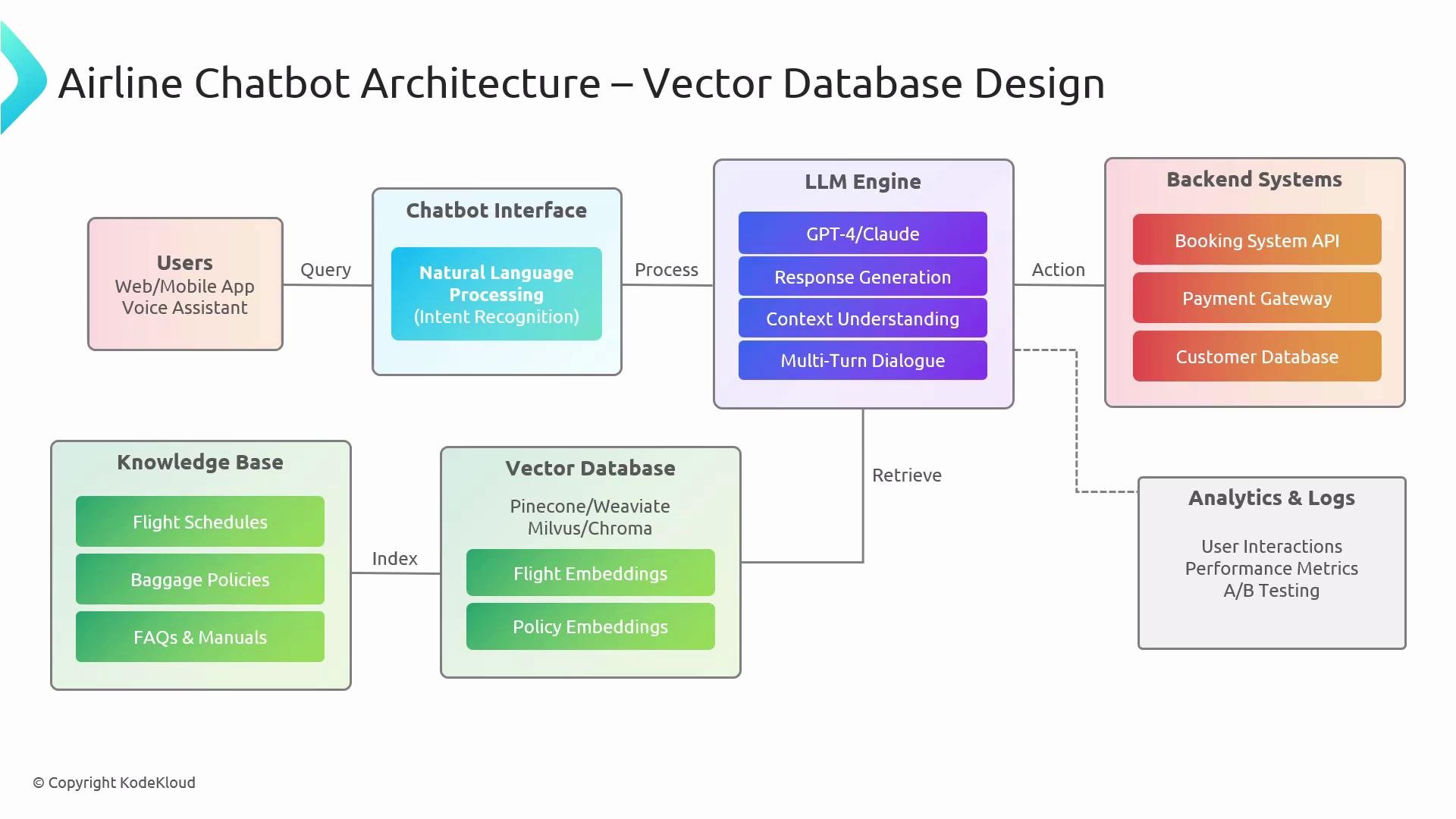
Welcome back. In this lesson we'll design an airline chatbot that uses a vector database in the backend. We'll walk through the architecture, explain where each component fits, and highlight operational considerations for building a reliable Retrieval-Augmented Generation (RAG) system for customer-facing scenarios like booking, cancellations, and policy lookups.
## High-level architecture overview
Users interact with the chatbot via a web app, mobile app, or voice assistant. Regardless of the surface, the interaction flows through a chatbot interface that accepts text or audio input. Audio input is converted to text before further processing.
Core responsibilities:
* Convert user input into a semantic representation (embeddings).
* Use embeddings to retrieve relevant documents from a vector database.
* Provide retrieved context and the user input to an LLM (e.g., [Claude](https://www.anthropic.com/claude), [ChatGPT](https://openai.com/chatgpt)) to generate a response.
* If the user requests a transactional operation (booking, payment, cancellation), call backend APIs (booking system, payment gateway) to complete the operation.
Typical request processing flow:
* User interacts with the chatbot (text or voice).
* If voice, run audio-to-text → normalize text.
* Encode text into embeddings (locally or via a managed service).
* Query the vector database for similar passages/documents.
* Provide retrieved context + user input to the LLM for response generation.
* If an action is required, the LLM or an orchestrating agent calls backend transactional APIs.
## Why a vector database?
LLMs do not automatically contain an organization's up-to-date manuals, policies, or domain-specific documents. Backend OLTP/OLAP systems expose transactional APIs and structured data but usually do not store unstructured knowledge (policies, FAQs, manuals). A knowledge base combined with a vector database fills this gap:
* Documents are converted into embeddings (embedding/ingestion pipeline).
* Embeddings + metadata are stored in the vector database for fast semantic search.
* On a user query, the system retrieves relevant passages and supplies them as context to the LLM for accurate and up-to-date answers.
 ## Component map
| Component | Purpose | Example / Notes |
| ----------------- | ---------------------------------------------------------- | -------------------------------------------- |
| Chatbot interface | Surface for user interactions (text/voice) | Web, Mobile, Voice assistants |
| Audio-to-text | Convert spoken queries to text | Use a speech-to-text model/service |
| Embedding service | Convert text to vector representation | Hosted embedding API or model |
| Vector database | Store vectors + metadata; semantic retrieval | Milvus, Pinecone, Weaviate, etc. |
| LLM / Generator | Compose natural language responses using retrieved context | Claude, ChatGPT, other LLMs |
| Backend APIs | Execute transactional operations (bookings, payments) | Airline booking systems, payment gateways |
| Analytics & logs | Monitor usage, quality, and errors | Query latency, click-through, fallback rates |
## Ingestion and freshness
* Run the embedding/ingestion pipeline continuously or on a schedule so new/updated documents are re-embedded.
* Store document metadata (timestamps, source, doc id) with vectors so you can prefer recent or authoritative sources during retrieval.
* Apply chunking and overlap strategies when splitting large documents to preserve context for retrieval.
Keep your ingestion pipeline and embeddings up to date. Freshness of the vector database is critical for accurate, trustworthy responses.
## Retrieval-Augmented Generation (RAG) pattern
RAG is the recommended pattern for combining retrieval with generation:
1. Retrieve relevant context from the vector DB using the user embedding.
2. Provide the retrieved passages to the LLM as part of the prompt (context).
3. The LLM generates a response grounded in the retrieved content, reducing hallucinations and improving factual accuracy.
Important: RAG supplies knowledge context. Transactional operations (bookings, payments, cancellations) still require direct API calls to backend systems.
## Operational considerations and best practices
* Indexing strategy: choose suitable vector dimensions, distance metrics (cosine, dot product), and index type for latency vs. throughput tradeoffs.
* Metadata filters: use metadata (region, language, recency) to narrow searches before vector similarity scoring.
* Caching: cache frequent queries and recent retrievals to reduce latency and cost.
* Hybrid search: combine keyword-based filters with vector similarity to enforce strict constraints (e.g., required legal disclaimers).
* Observability: track retrieval quality, prompt success rate, and fallbacks. Log retrieved passages for auditing and evaluation.
* Security & privacy: redact or encrypt PII in documents and control access to the vector DB and logs.
* Evaluation: set up automated QA tests comparing LLM answers to ground-truth documents and user satisfaction metrics.
## Example: booking + policy lookup flow
1. User opens the app and requests a new booking through the chatbot.
2. The chatbot invokes the booking APIs to complete the reservation (LLM/agent orchestrates API calls).
3. Later, the user asks about the baggage policy. The LLM queries the vector database for the latest policy documents and returns the relevant passages—without calling the transactional backend.
This separation—vector DB for knowledge retrieval and backend APIs for transactional work—covers the majority of real-world airline chatbot scenarios.
## Links and references
* [Kubernetes Basics](https://kubernetes.io/docs/concepts/overview/what-is-kubernetes/) (example reference for deploying services)
* [Anthropic Claude](https://www.anthropic.com/claude)
* [OpenAI ChatGPT](https://openai.com/chatgpt)
* Vector databases: Milvus, Pinecone, Weaviate (vendor docs and benchmarks)
That concludes this lesson. See you in the next one.
## Component map
| Component | Purpose | Example / Notes |
| ----------------- | ---------------------------------------------------------- | -------------------------------------------- |
| Chatbot interface | Surface for user interactions (text/voice) | Web, Mobile, Voice assistants |
| Audio-to-text | Convert spoken queries to text | Use a speech-to-text model/service |
| Embedding service | Convert text to vector representation | Hosted embedding API or model |
| Vector database | Store vectors + metadata; semantic retrieval | Milvus, Pinecone, Weaviate, etc. |
| LLM / Generator | Compose natural language responses using retrieved context | Claude, ChatGPT, other LLMs |
| Backend APIs | Execute transactional operations (bookings, payments) | Airline booking systems, payment gateways |
| Analytics & logs | Monitor usage, quality, and errors | Query latency, click-through, fallback rates |
## Ingestion and freshness
* Run the embedding/ingestion pipeline continuously or on a schedule so new/updated documents are re-embedded.
* Store document metadata (timestamps, source, doc id) with vectors so you can prefer recent or authoritative sources during retrieval.
* Apply chunking and overlap strategies when splitting large documents to preserve context for retrieval.
Keep your ingestion pipeline and embeddings up to date. Freshness of the vector database is critical for accurate, trustworthy responses.
## Retrieval-Augmented Generation (RAG) pattern
RAG is the recommended pattern for combining retrieval with generation:
1. Retrieve relevant context from the vector DB using the user embedding.
2. Provide the retrieved passages to the LLM as part of the prompt (context).
3. The LLM generates a response grounded in the retrieved content, reducing hallucinations and improving factual accuracy.
Important: RAG supplies knowledge context. Transactional operations (bookings, payments, cancellations) still require direct API calls to backend systems.
## Operational considerations and best practices
* Indexing strategy: choose suitable vector dimensions, distance metrics (cosine, dot product), and index type for latency vs. throughput tradeoffs.
* Metadata filters: use metadata (region, language, recency) to narrow searches before vector similarity scoring.
* Caching: cache frequent queries and recent retrievals to reduce latency and cost.
* Hybrid search: combine keyword-based filters with vector similarity to enforce strict constraints (e.g., required legal disclaimers).
* Observability: track retrieval quality, prompt success rate, and fallbacks. Log retrieved passages for auditing and evaluation.
* Security & privacy: redact or encrypt PII in documents and control access to the vector DB and logs.
* Evaluation: set up automated QA tests comparing LLM answers to ground-truth documents and user satisfaction metrics.
## Example: booking + policy lookup flow
1. User opens the app and requests a new booking through the chatbot.
2. The chatbot invokes the booking APIs to complete the reservation (LLM/agent orchestrates API calls).
3. Later, the user asks about the baggage policy. The LLM queries the vector database for the latest policy documents and returns the relevant passages—without calling the transactional backend.
This separation—vector DB for knowledge retrieval and backend APIs for transactional work—covers the majority of real-world airline chatbot scenarios.
## Links and references
* [Kubernetes Basics](https://kubernetes.io/docs/concepts/overview/what-is-kubernetes/) (example reference for deploying services)
* [Anthropic Claude](https://www.anthropic.com/claude)
* [OpenAI ChatGPT](https://openai.com/chatgpt)
* Vector databases: Milvus, Pinecone, Weaviate (vendor docs and benchmarks)
That concludes this lesson. See you in the next one.