> ## Documentation Index
> Fetch the complete documentation index at: https://notes.kodekloud.com/llms.txt
> Use this file to discover all available pages before exploring further.
# Role of Vector Databases in GenAI
> Explains how vector databases support Retrieval-Augmented Generation by storing embeddings for fast semantic search, enabling LLMs to access up-to-date contextual knowledge in production.
Hello and welcome back.
Where do vector databases fit into generative AI (GenAI)? This short lesson explains their role with a practical Retrieval-Augmented Generation (RAG) flow and real-world production examples.
What is the pattern? Consider a RAG application — this might be a chatbot, a domain-specific query service, or any system that augments user prompts with external knowledge. The end-to-end flow looks like this:
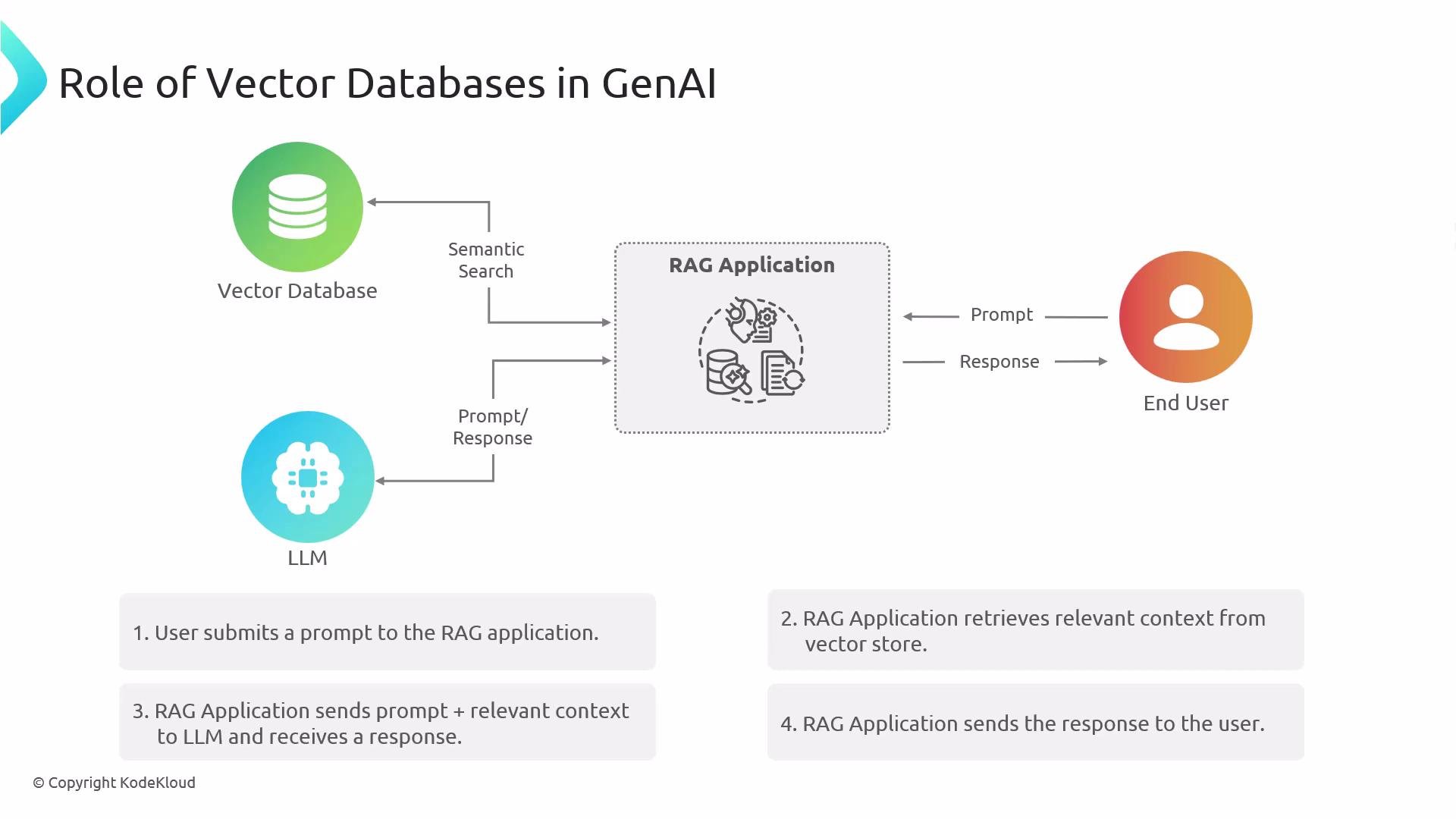
1. User submits a prompt to the RAG application (example: "What is the current temperature in Berlin?").
2. The RAG system converts the prompt (or relevant parts of it) into an embedding and issues a similarity query against a vector database. The vector database stores dense embeddings of documents, telemetry, or records paired with metadata, and supports fast nearest-neighbor search to find semantically relevant items.
* Common similarity search methods include HNSW, IVF, and PQ (used by FAISS, Milvus, Weaviate, etc.).
3. The vector database returns one or more context items — e.g., the latest sensor readings, a recent policy update, airline rules, or a healthcare document. In some architectures, very fresh signals (like live weather) may be fetched from a dedicated API, but many systems ingest those signals into the vector store so they become directly retrievable by RAG.
4. The RAG system sends the original prompt together with the retrieved context to a large language model (LLM) such as Claude, GPT, or Grok. The LLM synthesizes an answer using both the prompt and the retrieved context.
5. The synthesized response is returned to the user.
Key advantages and risks:
* Vector databases enable fast, semantically rich retrieval of context using dense embeddings, improving relevance and answer quality.
* Without a retrieval layer (or other up-to-date source), GenAI systems can return stale or irrelevant information.
* Vector stores are especially valuable in production for domains requiring current, authoritative context: policies, airline operations, healthcare, customer support, telemetry-driven systems, and knowledge bases.
Vector databases are central to many RAG architectures: they provide scalable, low-latency semantic retrieval that LLMs rely on to produce accurate, context-aware responses.
Example production use cases
| Domain | Typical use case | Why a vector DB helps |
| ------------------- | ----------------------------------------------------------------- | ----------------------------------------------------------------- |
| Customer Support | Chatbot that answers product questions using manuals and tickets | Retrieves the most relevant docs by meaning, not just keywords |
| Healthcare | Clinical assistant referencing latest protocols and patient notes | Ensures responses reflect up-to-date, relevant clinical context |
| Airlines / Travel | Policy and compensation assistant for agents and passengers | Quickly finds applicable rules and latest notices |
| Real-time Telemetry | Incident responder that uses recent sensor readings | Combines historical docs with live telemetry stored as embeddings |
Architecture diagram
This diagram shows the RAG flow: user prompt → embedding + vector DB retrieval → context + prompt to LLM → response to user.
 Further reading and references
* Vector databases and similarity search overview: [https://www.pinecone.io/learn/what-is-a-vector-database/](https://www.pinecone.io/learn/what-is-a-vector-database/)
* Retrieval-Augmented Generation (RAG) patterns and best practices: [https://www.pinecone.io/learn/rag/](https://www.pinecone.io/learn/rag/)
* Large language models (LLMs): [https://en.wikipedia.org/wiki/Large\_language\_model](https://en.wikipedia.org/wiki/Large_language_model)
* Popular vector search engines: FAISS, Milvus, Weaviate, Pinecone (search their official docs for deployment details)
That is it for this lesson.
Further reading and references
* Vector databases and similarity search overview: [https://www.pinecone.io/learn/what-is-a-vector-database/](https://www.pinecone.io/learn/what-is-a-vector-database/)
* Retrieval-Augmented Generation (RAG) patterns and best practices: [https://www.pinecone.io/learn/rag/](https://www.pinecone.io/learn/rag/)
* Large language models (LLMs): [https://en.wikipedia.org/wiki/Large\_language\_model](https://en.wikipedia.org/wiki/Large_language_model)
* Popular vector search engines: FAISS, Milvus, Weaviate, Pinecone (search their official docs for deployment details)
That is it for this lesson.