> ## Documentation Index
> Fetch the complete documentation index at: https://notes.kodekloud.com/llms.txt
> Use this file to discover all available pages before exploring further.
# Demo Understand Binary Quantization
> Explains binary quantization for embeddings, demonstrating bitwise conversion, tradeoffs between recall and storage, and when to use it for high dimensional vectors.
Welcome back. In this lesson we’ll explore binary quantization with an interactive, visual demo so the concept and tradeoffs become clear. You’ll see a step‑by‑step example, compare exact vs. quantized searches, and learn when binary quantization is a practical choice.
Jump into the demo UI below to follow along.
 ## Overview — the basic rule
We start with ten example vectors. Binary quantization reduces each floating‑point component to a single bit using a sign threshold:
* `x >= 0` becomes `1`
* `x < 0` becomes `0`
This converts every float vector into a compact bit-vector (a sequence of 0s and 1s). The next image shows this mapping applied to vectors with eight components.
## Overview — the basic rule
We start with ten example vectors. Binary quantization reduces each floating‑point component to a single bit using a sign threshold:
* `x >= 0` becomes `1`
* `x < 0` becomes `0`
This converts every float vector into a compact bit-vector (a sequence of 0s and 1s). The next image shows this mapping applied to vectors with eight components.
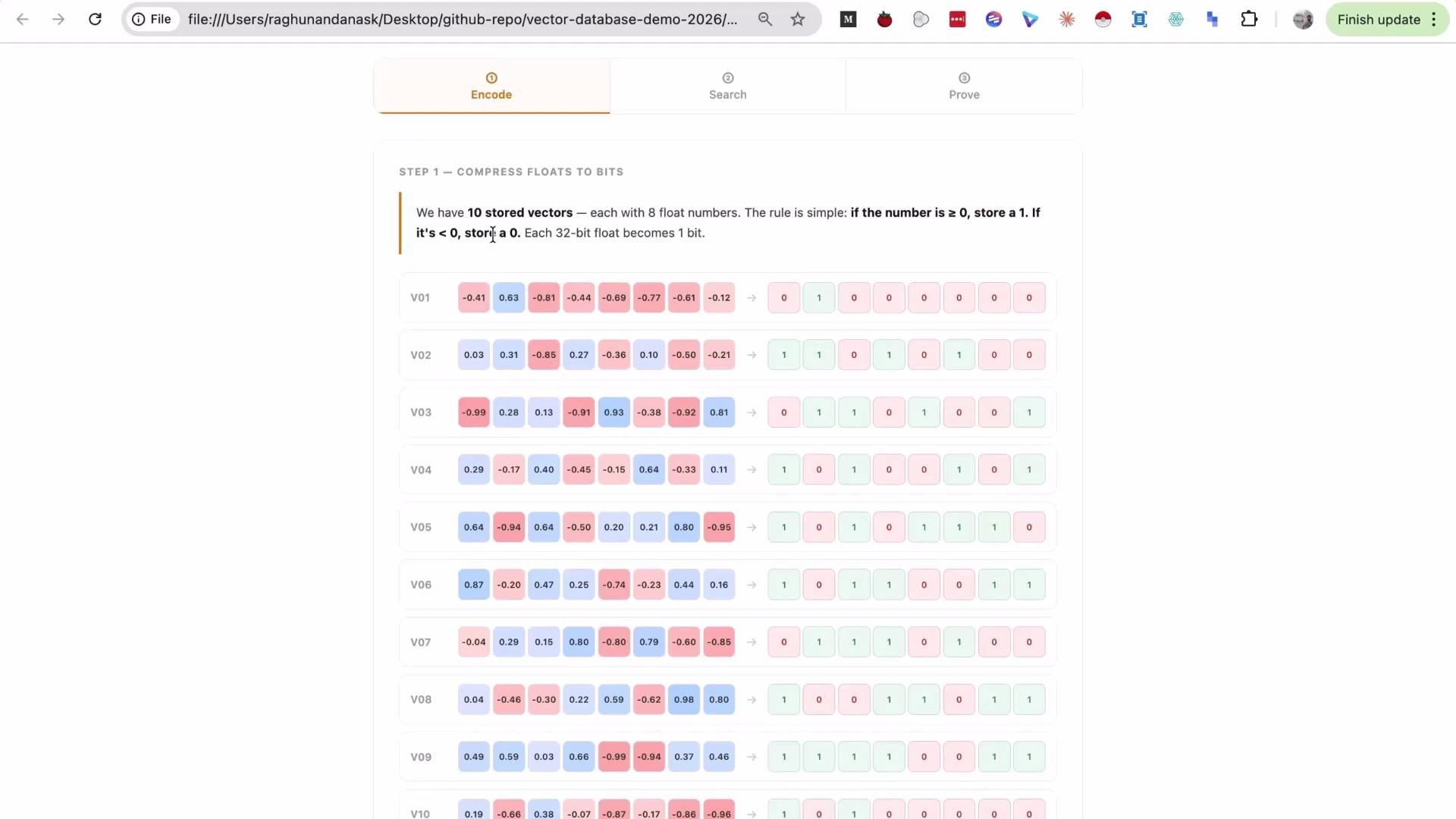 Example: a value of −0.41 quantizes to `0`, while positive components quantize to `1`. Every vector in the set is converted into a binary representation for storage and search.
## Searching with quantized vectors
After quantizing the dataset, quantize the query vector with the same sign rule. You can then run:
1. Exact search on the original floating‑point vectors (no quantization).
2. Binary search on the bit-vectors (using Hamming distance or bitwise similarity).
The UI below shows a side‑by‑side comparison of exact vs. binary search results.
Example: a value of −0.41 quantizes to `0`, while positive components quantize to `1`. Every vector in the set is converted into a binary representation for storage and search.
## Searching with quantized vectors
After quantizing the dataset, quantize the query vector with the same sign rule. You can then run:
1. Exact search on the original floating‑point vectors (no quantization).
2. Binary search on the bit-vectors (using Hamming distance or bitwise similarity).
The UI below shows a side‑by‑side comparison of exact vs. binary search results.
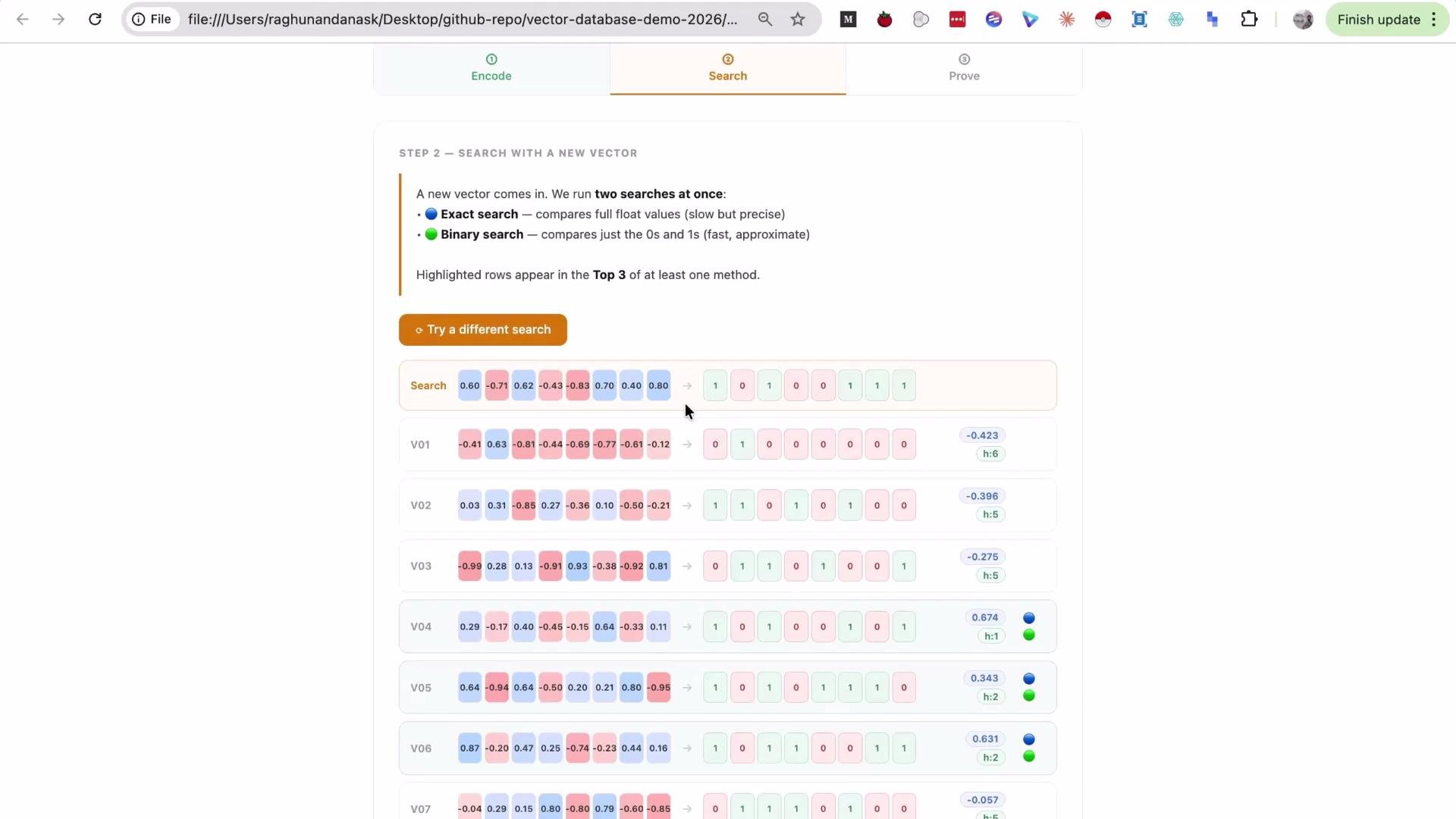 Key observations from the demo:
* Sometimes binary search returns the same top result(s) as exact search — one demo query had a 100% match.
* Other queries diverge. In one case binary search returned vector 2 (green) while exact search did not, reducing recall to 67%.
Takeaway: binary quantization can drastically reduce storage and still recover many relevant neighbors, but it may drop recall for some queries.
## How dimensionality affects binary quantization
Embedding dimensionality is the primary factor determining whether binary quantization preserves search accuracy.
* Higher-dimensional embeddings tend to retain more relative structure after binarization, improving recall while delivering large memory savings.
* Low-dimensional embeddings lose more information when converted to bits, causing recall to drop sharply.
Use the interactive control below to see how recall and memory savings vary with embedding dimension count.
Key observations from the demo:
* Sometimes binary search returns the same top result(s) as exact search — one demo query had a 100% match.
* Other queries diverge. In one case binary search returned vector 2 (green) while exact search did not, reducing recall to 67%.
Takeaway: binary quantization can drastically reduce storage and still recover many relevant neighbors, but it may drop recall for some queries.
## How dimensionality affects binary quantization
Embedding dimensionality is the primary factor determining whether binary quantization preserves search accuracy.
* Higher-dimensional embeddings tend to retain more relative structure after binarization, improving recall while delivering large memory savings.
* Low-dimensional embeddings lose more information when converted to bits, causing recall to drop sharply.
Use the interactive control below to see how recall and memory savings vary with embedding dimension count.
 Practical examples from the demo:
| Dimensions | Approx. Recall | Memory Saved |
| ---------: | -------------: | -----------: |
| 8 | \~33% | Very large |
| 64 | \~75% | \~96% |
| 768 | \~93% | \~96.9% |
The interactive explorer below highlights a 768‑dimension example (\~93% recall with \~96.9% memory saved) and provides guidance on when binary quantization is a good fit.
Practical examples from the demo:
| Dimensions | Approx. Recall | Memory Saved |
| ---------: | -------------: | -----------: |
| 8 | \~33% | Very large |
| 64 | \~75% | \~96% |
| 768 | \~93% | \~96.9% |
The interactive explorer below highlights a 768‑dimension example (\~93% recall with \~96.9% memory saved) and provides guidance on when binary quantization is a good fit.
 ## Practical guidance
Binary quantization is most valuable for very large collections (millions to billions of vectors) where storage reduction is critical. It performs best with higher-dimensional embeddings (hundreds of dims), typically delivering massive memory savings (often \~96% when converting 32‑bit floats to bits). Always validate recall on representative queries before production.
For low-dimensional embeddings (tens of dimensions), binary quantization can drastically reduce recall. Test quantized search against exact search on your workload; do not assume parity.
Suggested rule of thumb from the demo:
* Prefer binary quantization for embeddings ≥ \~256 dimensions to balance acceptable recall with large memory savings. For lower dims, expect significant recall loss.
## Conclusion
Binary quantization maps each float component to a single bit (by sign) to drastically reduce storage and enable fast bitwise similarity computations. This conversion trades accuracy for efficiency: the higher the embedding dimensionality, the more structure is preserved and the better the recall. Verify performance with your data and queries before adopting binarized search at scale.
That’s it for this lesson — see you in the next one.
## References
* [Vector search basics and Hamming distance](https://en.wikipedia.org/wiki/Hamming_distance)
* [Embedding dimensionality considerations](https://arxiv.org/abs/2003.09837)
## Practical guidance
Binary quantization is most valuable for very large collections (millions to billions of vectors) where storage reduction is critical. It performs best with higher-dimensional embeddings (hundreds of dims), typically delivering massive memory savings (often \~96% when converting 32‑bit floats to bits). Always validate recall on representative queries before production.
For low-dimensional embeddings (tens of dimensions), binary quantization can drastically reduce recall. Test quantized search against exact search on your workload; do not assume parity.
Suggested rule of thumb from the demo:
* Prefer binary quantization for embeddings ≥ \~256 dimensions to balance acceptable recall with large memory savings. For lower dims, expect significant recall loss.
## Conclusion
Binary quantization maps each float component to a single bit (by sign) to drastically reduce storage and enable fast bitwise similarity computations. This conversion trades accuracy for efficiency: the higher the embedding dimensionality, the more structure is preserved and the better the recall. Verify performance with your data and queries before adopting binarized search at scale.
That’s it for this lesson — see you in the next one.
## References
* [Vector search basics and Hamming distance](https://en.wikipedia.org/wiki/Hamming_distance)
* [Embedding dimensionality considerations](https://arxiv.org/abs/2003.09837)