> ## Documentation Index
> Fetch the complete documentation index at: https://notes.kodekloud.com/llms.txt
> Use this file to discover all available pages before exploring further.
# Choosing Your Vector Database
> Practical guide to choosing a vector database by deployment, scale, feature needs and operational tolerance with vendor recommendations
Welcome back — you’ve probably evaluated providers like [Pinecone](https://www.pinecone.io), [Weaviate](https://weaviate.io), and [Milvus](https://milvus.io). This guide walks you through a pragmatic decision path to pick the right vector database for your project based on deployment preference, data scale, required features (e.g., hybrid search), and how much operational overhead you can tolerate.
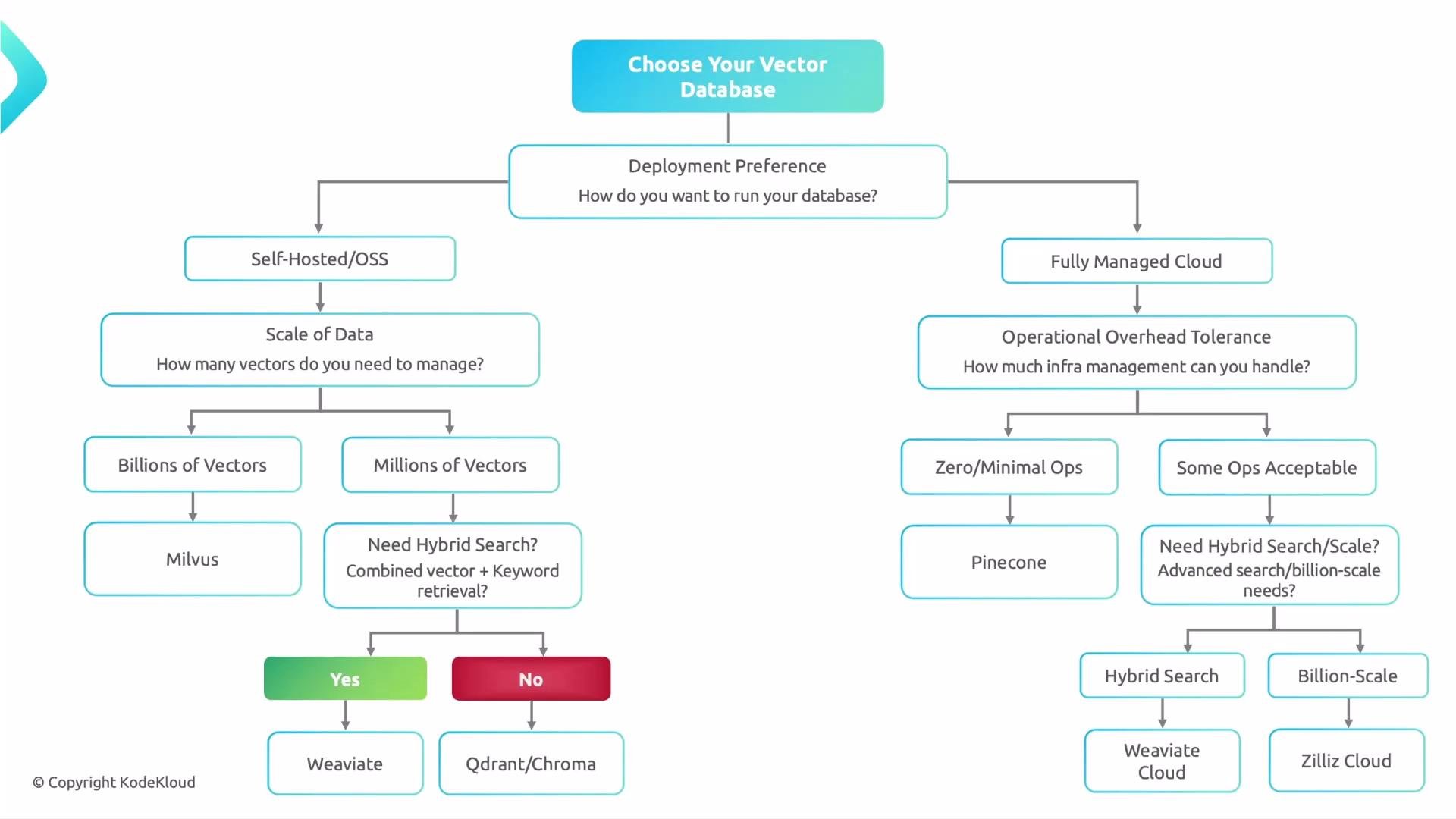
Start by answering one simple question: do you want to manage the database infrastructure yourself, or would you rather use a hosted/fully-managed service?
This single decision splits the selection into two branches: self-hosted (full control) or fully managed cloud (reduced ops). Use the guidance below to follow the flow and arrive at the best option for your workload.
## Decision flow (high level)
* Deployment model: self-hosted vs fully managed.
* Data scale: millions vs billions of vectors.
* Feature needs: hybrid search, filtering/metadata, custom distance metrics, and indexing options.
* Operational tolerance: zero-ops, minimal ops, or full control.
### Self-hosted / Open-source (full control)
Choose this when you want full control over infrastructure, networking, compliance, and custom integrations.
* If you expect billion-scale workloads:
* Milvus — a distributed, cloud-native vector database built for scale and sustained throughput. See [Milvus](https://milvus.io) (Zilliz).
* If you expect millions of vectors:
* Need built-in hybrid search (vector + keyword/semantic filtering)? Consider Weaviate.
* Prefer lightweight and simple to operate? Consider Qdrant or Chroma.
Links:
* [Weaviate](https://weaviate.io) — strong built-in hybrid capabilities.
* [Qdrant](https://qdrant.tech) — performant, lightweight vector DB.
* [Chroma](https://www.trychroma.com) — easy local/self-hosted option for smaller setups.
### Fully managed / Cloud (reduced ops)
Choose a hosted service when you want to focus on embeddings, models, and product features rather than running infrastructure.
* Minimal ops acceptable:
* Pinecone — a fully managed vector database that minimizes operational overhead and abstracts infrastructure.
* Zero-ops desired or need managed hybrid search:
* Managed Weaviate Cloud for hybrid search in a hosted model.
* Zilliz Cloud or other managed providers if you want a hosted Milvus-style solution.
Links:
* [Pinecone](https://www.pinecone.io)
* [Weaviate Cloud](https://weaviate.io/developers/weaviate/cloud)
* [Zilliz Cloud](https://zilliz.com/cloud)
 ## Quick comparison
| Database | Deployment model | Best for scale | Hybrid search support | Operational complexity |
| ---------------------------------------- | ---------------------------- | ------------------- | -------------------------------------------------------- | ----------------------------------- |
| [Milvus](https://milvus.io) | Self-hosted / Cloud (Zilliz) | Billions of vectors | Limited native hybrid — integrates with external filters | High (distributed ops) |
| [Weaviate](https://weaviate.io) | Self-hosted & Cloud | Millions → large | Strong built-in hybrid search | Medium (managed offering available) |
| [Pinecone](https://www.pinecone.io) | Fully managed | Millions → large | Hybrid via filters/metadata (varies) | Minimal (fully managed) |
| [Qdrant](https://qdrant.tech) | Self-hosted / Cloud | Millions | Basic hybrid via metadata filtering | Low → Medium |
| [Chroma](https://www.trychroma.com) | Self-hosted / Embeddable | Small → Millions | Limited | Low (developer-friendly) |
| [Zilliz Cloud](https://zilliz.com/cloud) | Fully managed | Millions → Billions | Depends on service plan | Zero → Minimal (managed) |
## Why this choice matters
* Performance and latency: index structure, sharding, and distribution affect query latency.
* Scalability: design for expected vector cardinality (millions vs billions).
* Features: hybrid search, filtering, metadata indexing, and custom distance metrics vary between systems.
* Cost and ops: managed services reduce ops but may increase recurring costs; self-hosted gives control but requires maintenance.
* Migration risk: changing vector databases later can mean exporting, re-indexing, and adapting application code.
Migration between vector databases can be costly and time-consuming. Favor a choice aligned to your expected scale and feature needs to avoid long migrations.
## Practical checklist before choosing
1. Decide deployment model: `self-hosted` vs `fully managed`.
2. Estimate data scale: millions vs billions of vectors.
3. Identify required features:
* Do you need hybrid search (vector + keyword/semantic)?
* Filtering and metadata indexing?
* Custom distance metrics or scoring functions?
4. Evaluate operational tolerance: `zero-ops`, `minimal ops`, or `full control`.
5. Match the database to your requirements:
* Milvus: choose for distributed, billion-scale workloads.
* Weaviate: choose when hybrid search is critical.
* Pinecone: choose to minimize ops and get a managed, production-ready service.
* Qdrant / Chroma: good for lightweight or smaller self-hosted deployments.
* Zilliz Cloud / other providers: managed alternatives for zero-ops or Milvus-compatible hosting.
## Additional resources
* [Milvus Documentation](https://milvus.io/docs/)
* [Weaviate Docs & Cloud](https://weaviate.io/developers)
* [Pinecone Docs](https://docs.pinecone.io/)
* [Qdrant Docs](https://qdrant.tech/documentation/)
* [Chroma](https://www.trychroma.com/)
* [Zilliz](https://zilliz.com/)
That’s it for this lesson — use the flow above, match your expected scale and features, and minimize the chance of an expensive migration later.
## Quick comparison
| Database | Deployment model | Best for scale | Hybrid search support | Operational complexity |
| ---------------------------------------- | ---------------------------- | ------------------- | -------------------------------------------------------- | ----------------------------------- |
| [Milvus](https://milvus.io) | Self-hosted / Cloud (Zilliz) | Billions of vectors | Limited native hybrid — integrates with external filters | High (distributed ops) |
| [Weaviate](https://weaviate.io) | Self-hosted & Cloud | Millions → large | Strong built-in hybrid search | Medium (managed offering available) |
| [Pinecone](https://www.pinecone.io) | Fully managed | Millions → large | Hybrid via filters/metadata (varies) | Minimal (fully managed) |
| [Qdrant](https://qdrant.tech) | Self-hosted / Cloud | Millions | Basic hybrid via metadata filtering | Low → Medium |
| [Chroma](https://www.trychroma.com) | Self-hosted / Embeddable | Small → Millions | Limited | Low (developer-friendly) |
| [Zilliz Cloud](https://zilliz.com/cloud) | Fully managed | Millions → Billions | Depends on service plan | Zero → Minimal (managed) |
## Why this choice matters
* Performance and latency: index structure, sharding, and distribution affect query latency.
* Scalability: design for expected vector cardinality (millions vs billions).
* Features: hybrid search, filtering, metadata indexing, and custom distance metrics vary between systems.
* Cost and ops: managed services reduce ops but may increase recurring costs; self-hosted gives control but requires maintenance.
* Migration risk: changing vector databases later can mean exporting, re-indexing, and adapting application code.
Migration between vector databases can be costly and time-consuming. Favor a choice aligned to your expected scale and feature needs to avoid long migrations.
## Practical checklist before choosing
1. Decide deployment model: `self-hosted` vs `fully managed`.
2. Estimate data scale: millions vs billions of vectors.
3. Identify required features:
* Do you need hybrid search (vector + keyword/semantic)?
* Filtering and metadata indexing?
* Custom distance metrics or scoring functions?
4. Evaluate operational tolerance: `zero-ops`, `minimal ops`, or `full control`.
5. Match the database to your requirements:
* Milvus: choose for distributed, billion-scale workloads.
* Weaviate: choose when hybrid search is critical.
* Pinecone: choose to minimize ops and get a managed, production-ready service.
* Qdrant / Chroma: good for lightweight or smaller self-hosted deployments.
* Zilliz Cloud / other providers: managed alternatives for zero-ops or Milvus-compatible hosting.
## Additional resources
* [Milvus Documentation](https://milvus.io/docs/)
* [Weaviate Docs & Cloud](https://weaviate.io/developers)
* [Pinecone Docs](https://docs.pinecone.io/)
* [Qdrant Docs](https://qdrant.tech/documentation/)
* [Chroma](https://www.trychroma.com/)
* [Zilliz](https://zilliz.com/)
That’s it for this lesson — use the flow above, match your expected scale and features, and minimize the chance of an expensive migration later.