> ## Documentation Index
> Fetch the complete documentation index at: https://notes.kodekloud.com/llms.txt
> Use this file to discover all available pages before exploring further.
# APIs Auth Security and cURL Imports
> Explains API authentication methods and using Import cURL to populate HTTP Request nodes, recommending centralized credentials for secure reusable secret management.
In this lesson we cover common authentication patterns when making API calls with HTTP Request nodes, and how the Import cURL feature speeds up configuring those nodes.
The HTTP Request node lets you reproduce API calls without manually entering every parameter. When you use Import cURL (for example, by pasting a command from API docs or a copied terminal command), the node parses the cURL and populates request fields—method, URL, headers, body, and query parameters—so you can focus on workflow logic instead of syntax.
Common ways to provide credentials in HTTP Request nodes:
* Header-based authentication (most common): include an API key or token in a header such as `Authorization` or a custom header like `x-api-key`.
* Using a saved Credentials entry: the node references a credential object (managed centrally) rather than embedding secrets in the node parameters.
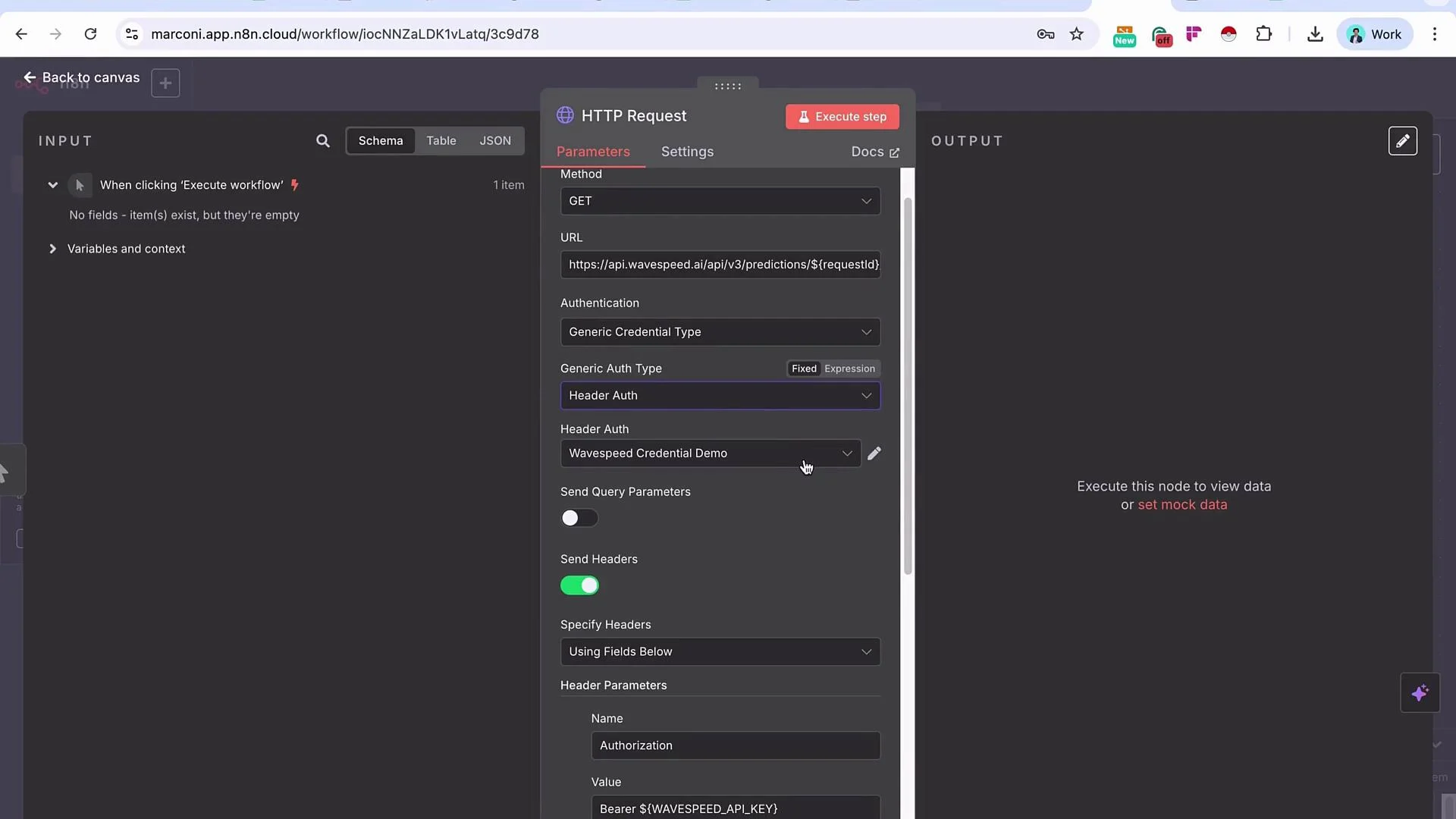 ## How Import cURL helps
When you paste a cURL command into Import cURL, the HTTP Request node will usually:
* Set the HTTP method (GET, POST, PUT, DELETE, etc.).
* Fill in the request URL and split out any query parameters.
* Populate headers (including `Authorization` or custom API-key headers).
* Add the request body and appropriate `Content-Type` header when applicable.
This dramatically reduces setup time because you don’t need to translate a curl command manually into node fields.
Example — copy/paste this cURL:
```bash theme={null}
curl -X GET "https://api.example.com/v1/data" \
-H "Authorization: Bearer abc123def456" \
-H "Accept: application/json"
```
Importing the above cURL typically configures the HTTP Request node with:
* Method: `GET`
* URL: `https://api.example.com/v1/data`
* Headers:
* `Authorization: Bearer abc123def456`
* `Accept: application/json`
Be careful: cURL commands often contain secrets (API keys, tokens). Remove or redact sensitive headers before sharing commands or screenshots. When importing, treat the resulting node configuration as sensitive until you store secrets in a secure credential.
## Authentication methods — quick reference
| Method | How it appears in requests | When to use |
| ----------------------------- | ------------------------------------------------------- | ------------------------------------------------------------------------------------------------------------------------------ |
| Header-based API key or token | `Authorization: Bearer ` or `x-api-key: ` | Simple APIs and services that require a single token per request. Works well for quick testing and many REST APIs. |
| Saved Credentials entry | Node references a credential (no secret in node fields) | Production workflows, reusable credentials, and secure secret rotation. Recommended for collaborative or long-lived workflows. |
| OAuth / OAuth2 | Token-based, often with refresh flow and scopes | When the API implements OAuth flows (user consent, scoped access). Use dedicated OAuth credential types if supported. |
## Why use Credentials instead of embedding headers directly
1. Reusability
* Create a credential (for example, a Header Auth credential) that stores the API key or token once, then select that credential in any HTTP Request node across workflows.
* This keeps the same credential consistent across multiple requests, reduces duplication, and simplifies updates.
2. Security and maintainability
* Credentials centralize secrets so they are not hard-coded into node parameters that can be inspected or exported.
* Central management makes key rotation, revocation, and auditing easier.
* Sharing workflows becomes safer because credentials are not embedded in exported configurations.
## Best practices
* Prefer credential entries for production secrets instead of pasting keys directly into node headers.
* Use placeholder examples like `Authorization: Bearer ` in docs; store the real token in a credential.
* Rotate keys regularly and delete unused credentials via your platform’s credential management UI.
* Sanitize cURL commands before sharing or logging them to avoid accidental secret exposure.
Avoid hard-coding secrets in node parameters. Store API keys and tokens in credential entries so they can be reused, rotated, and managed centrally.
## Summary
* Import cURL is a fast, reliable way to populate HTTP Request nodes with method, URL, headers, body, and query parameters.
* Header-based auth is common and convenient, but using a reusable credential entry improves security and maintainability.
* Use your platform's credential management features for storing, rotating, and deleting sensitive information instead of embedding secrets in nodes.
## Links and references
* cURL manual: [https://curl.se/docs/manpage.html](https://curl.se/docs/manpage.html)
* HTTP authentication overview: [https://developer.mozilla.org/en-US/docs/Web/HTTP/Authentication](https://developer.mozilla.org/en-US/docs/Web/HTTP/Authentication)
* n8n documentation (HTTP Request node and credentials): [https://docs.n8n.io/](https://docs.n8n.io/)
## How Import cURL helps
When you paste a cURL command into Import cURL, the HTTP Request node will usually:
* Set the HTTP method (GET, POST, PUT, DELETE, etc.).
* Fill in the request URL and split out any query parameters.
* Populate headers (including `Authorization` or custom API-key headers).
* Add the request body and appropriate `Content-Type` header when applicable.
This dramatically reduces setup time because you don’t need to translate a curl command manually into node fields.
Example — copy/paste this cURL:
```bash theme={null}
curl -X GET "https://api.example.com/v1/data" \
-H "Authorization: Bearer abc123def456" \
-H "Accept: application/json"
```
Importing the above cURL typically configures the HTTP Request node with:
* Method: `GET`
* URL: `https://api.example.com/v1/data`
* Headers:
* `Authorization: Bearer abc123def456`
* `Accept: application/json`
Be careful: cURL commands often contain secrets (API keys, tokens). Remove or redact sensitive headers before sharing commands or screenshots. When importing, treat the resulting node configuration as sensitive until you store secrets in a secure credential.
## Authentication methods — quick reference
| Method | How it appears in requests | When to use |
| ----------------------------- | ------------------------------------------------------- | ------------------------------------------------------------------------------------------------------------------------------ |
| Header-based API key or token | `Authorization: Bearer ` or `x-api-key: ` | Simple APIs and services that require a single token per request. Works well for quick testing and many REST APIs. |
| Saved Credentials entry | Node references a credential (no secret in node fields) | Production workflows, reusable credentials, and secure secret rotation. Recommended for collaborative or long-lived workflows. |
| OAuth / OAuth2 | Token-based, often with refresh flow and scopes | When the API implements OAuth flows (user consent, scoped access). Use dedicated OAuth credential types if supported. |
## Why use Credentials instead of embedding headers directly
1. Reusability
* Create a credential (for example, a Header Auth credential) that stores the API key or token once, then select that credential in any HTTP Request node across workflows.
* This keeps the same credential consistent across multiple requests, reduces duplication, and simplifies updates.
2. Security and maintainability
* Credentials centralize secrets so they are not hard-coded into node parameters that can be inspected or exported.
* Central management makes key rotation, revocation, and auditing easier.
* Sharing workflows becomes safer because credentials are not embedded in exported configurations.
## Best practices
* Prefer credential entries for production secrets instead of pasting keys directly into node headers.
* Use placeholder examples like `Authorization: Bearer ` in docs; store the real token in a credential.
* Rotate keys regularly and delete unused credentials via your platform’s credential management UI.
* Sanitize cURL commands before sharing or logging them to avoid accidental secret exposure.
Avoid hard-coding secrets in node parameters. Store API keys and tokens in credential entries so they can be reused, rotated, and managed centrally.
## Summary
* Import cURL is a fast, reliable way to populate HTTP Request nodes with method, URL, headers, body, and query parameters.
* Header-based auth is common and convenient, but using a reusable credential entry improves security and maintainability.
* Use your platform's credential management features for storing, rotating, and deleting sensitive information instead of embedding secrets in nodes.
## Links and references
* cURL manual: [https://curl.se/docs/manpage.html](https://curl.se/docs/manpage.html)
* HTTP authentication overview: [https://developer.mozilla.org/en-US/docs/Web/HTTP/Authentication](https://developer.mozilla.org/en-US/docs/Web/HTTP/Authentication)
* n8n documentation (HTTP Request node and credentials): [https://docs.n8n.io/](https://docs.n8n.io/)