> ## Documentation Index
> Fetch the complete documentation index at: https://notes.kodekloud.com/llms.txt
> Use this file to discover all available pages before exploring further.
# Workflow 3 HTTP Request Node Demo
> Guide to using n8n's HTTP Request node for public, authenticated, and asynchronous API calls including polling patterns and credential best practices.
n8n's HTTP Request node lets you call any HTTP API from within your workflows — public endpoints, authenticated services, or asynchronous APIs that require polling. This article walks through three practical scenarios and builds a reusable pattern for synchronous and asynchronous API calls:
* Scenario 1: Public API (no authentication) — random cat facts
* Scenario 2: Authenticated API — OpenWeatherMap current weather
* Scenario 3: Web-scraper API (Firecrawl) — SCRAPE (simple POST) and EXTRACT (POST → poll GET)
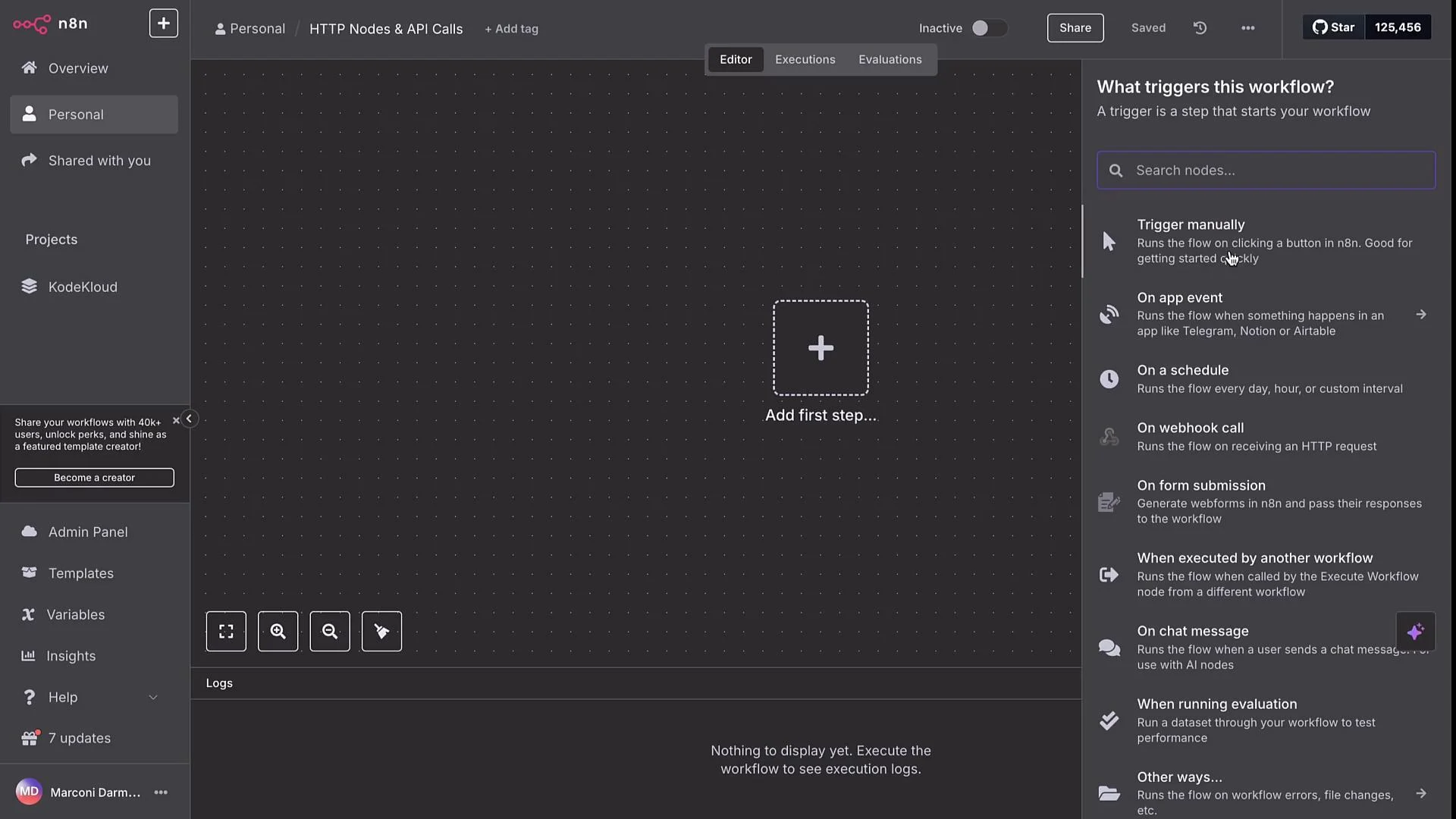
We’ll start with a Manual Trigger and add HTTP Request nodes to demonstrate each case step by step.
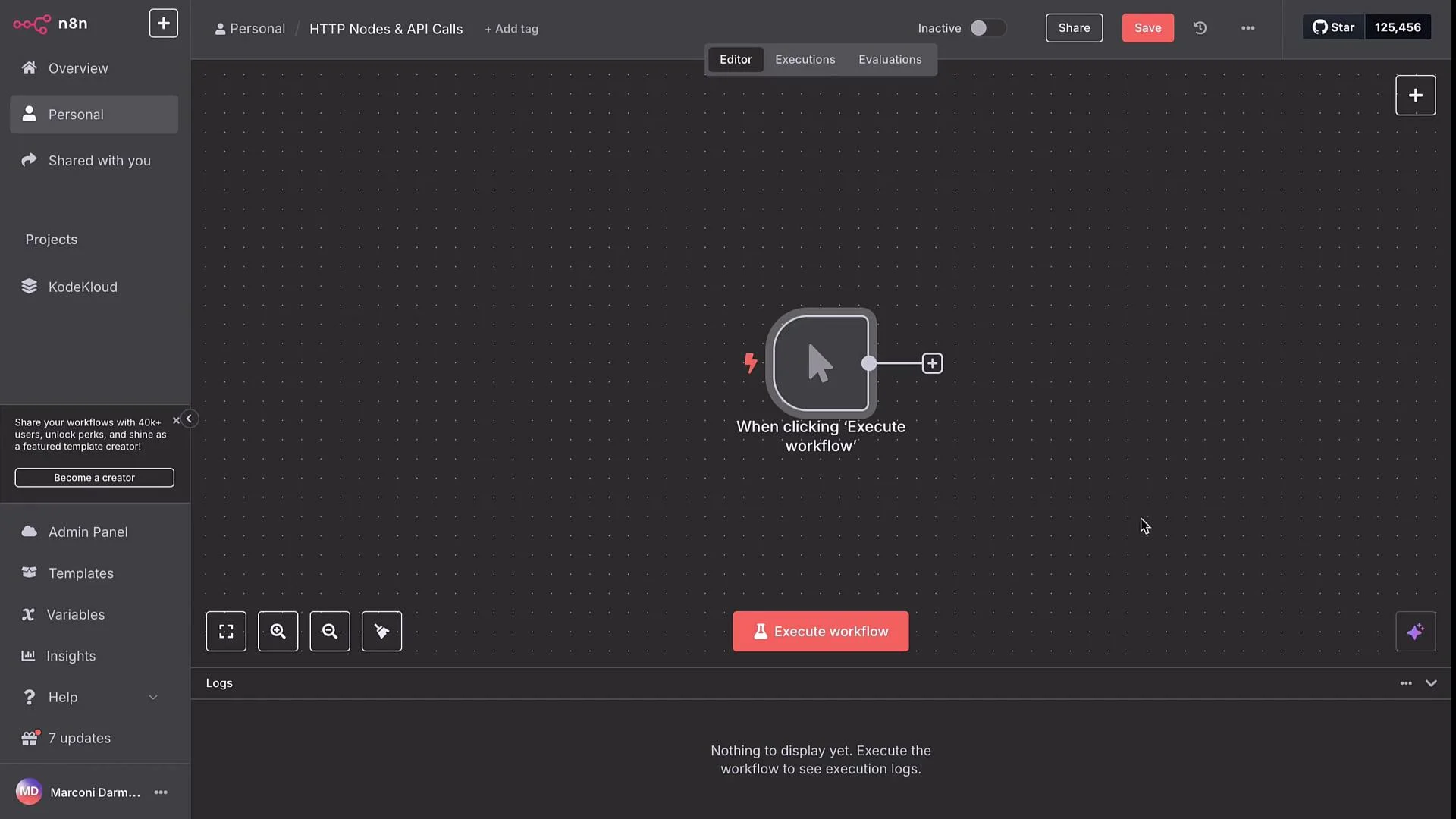
 Begin with a Manual Trigger node — it’s the simplest trigger and ideal when you don't have an incoming payload. When executed alone, the Manual Trigger produces an empty payload; the HTTP Request node can still run without input.
 ## Quick reference: scenarios and endpoints
| Scenario | Endpoint / Method | Notes |
| ------------------------------ | --------------------------------------------------------------------------------------------- | ------------------------------------------------------------- |
| Public cat facts | `GET https://catfact.ninja/fact` | No auth required; returns a random cat fact JSON. |
| OpenWeatherMap current weather | `GET https://api.openweathermap.org/data/2.5/weather?q={city name}&appid={API key}` | Use credentials for reuse and security. |
| Firecrawl SCRAPE | `POST https://api.firecrawl.dev/v1/scrape` | Returns HTML/markdown/screenshot in response. |
| Firecrawl EXTRACT (async) | `POST https://api.firecrawl.dev/v1/extract` → `GET https://api.firecrawl.dev/v1/extract/{id}` | POST returns an `id`. Poll GET until `status` is `completed`. |
Links and references:
* [n8n Credentials docs](https://docs.n8n.io/integrations/credentials/)
* [OpenWeatherMap](https://openweathermap.org)
* [Firecrawl](https://firecrawl.dev)
* [Cat Facts API](https://catfact.ninja)
***
## Scenario 1 — Public API (no authentication): Cat facts
Add an HTTP Request node and configure a GET to the Cat Facts API:
```http theme={null}
GET https://catfact.ninja/fact
```
Execute the node and inspect its output. The HTTP Request node returns structured JSON with a random cat fact in the response body, for example:
> "Two members of the cat family are distinct from all others — the clouded leopard and the cheetah. The clouded leopard does not roar like other big cats, nor does it groom or purr like small cats."
## Quick reference: scenarios and endpoints
| Scenario | Endpoint / Method | Notes |
| ------------------------------ | --------------------------------------------------------------------------------------------- | ------------------------------------------------------------- |
| Public cat facts | `GET https://catfact.ninja/fact` | No auth required; returns a random cat fact JSON. |
| OpenWeatherMap current weather | `GET https://api.openweathermap.org/data/2.5/weather?q={city name}&appid={API key}` | Use credentials for reuse and security. |
| Firecrawl SCRAPE | `POST https://api.firecrawl.dev/v1/scrape` | Returns HTML/markdown/screenshot in response. |
| Firecrawl EXTRACT (async) | `POST https://api.firecrawl.dev/v1/extract` → `GET https://api.firecrawl.dev/v1/extract/{id}` | POST returns an `id`. Poll GET until `status` is `completed`. |
Links and references:
* [n8n Credentials docs](https://docs.n8n.io/integrations/credentials/)
* [OpenWeatherMap](https://openweathermap.org)
* [Firecrawl](https://firecrawl.dev)
* [Cat Facts API](https://catfact.ninja)
***
## Scenario 1 — Public API (no authentication): Cat facts
Add an HTTP Request node and configure a GET to the Cat Facts API:
```http theme={null}
GET https://catfact.ninja/fact
```
Execute the node and inspect its output. The HTTP Request node returns structured JSON with a random cat fact in the response body, for example:
> "Two members of the cat family are distinct from all others — the clouded leopard and the cheetah. The clouded leopard does not roar like other big cats, nor does it groom or purr like small cats."
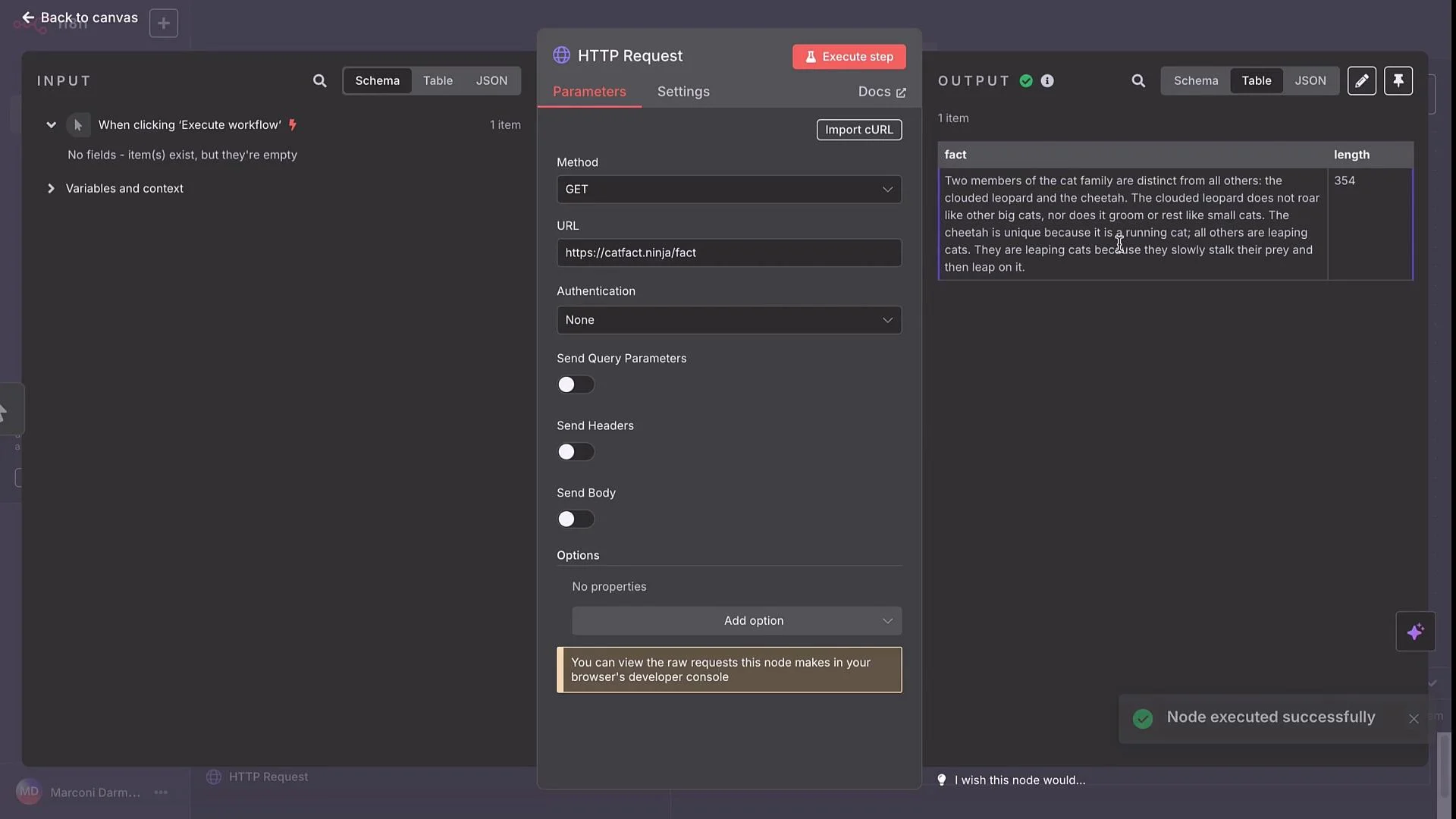 This scenario demonstrates the simplest HTTP GET with no authentication and how to read the structured node output.
***
## Scenario 2 — Authenticated API: OpenWeatherMap
To fetch current weather data, call the OpenWeatherMap API. The endpoint formats are (shown as text to preserve braces):
```text theme={null}
https://api.openweathermap.org/data/2.5/weather?q={city name}&appid={API key}
https://api.openweathermap.org/data/2.5/weather?q={city name},{country code}&appid={API key}
https://api.openweathermap.org/data/2.5/weather?q={city name},{state code},{country code}&appid={API key}
```
A quick test example:
```http theme={null}
GET https://api.openweathermap.org/data/2.5/weather?q=London&appid={API key}
```
After creating an API key at OpenWeatherMap, you can run the GET and inspect fields such as `main.temp`, `main.temp_min`, `main.temp_max`, and `clouds.all`.
This scenario demonstrates the simplest HTTP GET with no authentication and how to read the structured node output.
***
## Scenario 2 — Authenticated API: OpenWeatherMap
To fetch current weather data, call the OpenWeatherMap API. The endpoint formats are (shown as text to preserve braces):
```text theme={null}
https://api.openweathermap.org/data/2.5/weather?q={city name}&appid={API key}
https://api.openweathermap.org/data/2.5/weather?q={city name},{country code}&appid={API key}
https://api.openweathermap.org/data/2.5/weather?q={city name},{state code},{country code}&appid={API key}
```
A quick test example:
```http theme={null}
GET https://api.openweathermap.org/data/2.5/weather?q=London&appid={API key}
```
After creating an API key at OpenWeatherMap, you can run the GET and inspect fields such as `main.temp`, `main.temp_min`, `main.temp_max`, and `clouds.all`.
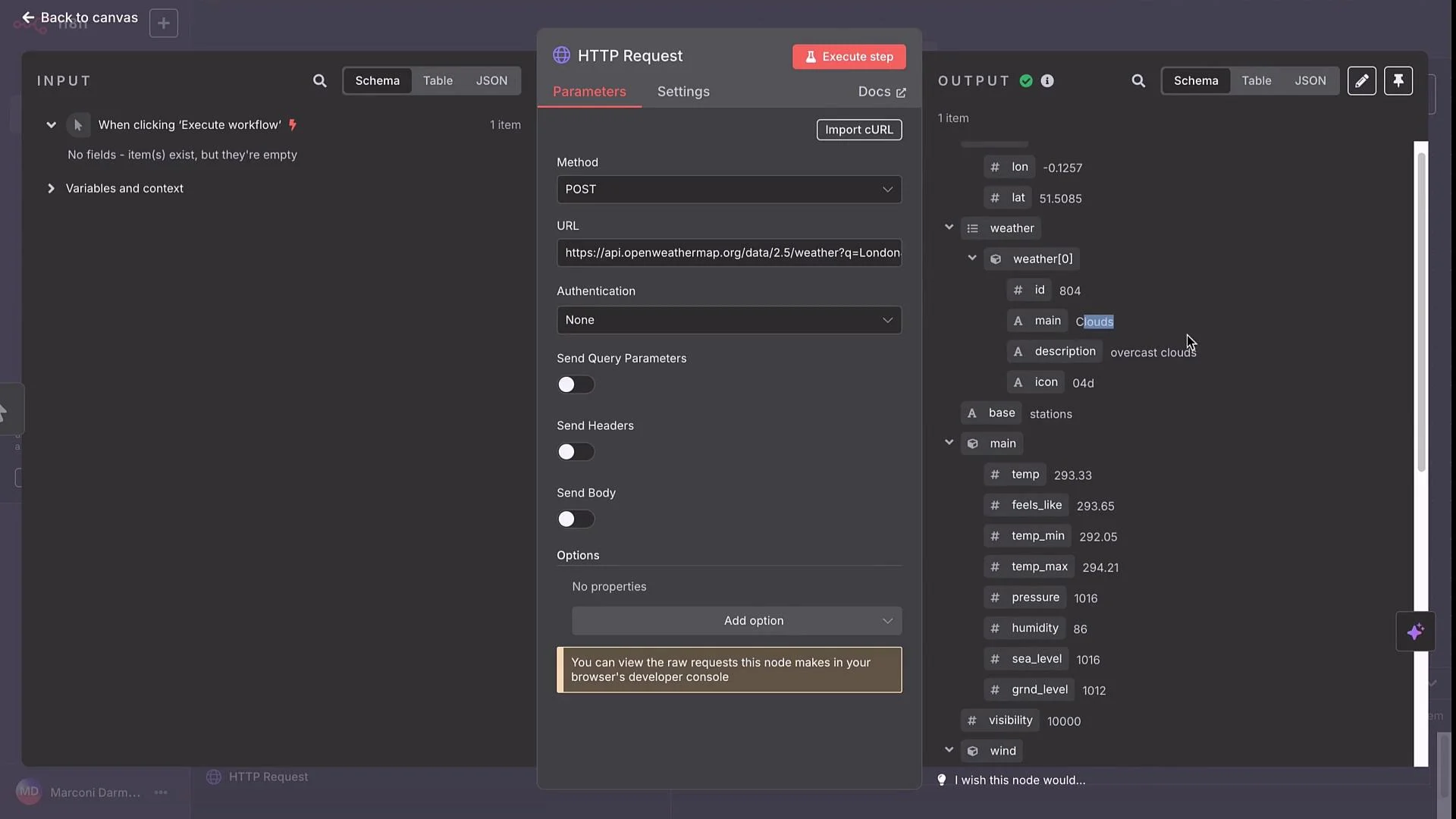 Best practice: store API keys in n8n credentials and reference them rather than embedding secrets into node fields. For example, when constructing a URL expression to include the stored key, reference it inside backticks like:
`&appid={{ $credentials.OpenWeatherMap.apiKey }}`
How to use credentials:
* Open the HTTP Request node → Authentication.
* Choose the appropriate credential type (API Key, Header Auth, or OAuth2) depending on the API.
* If the API expects the key as a query parameter (like `appid`) you can reference a stored credential in your URL expression.
* If the API expects a header (for example `Authorization: Bearer ...` or `X-API-Key`), configure Header Auth credentials.
Using credentials keeps secrets secure, reusable, and easier to manage across workflows.
Best practice: store API keys in n8n credentials and reference them rather than embedding secrets into node fields. For example, when constructing a URL expression to include the stored key, reference it inside backticks like:
`&appid={{ $credentials.OpenWeatherMap.apiKey }}`
How to use credentials:
* Open the HTTP Request node → Authentication.
* Choose the appropriate credential type (API Key, Header Auth, or OAuth2) depending on the API.
* If the API expects the key as a query parameter (like `appid`) you can reference a stored credential in your URL expression.
* If the API expects a header (for example `Authorization: Bearer ...` or `X-API-Key`), configure Header Auth credentials.
Using credentials keeps secrets secure, reusable, and easier to manage across workflows.
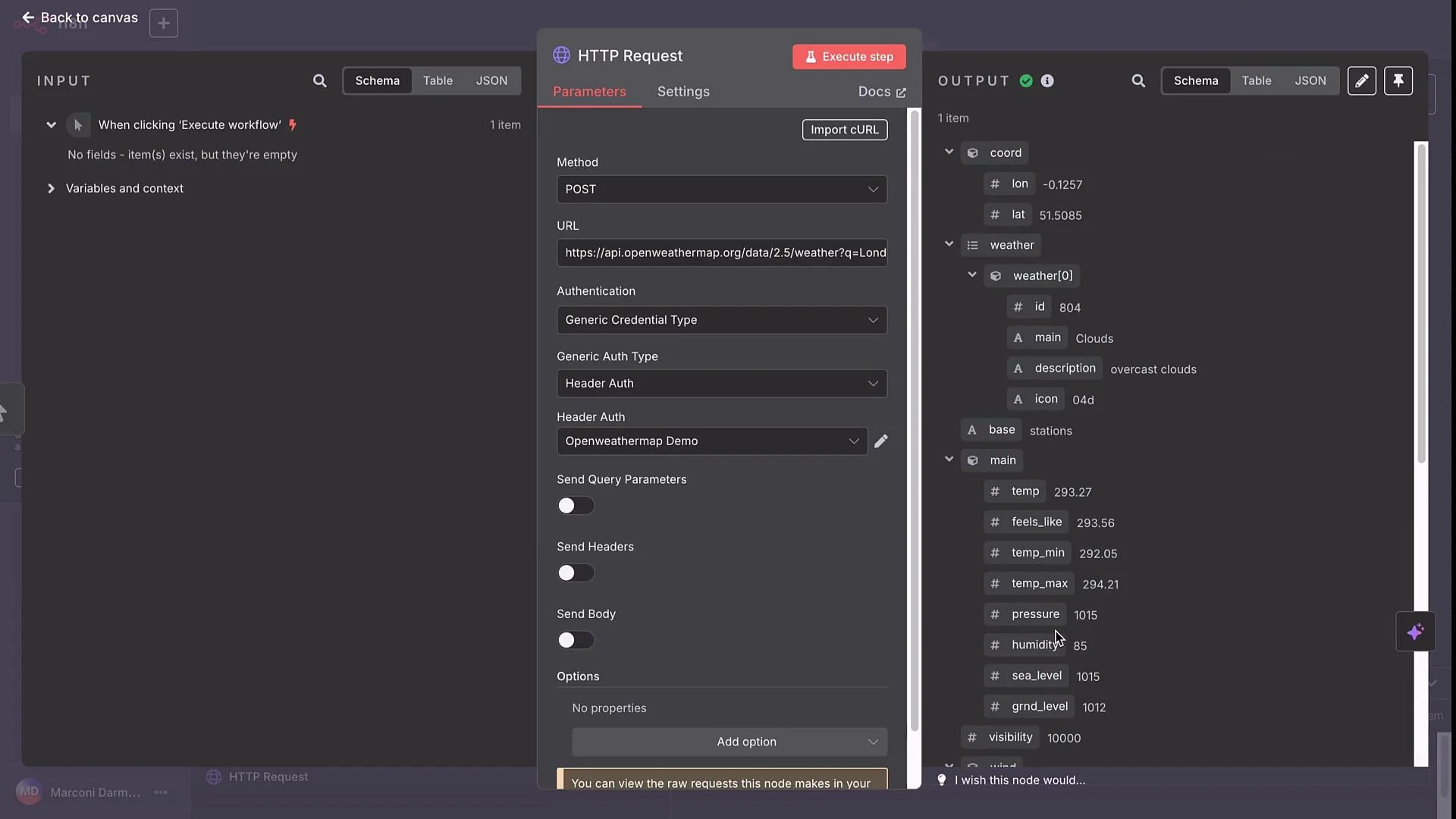 Store API keys in n8n credentials (Header Auth, API Key, or OAuth) instead of embedding them in URLs or node fields. Credentials are reusable, easier to rotate, and reduce the risk of secret leakage.
***
## Scenario 3 — Web-scraper API (Firecrawl)
Firecrawl provides two relevant flows:
* SCRAPE: POST `/v1/scrape` to retrieve page content (HTML, markdown, screenshot).
* EXTRACT: POST `/v1/extract` to request structured extraction across pages — the API returns an `id` and you poll with GET `/v1/extract/{id}` until results are ready.
### Firecrawl — SCRAPE (POST)
Import the provider’s cURL into an HTTP Request node and replace the `location` body field with the URL you want to scrape.
Example cURL body (importable into n8n):
```bash theme={null}
curl --request POST \
--url https://api.firecrawl.dev/v1/scrape \
--header 'Authorization: Bearer YOUR_API_KEY' \
--header 'Content-Type: application/json' \
--data '{
"zeroDataRetention": false,
"onlyMainContent": true,
"maxAge": 0,
"waitFor": 0,
"mobile": false,
"skipTlsVerification": false,
"timeout": 30000,
"parsePDF": true,
"location": {}
}'
```
A sample successful response shape:
```json theme={null}
{
"success": true,
"data": {
"markdown": "",
"html": "",
"rawHtml": "",
"screenshot": "",
"links": [""],
"actions": {
"screenshots": [""],
"html": ""
}
}
}
```
Replace the `location` field with the target, for example:
```json theme={null}
"location": { "url": "https://techcrunch.com/tag/generative-ai/" }
```
When executed, the node returns `markdown`, `html`, and other assets that you can forward to other nodes for processing or storage.
Store API keys in n8n credentials (Header Auth, API Key, or OAuth) instead of embedding them in URLs or node fields. Credentials are reusable, easier to rotate, and reduce the risk of secret leakage.
***
## Scenario 3 — Web-scraper API (Firecrawl)
Firecrawl provides two relevant flows:
* SCRAPE: POST `/v1/scrape` to retrieve page content (HTML, markdown, screenshot).
* EXTRACT: POST `/v1/extract` to request structured extraction across pages — the API returns an `id` and you poll with GET `/v1/extract/{id}` until results are ready.
### Firecrawl — SCRAPE (POST)
Import the provider’s cURL into an HTTP Request node and replace the `location` body field with the URL you want to scrape.
Example cURL body (importable into n8n):
```bash theme={null}
curl --request POST \
--url https://api.firecrawl.dev/v1/scrape \
--header 'Authorization: Bearer YOUR_API_KEY' \
--header 'Content-Type: application/json' \
--data '{
"zeroDataRetention": false,
"onlyMainContent": true,
"maxAge": 0,
"waitFor": 0,
"mobile": false,
"skipTlsVerification": false,
"timeout": 30000,
"parsePDF": true,
"location": {}
}'
```
A sample successful response shape:
```json theme={null}
{
"success": true,
"data": {
"markdown": "",
"html": "",
"rawHtml": "",
"screenshot": "",
"links": [""],
"actions": {
"screenshots": [""],
"html": ""
}
}
}
```
Replace the `location` field with the target, for example:
```json theme={null}
"location": { "url": "https://techcrunch.com/tag/generative-ai/" }
```
When executed, the node returns `markdown`, `html`, and other assets that you can forward to other nodes for processing or storage.
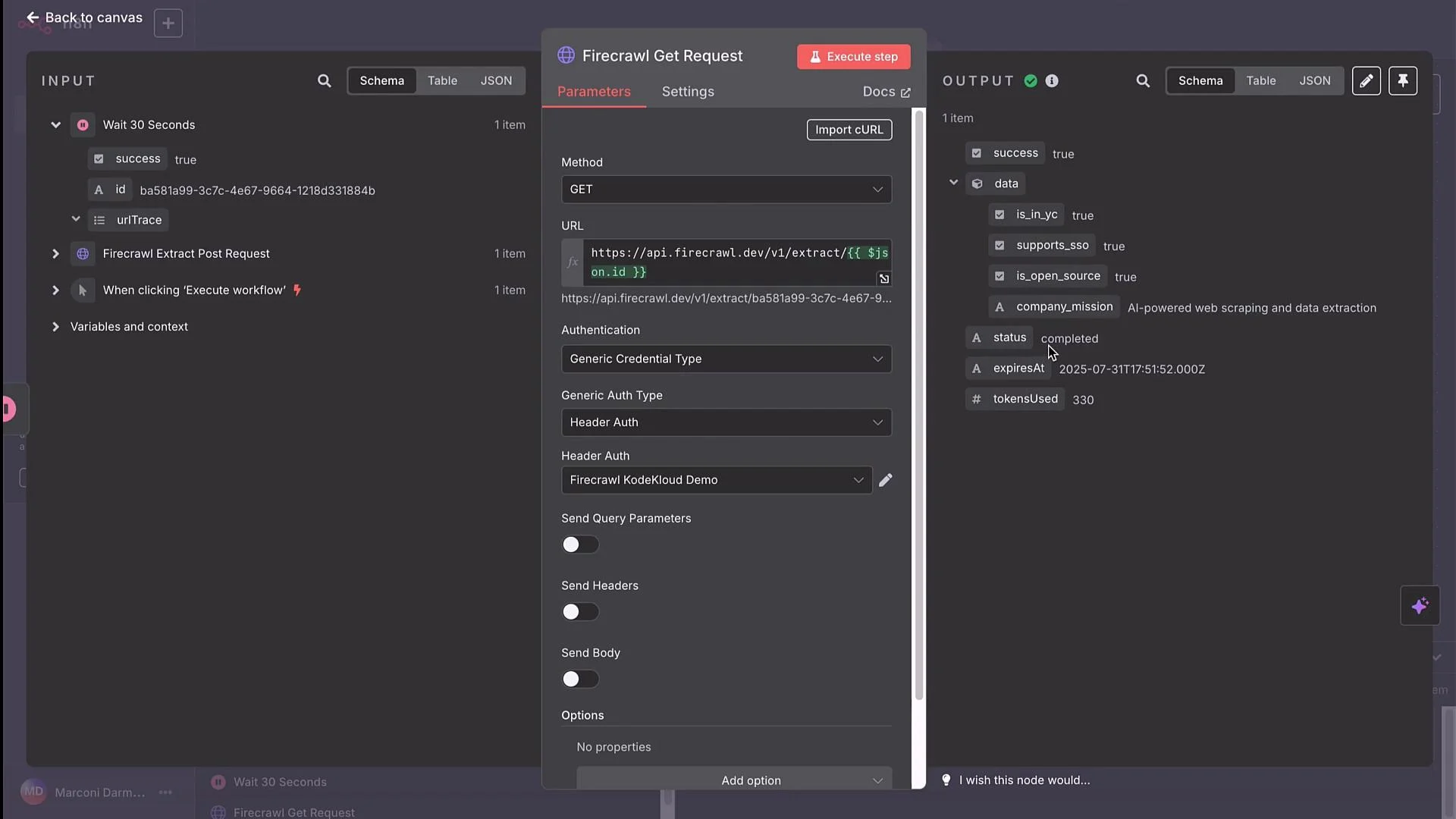 ### Firecrawl — EXTRACT (async): POST → poll GET
EXTRACT is asynchronous. The recommended pattern in n8n is:
1. POST `/v1/extract` with `urls`, a `prompt`, and a `schema`. The API returns an object containing an `id`.
2. Wait a fixed interval (e.g., 30s).
3. GET `/v1/extract/{id}` to check status/results.
4. If not completed, wait and retry (loop) until `status` becomes `completed` or until a max retry/timeout is reached.
Example EXTRACT POST (import to an HTTP Request node):
```bash theme={null}
curl -X POST https://api.firecrawl.dev/v1/extract \
-H 'Content-Type: application/json' \
-H 'Authorization: Bearer YOUR_API_KEY' \
-d '{
"urls": [
"https://firecrawl.dev/",
"https://docs.firecrawl.dev/",
"https://www.ycombinator.com/companies"
],
"prompt": "Extract the company mission, whether it supports SSO, whether it is open source, and whether it is in YC.",
"schema": {
"type": "object",
"properties": {
"company_mission": {"type": "string"},
"supports_sso": {"type": "boolean"},
"is_open_source": {"type": "boolean"},
"is_in_yc": {"type": "boolean"}
},
"required": ["company_mission", "supports_sso"]
}
}'
```
The POST response will typically return an object like:
```json theme={null}
[
{
"success": true,
"id": "ba581a99-3c7c-4e67-9664-1218d331884b",
"urlTrace": []
}
]
```
To poll for results, call the GET endpoint using the returned `id`:
```http theme={null}
GET https://api.firecrawl.dev/v1/extract/{id}
```
When building the GET node in n8n, use an expression to inject the `id` from the POST response. Example URL expression (wrap double-curly expressions in backticks):
`https://api.firecrawl.dev/v1/extract/{{ $json.id }}`
Execute the GET after a Wait node and inspect response fields such as `status` and the extracted data (e.g., `company_mission`).
### Firecrawl — EXTRACT (async): POST → poll GET
EXTRACT is asynchronous. The recommended pattern in n8n is:
1. POST `/v1/extract` with `urls`, a `prompt`, and a `schema`. The API returns an object containing an `id`.
2. Wait a fixed interval (e.g., 30s).
3. GET `/v1/extract/{id}` to check status/results.
4. If not completed, wait and retry (loop) until `status` becomes `completed` or until a max retry/timeout is reached.
Example EXTRACT POST (import to an HTTP Request node):
```bash theme={null}
curl -X POST https://api.firecrawl.dev/v1/extract \
-H 'Content-Type: application/json' \
-H 'Authorization: Bearer YOUR_API_KEY' \
-d '{
"urls": [
"https://firecrawl.dev/",
"https://docs.firecrawl.dev/",
"https://www.ycombinator.com/companies"
],
"prompt": "Extract the company mission, whether it supports SSO, whether it is open source, and whether it is in YC.",
"schema": {
"type": "object",
"properties": {
"company_mission": {"type": "string"},
"supports_sso": {"type": "boolean"},
"is_open_source": {"type": "boolean"},
"is_in_yc": {"type": "boolean"}
},
"required": ["company_mission", "supports_sso"]
}
}'
```
The POST response will typically return an object like:
```json theme={null}
[
{
"success": true,
"id": "ba581a99-3c7c-4e67-9664-1218d331884b",
"urlTrace": []
}
]
```
To poll for results, call the GET endpoint using the returned `id`:
```http theme={null}
GET https://api.firecrawl.dev/v1/extract/{id}
```
When building the GET node in n8n, use an expression to inject the `id` from the POST response. Example URL expression (wrap double-curly expressions in backticks):
`https://api.firecrawl.dev/v1/extract/{{ $json.id }}`
Execute the GET after a Wait node and inspect response fields such as `status` and the extracted data (e.g., `company_mission`).
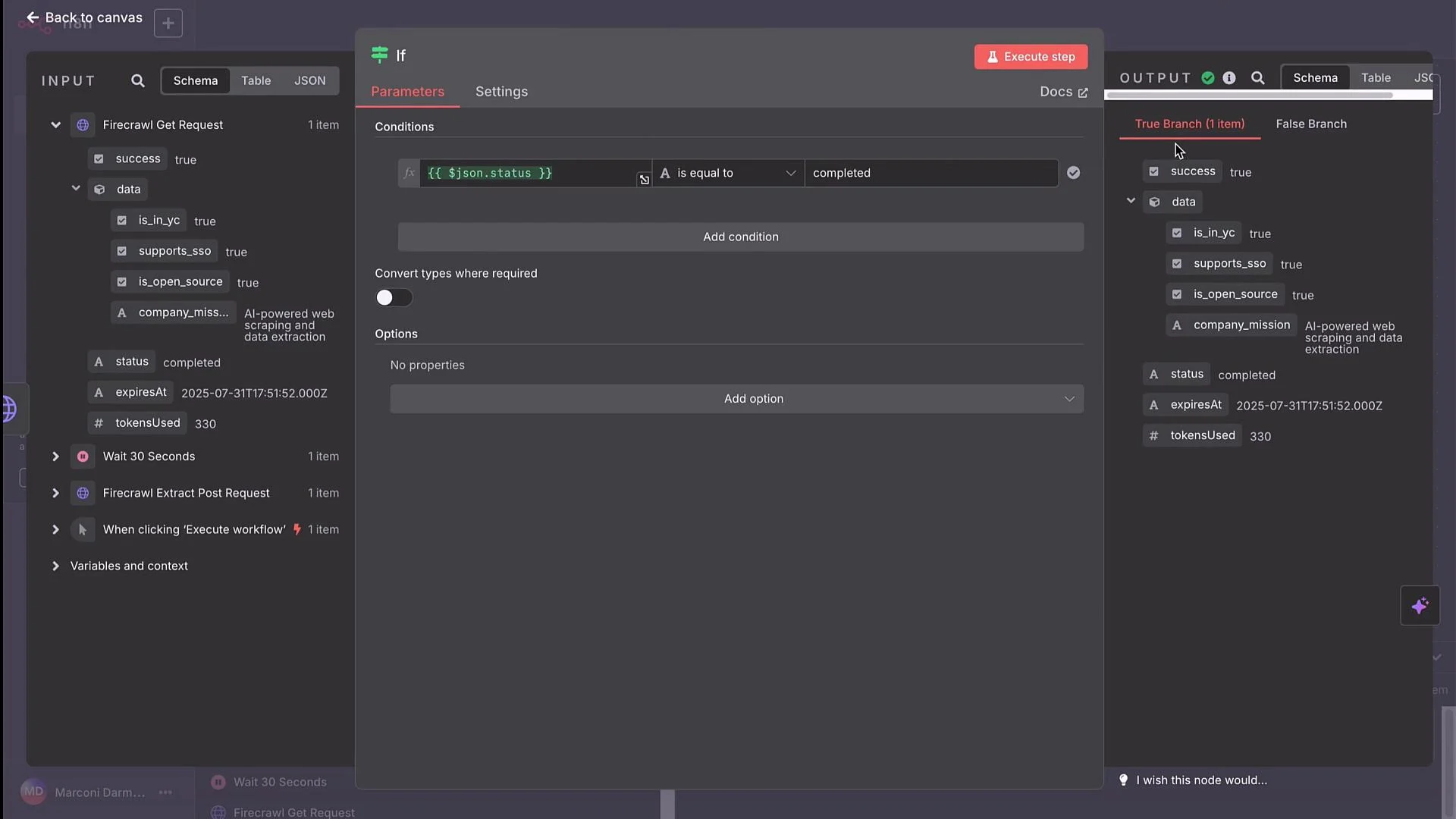
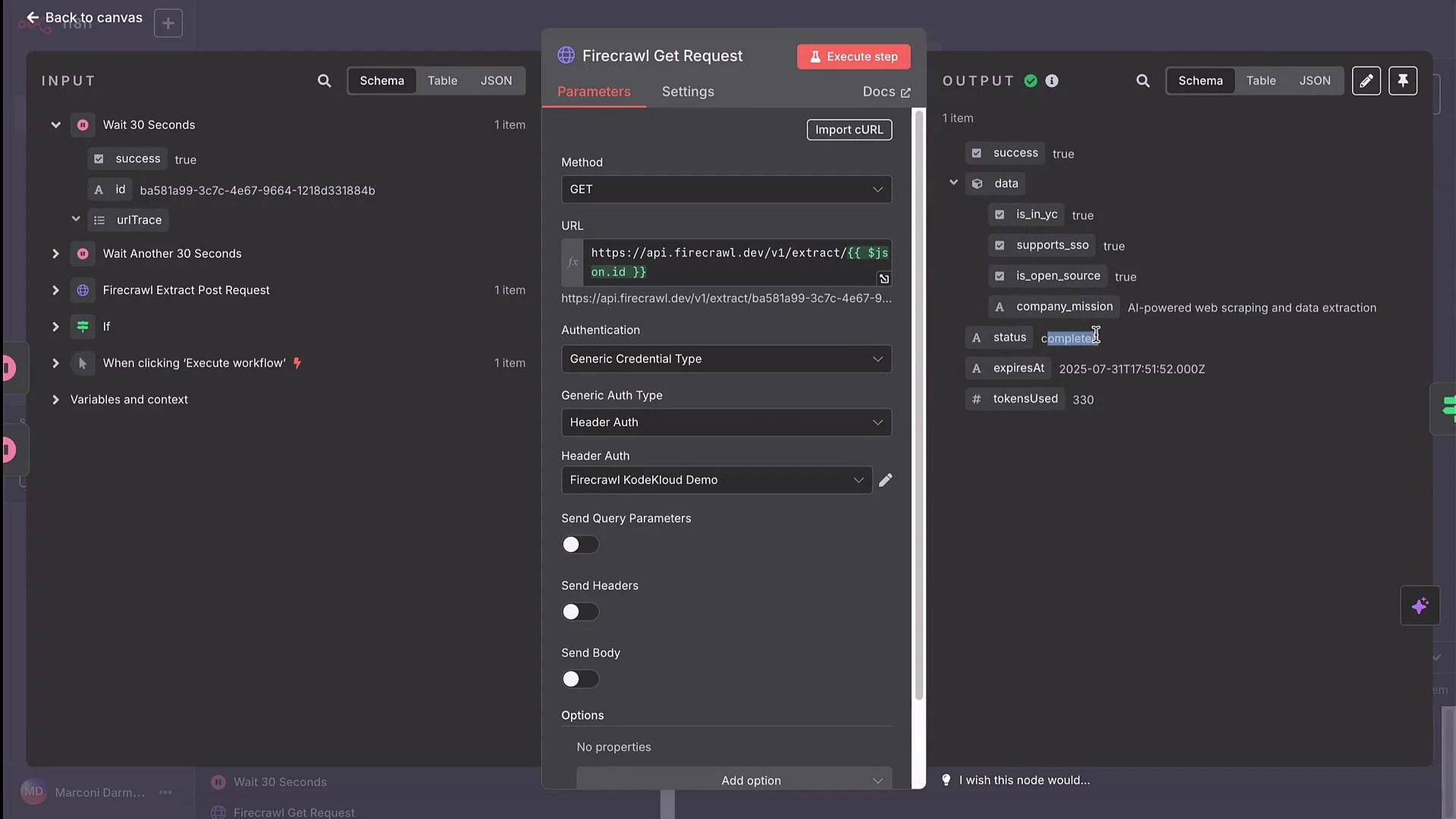 When polling asynchronous endpoints, always implement a sensible timeout and maximum retries. Without limits you risk infinite loops or unexpected API charges. Use an If node to evaluate `status` and a Wait node plus a retry counter to prevent runaway executions.
### Implementing the loop in n8n (step-by-step)
* POST EXTRACT node → receives JSON array with `id`.
* Wait node → pause workflow for a chosen interval (e.g., 30 seconds).
* HTTP Request node (GET) → URL: use a runtime expression to insert the `id`, for example:
* `https://api.firecrawl.dev/v1/extract/{{ $json.id }}`
* If node → check the GET response `status` field:
* Condition: `status` equals `completed`
* True branch: process and forward results (store, send email, etc.)
* False branch: connect to another Wait node and loop back to the GET request (increment a retry counter or check elapsed time)
* Add logic to stop after N retries or after a maximum elapsed time to avoid infinite loops.
Example data flow (conceptual):
* POST returns:
```json theme={null}
[
{
"success": true,
"id": "ba581a99-3c7c-4e67-9664-1218d331884b"
}
]
```
* GET URL expression:
`https://api.firecrawl.dev/v1/extract/{{ $json.id }}`
* If node checks:
* If `status == "completed"` → process results
* Else → Wait (30s) → GET again
This pattern handles the asynchronous nature of EXTRACT jobs reliably and prevents premature failures.
***
## Summary & best practices
* The HTTP Request node can call any HTTP API: public endpoints, authenticated services, and async jobs that require polling.
* Use n8n credentials (Header Auth, API Key, OAuth2) to secure and reuse API keys. Match the credential type to what the provider expects (query parameter vs header).
* For async endpoints that return request IDs, implement Wait + GET + If loops with a retry cap to poll until completion.
* Import provider cURL examples directly into n8n’s HTTP Request node to save time on configuration.
This walkthrough showed three scenarios — public GET, authenticated GET, and an asynchronous POST+GET scrape/extract flow — to illustrate patterns you can reuse when integrating external APIs with n8n.
When polling asynchronous endpoints, always implement a sensible timeout and maximum retries. Without limits you risk infinite loops or unexpected API charges. Use an If node to evaluate `status` and a Wait node plus a retry counter to prevent runaway executions.
### Implementing the loop in n8n (step-by-step)
* POST EXTRACT node → receives JSON array with `id`.
* Wait node → pause workflow for a chosen interval (e.g., 30 seconds).
* HTTP Request node (GET) → URL: use a runtime expression to insert the `id`, for example:
* `https://api.firecrawl.dev/v1/extract/{{ $json.id }}`
* If node → check the GET response `status` field:
* Condition: `status` equals `completed`
* True branch: process and forward results (store, send email, etc.)
* False branch: connect to another Wait node and loop back to the GET request (increment a retry counter or check elapsed time)
* Add logic to stop after N retries or after a maximum elapsed time to avoid infinite loops.
Example data flow (conceptual):
* POST returns:
```json theme={null}
[
{
"success": true,
"id": "ba581a99-3c7c-4e67-9664-1218d331884b"
}
]
```
* GET URL expression:
`https://api.firecrawl.dev/v1/extract/{{ $json.id }}`
* If node checks:
* If `status == "completed"` → process results
* Else → Wait (30s) → GET again
This pattern handles the asynchronous nature of EXTRACT jobs reliably and prevents premature failures.
***
## Summary & best practices
* The HTTP Request node can call any HTTP API: public endpoints, authenticated services, and async jobs that require polling.
* Use n8n credentials (Header Auth, API Key, OAuth2) to secure and reuse API keys. Match the credential type to what the provider expects (query parameter vs header).
* For async endpoints that return request IDs, implement Wait + GET + If loops with a retry cap to poll until completion.
* Import provider cURL examples directly into n8n’s HTTP Request node to save time on configuration.
This walkthrough showed three scenarios — public GET, authenticated GET, and an asynchronous POST+GET scrape/extract flow — to illustrate patterns you can reuse when integrating external APIs with n8n.