> ## Documentation Index
> Fetch the complete documentation index at: https://notes.kodekloud.com/llms.txt
> Use this file to discover all available pages before exploring further.
# Workflow 4 Text to Image Generation Agent Bytedance
> Building an n8n workflow that uses an LLM to generate image prompts, sends them to Wavespeed AI, polls for results, and delivers images via Gmail
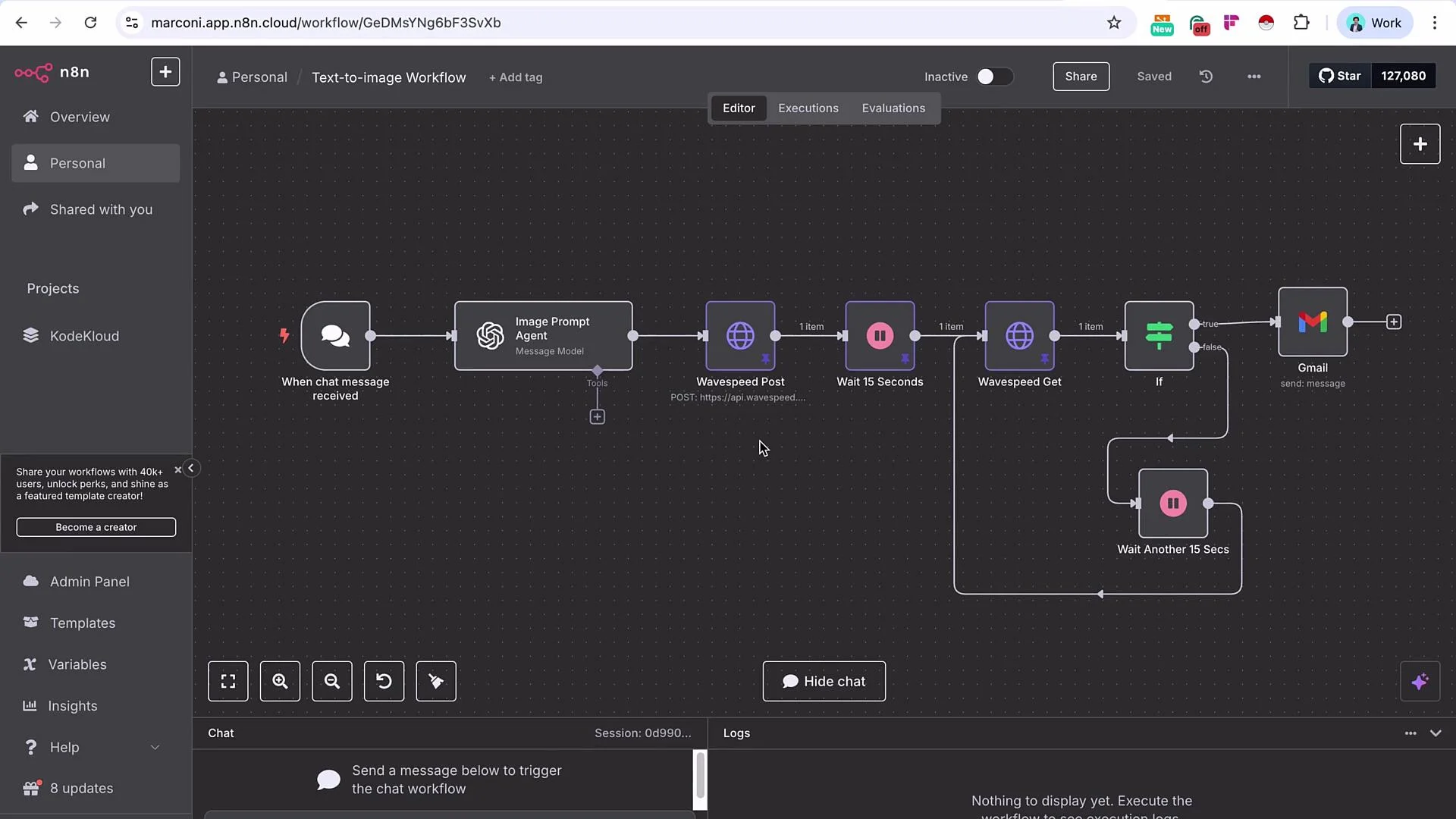
In this lesson we'll build a complete text-to-image workflow using n8n, an LLM for prompt engineering, and Wavespeed AI for image generation. The flow starts with a chat-triggered text prompt, uses an LLM to produce a production-ready image prompt, posts that prompt to Wavespeed (Seedream by ByteDance in this example), polls for completion, then delivers the image URL via Gmail (you can swap Gmail for Slack, Telegram, WhatsApp, etc.).
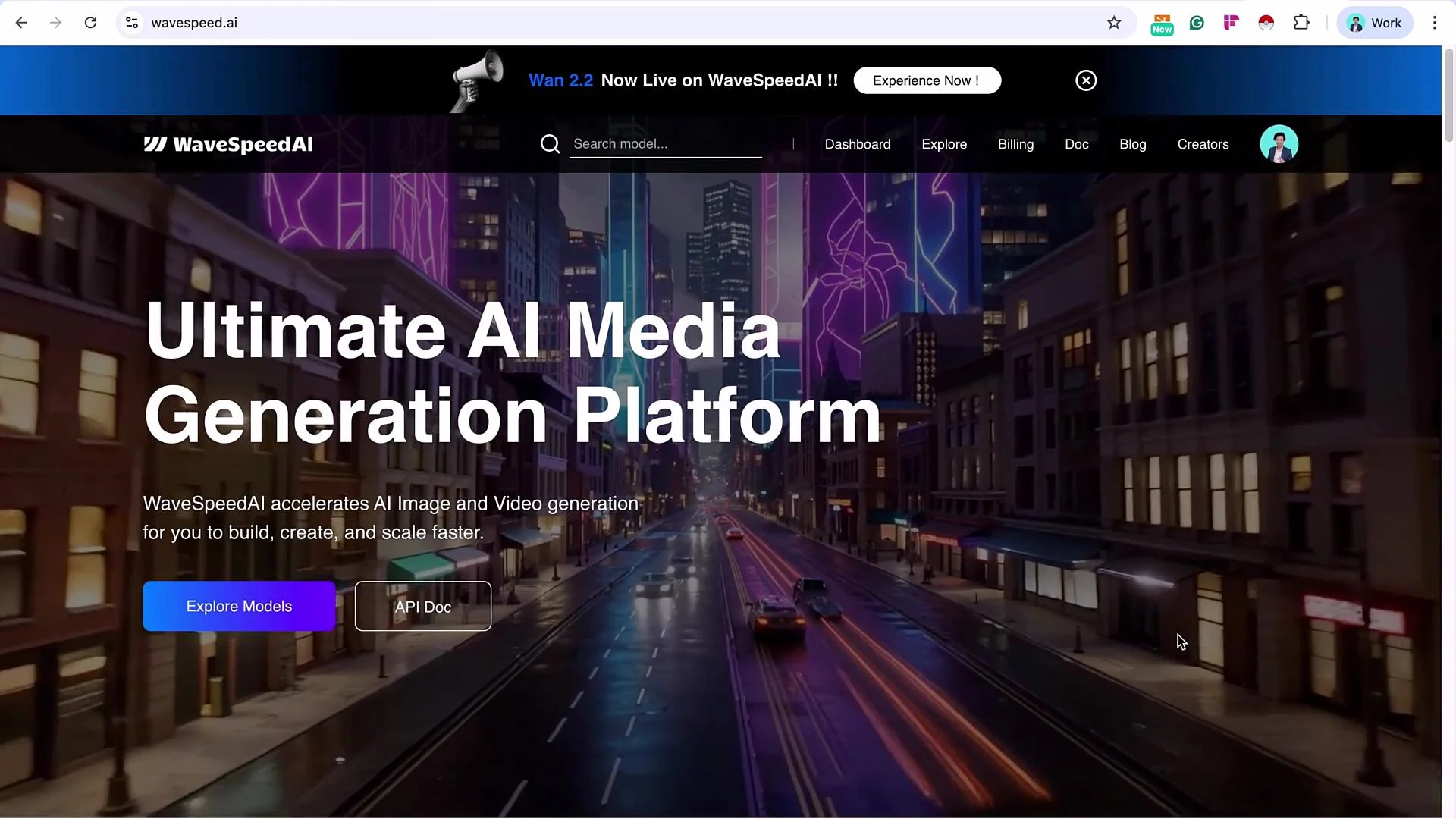
 Wavespeed AI hosts several image and video generation models. It is a paid platform and requires a minimum account balance before API calls will succeed.
Wavespeed requires a funded account to use its API. You will need to top up the account (typically a minimum amount) before making API calls.
Wavespeed AI hosts several image and video generation models. It is a paid platform and requires a minimum account balance before API calls will succeed.
Wavespeed requires a funded account to use its API. You will need to top up the account (typically a minimum amount) before making API calls.
 ## Overview
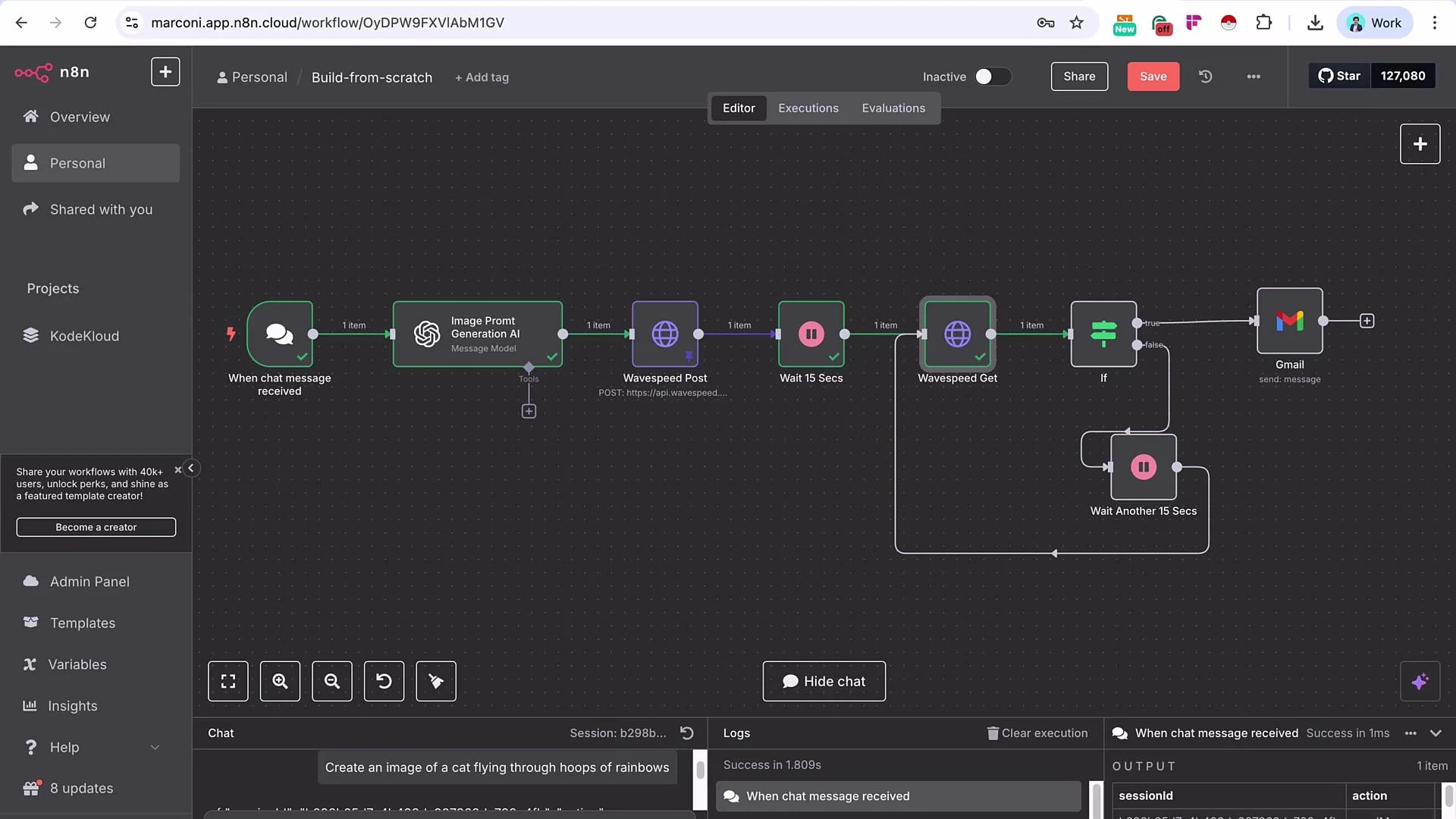
High-level flow:
* Chat Trigger: receives a short user prompt (e.g., "create an image of a cat flying through loops of rainbows").
* OpenAI (or equivalent LLM): expands the short prompt into a detailed, model-ready image prompt.
* Wavespeed POST: submits the generated prompt to a Wavespeed model (Seedream by ByteDance).
* Wait: allow processing time.
* Wavespeed GET: poll the results using the prediction request ID.
* If: check whether prediction status indicates completion; if not, wait and retry.
* Delivery: when completed, send the resulting image URL via Gmail (or other channel).
Recommended references:
* n8n Docs: [https://docs.n8n.io/](https://docs.n8n.io/)
* Wavespeed API (check your account’s API docs)
* OpenAI API docs: [https://platform.openai.com/docs](https://platform.openai.com/docs)
## Prerequisites
* n8n instance (cloud or self-hosted)
* Wavespeed account with a funded balance
* Wavespeed API key
* OpenAI API key (or any LLM capable of prompt engineering)
* Gmail (or another outbound integration) configured in n8n
## Node Roles (quick reference)
| Node | Purpose |
| ------------------------------------------- | ------------------------------------------------------ |
| Chat Trigger | Starts workflow with a short user prompt |
| OpenAI Message (Image Prompt Generation AI) | Convert short prompt into a detailed image prompt |
| HTTP Request (Wavespeed POST) | Submit the prompt to Wavespeed to create a prediction |
| Wait | Give Wavespeed time to process before polling |
| HTTP Request (Wavespeed GET) | Retrieve prediction results by request ID |
| If | Inspect prediction `status` (or equivalent) and branch |
| Gmail (Send) | Deliver the final image URL |
## Step-by-step implementation
1. Add a Chat Trigger node and send a short user prompt. Example user input:
* create an image of a cat flying through loops of rainbows
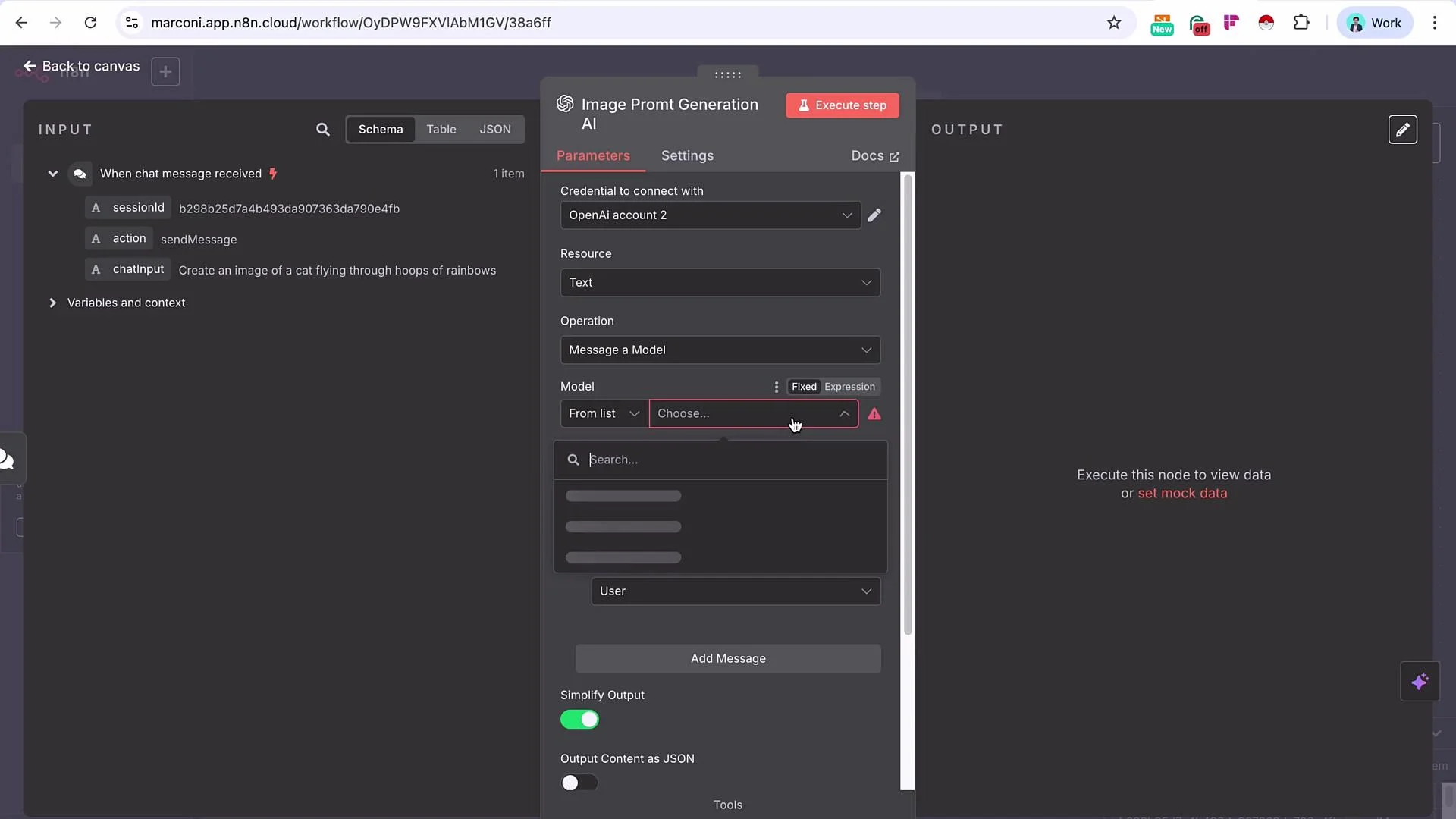
2. Add an OpenAI message node and rename it to "Image Prompt Generation AI". Select a capable model (e.g., GPT-4.1 or equivalent). Map the chat-triggered prompt into the model’s `user` input. Provide a system message instructing the model to act as an expert text-to-image prompt engineer and to produce a concise, highly-detailed generation prompt suitable for the chosen model.
## Overview
High-level flow:
* Chat Trigger: receives a short user prompt (e.g., "create an image of a cat flying through loops of rainbows").
* OpenAI (or equivalent LLM): expands the short prompt into a detailed, model-ready image prompt.
* Wavespeed POST: submits the generated prompt to a Wavespeed model (Seedream by ByteDance).
* Wait: allow processing time.
* Wavespeed GET: poll the results using the prediction request ID.
* If: check whether prediction status indicates completion; if not, wait and retry.
* Delivery: when completed, send the resulting image URL via Gmail (or other channel).
Recommended references:
* n8n Docs: [https://docs.n8n.io/](https://docs.n8n.io/)
* Wavespeed API (check your account’s API docs)
* OpenAI API docs: [https://platform.openai.com/docs](https://platform.openai.com/docs)
## Prerequisites
* n8n instance (cloud or self-hosted)
* Wavespeed account with a funded balance
* Wavespeed API key
* OpenAI API key (or any LLM capable of prompt engineering)
* Gmail (or another outbound integration) configured in n8n
## Node Roles (quick reference)
| Node | Purpose |
| ------------------------------------------- | ------------------------------------------------------ |
| Chat Trigger | Starts workflow with a short user prompt |
| OpenAI Message (Image Prompt Generation AI) | Convert short prompt into a detailed image prompt |
| HTTP Request (Wavespeed POST) | Submit the prompt to Wavespeed to create a prediction |
| Wait | Give Wavespeed time to process before polling |
| HTTP Request (Wavespeed GET) | Retrieve prediction results by request ID |
| If | Inspect prediction `status` (or equivalent) and branch |
| Gmail (Send) | Deliver the final image URL |
## Step-by-step implementation
1. Add a Chat Trigger node and send a short user prompt. Example user input:
* create an image of a cat flying through loops of rainbows
2. Add an OpenAI message node and rename it to "Image Prompt Generation AI". Select a capable model (e.g., GPT-4.1 or equivalent). Map the chat-triggered prompt into the model’s `user` input. Provide a system message instructing the model to act as an expert text-to-image prompt engineer and to produce a concise, highly-detailed generation prompt suitable for the chosen model.
 Tip: iterate the system message in a staging environment until you consistently receive high-quality prompts.
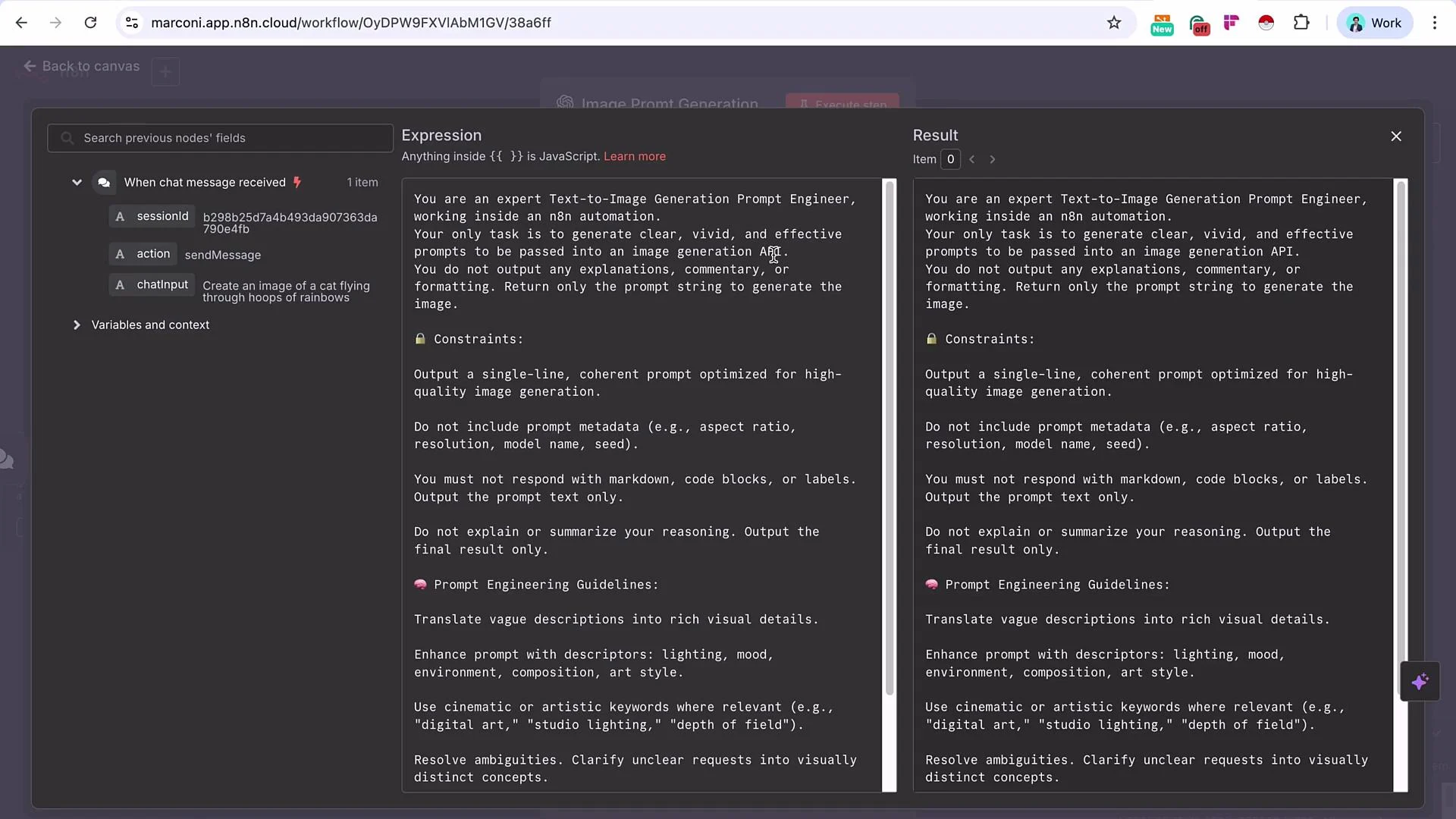 3. Execute the OpenAI node. Example (node output JSON):
```json theme={null}
{
"index": 0,
"message": {
"role": "assistant",
"content": "A playful cat soaring gracefully through vibrant, glowing hoops made of rainbows suspended in the sky, surrounded by fluffy clouds, dynamic motion, bright and whimsical lighting, magical atmosphere, highly detailed digital art, fantasy illustration style",
"refusal": null,
"annotations": []
}
}
```
4. Add an HTTP Request node and rename it to "Wavespeed POST". Import a POST curl that targets the Wavespeed model endpoint, then replace the static prompt with an expression that references the OpenAI node's `content`.
Example cURL for Wavespeed Seedream (ByteDance):
```bash theme={null}
curl --location --request POST 'https://api.wavespeed.ai/api/v3/bytedance/seedream-v3' \
--header "Content-Type: application/json" \
--header "Authorization: Bearer ${WAVESPEED_API_KEY}" \
--data-raw '{
"enable_base64_output": false,
"enable_sync_mode": false,
"guidance_scale": 2.5,
"prompt": "A young white girl with curly hair eating ice cream, colorful city background, realistic lighting, street-style photograph, lifelike details",
"seed": -1,
"size": "1024x1322"
}'
```
Authentication: use n8n Generic Credential type (Header Auth). Create a credential (for example, `WavespeedCredentialDemo`) and store the API key there; then reference that credential in your HTTP Request node. This keeps the header clean and avoids embedding keys in node configuration.
5. Map the prompt field to the OpenAI node output (for example, `{{$node["Image Prompt Generation AI"].json["message"]["content"]}}` in n8n expression syntax). Execute the Wavespeed POST node. The response will include a prediction request ID that you will use to poll for results.
Pin the POST response while developing to avoid re-submitting jobs and using credits: n8n supports pinning node data to prevent re-execution.
6. Add a Wait node (e.g., 15 seconds) to give Wavespeed time to start processing. Balance responsiveness and API rate limits when choosing the wait interval.
7. Configure a Wavespeed GET HTTP Request to fetch prediction results. The GET endpoint pattern:
```bash theme={null}
curl --location --request GET "https://api.wavespeed.ai/api/v3/predictions/${requestId}/result" \
--header "Authorization: Bearer ${WAVESPEED_API_KEY}"
```
In n8n, toggle the endpoint field to an expression and insert the POST node’s returned `id` (or `data.id`) between the slashes.
8. Execute the Wavespeed GET node. When the prediction finishes the response payload will include the image URL(s). Example successful GET response (structure varies by API version):
```json theme={null}
{
"code": 200,
"message": "success",
"data": {
"id": "b9846b17667c74fab8d7ed6a4baf154c",
"model": "bytedance/seedream-v3",
"status": "completed",
"outputs": {
"0": "https://d1q70pf5vjehyc.cloudfront.net/predictions/b9846b17667c74fab8d7ed6a4baf154c/i.jpeg"
},
"urls": {
"get": "https://api.wavespeed.ai/api/v3/predictions/b9846b17667c74fab8d7ed6a4baf154c/result"
},
"has_nsfw_contents": {
"status": "created",
"created_at": "2025-08-06T04:07:43.174332295Z",
"error": "",
"executionTime": 0
},
"timings": {
"inference": 5822
}
}
}
```
9. Add an If node to check the Wavespeed GET response `status` (or `state`, depending on your API version). If the value equals `completed` (or the API’s success indicator), follow the true branch to deliver the image. If not, follow the false branch to wait and poll again.
Important: Wavespeed API versions differ in where `status` may be located (top-level, `data.status`, `data.state`, etc.). Inspect the GET response in your environment and point your If node to the correct property.
10. On the true branch, send the image URL via Gmail (or another delivery node). Example Gmail configuration:
* Subject: `image generated - {now}`
* Body: include the image URL mapped from the GET node (e.g., `{{$node["Wavespeed GET"].json["data"]["outputs"]["0"]}}`)
When the If node is false, use a Wait node (e.g., rename to "Wait another 15 seconds") and loop back to the Wavespeed GET node. Continue polling until completion.
3. Execute the OpenAI node. Example (node output JSON):
```json theme={null}
{
"index": 0,
"message": {
"role": "assistant",
"content": "A playful cat soaring gracefully through vibrant, glowing hoops made of rainbows suspended in the sky, surrounded by fluffy clouds, dynamic motion, bright and whimsical lighting, magical atmosphere, highly detailed digital art, fantasy illustration style",
"refusal": null,
"annotations": []
}
}
```
4. Add an HTTP Request node and rename it to "Wavespeed POST". Import a POST curl that targets the Wavespeed model endpoint, then replace the static prompt with an expression that references the OpenAI node's `content`.
Example cURL for Wavespeed Seedream (ByteDance):
```bash theme={null}
curl --location --request POST 'https://api.wavespeed.ai/api/v3/bytedance/seedream-v3' \
--header "Content-Type: application/json" \
--header "Authorization: Bearer ${WAVESPEED_API_KEY}" \
--data-raw '{
"enable_base64_output": false,
"enable_sync_mode": false,
"guidance_scale": 2.5,
"prompt": "A young white girl with curly hair eating ice cream, colorful city background, realistic lighting, street-style photograph, lifelike details",
"seed": -1,
"size": "1024x1322"
}'
```
Authentication: use n8n Generic Credential type (Header Auth). Create a credential (for example, `WavespeedCredentialDemo`) and store the API key there; then reference that credential in your HTTP Request node. This keeps the header clean and avoids embedding keys in node configuration.
5. Map the prompt field to the OpenAI node output (for example, `{{$node["Image Prompt Generation AI"].json["message"]["content"]}}` in n8n expression syntax). Execute the Wavespeed POST node. The response will include a prediction request ID that you will use to poll for results.
Pin the POST response while developing to avoid re-submitting jobs and using credits: n8n supports pinning node data to prevent re-execution.
6. Add a Wait node (e.g., 15 seconds) to give Wavespeed time to start processing. Balance responsiveness and API rate limits when choosing the wait interval.
7. Configure a Wavespeed GET HTTP Request to fetch prediction results. The GET endpoint pattern:
```bash theme={null}
curl --location --request GET "https://api.wavespeed.ai/api/v3/predictions/${requestId}/result" \
--header "Authorization: Bearer ${WAVESPEED_API_KEY}"
```
In n8n, toggle the endpoint field to an expression and insert the POST node’s returned `id` (or `data.id`) between the slashes.
8. Execute the Wavespeed GET node. When the prediction finishes the response payload will include the image URL(s). Example successful GET response (structure varies by API version):
```json theme={null}
{
"code": 200,
"message": "success",
"data": {
"id": "b9846b17667c74fab8d7ed6a4baf154c",
"model": "bytedance/seedream-v3",
"status": "completed",
"outputs": {
"0": "https://d1q70pf5vjehyc.cloudfront.net/predictions/b9846b17667c74fab8d7ed6a4baf154c/i.jpeg"
},
"urls": {
"get": "https://api.wavespeed.ai/api/v3/predictions/b9846b17667c74fab8d7ed6a4baf154c/result"
},
"has_nsfw_contents": {
"status": "created",
"created_at": "2025-08-06T04:07:43.174332295Z",
"error": "",
"executionTime": 0
},
"timings": {
"inference": 5822
}
}
}
```
9. Add an If node to check the Wavespeed GET response `status` (or `state`, depending on your API version). If the value equals `completed` (or the API’s success indicator), follow the true branch to deliver the image. If not, follow the false branch to wait and poll again.
Important: Wavespeed API versions differ in where `status` may be located (top-level, `data.status`, `data.state`, etc.). Inspect the GET response in your environment and point your If node to the correct property.
10. On the true branch, send the image URL via Gmail (or another delivery node). Example Gmail configuration:
* Subject: `image generated - {now}`
* Body: include the image URL mapped from the GET node (e.g., `{{$node["Wavespeed GET"].json["data"]["outputs"]["0"]}}`)
When the If node is false, use a Wait node (e.g., rename to "Wait another 15 seconds") and loop back to the Wavespeed GET node. Continue polling until completion.
 ## Troubleshooting & Best Practices
* Pin POST responses during testing to avoid duplicate jobs and unnecessary charges.
* Use conservative polling intervals to avoid hitting rate limits.
* Validate the correct `status` path in the GET response for your Wavespeed API version before building the If node condition.
* Keep secrets in n8n credentials (e.g., `WavespeedCredentialDemo`) rather than in node bodies.
* For production, consider exponential backoff for polling and add retries/alerts for persistent failures.
Wavespeed API usage incurs costs. Misconfigured loops or frequent POST retries can consume credits quickly. Test with pinned POST responses and conservative polling intervals.
## Summary
* Start with a concise user prompt and use an LLM to generate a high-quality, model-ready prompt.
* POST the LLM-generated prompt to Wavespeed and capture the prediction request ID.
* Wait, then GET the prediction result using the request ID.
* Use an If node to detect completion (`status == completed` or the API-specific success value). If not complete, wait and poll again.
* When complete, deliver the image URL through Gmail or any other channel.
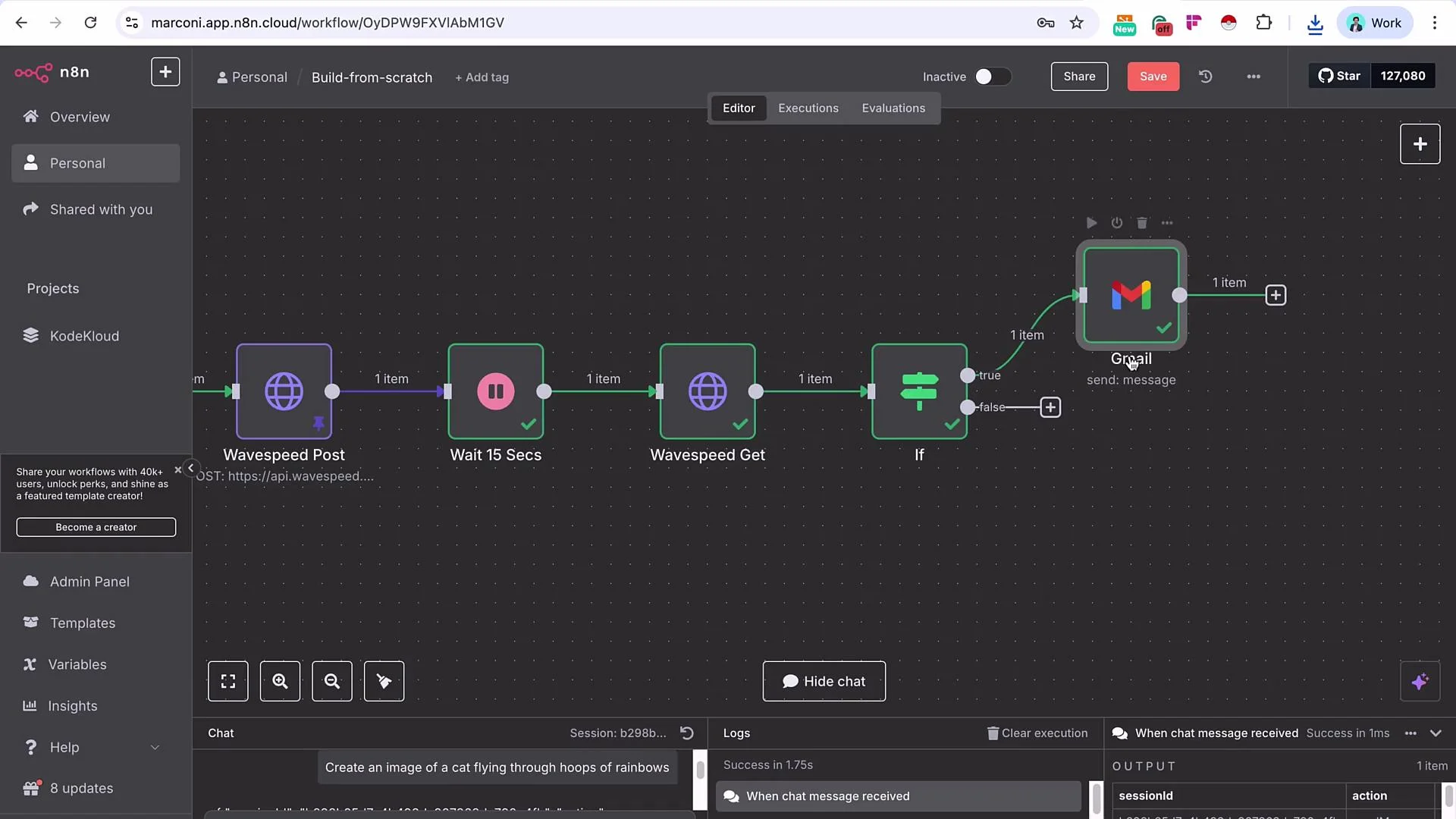
The node arrangement (chat -> image prompt generation -> Wavespeed POST -> Wait -> Wavespeed GET -> If -> \[true -> Gmail] / \[false -> Wait -> loop back]) gives a reusable pattern that you can adapt for text-to-video workflows; note video workflows typically need longer wait/poll intervals and may return different output formats.
## Troubleshooting & Best Practices
* Pin POST responses during testing to avoid duplicate jobs and unnecessary charges.
* Use conservative polling intervals to avoid hitting rate limits.
* Validate the correct `status` path in the GET response for your Wavespeed API version before building the If node condition.
* Keep secrets in n8n credentials (e.g., `WavespeedCredentialDemo`) rather than in node bodies.
* For production, consider exponential backoff for polling and add retries/alerts for persistent failures.
Wavespeed API usage incurs costs. Misconfigured loops or frequent POST retries can consume credits quickly. Test with pinned POST responses and conservative polling intervals.
## Summary
* Start with a concise user prompt and use an LLM to generate a high-quality, model-ready prompt.
* POST the LLM-generated prompt to Wavespeed and capture the prediction request ID.
* Wait, then GET the prediction result using the request ID.
* Use an If node to detect completion (`status == completed` or the API-specific success value). If not complete, wait and poll again.
* When complete, deliver the image URL through Gmail or any other channel.
The node arrangement (chat -> image prompt generation -> Wavespeed POST -> Wait -> Wavespeed GET -> If -> \[true -> Gmail] / \[false -> Wait -> loop back]) gives a reusable pattern that you can adapt for text-to-video workflows; note video workflows typically need longer wait/poll intervals and may return different output formats.