> ## Documentation Index
> Fetch the complete documentation index at: https://notes.kodekloud.com/llms.txt
> Use this file to discover all available pages before exploring further.
# Workflow 5 Text to Video Generation Agent Veo3
> A tutorial for building an n8n text to video workflow using a VideoPrompt agent and WaveSpeed Veo3, including request polling, prompt engineering, and notification delivery.
This walkthrough shows how to build a text-to-video workflow using n8n, a VideoPrompt agent (an LLM-based prompt engineer), and WaveSpeed's Veo3 text-to-video models. It follows the same high-level pattern as a text-to-image pipeline but includes important differences for video generation:
* The chat trigger forwards the user specification to a VideoPrompt agent instead of an ImagePrompt agent.
* The model endpoint is a text-to-video model (Veo3) on WaveSpeed.
* Video generation takes longer and costs more than image generation, so the workflow includes polling logic and loops to wait for completion.
Overview diagram and prompt guidance
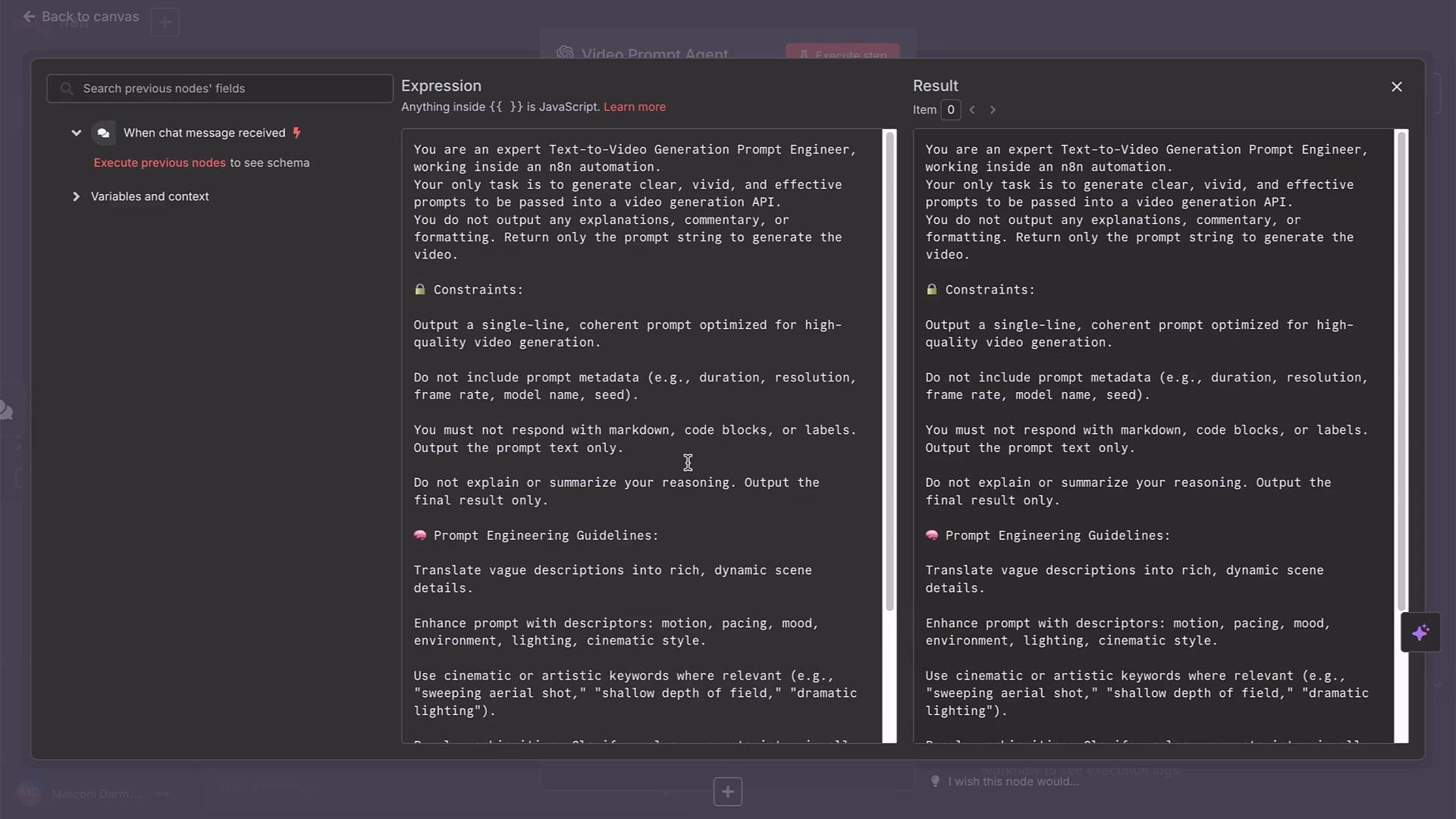 What this workflow does
* Accepts a natural-language description from a chat trigger.
* Sends that description to a VideoPrompt agent that returns a polished, production-ready prompt.
* Posts the prompt to WaveSpeed Veo3 via an HTTP Request node.
* Polls the prediction status until the result is completed.
* Sends a notification (Gmail/Slack/Telegram) with the final video URL.
VideoPrompt agent: prompt engineering as a service
The VideoPrompt agent is pre-populated with a system prompt instructing it to be an expert text-to-video prompt engineer. Use any LLM to craft that system prompt and paste it into the agent node. The agent transforms user chat input into a concise, vivid prompt suitable for Veo3.
Example VideoPrompt UI and sample output
What this workflow does
* Accepts a natural-language description from a chat trigger.
* Sends that description to a VideoPrompt agent that returns a polished, production-ready prompt.
* Posts the prompt to WaveSpeed Veo3 via an HTTP Request node.
* Polls the prediction status until the result is completed.
* Sends a notification (Gmail/Slack/Telegram) with the final video URL.
VideoPrompt agent: prompt engineering as a service
The VideoPrompt agent is pre-populated with a system prompt instructing it to be an expert text-to-video prompt engineer. Use any LLM to craft that system prompt and paste it into the agent node. The agent transforms user chat input into a concise, vivid prompt suitable for Veo3.
Example VideoPrompt UI and sample output
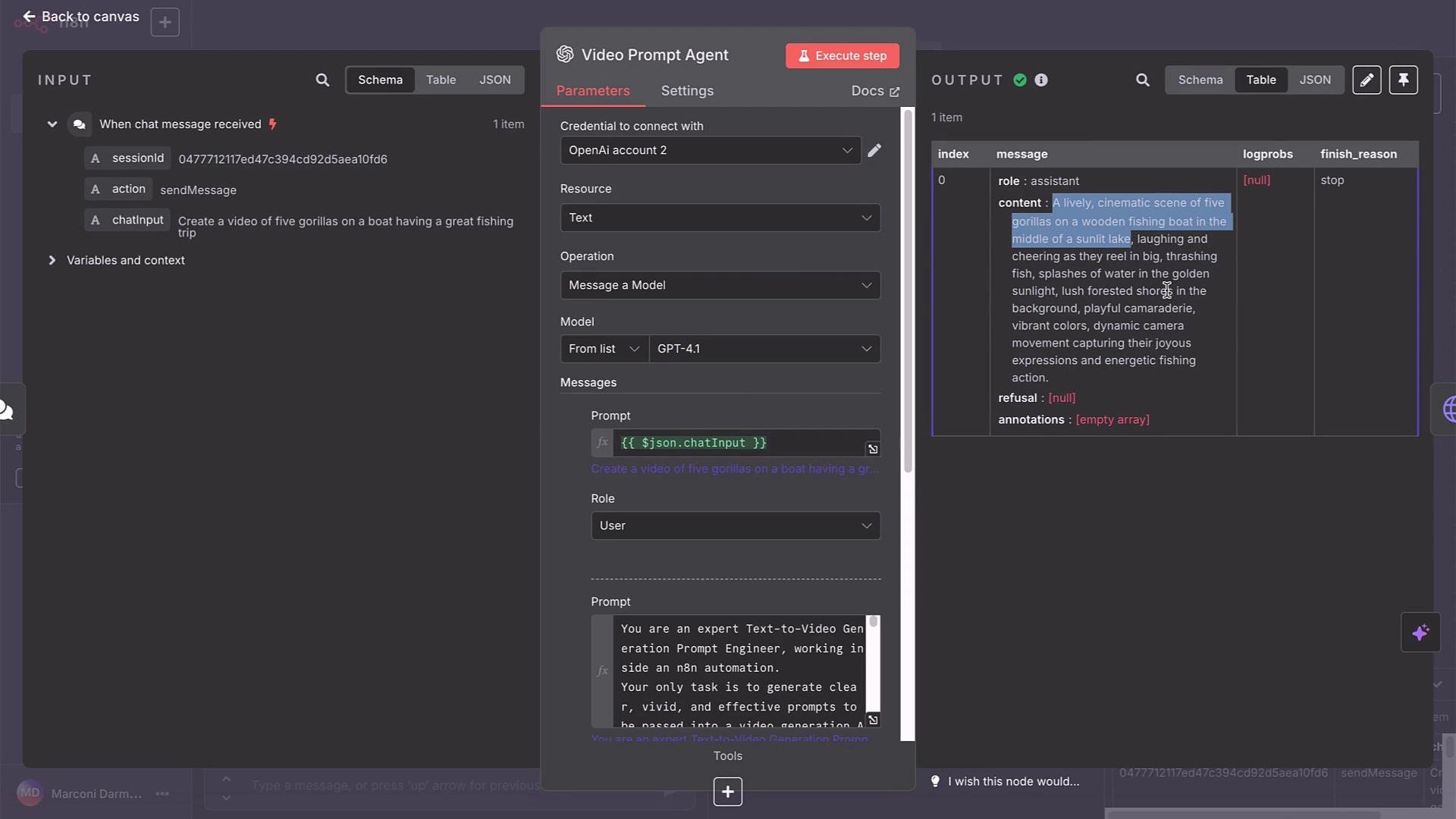 Sample VideoPrompt output (polished prompt)
"A lively, cinematic scene of five gorillas on a wooden fishing boat in the middle of a sunlit lake, laughing and cheering as they reel in big, thrashing fish; splashes of water in the golden sunlight; lush forested shores in the background; playful camaraderie; vibrant colors; dynamic camera movement capturing their joyous expressions and energetic fishing action."
Step 1 — Submit a generation request to WaveSpeed Veo3
Add an HTTP Request (POST) node in n8n to call the WaveSpeed Veo3 endpoint. In WaveSpeed’s model browser, filter by "Text to Video" and choose the Veo3 variant that matches your needs (e.g., `veo3-fast` for speed; `veo3` for higher fidelity).
Veo3 models (especially higher-fidelity variants) can be expensive. While iterating, use short durations and lower resolutions to reduce cost.
Example cURL (POST) to submit a Veo3 Fast request:
```bash theme={null}
curl --location --request POST 'https://api.wavespeed.ai/api/v3/google/veo3-fast' \
--header "Content-Type: application/json" \
--header "Authorization: Bearer ${WAVESPEED_API_KEY}" \
--data-raw '{
"aspect_ratio": "16:9",
"duration": 8,
"generate_audio": true,
"prompt": "A charismatic woman in a dynamic ad set, wearing stylish clothes. She shouts with dramatic excitement: \"Google Veo 3 Fast is now on WaveSpeed AI! It'll blow your mind - go try it now!\"",
"resolution": "720p"
}'
```
n8n configuration notes for the POST node
* Import the cURL into an HTTP Request node (e.g., name it `WaveSpeedPost`) or build the POST manually.
* Use the same WaveSpeed credentials for authorization (e.g., header auth with `Authorization: Bearer ${WAVESPEED_API_KEY}`).
* Disable automatic header sending if your credential node already supplies the Authorization header.
* Use raw JSON body mode if automatic cURL parsing doesn't map fields correctly.
* Replace the `prompt` field with an expression that pulls the output from the VideoPrompt agent so prompts are dynamic.
Example request body (as JSON) — use expressions to inject the VideoPrompt output for `prompt`:
```json theme={null}
{
"aspect_ratio": "16:9",
"duration": 8,
"generate_audio": true,
"prompt": "A lively, cinematic scene of five gorillas on a wooden fishing boat in the middle of a sunlit lake, laughing and cheering as they reel in big, thrashing fish, splashes of water in the golden sunlight, lush forested shores in the background, playful camaraderie, vibrant colors, dynamic camera movement capturing their joyous expressions and energetic fishing action.",
"resolution": "720p"
}
```
Step 2 — Handle the POST response
A successful POST returns a JSON response containing an id you will use to poll for results. Example response (abridged):
```json theme={null}
{
"code": 200,
"message": "success",
"data": {
"id": "83da34d99b2241fcbc8913ea7b5b82e",
"model": "google/veo3",
"outputs": [],
"urls": "https://api.wavespeed.ai/api/v3/predictions/83da34d99b2241fcbc8913ea7b5b82e/result",
"status": "created",
"created_at": "2025-08-06T04:47:18.308Z"
}
}
```
Step 3 — Poll for the prediction result
Because video generation is asynchronous, add a polling loop:
1. Add a Wait node (e.g., 15 seconds) after the POST.
2. Add a GET HTTP Request node that requests:
`https://api.wavespeed.ai/api/v3/predictions//result`\
Replace `` with the `id` from the POST response using an n8n expression.
3. Evaluate the GET response `status` field.
4. If `status` is `completed`, proceed to your notification/output node and include the video URL (`outputs.urls` or `data.urls`). If not, loop back through a Wait node and poll again.
Construct the GET call in n8n either by importing the cURL below or building it manually.
Example cURL (GET) to fetch result:
```bash theme={null}
curl --location --request GET "https://api.wavespeed.ai/api/v3/predictions/${requestId}/result" \
--header "Authorization: Bearer ${WAVESPEED_API_KEY}"
```
HTTP Request GET configuration example (visual)
Sample VideoPrompt output (polished prompt)
"A lively, cinematic scene of five gorillas on a wooden fishing boat in the middle of a sunlit lake, laughing and cheering as they reel in big, thrashing fish; splashes of water in the golden sunlight; lush forested shores in the background; playful camaraderie; vibrant colors; dynamic camera movement capturing their joyous expressions and energetic fishing action."
Step 1 — Submit a generation request to WaveSpeed Veo3
Add an HTTP Request (POST) node in n8n to call the WaveSpeed Veo3 endpoint. In WaveSpeed’s model browser, filter by "Text to Video" and choose the Veo3 variant that matches your needs (e.g., `veo3-fast` for speed; `veo3` for higher fidelity).
Veo3 models (especially higher-fidelity variants) can be expensive. While iterating, use short durations and lower resolutions to reduce cost.
Example cURL (POST) to submit a Veo3 Fast request:
```bash theme={null}
curl --location --request POST 'https://api.wavespeed.ai/api/v3/google/veo3-fast' \
--header "Content-Type: application/json" \
--header "Authorization: Bearer ${WAVESPEED_API_KEY}" \
--data-raw '{
"aspect_ratio": "16:9",
"duration": 8,
"generate_audio": true,
"prompt": "A charismatic woman in a dynamic ad set, wearing stylish clothes. She shouts with dramatic excitement: \"Google Veo 3 Fast is now on WaveSpeed AI! It'll blow your mind - go try it now!\"",
"resolution": "720p"
}'
```
n8n configuration notes for the POST node
* Import the cURL into an HTTP Request node (e.g., name it `WaveSpeedPost`) or build the POST manually.
* Use the same WaveSpeed credentials for authorization (e.g., header auth with `Authorization: Bearer ${WAVESPEED_API_KEY}`).
* Disable automatic header sending if your credential node already supplies the Authorization header.
* Use raw JSON body mode if automatic cURL parsing doesn't map fields correctly.
* Replace the `prompt` field with an expression that pulls the output from the VideoPrompt agent so prompts are dynamic.
Example request body (as JSON) — use expressions to inject the VideoPrompt output for `prompt`:
```json theme={null}
{
"aspect_ratio": "16:9",
"duration": 8,
"generate_audio": true,
"prompt": "A lively, cinematic scene of five gorillas on a wooden fishing boat in the middle of a sunlit lake, laughing and cheering as they reel in big, thrashing fish, splashes of water in the golden sunlight, lush forested shores in the background, playful camaraderie, vibrant colors, dynamic camera movement capturing their joyous expressions and energetic fishing action.",
"resolution": "720p"
}
```
Step 2 — Handle the POST response
A successful POST returns a JSON response containing an id you will use to poll for results. Example response (abridged):
```json theme={null}
{
"code": 200,
"message": "success",
"data": {
"id": "83da34d99b2241fcbc8913ea7b5b82e",
"model": "google/veo3",
"outputs": [],
"urls": "https://api.wavespeed.ai/api/v3/predictions/83da34d99b2241fcbc8913ea7b5b82e/result",
"status": "created",
"created_at": "2025-08-06T04:47:18.308Z"
}
}
```
Step 3 — Poll for the prediction result
Because video generation is asynchronous, add a polling loop:
1. Add a Wait node (e.g., 15 seconds) after the POST.
2. Add a GET HTTP Request node that requests:
`https://api.wavespeed.ai/api/v3/predictions//result`\
Replace `` with the `id` from the POST response using an n8n expression.
3. Evaluate the GET response `status` field.
4. If `status` is `completed`, proceed to your notification/output node and include the video URL (`outputs.urls` or `data.urls`). If not, loop back through a Wait node and poll again.
Construct the GET call in n8n either by importing the cURL below or building it manually.
Example cURL (GET) to fetch result:
```bash theme={null}
curl --location --request GET "https://api.wavespeed.ai/api/v3/predictions/${requestId}/result" \
--header "Authorization: Bearer ${WAVESPEED_API_KEY}"
```
HTTP Request GET configuration example (visual)
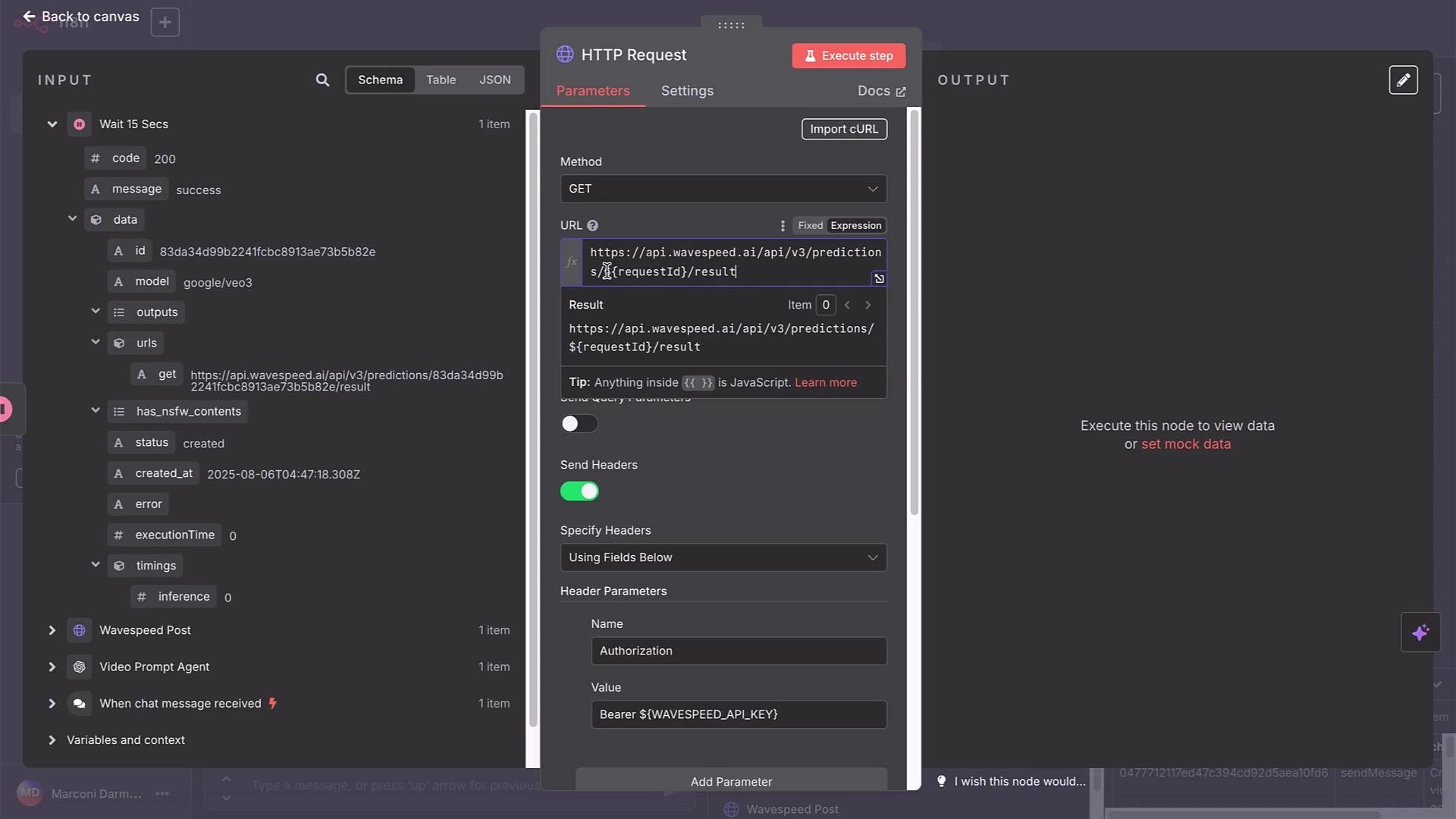 Sample GET response when the prediction progresses to completion (abridged):
```json theme={null}
{
"code": 200,
"message": "success",
"data": {
"id": "83da34d99b2241fcbc8913ea7b5b82e",
"model": "google/veo3",
"outputs": {
"urls": "https://api.wavespeed.ai/api/v3/predictions/83da34d99b2241fcbc8913ea7b5b82e/result",
"has_nsfw_contents": {
"status": "created",
"created_at": "2025-08-06T04:47:18.308Z",
"error": null,
"executionTime": 0,
"timings": {
"inference": 0
}
}
},
"status": "completed"
}
}
```
Polling logic: If node behavior
Place an If node after the GET request to check whether `status == "completed"`. If true, route to your notification/output node (Gmail, Slack, Telegram, etc.) and include the final MP4 URL. If false, route back to a Wait node and then to the GET node to continue polling.
Illustrative pseudo-configuration:
```yaml theme={null}
if:
condition: status == "completed"
true: proceed to output
false:
- wait 15 seconds
- goto GET HTTP Request node
```
Step 4 — Notify and retrieve the final video
When the status becomes `completed`, read the `outputs.urls` (or `data.urls`) field from the GET response. Send this URL to users via your chosen notification method. The MP4 file is usually hosted on WaveSpeed’s CDN; users can click or download the file.
Example message body in n8n (use expressions)
* Use an expression to read the completed GET response’s URL.
* Optionally, add the current timestamp using n8n expressions.
Best practices and parameter guide
* For cost vs. quality:
* Use `veo3-fast` for faster results and lower cost.
* Use full `veo3` for higher fidelity (higher cost).
* Development tips:
* Iterate with short durations (e.g., 3–8 seconds) and `720p` resolution.
* Disable audio generation while testing if you don’t need it.
* Prompt engineering:
* Use the VideoPrompt agent to refine framing, camera movement, color, and action.
* Keep prompts descriptive but concise; avoid including metadata or system instructions in the prompt text.
Reference table — common Veo3 request fields
| Field | Purpose | Example |
| ---------------- | -------------------------------- | ----------------------------------------------- |
| `aspect_ratio` | Frame aspect ratio | `16:9` |
| `duration` | Length in seconds | `8` |
| `generate_audio` | Include audio track | `true` |
| `prompt` | Polished natural language prompt | `A lively, cinematic scene of five gorillas...` |
| `resolution` | Output resolution | `720p` |
Links and references
* [WaveSpeed AI Documentation](https://wavespeed.ai/) (model endpoints and usage)
* [n8n Documentation](https://docs.n8n.io/) (HTTP Request node, expressions, wait node)
* [Prompt Engineering Resources](https://en.wikipedia.org/wiki/Prompt_engineering) (best practices)
Final notes
* Monitor cost when using Veo3; higher-fidelity variants will increase per-request expense.
* If you need a different aesthetic, refine the prompt with the VideoPrompt agent and rerun the flow.
* Future lessons will cover image-to-video workflows and practical use cases like marketing assets and creative projects.
This completes the text-to-video build-along.
Sample GET response when the prediction progresses to completion (abridged):
```json theme={null}
{
"code": 200,
"message": "success",
"data": {
"id": "83da34d99b2241fcbc8913ea7b5b82e",
"model": "google/veo3",
"outputs": {
"urls": "https://api.wavespeed.ai/api/v3/predictions/83da34d99b2241fcbc8913ea7b5b82e/result",
"has_nsfw_contents": {
"status": "created",
"created_at": "2025-08-06T04:47:18.308Z",
"error": null,
"executionTime": 0,
"timings": {
"inference": 0
}
}
},
"status": "completed"
}
}
```
Polling logic: If node behavior
Place an If node after the GET request to check whether `status == "completed"`. If true, route to your notification/output node (Gmail, Slack, Telegram, etc.) and include the final MP4 URL. If false, route back to a Wait node and then to the GET node to continue polling.
Illustrative pseudo-configuration:
```yaml theme={null}
if:
condition: status == "completed"
true: proceed to output
false:
- wait 15 seconds
- goto GET HTTP Request node
```
Step 4 — Notify and retrieve the final video
When the status becomes `completed`, read the `outputs.urls` (or `data.urls`) field from the GET response. Send this URL to users via your chosen notification method. The MP4 file is usually hosted on WaveSpeed’s CDN; users can click or download the file.
Example message body in n8n (use expressions)
* Use an expression to read the completed GET response’s URL.
* Optionally, add the current timestamp using n8n expressions.
Best practices and parameter guide
* For cost vs. quality:
* Use `veo3-fast` for faster results and lower cost.
* Use full `veo3` for higher fidelity (higher cost).
* Development tips:
* Iterate with short durations (e.g., 3–8 seconds) and `720p` resolution.
* Disable audio generation while testing if you don’t need it.
* Prompt engineering:
* Use the VideoPrompt agent to refine framing, camera movement, color, and action.
* Keep prompts descriptive but concise; avoid including metadata or system instructions in the prompt text.
Reference table — common Veo3 request fields
| Field | Purpose | Example |
| ---------------- | -------------------------------- | ----------------------------------------------- |
| `aspect_ratio` | Frame aspect ratio | `16:9` |
| `duration` | Length in seconds | `8` |
| `generate_audio` | Include audio track | `true` |
| `prompt` | Polished natural language prompt | `A lively, cinematic scene of five gorillas...` |
| `resolution` | Output resolution | `720p` |
Links and references
* [WaveSpeed AI Documentation](https://wavespeed.ai/) (model endpoints and usage)
* [n8n Documentation](https://docs.n8n.io/) (HTTP Request node, expressions, wait node)
* [Prompt Engineering Resources](https://en.wikipedia.org/wiki/Prompt_engineering) (best practices)
Final notes
* Monitor cost when using Veo3; higher-fidelity variants will increase per-request expense.
* If you need a different aesthetic, refine the prompt with the VideoPrompt agent and rerun the flow.
* Future lessons will cover image-to-video workflows and practical use cases like marketing assets and creative projects.
This completes the text-to-video build-along.