

High-level flow
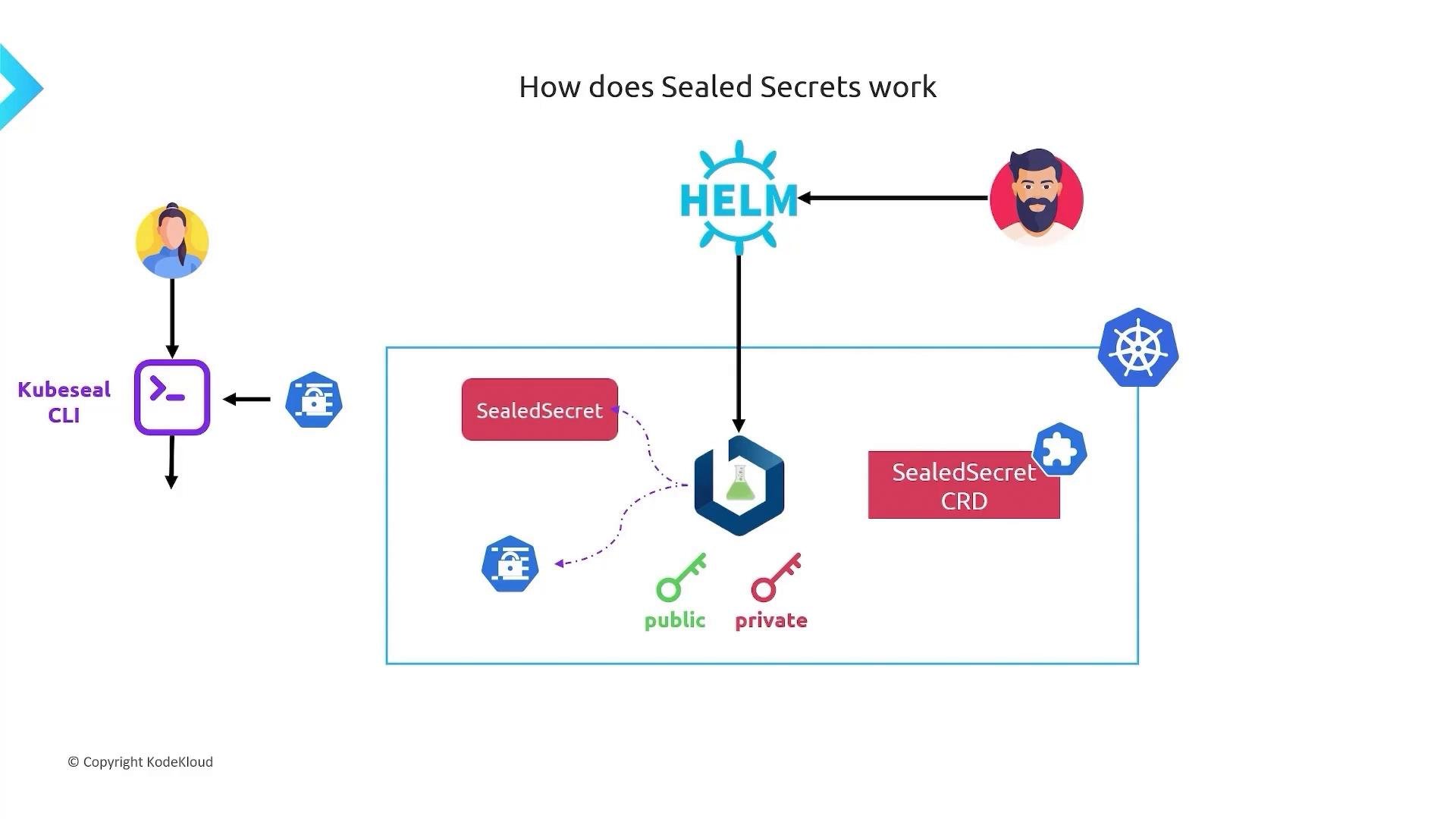
- Install the Sealed Secrets controller in your Kubernetes cluster.
- The controller creates a
SealedSecretCustomResourceDefinition (CRD) and generates an asymmetric keypair. - Use the controller’s public key to encrypt Secret data locally with the
kubesealCLI, producing aSealedSecretmanifest that is safe to commit to Git. - Apply the
SealedSecretto the cluster. The controller decrypts it with its private key and creates a regular KubernetesSecretin the same namespace. - Pods consume the standard
Secretas usual.
Components summary
Install the controller
Deploy the Sealed Secrets controller/Helm chart into your cluster. You can use plainkubectl or Helm depending on your workflow:
- kubectl: apply the controller manifest directly.
- Helm: install the chart into your cluster.
SealedSecret CRD and generates an asymmetric keypair:
- Public key: used to encrypt secrets outside the cluster.
- Private key: stored inside the cluster and used by the controller to decrypt
SealedSecretobjects.
Encrypting a Secret (client-side)
- Create a regular Kubernetes
Secretmanifest locally (or generate one viakubectl). - Use the
kubesealCLI to encrypt thatSecretinto aSealedSecretobject.kubesealuses the controller’s public key to produce encrypted output safe for version control.
SealedSecret manifest looks like this:
kubeseal --fetch-cert and use --cert to seal offline.
Deploying the SealedSecret
Apply the sealed manifest to your cluster as you would any other Kubernetes object:What the controller does when it sees a SealedSecret
- The Sealed Secrets controller watches for
SealedSecretobjects. - When it detects one, it uses its private key to decrypt
spec.encryptedData. - The controller then creates a standard Kubernetes
Secretin the same namespace. - That resulting
Secretbehaves like any other: mountable into pods, usable as environment variables, etc.
Why this is secure for GitOps
- The
SealedSecretyou store in Git contains only encrypted blobs generated with the controller’s public key. - The private key required for decryption never leaves the cluster—it is kept by the controller.
- Without the controller’s private key, an attacker cannot decrypt the stored sealed data even if they obtain the Git repository.
The controller’s private key is the only key that can decrypt SealedSecrets. Keep the controller and its backups secure — losing the private key means you will no longer be able to decrypt your sealed secrets.
Secret for pods to consume.