Welcome to a hands-on demonstration of K8sGPT, your AI assistant for Kubernetes diagnostics and remediation. In this lesson, we’ll:
  • Authenticate with your AI backend
  • Scan and explain cluster issues
  • Filter results by namespace and resource type
  • Review common NGINX deployment errors and solutions

1. Authenticate Your AI Backend

Before using K8sGPT, add your OpenAI (or Hugging Face) API key:
k8sgpt auth add
Sample output:
ollama@Bakugo:~/demo-k8sgpt$ k8sgpt auth add
Warning: backend input is empty, will use the default value: openai
Warning: model input is empty, will use the default value: gpt-3.5-turbo
Enter openai Key:
K8sGPT supports multiple backends (e.g., OpenAI and Hugging Face). If you don’t specify, it defaults to OpenAI’s gpt-3.5-turbo.

2. Cluster Analysis Commands

CommandDescriptionExample
k8sgpt analyzeScan all namespaces
k8sgpt analyze --explain --namespace k8sgptExplain issues in a specific namespace
k8sgpt analyze --explain --filter=DeploymentFilter output by resource type (e.g., Deployment)
k8sgpt analyze --explain --namespace k8sgpt --output=jsonGet machine-readable JSON output
k8sgpt analyze ... --anonymizeRemove sensitive data from output

3. Scan Your Cluster

  1. All namespaces
    ollama@Bakugo:~/demo-k8sgpt$ k8sgpt analyze
    
  2. Specific namespace
    ollama@Bakugo:~/demo-k8sgpt$ k8sgpt analyze --explain --namespace k8sgpt
    
Sample output:
15: Pod kube-system/etcd-docker-desktop/etcd()
   - Error: {"level":"warn","ts":"2024-08-12T22:31:30.352021Z",...}

17: Pod kube-system/kube-controller-manager-docker-desktop/kube-controller-manager()
   - Error: serviceaccount "k8sgpt" not found

19: Pod default/nginx/nginx()
   - Error: no such file or directory

20: Pod k8sgpt/nginx-deployment-6f596f9bb9-8mw6m/nginx(Deployment/nginx-deployment)
   - Error: The server rejected our request for an unknown reason (get pods nginx-deployment-6f596f9bb9-8mw6m)

4. Common NGINX Deployment Errors & Fixes

When focusing on the k8sgpt namespace’s NGINX deployment, K8sGPT may report:
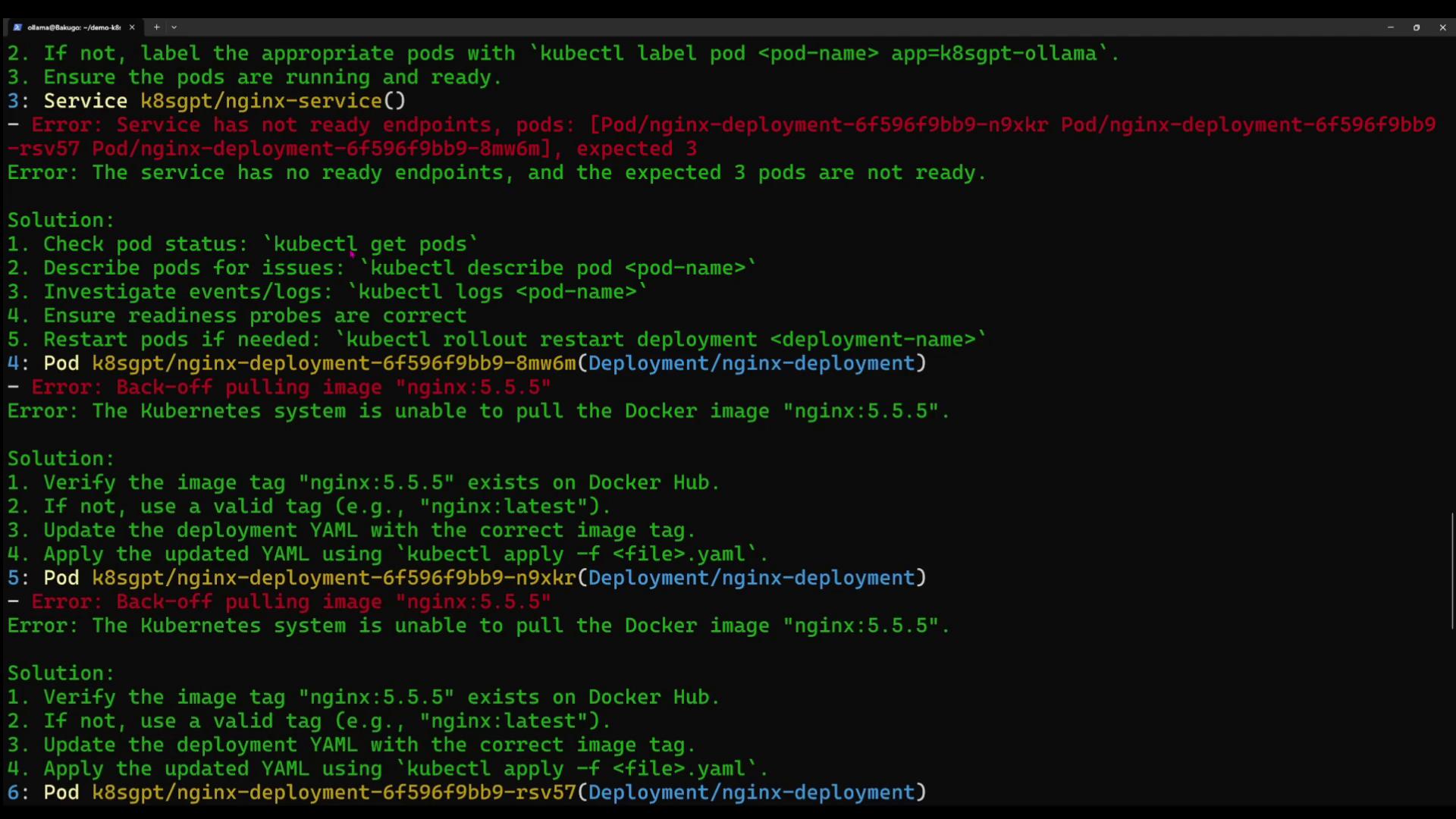
The image shows a terminal window with Kubernetes error messages and solutions related to pod deployment and Docker image pulling issues.

4.1 Error: Service has no ready endpoints

Solution:
  1. Check pod status
    kubectl get pods -n k8sgpt
    
  2. Describe the failing pod
    kubectl describe pod <pod-name> -n k8sgpt
    
  3. Inspect logs
    kubectl logs <pod-name> -n k8sgpt
    
  4. Verify readiness probes, then restart
    kubectl rollout restart deployment nginx-deployment -n k8sgpt
    

4.2 Error: Back-off pulling image “nginx:5.5”

Solution:
  1. Confirm the tag exists on Docker Hub.
  2. If missing, update to a valid tag (e.g., nginx:latest) in your Deployment YAML.
  3. Apply the updated manifest:
    kubectl apply -f <deployment-file>.yaml -n k8sgpt
    

5. Filtering by Resource Type

5.1 Deployments Only

k8sgpt analyze --explain --filter=Deployment --namespace k8sgpt
Sample output:
0: Deployment k8sgpt/k8sgpt-ollama
   - Error: Deployment has 1 replica but 0 are available.
Solution Steps:
  1. kubectl get pods -n k8sgpt
  2. kubectl describe pod <pod-name> -n k8sgpt
  3. kubectl logs <pod-name> -n k8sgpt
  4. Fix image or spec issues, then rollout restart.

5.2 Services Only

k8sgpt analyze --explain --filter=Service --namespace k8sgpt
Sample output:
0: Service k8sgpt/k8sgpt-ollama
   - Error: No endpoints found; expected pods with label app=k8sgpt-ollama.
Solution Steps:
  1. kubectl get pods -l app=k8sgpt-ollama -n k8sgpt
  2. Label pods if missing:
    kubectl label pod <pod-name> app=k8sgpt-ollama -n k8sgpt
    
  3. Ensure pods are Running and Ready.

6. JSON & Anonymized Output

  • JSON output
    k8sgpt analyze --explain --namespace k8sgpt --output=json
    
  • Anonymize sensitive data
    k8sgpt analyze --explain --namespace k8sgpt --output=json --anonymize
    
When sharing logs or JSON output publicly, use --anonymize to mask identifiers.

7. Next Steps

K8sGPT delivers natural-language diagnostics for Kubernetes. Use it to troubleshoot Pods, Deployments, Services, and more. Head into your lab environment and let AI power your Kubernetes operations!