This article explains handling concurrent runs and queued states in Spacelift when multiple engineers modify Terraform configurations simultaneously.
In this article, we explain how changes in your Terraform configuration trigger concurrent runs in Spacelift and how to handle queued states when multiple engineers modify the code simultaneously.
We begin by updating the main Terraform configuration file (main.tf) to deploy a simple AWS EC2 instance. The configuration below specifies the required Terraform version, AWS provider settings, and resource details for the EC2 instance:
required_version = ">= 1.2.0"provider "aws" { region = "us-east-1"}resource "aws_instance" "app_server" { ami = "ami-02396cdd13e9a1257" instance_type = "t2.micro"}
Next, verify that your AWS credentials are correctly stored on your local system. This ensures that authentication is properly configured:
space lift-demo on main via default> cat ~/.aws/credentials[default]aws_access_key_id = AKIAIAAWSJ5UTC5X42CUaws_secret_access_key = pqShHczzZPHyzozyN5+0gIHpntqd1VDOSnkfB09wspace lift-demo on main via default> AKIAIAAWSJ5UTC5X42CU
Now, let’s create a simple Virtual Private Cloud (VPC) with a CIDR block of 10.0.0.0/16, named “tf-example”. After you save, add, and commit these changes to your Git repository, a new run is triggered in Spacelift.Below is the Terraform configuration for creating the VPC:
provider "aws" { region = "us-east-1"}resource "aws_vpc" "my_vpc" { cidr_block = "10.0.0.0/16" tags = { Name = "tf-example" }}
After committing these changes, the Git output might look like this:
1 file changed, 8 insertions(+)spacelift-demo on main [!] via ⬢ default> git pushEnumerating objects: 5, done.Counting objects: 100% (5/5), done.Delta compression using up to 12 threadsCompressing objects: 100% (3/3), done.Writing objects: 100% (3/3), 415 bytes | 415.00 KiB/s, done.Total 3 (delta 1), reused 0 (delta 0), pack-reused 0remote: Resolving deltas: 100% (1/1), completed with 1 local object.To https://github.com/Sanjeev-Thiyagarajan/spacelift-demo.git 2e4d018..1587182 main -> mainspacelift-demo on main via ⬢ default took 2s
Back in Spacelift, the run corresponding to the “add VPC” commit starts by initializing, generating a plan, and then moving into an unconfirmed state. The plan output indicates that a new VPC will be created:
# aws_vpc.my_vpc will be createdresource "aws_vpc" "my_vpc" { cidr_block = "10.0.0.0/16" default_network_acl_id = (known after apply) default_route_table_id = (known after apply) enable_dns_support = (known after apply) enable_classiclink = (known after apply) enable_classiclink_dns_support = (known after apply) enable_dhpc_options = true id = (known after apply)}
At this point, the plan is in an unconfirmed state. Instead of confirming or discarding the plan immediately, another engineer might make a change to the VPC configuration.
Assume another engineer updates the VPC configuration by changing the CIDR block to 10.2.0.0/16. Their updated configuration is as follows:
provider "aws" { region = "us-east-1"}resource "aws_vpc" "my_vpc" { cidr_block = "10.2.0.0/16" tags = { Name = "tf-example" }}
After committing these changes, you will see similar Git output:
1 file changed, 8 insertions(+)$ git pushEnumerating objects: 5, done.Counting objects: 100% (5/5), done.Delta compression using up to 12 threadsCompressing objects: 100% (3/3), done.Writing objects: 100% (3/3), 415 bytes | 415.00 KiB/s, done.Total 3 (delta 1), reused 0 (delta 0), pack-reused 0remote: Resolving deltas: 100% (1/1), completed with 1 local object.To https://github.com/Sanjeev-Thiyagarajan/spacelift-demo.git 2e4d018..1587182 main -> main
Since the previous run is still awaiting confirmation, this new commit causes the new run to be queued. Spacelift blocks the new plan because a prior commit is pending confirmation. The following log output illustrates the plan execution for the queued run:
Plan: 1 to add, 0 to change, 0 to destroy.
  [16G2A21ZKRPPCFHCXHCKDX] changes are GO
  Uploading the list of managed resources...
  Please be aware that Run changes calculation includes Terraform output changes.
  Resource list upload is GO
  Generating JSON representation of the plan...
  JSON representation is GO
  Loading custom plan policy inputs...
  No custom plan policy inputs found
  Encrypting workspace...
  Uploading workspace...
  [16G2A21ZKRPPCFHCXHCKDX] workspace upload is GO
If the run remains in a queued state due to an unconfirmed prior commit, you may need to discard the queued run to allow the previously pending changes to proceed.
Once the queued run is discarded, the remaining unconfirmed run continues through the following initialization steps:
Downloading the source code.
Setting up mounted files.
Configuring file permissions.
Pulling the required Docker image.
Downloading Terraform.
Creating and starting the Docker container.
Verifying prerequisites.
Example initialization output:
[019A21Z1ZKRPCPWHCHDX]Downloading source code...Source code is GOSetting up mounted files...Mounted files are GOConfiguring file permissions...Permissions are GOEvaluating run initialization policy...No initialization policies attachedPulling Docker image public.ecr.aws/spacelift/runner-terraform:latest...Docker image is GODownloading Terraform 1.4.6...Terraform 1.4.6 download is GO (/bin/terraform)Creating Docker container...Starting Docker container...Docker container is GOVerifying container image prerequisites...Successfully verified container image prerequisites
After reviewing the plan, you can confirm the run. The confirmed plan incorporates a minor adjustment in the resource tags, as seen below:
tags = { "Name" = "tf-example"}tags_all = { "Name" = "tf-example"}Plan: 1 to add, 0 to change, 0 to destroy.[016A21Z1KCPW93HDBYHCKD] Changes are GO[016A21Z1KCPW93HDBYHCKD] Uploading the list of managed resources...Please be aware that run changes calculation includes Terraform output changes.[016A21Z1KCPW93HDBYHCKD] Generating JSON representation of the plan...json representation is GO[016A21Z1KCPW93HDBYHCKD] Loading custom plan policy inputs...[016A21Z1KCPW93HDBYHCKD] No custom plan policy inputs found
Confirming the run initiates Terraform to apply the changes. During the apply phase, the new VPC is created successfully:
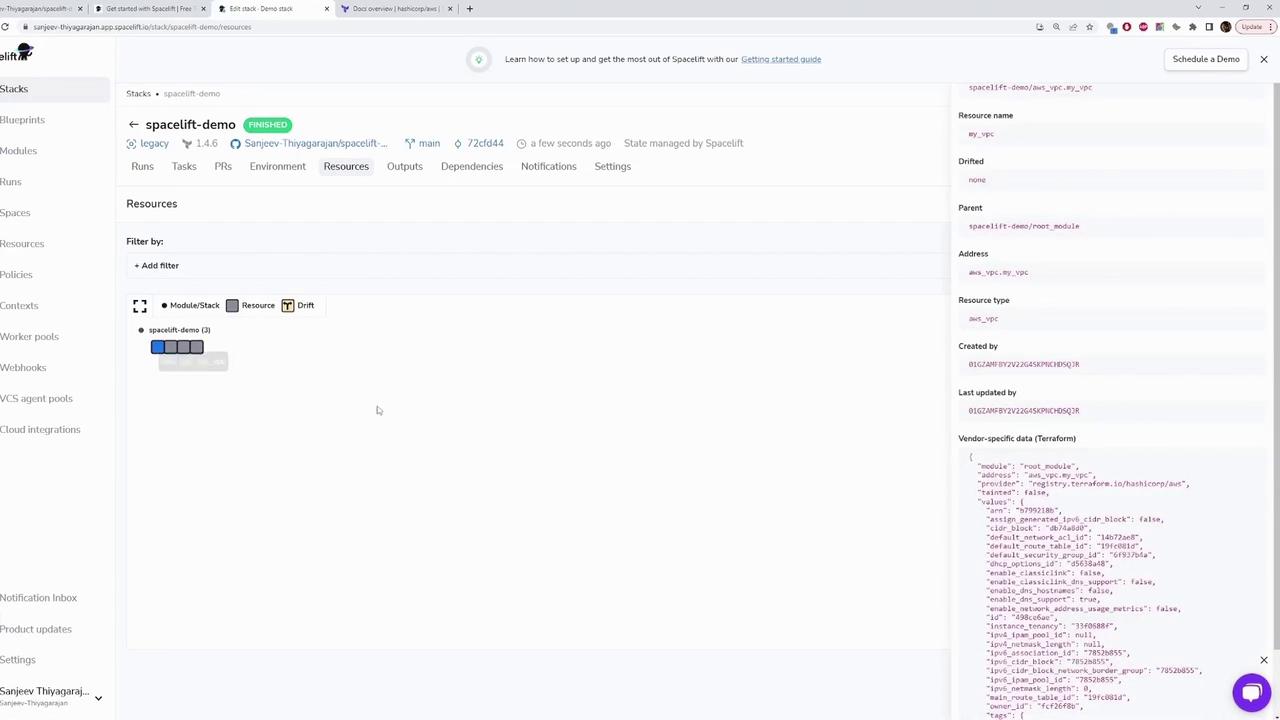
The run then transitions to a finished state, and you can verify the successful creation of the VPC in your AWS environment.The image below shows an example of the Spacelift dashboard displaying the “spacelift-demo” stack details, including resources and configuration information:
This article demonstrated how Spacelift handles concurrent runs and queued states when multiple engineers update Infrastructure as Code. By understanding and managing these states effectively, you can avoid conflicts and ensure a smooth deployment process.For more detailed information on managing Terraform configurations and Spacelift operations, check out the Terraform Documentation and Spacelift Guides.