This article explains how to create and manage policies in Spacelift to enforce restrictions during Terraform plans.
In this article, we explain how to work with policies in Spacelift to enforce restrictions during a Terraform plan. For instance, you can create a policy to allow only specific instance types—such as t2.micro—to prevent unwanted resource configurations and avoid unnecessary expenditures.────────────────────────────
Start by navigating to the Policies tab in Spacelift and create a new policy. For example, name it “instance size policy.” When prompted, select a plan policy since this type enforces rules during the planning phase and can fail a run if a rule is violated.Below is an example of a base policy written in Go for Spacelift:
package spacelift# Feel free to remove commented code once your policy is ready.## ⚠️ Plan policies only take effect once attached to a Stack or Module ⚠️## A plan policy can be used to fail a run during the planning phase or warn human# reviewers about any suspicious changes. As input, it receives data from both Spacelift# and Terraform in the following form:## "spacelift": {# "commit": "string",# "author": "string",# "branch": "string",# "created_at": "number (timestamp in nanoseconds)",# "message": "string",# },# "request": {# "timestamp_ms": "number - current Unix timestamp in milliseconds"# },# "run": {# "creator_session": {# "admin": "boolean",# "creator_ip": "string",# },# "name": "string",# "id": "string",# "machine": "boolean - whether the run was initiated by a human or a machine"# }
You might also encounter an updated version that more explicitly defines the input:
package spacelift# Feel free to remove commented code once your policy is ready.# ⚠️ Plan policies only take effect once attached to a Stack or Module ⚠️# A plan policy can be used to fail a run during the planning phase or warn human# reviewers about any suspicious changes. As input, it receives both Spacelift# and Terraform data in the following form:# {# "spacelift": {# "commit": "string",# "author": "string",# "branch": "string",# "created_at": "number (timestamp in nanoseconds)",# "message": "string"# },# "request": {# "timestamp_ns": "number - current Unix timestamp in nanoseconds"# },# "run": {# "creator_session": {# "admin": "boolean",# "creator_ip": "string",# "name": "string"# },# "name": "string",# "machine": "boolean - whether the run was initiated by a human or a machine"# }# }
This policy serves as a template to enforce rules—such as preventing deployment of non-approved instance sizes.────────────────────────────
A plan policy in Spacelift supports only denials since all actions are allowed by default. A typical deny rule example starts as follows:
package spaceliftdeny["Policy was denied"] { // Define your conditions here.}
For demonstration purposes, consider the following policy that always denies the plan by using a condition that always evaluates to true:
package spaceliftdeny["Policy was denied"] { true}
This simple example is often referred to as the “world’s dumbest policy” and is designed solely to illustrate how a denial works.────────────────────────────
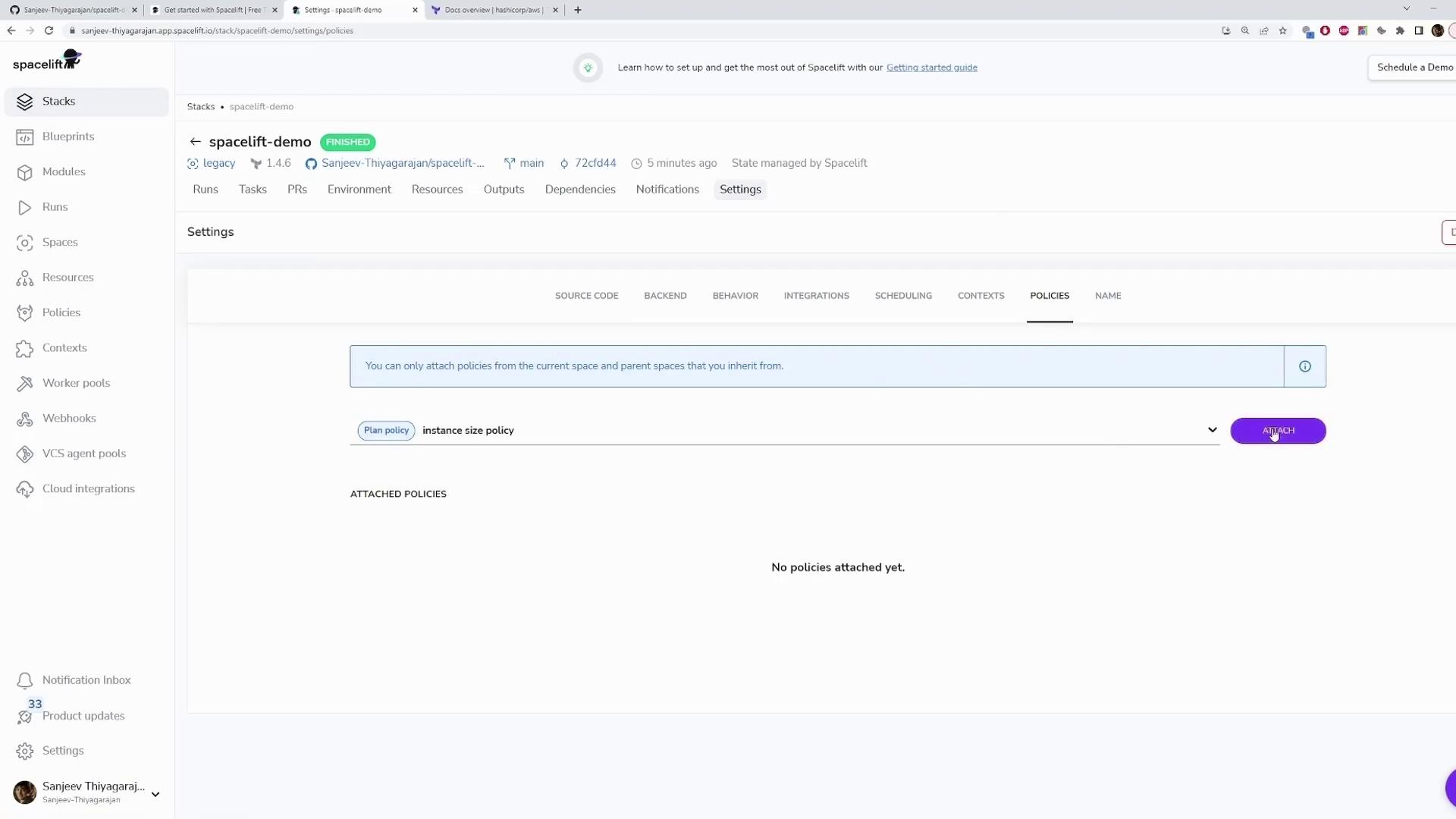
After defining your policy, you need to attach it to your stack:
Go to your stack’s Settings.
Navigate to the Policies section.
Attach the “instance size policy” to your stack.
The dashboard interface provides the necessary options to attach policies. If you do not see the visual guide, simply locate the Policies section under your stack settings.
Now, run your plan. Since the policy condition always evaluates to true, the policy will deny the plan during the planning phase. The console output may include logs resembling the following:
Downloading source code...Source code is GOSetting up mounted files...Mounted files are GOConfiguring file permissions...permissions are GOEvaluating run initialization policy...No initialization policies attachedPulling Docker image public.ecr.aws/spacelift/runner-terraform:latest...Docker image is GODownloading Terraform 1.4.6...Terraform 1.4.6 download is GO (/bin/terraform)Starting Docker container...Docker container is GOVerifying container image prerequisites...successfully verified container image prerequisites
Followed by logs indicating the plan was denied:
aws_vpc.my_vpc: Refreshing state... [id=vpc-aba7757b5bef21424e4]No changes. Your infrastructure matches the configuration.Terraform has compared your real infrastructure against your configurationand found no differences, so no changes are needed.Changes are GO[0G1A2Z1KPCF9VCRHMCKX] Uploading the list of managed resources...[0G1A2Z1KPCF9VCRHMCKX] Please be aware that Run Changes calculation includes Terraform output changes.[0G1A2Z1KPCF9VCRHMCKX] Resource list upload is GO[0G1A2Z1KPCF9VCRHMCKX] Generating JSON representation of the plan...[0G1A2Z1KPCF9VCRHMCKX] JSON representation is GO[0G1A2Z1KPCF9VCRHMCKX] Loading custom plan inputs...[0G1A2Z1KPCF9VCRHMCKX] 0 custom plan policy inputs found[0G1A2Z1KPCF9VCRHMCKX] Evaluated 1 plan policy[0G1A2Z1KPCF9VCRHMCKX] Denied by policy: Policy was denied[0G1A2Z1KPCF9VCRHMCKX] Failing the run as per plan policy
This log clearly indicates that the run fails because the denial condition is met.────────────────────────────
To assist with troubleshooting your policy, include a sample block that outputs the data Spacelift passes to the policy. This sample helps you understand the input structure, which includes details such as the git commit, Terraform configuration, and planned changes.
package spaceliftdeny["Policy was denied"] { input # Cannot edit in read-only editor}sample { true }
By examining this sample output, you can adjust your policy conditions as needed.────────────────────────────
If a resource change includes an instance type other than t2.micro, the condition will evaluate to true, and the plan is denied.To test this policy, update your instance configuration to use a different type, such as t2.large:
resource "aws_instance" "app_server" { ami = "ami-02396cdd13e9a1257" instance_type = "t2.large" tags = { Name = "app-server" }}
You might also update your policy accordingly if needed:
If you encounter an error stating that the “sanitized” function is undefined, verify that you are using the correct function name or adjust your approach according to your environment’s specifications.
After pushing your changes via git, Spacelift will run the plan. The policy will deny the plan if the instance type does not match the approved value. For instance, the Terraform plan logs may display:
aws_vpc.my_vpc: Refreshing state... [id=vpc-ab4a7575bef21424e4]No changes. Your infrastructure matches the configuration.Terraform has compared your real infrastructure against your configuration and found no differences.Changes are GOUploading the list of managed resources...Resource list upload is GOGenerating JSON representation of the plan...JSON representation is GOLoading custom plan policy inputs...Evaluated 1 plan policyDenied by policy: Policy was deniedFailing the run as per plan policy
When you change the configuration back to t2.micro:
resource "aws_instance" "app_server" { ami = "ami-02396cdd13e9a1257" instance_type = "t2.micro" tags = { Name = "app-server" }}
Commit and push your changes:
git commit -m "changing to t2.micro"git push
Now, the plan should proceed because the instance type complies with the enforced policy.────────────────────────────
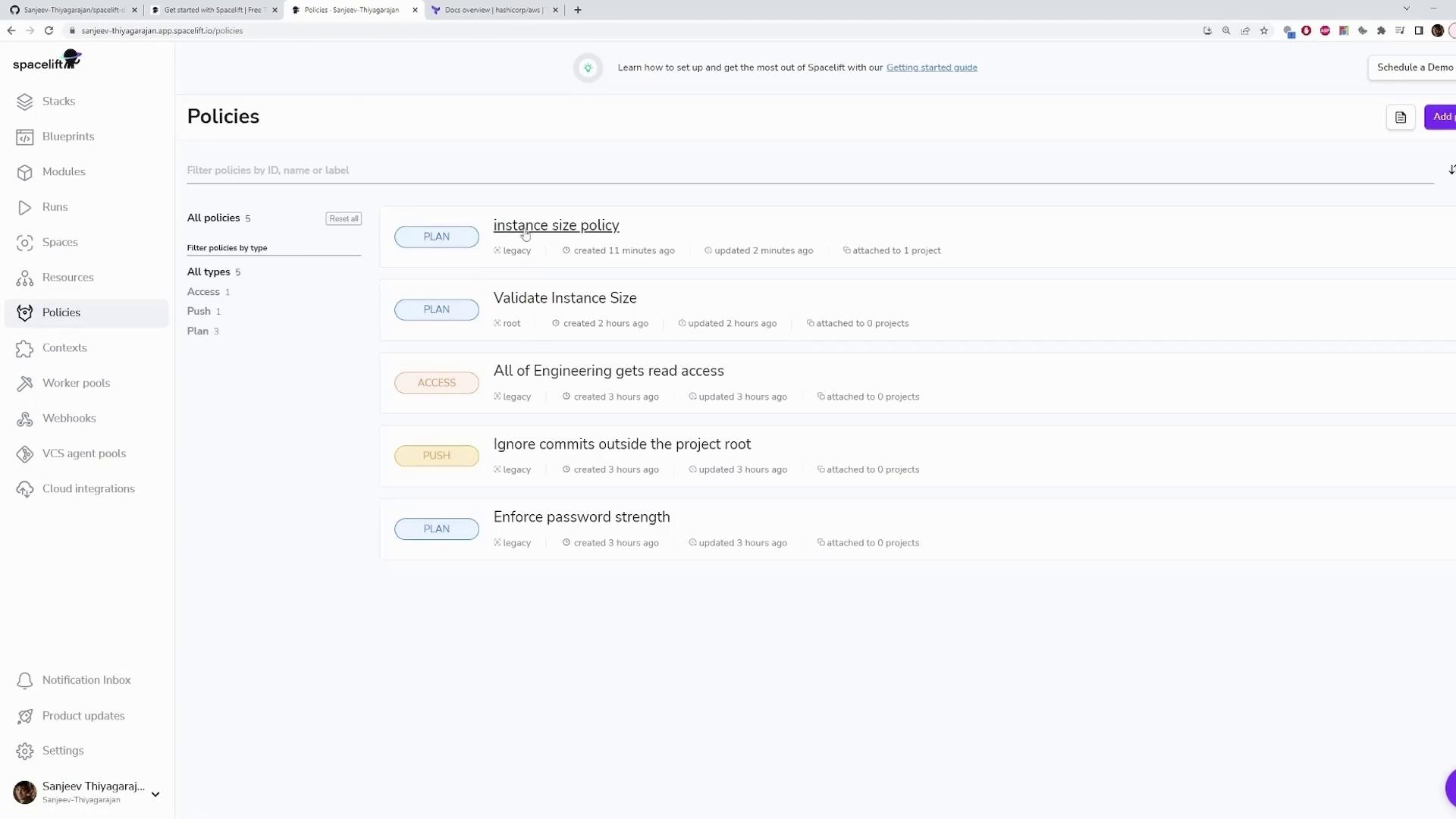
Once your policy is active, use the Spacelift dashboard to verify its status and view detailed logs. The dashboard lists all policies attached to your stack along with information about their creation and update times.
The image below provides an illustrative example of the dashboard interface for managing policies. All necessary functionality is accessible through the dashboard, regardless of the visual layout.
This article demonstrated how to create, test, and update a Spacelift plan policy. By enforcing restrictions on instance types through a deny rule, you ensure that only approved configurations (like t2.micro) are deployed. Utilize the sample input feature to troubleshoot and refine your policies for robust infrastructure management. For more information, check out the Spacelift documentation.Happy policy building!