

- Create a fixed number of buckets. Example: 1000 buckets numbered
0..999. - For each user, compute a stable hash from the user ID and take the remainder modulo the number of buckets:
hash(userID) % 1000. That remainder is the bucket assigned to the user. - Do not map users directly to shards. Instead, map users → buckets (via hash) and maintain a separate bucket map that maps buckets → shards.
- Routing becomes two-step: user → bucket (deterministic hash) and bucket → shard (bucket map lookup).
Choose a stable, uniform hash function and keep the hash algorithm and seed constant across deployments. Changing the hash function or seed will remap users to different buckets and defeat the predictability of this scheme.
371, so Chris is assigned to bucket 371. Leo’s hash might yield remainder 120, so Leo is in bucket 120. The bucket map determines which shard currently owns bucket 371 or 120.
This design keeps the user-to-bucket assignment stable when shards are added or removed, because hashing is always done modulo the fixed number of buckets.
Shard-to-bucket distribution and what happens when we add a shard
With 1000 buckets and 4 shards, each shard will own roughly 250 buckets. When a 5th shard is added, you update the bucket map to reassign buckets — you do not recompute per-user hashes. Roughly each of the 4 existing shards gives about 50 buckets to the new shard, so the new shard ends up with ~200 buckets (1000 / 5 = 200). Only ~200 buckets move (~20% of the data), and every user remains in the same bucket (their bucket assignment never changes).
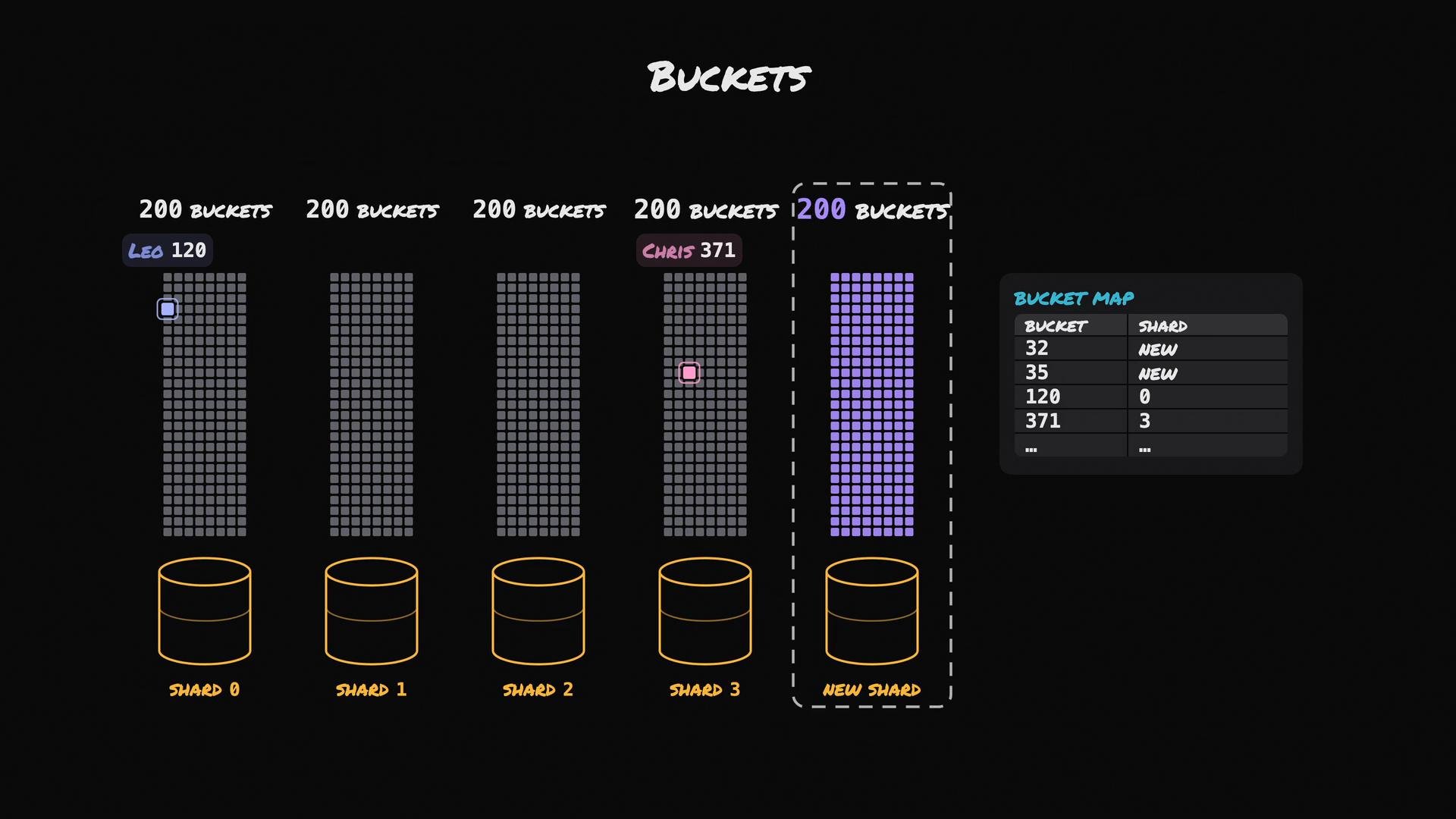
A user never changes buckets. Only the bucket→shard mapping changes when you add or remove shards. This containment makes resharding predictable and limits the amount of data that must be moved.
-
Copy (initial snapshot)
- Take a background snapshot of all rows belonging to bucket
602on the source shard and copy them to the destination shard. - The source shard continues to serve reads and writes for bucket
602during this phase.
- Take a background snapshot of all rows belonging to bucket
-
Catch up (replicate ongoing changes)
- While the snapshot is being copied and after it completes, stream or replicate all subsequent changes (inserts, updates, deletes) that affect bucket
602from the source to the destination shard. - Use change-data-capture, MySQL binary log streaming, or write-ahead-log replay to continuously apply changes.
- Preserve change ordering for the bucket, or use per-row sequence/version numbers to prevent reordering or lost updates.
- While the snapshot is being copied and after it completes, stream or replicate all subsequent changes (inserts, updates, deletes) that affect bucket
-
Cutover (brief pause and final sync)
- Quiesce writes for bucket
602briefly (pause writes for that bucket). - Send the final outstanding changes to the destination shard and verify both copies are consistent.
- Update the bucket map so bucket
602now points to the destination shard. From this moment reads/writes for bucket602are routed to the destination shard. - Resolve any in-flight transactions and verify consistency using checksums, row counts, or per-row version checks.
- Quiesce writes for bucket
-
Remove (cleanup)
- Once traffic is confirmed to go to the new shard and the new shard is healthy, remove the old copy of bucket
602from the source shard.
- Once traffic is confirmed to go to the new shard and the new shard is healthy, remove the old copy of bucket
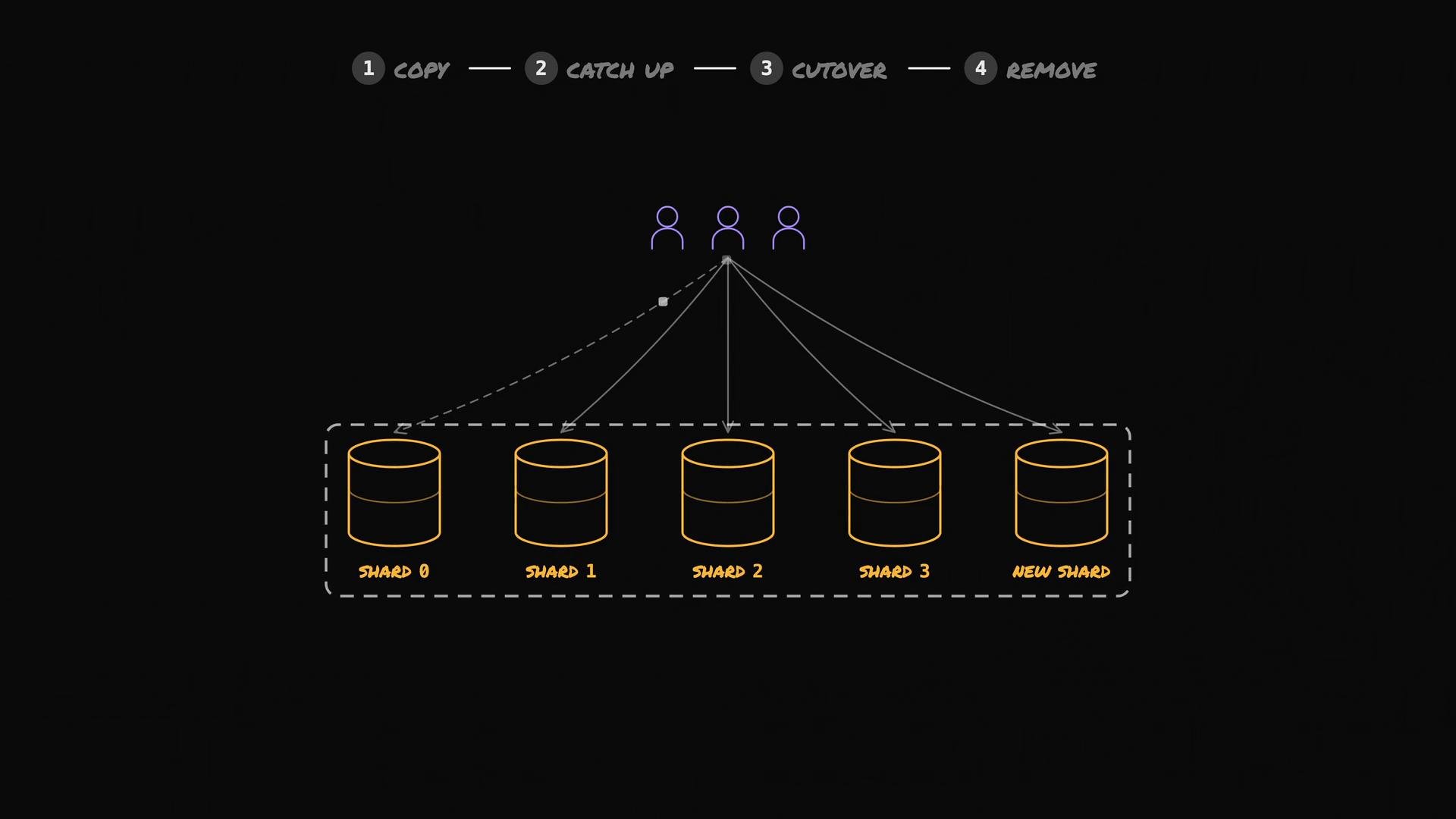
- Fixed buckets let you add or remove shards by updating a bucket map instead of recomputing user hashes.
- Only the buckets that are reassigned move their data, which limits how much data must be copied during resharding.
- A safe bucket migration follows the sequence: copy snapshot → replicate changes → short write pause and final sync → update bucket map → remove old data.
Operational considerations
- Ensure your bucket map is stored in a highly available, consistent store (e.g., a distributed config service) so routers and application servers see the updates atomically.
- Instrument and monitor per-bucket copy and replication throughput to estimate resharding time and plan maintenance windows.
- Test cutover procedures to ensure the brief write quiesce can be achieved within acceptable SLAs.
- If you use per-row versioning or sequence numbers, design them to be monotonic per-bucket so ordering guarantees are preserved during replication.
- Consistent hashing — https://en.wikipedia.org/wiki/Consistent_hashing
- MurmurHash3 — https://en.wikipedia.org/wiki/MurmurHash
- xxHash — https://cyan4973.github.io/xxHash/
- Change Data Capture — https://en.wikipedia.org/wiki/Change_data_capture
- MySQL binary log — https://dev.mysql.com/doc/refman/8.0/en/binary-log.html
- Write-ahead logging — https://en.wikipedia.org/wiki/Write-ahead_logging