Guide to designing and implementing a simple MySQL relational schema for a food delivery app, including tables, types, foreign keys, sample data, and example queries.
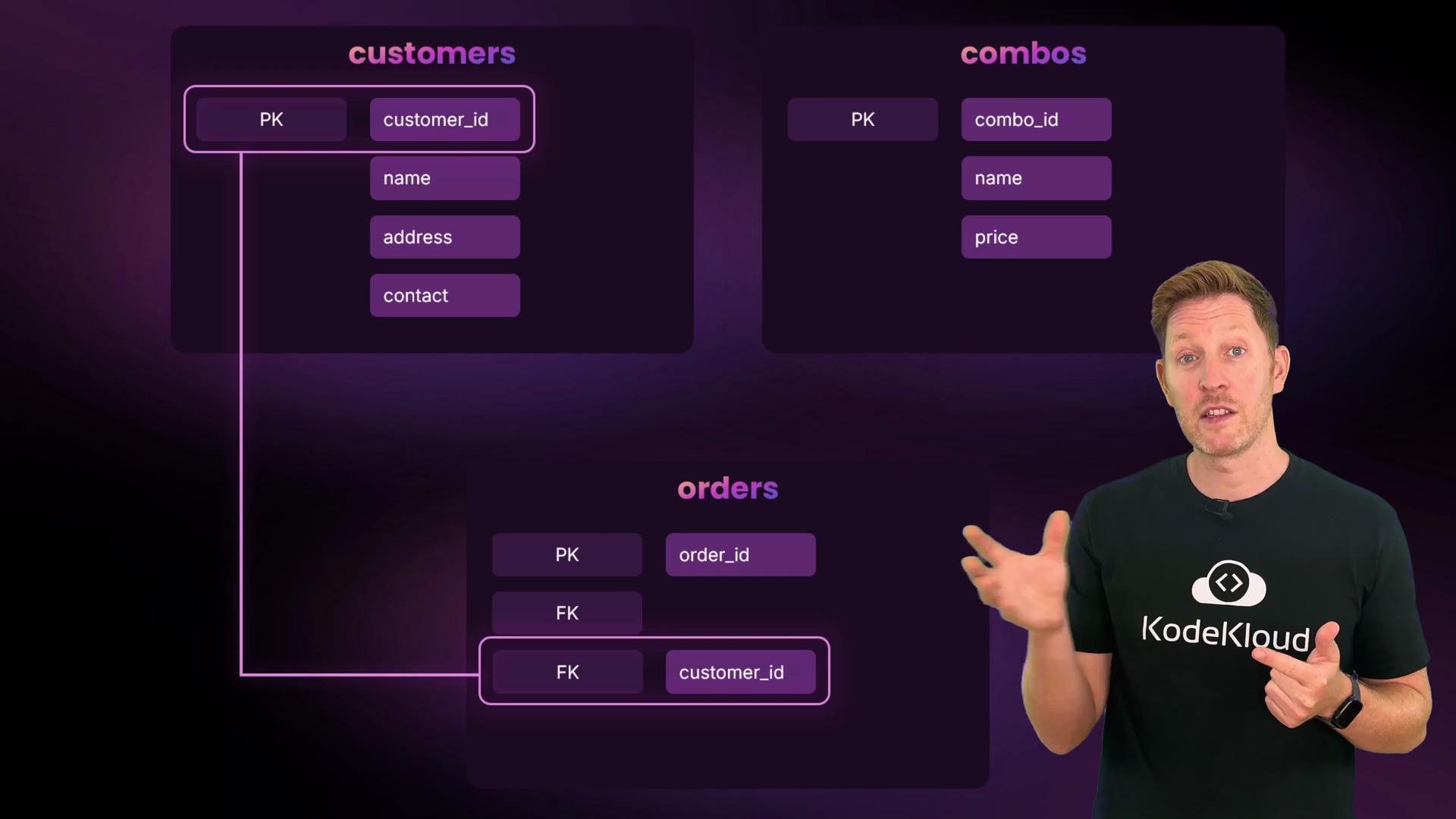
In this lesson you’ll combine schema design and SQL to build a small relational database from scratch. The goal is a simple backend for a food delivery app called Feline Foods where customers order a single meal-deal combo for delivery. We’ll design the entity-relationship model, choose data types, implement the schema in MySQL, load sample data, and run queries that show how the tables relate.Design the ERDStart by sketching the entities and their attributes. We have three tables: customers, combos, and orders.
Customers
customer_id — unique identifier, primary key
name
address
contact
Combos
combo_id — unique identifier, primary key
name
price
Orders
order_id — unique identifier, primary key
customer_id — foreign key to customers(customer_id)
combo_id — foreign key to combos(combo_id)
order_time
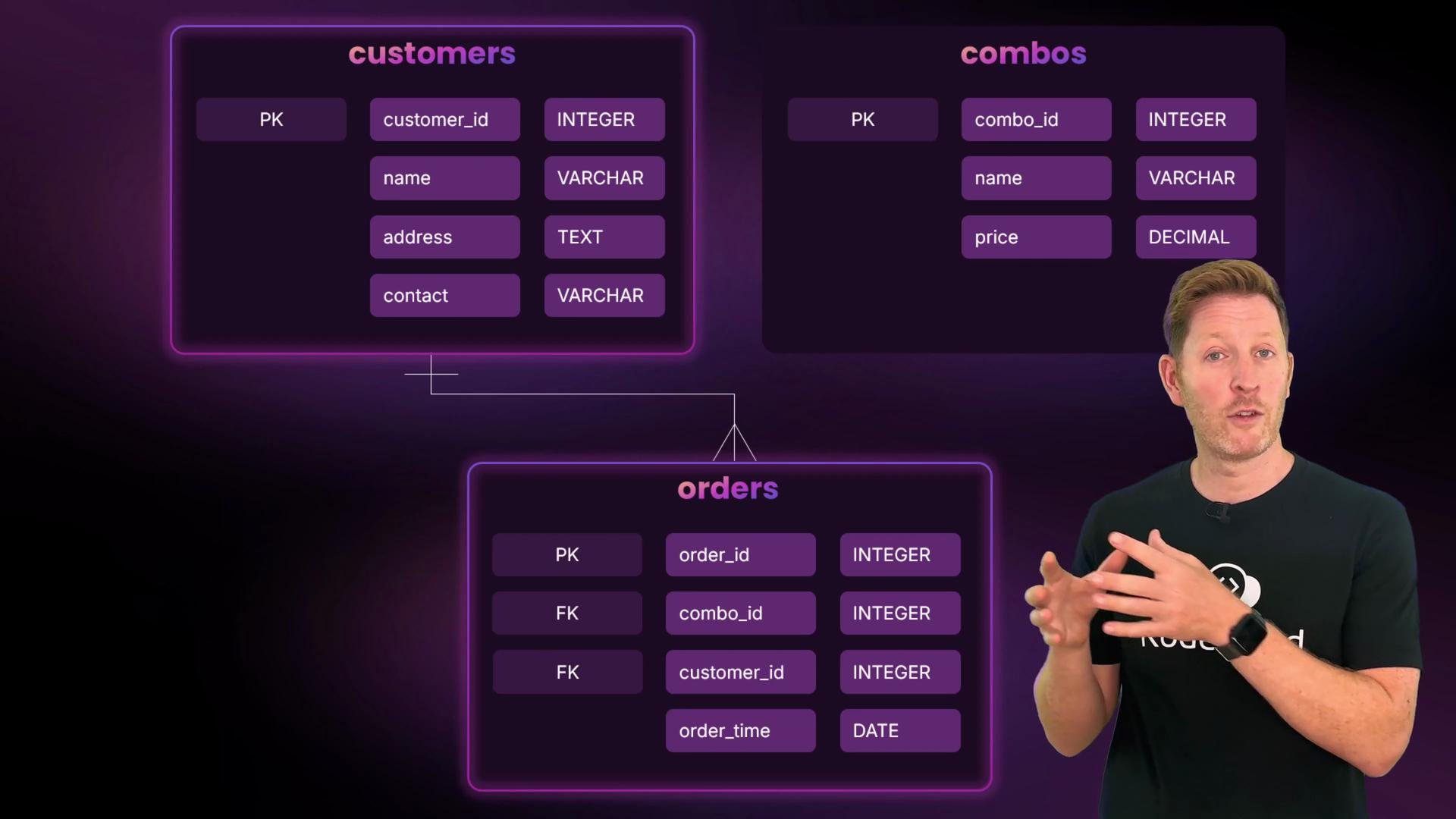
Choose types for each columnUse types that match the data and common best practices for small transactional systems:
IDs: INT with AUTO_INCREMENT for simple unique identifiers.
Names: VARCHAR(100) — variable length and index-friendly.
Address: TEXT — can be long and is rarely filtered by equality.
Price: DECIMAL — exact storage for currency, e.g., DECIMAL(4,2).
Order time: DATETIME.
Contact: VARCHAR(20) — phone numbers stored as strings.
Table: Columns and chosen types
Table
Column
Type / Constraint
Notes
customers
customer_id
INT PRIMARY KEY AUTO_INCREMENT
Unique customer identifier
customers
name
VARCHAR(100) NOT NULL
Human names
customers
address
TEXT NOT NULL
Free-form address
customers
contact
VARCHAR(20) NOT NULL
Phone numbers stored as text
combos
combo_id
INT PRIMARY KEY AUTO_INCREMENT
Unique combo identifier
combos
name
VARCHAR(100) NOT NULL
Combo name
combos
price
DECIMAL(4,2) NOT NULL
Currency: up to 99.99
orders
order_id
INT PRIMARY KEY AUTO_INCREMENT
Unique order identifier
orders
customer_id
INT
FK -> customers(customer_id)
orders
combo_id
INT
FK -> combos(combo_id)
orders
order_time
DATETIME
Timestamp when the order was placed
Store phone numbers as VARCHAR because they may include leading zeros, country codes, plus signs, or formatting characters (dashes, spaces, parentheses). Numeric types will drop leading zeros and lose formatting.
Define relationships
One customer can place zero or many orders (1:N).
One combo can appear in zero or many orders (1:N).
Each order belongs to exactly one customer and one combo.
No separate join table is necessary — the orders table models the association.
Build the schema in MySQLCreate and switch to a new database:
mysql> CREATE DATABASE felinefoods;Query OK, 1 row affected (0.00 sec)mysql> SHOW DATABASES;+---------------------+| Database |+---------------------+| employees || felinefoods || information_schema || mysql || performance_schema |+---------------------+5 rows in set (0.00 sec)mysql> USE felinefoods;Database changedmysql> SELECT DATABASE();+-------------+| DATABASE() |+-------------+| felinefoods |+-------------+1 row in set (0.00 sec)
Create the three tables with appropriate types and foreign key constraints:
CREATE TABLE customers ( customer_id INT PRIMARY KEY AUTO_INCREMENT, name VARCHAR(100) NOT NULL, address TEXT NOT NULL, contact VARCHAR(20) NOT NULL);CREATE TABLE combos ( combo_id INT PRIMARY KEY AUTO_INCREMENT, name VARCHAR(100) NOT NULL, price DECIMAL(4,2) NOT NULL);CREATE TABLE orders ( order_id INT PRIMARY KEY AUTO_INCREMENT, customer_id INT, combo_id INT, order_time DATETIME, FOREIGN KEY (customer_id) REFERENCES customers(customer_id), FOREIGN KEY (combo_id) REFERENCES combos(combo_id));
Expected confirmation from MySQL:
Query OK, 0 rows affected (0.00 sec)
Foreign key constraints require a storage engine that supports them (e.g., InnoDB). If you get errors creating FKs, ensure your tables use ENGINE=InnoDB or the server default supports foreign keys.
Populate the tables with sample dataInsert some customers, combos, and orders. Use proper quoting and valid datetime strings:
Referential integrityBecause orders.customer_id and orders.combo_id are foreign keys, every row in orders must reference existing rows in customers and combos. This prevents orphaned references and keeps your data consistent.Reading the dataA simple SELECT on the orders table shows only IDs and FK references:
Join tables to produce meaningful resultsUse JOINs to show which customer ordered which combo and how much it cost:
SELECT o.order_id, c.name AS customer_name, cb.name AS combo_name, cb.price, o.order_timeFROM orders oJOIN customers c ON o.customer_id = c.customer_idJOIN combos cb ON o.combo_id = cb.combo_idORDER BY o.order_time;
Wrap-up and next stepsYou now have a compact, working relational schema for Feline Foods: customers, combos, and orders linked by foreign keys. The design enforces referential integrity, uses VARCHAR for phone numbers, DECIMAL for currency, and DATETIME for timestamps.Consider these extensions to make the model more production-ready:
Add indexes on frequently queried columns (e.g., customers(name), orders(order_time)).
Add order_status, delivery_instructions, or delivery_address to orders.
Normalize or denormalize further depending on read/write patterns.
Add constraints for data quality (e.g., CHECK on price >= 0).