

- Telepresence Traffic Manager installed in the cluster.
- A running
telepresence connectsession from your laptop or local machine to the cluster.
You must run
telepresence connect before creating any intercepts. Without an active connection, intercept commands will fail.How intercepts work (high level)
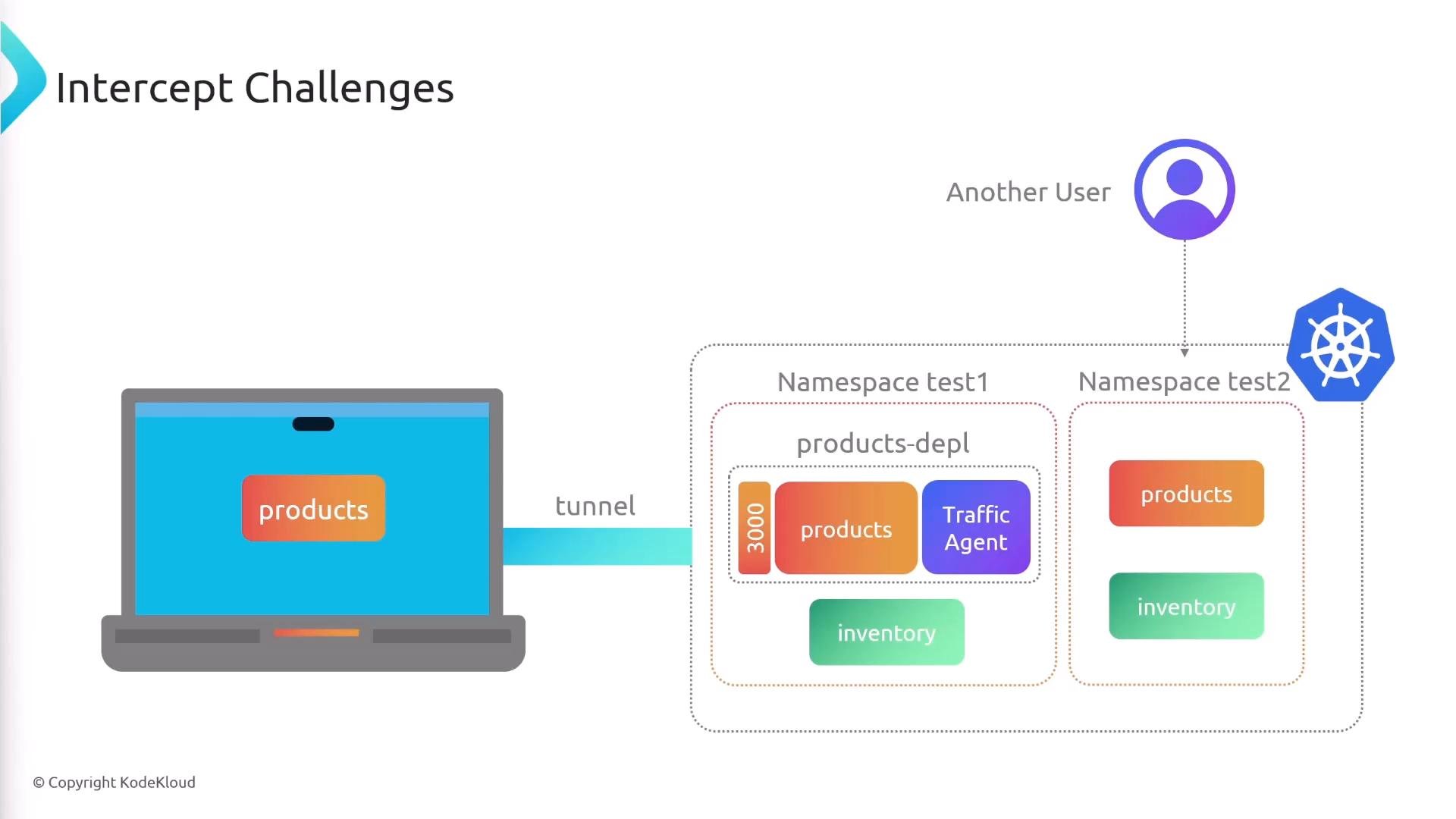
When you create an intercept for a deployment, Telepresence injects a traffic-agent (sidecar) into the target pod. That sidecar instructs the cluster to route requests destined for the service’s port to your local machine. Service discovery and other cluster services continue to operate normally; Telepresence proxies the traffic from the cluster to the local process you specify. Key concepts:- traffic-agent (sidecar): a small proxy injected into the intercepted pod to reroute service traffic.
- Destination: the local address (e.g.,
127.0.0.1:8000) where cluster requests are forwarded. - Intercept scope: you can intercept per Deployment/Workload and per service port.
Create an intercept
The basic syntax maps a remote service port to a local port:products-depl deployment (service port 3000) and forward it to port 8000 on your laptop:
- If the service exposes only a single port, Telepresence can often infer the service port; specifying it is optional.
- Format is
--port <local>:<service>. You may reuse the same number for both sides, e.g.3000:3000. - Intercepts create a traffic-agent sidecar in the intercepted pod to apply routing; the workload remains otherwise unchanged.
Example intercept output
When an intercept is successfully established, Telepresence prints details like the example below:List active intercepts
To view current intercepts and their status:Multiple intercepts and performance considerations
You can create multiple intercepts simultaneously. Example:- Local port collisions: pick unique local ports — two processes cannot listen on the same port.
- Extra cluster hops: when an intercepted service calls another intercepted service, traffic may traverse the cluster twice:
- Request enters cluster and is routed to
products(intercepted to your laptop). - Your local
productscallsinventoryusing cluster DNS. - The call goes into the cluster and then is proxied back to your local
inventoryintercept.
- Request enters cluster and is routed to
- Latency: these extra hops can add latency. Telepresence does not automatically rewrite service discovery to force direct local-to-local calls; any DNS/hosts rewrites or local stubs must be managed by you.
If you need multiple services to talk directly on your machine during development, you’ll typically need to adjust local host resolution or run a local stub that emulates the needed services. Telepresence will not automatically make intercepted services talk directly to other local processes.
Collaboration and isolation
Intercepted traffic can be affected by other developers if they target the same service in the same namespace. To avoid confusion or accidental cross-traffic, use per-developer namespaces or personal deployments. Benefits of using separate namespaces:- Isolation of intercepts: your intercepts only affect workloads in your namespace.
- Reduced accidental interference between developers.
- Easier cleanup and targeted testing.
Summary
- Start with
telepresence connect. - Create an intercept with
telepresence intercept <deployment> --port <local_port>:<service_port>to forward cluster traffic to a local process. - Inspect active intercepts with
telepresence list. - Multiple intercepts are supported but can introduce extra cluster hops and latency.
- Use per-developer namespaces to reduce cross-traffic and accidental interference.
Links and references
- Telepresence documentation: https://www.telepresence.io/docs/
- Kubernetes concepts: https://kubernetes.io/docs/concepts/overview/what-is-kubernetes/
- Telepresence GitHub: https://github.com/telepresenceio/telepresence