Explains network protocol layers, addressing, encapsulation, and core Internet protocols like TCP and IP to show how devices communicate reliably.
Earlier we looked at how you could access a website on the other side of the planet.In this lesson we dig deeper and ask one key question:How do all these devices and services speak the same language and avoid getting their wires crossed?What follows is a tour across protocol layers, addressing, and a frankly ridiculous number of acronyms. Together, these concepts make modern networks work reliably and predictably.
Overview
We’ll meet the core protocols that run the Internet.
You’ll learn how devices get addresses, how data is split and wrapped, and how endpoints stay in sync.
Finally, we’ll map protocols and addresses to the layers in the network stack so you can see how everything fits together.
Why a common model mattersIn the early days of computing, manufacturers built incompatible systems. IBM machines couldn’t talk to DEC machines, and even two computers from the same vendor might need custom code just to share a file. It was chaos — like every device speaking a different language.The solution was a common, layered model for networking. That model most used in practice is the TCP/IP model, named after two of its core protocols:
Transmission Control Protocol (TCP): provides reliable, ordered delivery of a byte stream between processes.
Internet Protocol (IP): handles addressing and routing so packets can travel across multiple networks.
TCP and IP together formed the backbone of the early Internet and gave their name to the practical five-layer model used in most systems today.What the TCP/IP model doesThe TCP/IP model provides a shared structure so diverse systems can exchange data reliably. It divides communication into layers — each layer has a focused responsibility and adds or removes information as data moves between endpoints. Using distinct names for the data at each stage helps track how information changes during transit.Common layer names and how data is referred to at each step:
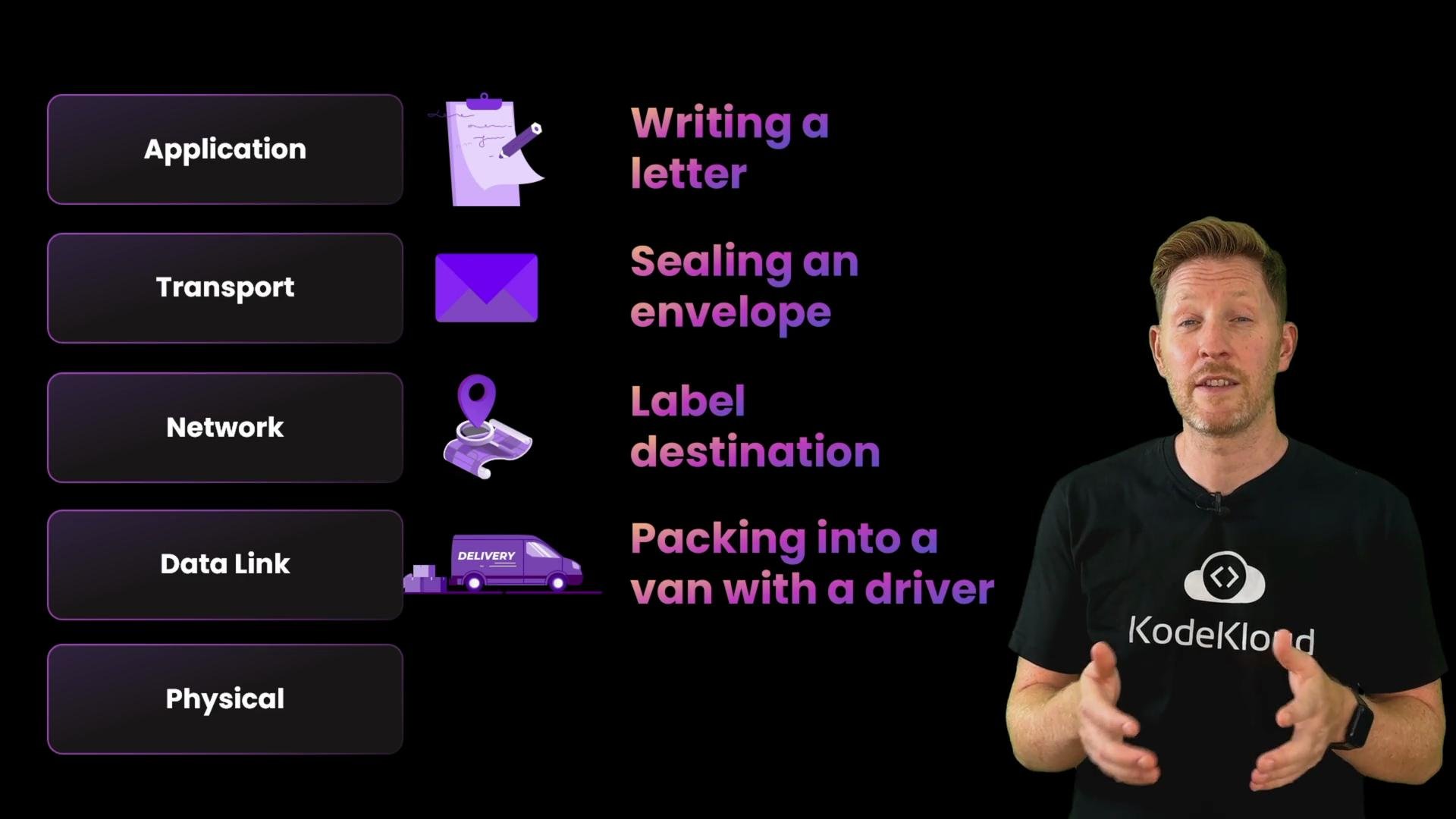
Application layer — the message (e.g., an HTTP GET). Think: writing a letter.
Transport layer — the segment (adds port and transport flags). Think: sealing the letter in an envelope with delivery instructions.
Network layer — the packet (adds source/destination IP). Think: adding a destination label for global travel.
Data link layer — the frame (adds MAC addresses or link-specific headers). Think: loading it into a local delivery van for the next hop.
Physical layer — the bits (actual electrical or radio signals transmitted). Think: the wheels turning or radio pulses being sent.
This process of adding headers (and sometimes trailers) as data moves down the stack is called encapsulation. At the receiving end the reverse—removing headers and trailers layer by layer—is decapsulation.Layer-by-layer summary
Layer (TCP/IP)
Data unit
Primary responsibilities
Common protocols
Postal analogy
Application
Message
High-level services & formats (HTTP, SMTP, DNS)
HTTP, SMTP, DNS, FTP, SSH
Writing a letter
Transport
Segment
End-to-end communication, ports, reliability/flow
TCP, UDP
Sealing and labeling an envelope
Network
Packet
Logical addressing and routing across networks
IP (IPv4/IPv6), ICMP
Adding a destination label for long-distance travel
Data link
Frame
Local network delivery, MAC addressing, framing
Ethernet, ARP, PPP
Packing into a van for the local hop
Physical
Bits
Electrical/radio/optical transmission of raw bits
Ethernet PHY, Wi-Fi PHY
The wheels turning / radio signal
OSI vs. TCP/IPYou may also hear about the OSI model, which defines seven layers (it separates session and presentation layers). OSI is a useful theoretical reference and helps with teaching and troubleshooting, but in practice the five-layer TCP/IP model is the widely implemented framework for the Internet. When people say “layer 4” in real-world contexts, they usually mean the transport layer.
Encapsulation: wrapping data with protocol headers/trailers as it moves down the stack.
Decapsulation: removing those headers/trailers as it moves up the stack at the receiver.
Quick quizWhich of the following statements are true?A. The TCP/IP model prevents older computers from communicating with newer ones.
B. Encapsulation is the process of wrapping the data layer by layer.
C. The TCP/IP model defines a universal structure for sending and receiving data reliably.
D. The OSI model is more widely used in real networks than TCP/IP.Pause now for thinking time.Answers: B and C are true. A and D are false.
A is false — TCP/IP was created to enable diverse systems to interoperate, not to block compatibility.
B is true — encapsulation is exactly the process of adding headers/trailers as data descends the layers.
C is true — TCP/IP provides a shared framework used across the Internet; protocols at different layers implement reliability, addressing, and routing.
D is false — OSI is a conceptual model useful for education; TCP/IP is the practical model implemented across real networks.
Next steps and references
Read RFC 791 for the original IPv4 specification and RFC 793 for TCP (historical perspective).
For practical overviews and tutorials, see the IETF and general networking resources:
We’ll continue by examining specific protocols at each layer — their addresses, headers, and how routers, switches, and endpoints coordinate to keep networks running smoothly.