

Single Server Scenario
When deploying a web application to a single server, Ansible executes tasks sequentially. If one task fails—say, the first two tasks run successfully and the third fails—the playbook halts immediately. Below is a sample playbook structure for a single server deployment:In single-server scenarios, immediate task failure can be beneficial to prevent further misconfigurations or cascading errors.
Multiple Servers Scenario
When running a playbook on multiple servers, Ansible completes each task on all targeted hosts before proceeding to the next one. For instance, it will install dependencies on all servers first, then continue with MySQL installation. If a task—such as starting the database—fails on one server (e.g., server two), Ansible removes that server from subsequent tasks and continues executing on the remaining healthy servers.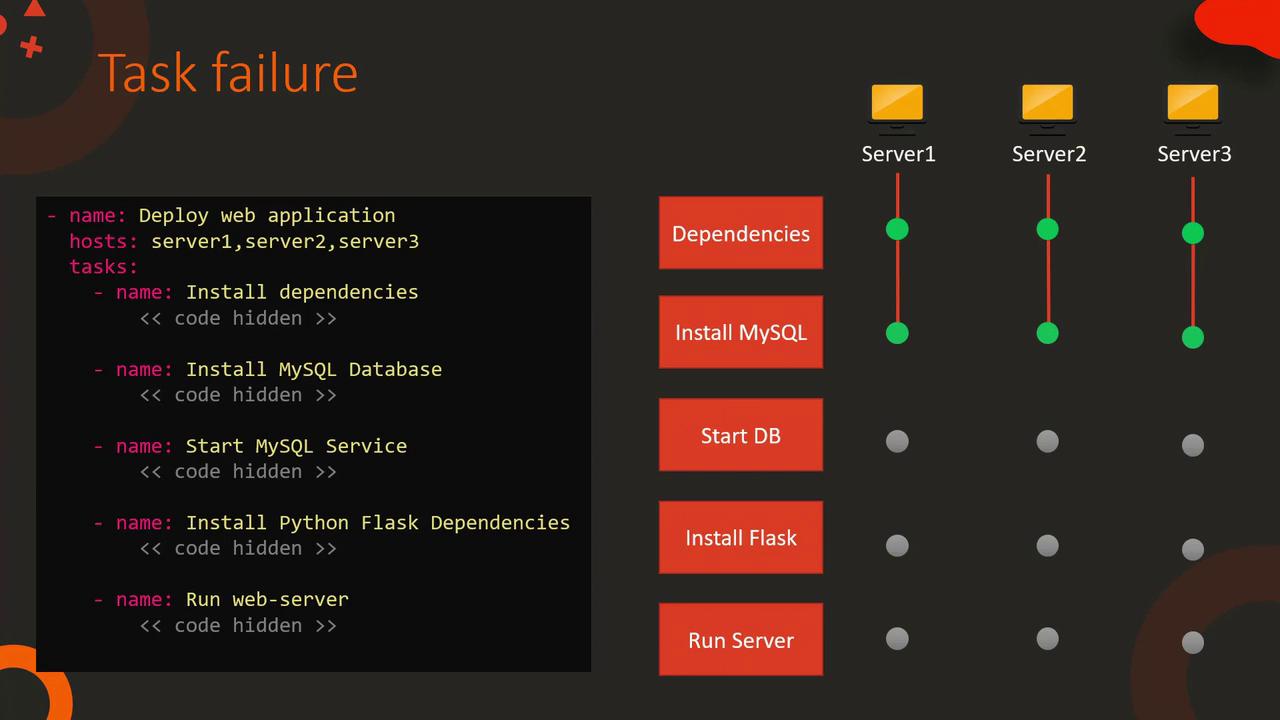
Halting Execution on Errors
Consistency during deployment may require stopping the playbook as soon as any server fails. You can achieve this by enabling theany_errors_fatal option. With this option set to true, a failure on any task across any server halts the entire playbook execution. The updated playbook structure is as follows:
Use
any_errors_fatal when uniformity in deployment is critical, ensuring that any failure results in an immediate stop.Handling Partial Failures with Many Servers
When deploying on hundreds of servers, occasional individual task failures might be acceptable. You can rerun the playbook for those specific servers later. However, if a significant portion of servers fails a task, it indicates a broader problem and should stop the playbook execution. Themax_fail_percentage option allows you to define a failure threshold. For example, setting max_fail_percentage: 30 means that if more than 30% of the servers fail at a particular task, the playbook stops:
Ignoring Non-Critical Errors
In some cases, non-critical errors should not interrupt the overall playbook execution. For instance, you might include a notification task using the mail module to inform your team that the web server is ready even if the SMTP server is unstable. By setting theignore_errors flag to yes, you ensure that the playbook continues even if this notification fails:
Implementing a Health Check
To further ensure the stability of your web server, you can run a health check that verifies the server log file does not contain error messages. In this task, the output of the command is captured using theregister keyword, and the failed_when directive checks for the word “ERROR” in the output. If found, the task—and thus the playbook—fails: