• Defining settings for your playbooks (for example, configuring DNS server IPs, NTP server IPs, firewall rules, etc.).
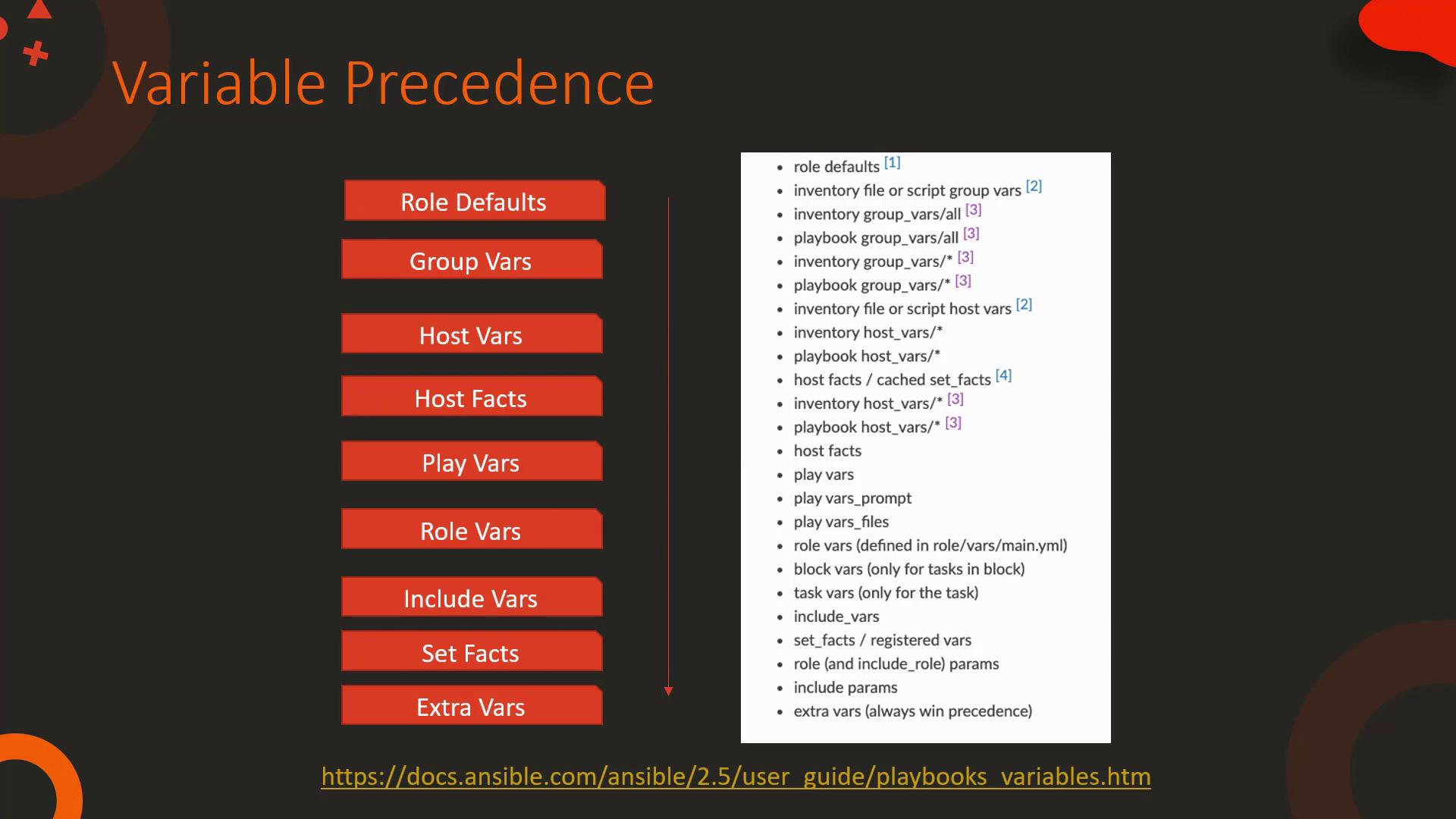
Ansible variables are assigned to host objects during playbook execution. Initially, group variables are associated with each host, and then any host-specific variables override these values.
Host Versus Group Variables
When the same variable is defined both on the host level and in the group, the host-specific variable takes precedence. Consider modifying the inventory for “web2” as follows:Variables Defined in Playbooks
Variables can also be declared directly within a playbook. Defining variables at the play level overrides both host and group inventory variables. For example, consider the following playbook that configures the DNS server using a play-level variable:Extra Variables from the Command Line
Extra variables passed via the command line have the highest precedence in Ansible. For instance, running the following command:Overview of Precedence
Ansible applies variables following a defined hierarchical order. The order starts from the lowest precedence (role default variables), then proceeds through inventory and playbook variables, and finally applies extra vars provided directly on the command line (the highest precedence). This structure guarantees that more specific variables override more general ones.