

Single Server Deployment
When deploying a web application on a single server, all components (such as the database and web server) reside on one system. In the example below, tasks include installing dependencies, setting up MySQL, starting the MySQL service, installing Python Flask dependencies, and finally running the web server. All tasks are executed sequentially on the single server:For single server deployments, task order is strictly sequential, ensuring each installation or configuration step completes before the next begins.
Multi-Server Deployment Using the Linear Strategy
The linear strategy is Ansible’s default approach for multi-server deployments. In this scenario, the playbook targets multiple servers—such as three servers—executing each task across all hosts in parallel. However, Ansible waits until every server completes the current task before moving to the next one.If one server experiences delays during a task, it will hold up the progression of tasks across all targeted servers.
Free Strategy
For scenarios where servers can progress at their own pace, you can use the “free” strategy. With this strategy, each host executes its tasks independently without waiting for others to complete the same task. To enable this, specify the strategy directive in your playbook:Batch Processing with Serial
In extensive deployments, processing servers in batches minimizes risk and load. Theserial keyword lets you specify how many hosts to process at a time. For instance, to deploy to five servers in batches of three, update your playbook as follows:
If the built-in strategies—linear, free, or serial—do not fully meet your deployment needs, consider developing a custom strategy plugin.
Controlling Parallelism with Forks
A common query is: How many servers can Ansible manage concurrently? Even when deploying to hundreds of servers, Ansible uses the concept of forks to control the number of parallel connections. By default, Ansible sets 5 forks, meaning it will only execute tasks on five hosts concurrently. For example, if a playbook targets 100 servers, Ansible processes them in increments of five unless you change the configuration: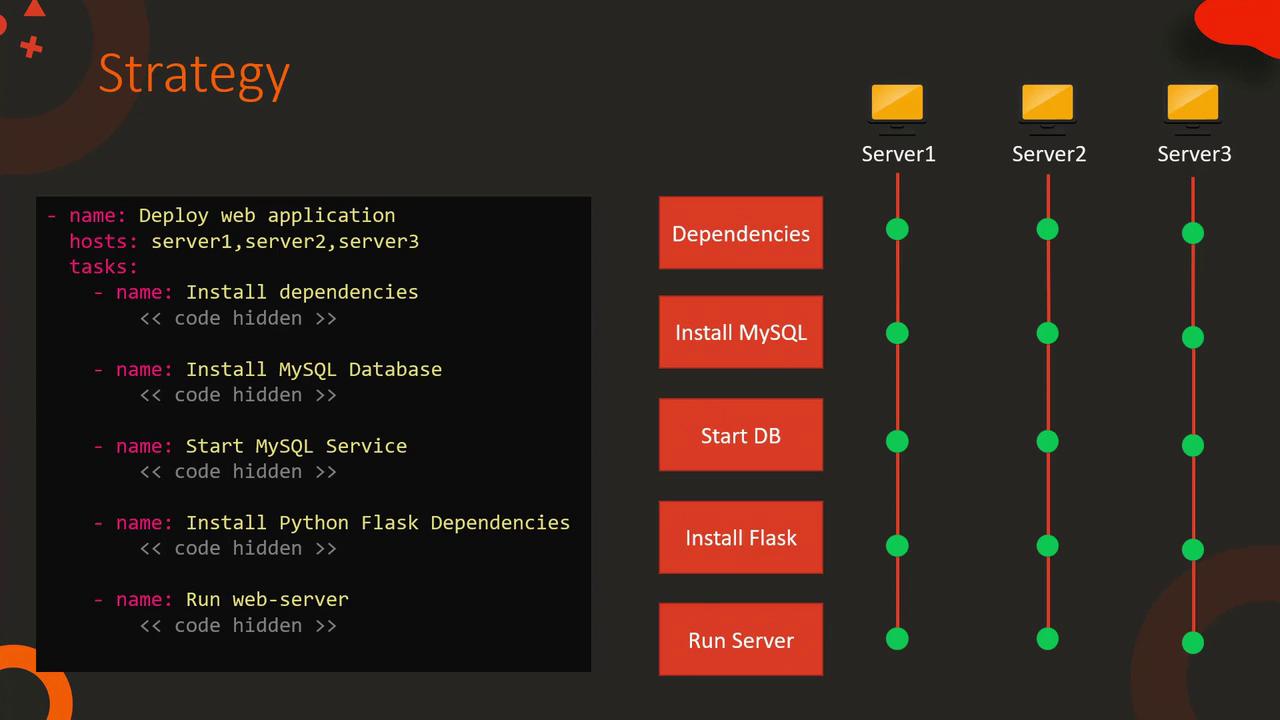
Summary
This lesson provided an overview of how Ansible manages parallelism through different strategies:
Understanding these methods helps you optimize task execution across various server configurations and effectively manage deployment parallelism.
That’s all for this article. In the next lesson, we continue our exploration of advanced Ansible concepts and best practices for enterprise deployments.