

How Rebasing Works
When using a traditional Dockerfile, the first layer of an image is typically the base image, followed by additional layers that include application dependencies and source code. Any change to the base image—such as an operating system update, applying a hotfix, addressing a security vulnerability, or adding new dependencies—requires rebuilding every layer above it. This process can be resource-intensive and inefficient. Buildpacks streamline this process. When you rebase an image with an updated base image, only the base layer is replaced, while the higher-level layers remain unchanged. This targeted replacement minimizes rebuild time and data transfer during the image update process.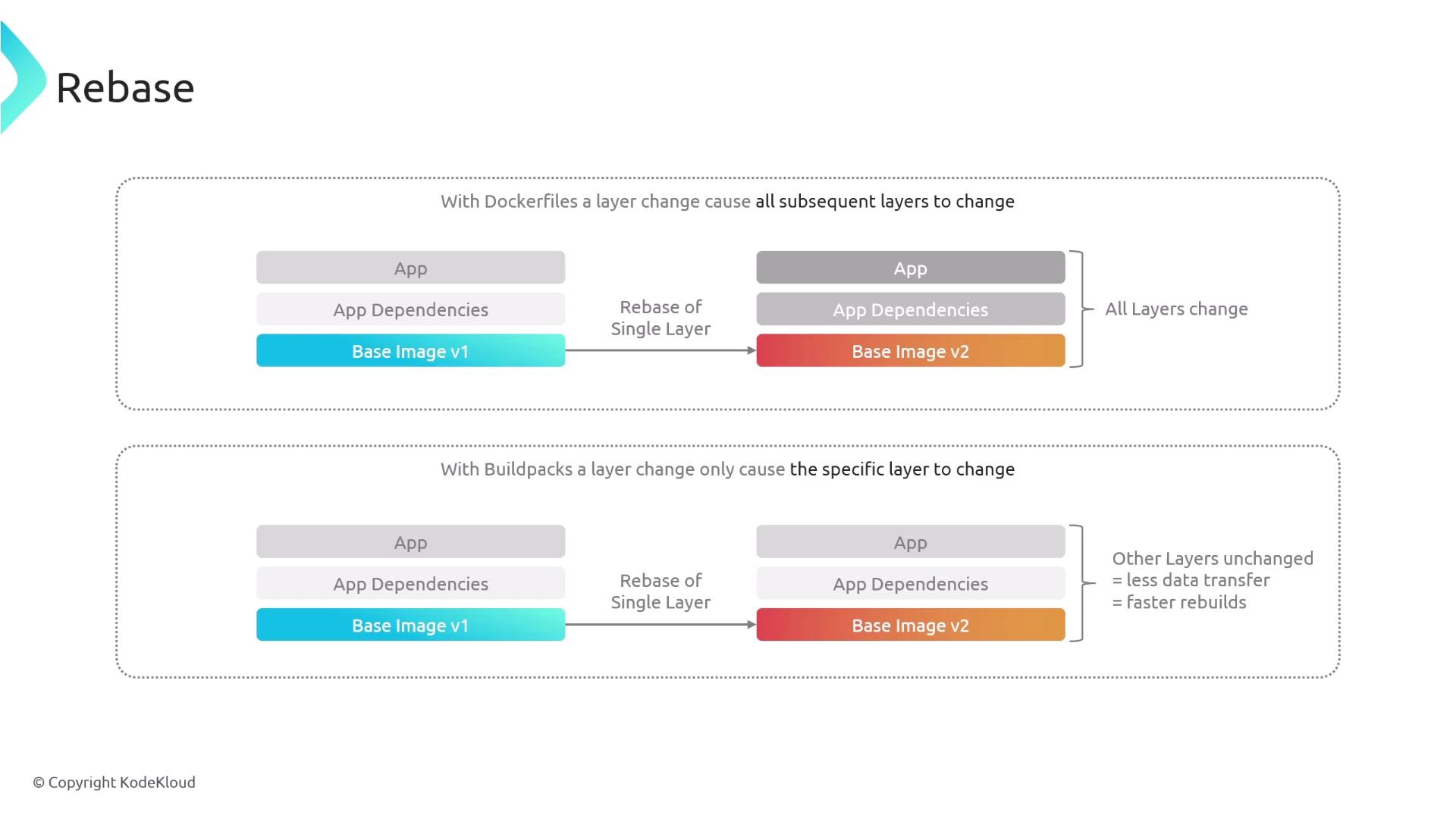
Rebasing significantly improves your build performance by only updating the necessary layer. This makes it an ideal approach when you need to apply minor changes or security fixes.
Inspecting the Image
Before proceeding with a rebase operation, you can inspect the current image details using the Pack CLI. Run the following command:Rebasing the Image
If you need to update the base image—whether to apply a hotfix, address security vulnerabilities, or add new dependencies—and have created an updated base image (for example, run-base:v2), you can perform a rebase with the following command:Ensure that your updated base image has been thoroughly tested before performing the rebase in production. This helps avoid any unexpected issues.